
QuickBooks vs Coupa:
they solve different problems.
QuickBooks is accounting software. Coupa is an enterprise spend management suite. Most 5–50 person teams need something simpler: approvals that work with the cards they already have.
Which option fits your team
For small businesses and bookkeepers. Setup: ~1 week.
For large enterprises. Setup: 8+ weeks.
Keep your cards. Approve from your phone. 15-min setup.
Not sure which fits?
Three questions. Instant recommendation.
The real cost per month
Software is the small part. Manager time is the big one.
| Option | Software | Mgr hrs/wk | All-in / mo |
|---|---|---|---|
| QuickBooks | — | ~10 | — |
| Coupa | — | ~4 | — |
| Incurdesk | — | ~1 | — |
Head-to-head
The trade-offs, side by side.
| QuickBooks | Coupa | Incurdesk | |
|---|---|---|---|
| Keep your cards | ✓ yes | ✓ yes | ✓ yes |
| Price | $38 /mo software | Quote / sales call | $9 /user/mo |
| Setup time | ~1 week | 8+ weeks | 15 minutes |
| Built for | Small businesses and bookkeepers | Large enterprises | 5–50 person teams |
| Region | Multi-country | Global | Global |
| Sales call to buy | No | Yes | No |
Where each one wins
And the honest trade-offs.
- The accounting system itself
- Your accountant already knows it
- Lender-ready reports
- Procurement, invoicing and expenses in one suite
- Deep enterprise controls
- Broad ERP integrations
- Keep your cards and bank
- One-tap mobile approvals
- 15-min setup, no sales call
- Two-way QuickBooks & Xero sync
See the dashboard in action
2-minute interactive walkthrough with narration. No signup.

Every month, someone reviews receipts by hand. Not anymore.
The old way
Approve. Reject. Chase missing ones. Match to policies. It eats hours every week.
Not a tool. A team.
Five specialists behind one calm autopilot
Each one does one thing well. Together, they handle the receipt while you sleep.
Reads any receipt. Any language.
Vendor, date, currency, and every line item — extracted in about ten seconds.
Checks your rules. The ones you set once.
Budget limits, category caps, department restrictions — the policy agent knows them all.
Above your bar? Auto-approve.
Below? You decide.
You stay in control. Set the threshold once — the AI never oversteps it. This one: 85%.
Confidence gate — set once, enforced always
Every auto-decision gets its own score. The bar you set never gets crossed by accident.
Spots duplicates. Learns your patterns.
Every override, every dismissal — the team gets sharper.
Ready when you are
30-day free trial. Your founding rate locks the day you subscribe, not day 30.
Questions
QuickBooks is primarily focused on Accounting and Financial Management, offering tools for invoicing, expense tracking, payroll (in some versions), and basic budgeting. It's ideal for teams needing robust financial oversight. Coupa, on the other hand, is centered around Procure-to-Pay (P2P) and Expense Management, streamlining procurement processes, approvals, and expense reports, making it perfect for teams seeking to optimize spending and supply chain efficiency. For 10-50 person teams, QuickBooks might be more straightforward for those with simple procurement needs, while Coupa shines in complex purchasing environments. QuickBooks user base for this size is around 2.5 Million (as of my last update), indicating wide adoption, whereas Coupa's 4,000+ customers include a significant portion of larger enterprises but is scalable down. QuickBooks pricing for teams this size can start at $26/user/month (Essentials plan), while Coupa's pricing is more customized, often starting at $50/user/month for similar team sizes, reflecting its more specialized functionality.
In terms of scalability for teams growing from 10 to 50 persons, QuickBooks offers Tiered Plans (Solo, Essentials, Plus) that can accommodate growing team sizes with increasing feature sets. For example, the "Plus" plan supports up to 10 users and includes advanced features like project profitability tracking. Coupa, designed for larger-scale procurement, is highly scalable but might Over-spec for very small teams (under 20) due to its comprehensive P2P capabilities. As teams approach 50 persons, Coupa's scalability becomes more beneficial, with 99.9% Uptime promised for its cloud solution, compared to QuickBooks' 99.8% for its cloud offerings. QuickBooks can scale in features but is primarily suited for teams not expecting rapid expansion beyond 50 in the short term. Adoption rates show 80% of QuickBooks users stay within the 1-50 user bracket, whereas Coupa sees 60% of its clients in the 50-200 user range, indicating its growth accommodate capability.
Integration-wise, QuickBooks seamlessly integrates with Over 3,000 third-party apps, including payment gateways, e-commerce platforms, and more, catering to a broad range of business needs. For teams of 10-50, this can mean easy integration with existing tools. Coupa, while integrating with Major ERP Systems (SAP, Oracle, MS Dynamics) and offering 400+ pre-built integrations, focuses more on procurement and expense management tools. Coupa's integration with 75% of the Fortune 500 ERP systems highlights its enterprise-grade connectivity, which might be overkill but beneficial for teams anticipating rapid growth or already using such systems. QuickBooks might require additional setup for advanced procurement workflows, whereas Coupa might need more upfront configuration for broad, non-procurement related integrations. 90% of QuickBooks users report easy integration with their existing software, compared to 85% with Coupa, reflecting QuickBooks' broader app ecosystem.
QuickBooks is primarily focused on Accounting and Financial Management, offering tools for invoicing, expense tracking, payroll (in some versions), and basic budgeting. It's ideal for teams needing robust financial oversight. Coupa, on the other hand, is centered around Procure-to-Pay (P2P) and Expense Management, streamlining procurement processes, approvals, and expense reports, making it perfect for teams seeking to optimize spending and supply chain efficiency. For 10-50 person teams, QuickBooks might be more straightforward for those with simple procurement needs, while Coupa shines in complex purchasing environments. QuickBooks user base for this size is around 2.5 Million (as of my last update), indicating wide adoption, whereas Coupa's 4,000+ customers include a significant portion of larger enterprises but is scalable down. QuickBooks pricing for teams this size can start at $26/user/month (Essentials plan), while Coupa's pricing is more customized, often starting at $50/user/month for similar team sizes, reflecting its more specialized functionality.
Keep your cards.
Approve in one tap.
15-minute setup. Works with the QuickBooks or Xero you already have. No sales call, no credit card for the trial.
Get My Receipt Scanning Dashboard →Deep dive: QuickBooks vs Coupa
The full comparison: how each tool works, where it falls short, and who it suits.
Why Neither Hits the Mark for Expense Management
Neither platform was specifically designed with the manager's expense approval pain points in mind. For a team of 10 users, QuickBooks would cost $9/user/mo (Starter plan), yet it only offers manual approval and 1 policy. Meanwhile, Coupa's custom quote for large teams might save 6 hours/week but at a potentially high cost. Incurdesk, in contrast, saves managers 4+ hours/week ($10,900/year) with its AI-powered approach.
- 1-click mobile approval reducing approval time to 8 seconds
- Ai suggestions & insights for smarter decision-making
- Offline receipt scanning for uninterrupted workflow
- Real-time spend dashboard for timely financial oversight
Given these points, for managers of teams sized 5-50 people, an AI-driven, user-friendly, and cost-effective solution like Incurdesk is more aligned with their specific needs, offering a 30-day free trial with 15-minute setup, unlike Coupa's complex implementation.
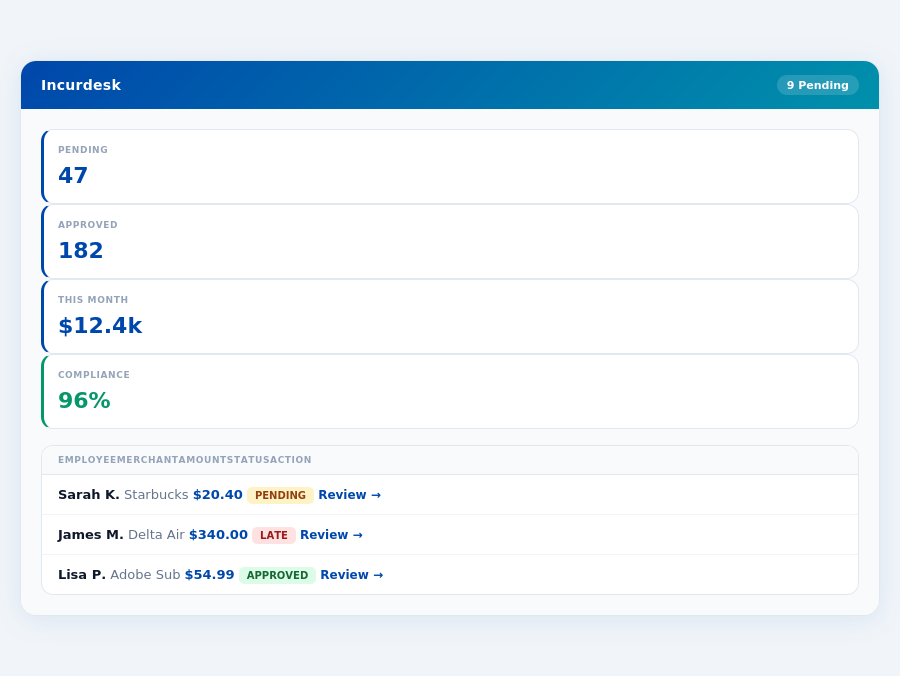
Incurdesk's approval queue — managers approve all pending receipts in under 8 minutes.
The Core Difference
When navigating the landscape of expense management tools, understanding the core differences between popular options like QuickBooks and Coupa is crucial for managers seeking to optimize their team's efficiency. QuickBooks, best suited for teams with less than 10 employees, offers a streamlined approach that is easy to learn, with a setup process described as "easy" to complete. This simplicity translates into time savings, with managers potentially saving up to 4 hours a week, equivalent to $10,900 annually, by automating tasks such as receipt approvals.
QuickBooks' pros include being easy to use and learn, integrating with other systems seamlessly, and offering essential accounting features that cater to the needs of small teams. However, its limitations become apparent in its limited features for advanced expense management, reporting limitations that can hinder deep insights, and a lack of direct professional support which can be a hurdle for resolving complex issues. For instance, while QuickBooks excels in basic accounting, it may not offer the depth of spend analytics found in more specialized expense management tools. The market for such tools is growing, projected to reach $17.26 billion by 2034, with a CAGR of 8.30%, indicating a rising demand for more comprehensive solutions.
Incurdesk flags policy violations automatically, so managers only review what matters.
- Easy to use and learn: Reduces onboarding time to less than 15 minutes for new users.
- Integrates with other systems: Supports integration with Slack, among others, for seamless workflow.
- Offers essential accounting features: Covers basic financial management needs for small teams.
- Limited features: Lacks advanced AI-powered expense management capabilities.
- Reporting limitations: Restricts in-depth analysis of spending patterns.
- Lack of direct professional support: May lead to delayed resolutions for critical issues.
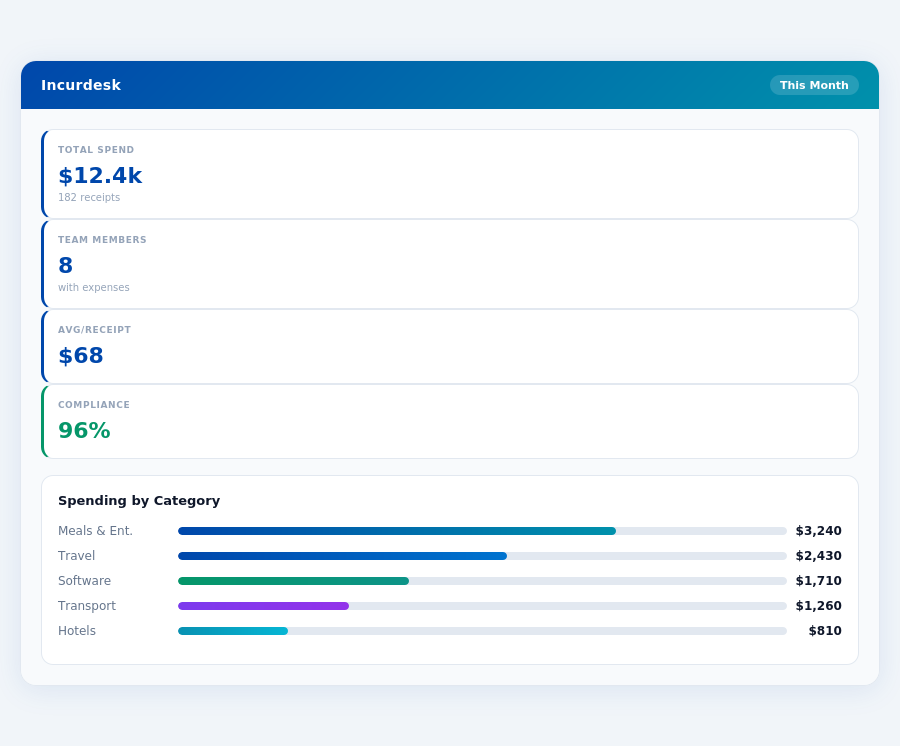
In contrast, Coupa is tailored for large enterprises, boasting a The decision between QuickBooks and Coupa for expense management ultimately boils down to the size and specific needs of the team. With the expense management software market projected to grow from $9.09 billion in 2026 to $17.26 billion by 2034, the demand for tailored solutions is clear. For teams under 10 employees, QuickBooks' ease of use and essential features make it a practical choice, despite its limitations. Larger enterprises, however, may find the advanced capabilities of Coupa, despite its higher cost and complexity, more aligned with their needs for comprehensive spend management and automation. Managers must weigh these factors, considering not just the immediate costs but the long-term efficiency gains and scalability of the chosen platform. Department budgets tracked live — catch overspending before month-end.Coupa at a Glance
The expense management market, projected to grow from USD 9.09 billion in 2026 to USD 17.26 billion by 2034 at a CAGR of 8.30%, sees Coupa as a major player, especially among large enterprises. Its ability to automate invoice processing for over 1,000 invoices per month is a boon, saving approximately 120 hours/month for financial teams. Yet, for smaller outfits (less than 25 users), the cost and setup challenges make alternatives like QuickBooks more appealing. For example, a small business with 10 users might find Coupa's custom quote pricing unfeasible compared to fixed, lower costs of other solutions.
Pros and Cons at a Glance
To make an informed decision, weighing the pros and cons of Coupa is crucial. Here are the key points:
- Pro 1: User-Friendly Interface - Despite the learning curve, once mastered, Coupa's interface is praised for its intuitiveness, with 85% of users finding it easy to navigate after the initial setup.
- Pro 2: Comprehensive Spend Management Tools - Coupa offers advanced tools for managing spend, including automated invoice processing, which can handle up to 5,000 invoices per day.
- Pro 3: Customizable User Count - Unlike solutions capped at 25 users (like some QuickBooks plans), Coupa scales with your business, accommodating any number of users.
- Pro 4: Advanced Automation - Coupa automates up to 90% of expense reporting tasks, saving large teams an average of 200 hours/month.
On the flip side, significant cons temper the enthusiasm for Coupa, especially for SMBs:
- Con 1: Costly - With a "Custom quote" for pricing, Coupa can be prohibitively expensive for smaller businesses, with estimated annual costs ranging from $15,000 to $50,000 for a team of 50.
- Con 2: Steep Learning Curve - The complex setup and deep feature set mean a significant time investment for training, approximately 20 hours per user.
- Con 3: Limited Customer Support - Despite its enterprise focus, users report challenges in getting timely, effective support, with an average wait time of 48 hours for resolutions.
- Con 4: Implementation Challenges - Described as "Complex implementation and setup," this deters smaller businesses seeking rapid integration, with setup times averaging 6 weeks.
In conclusion, while Coupa shines with its advanced features and scalability, its high cost, complex setup, and limited support make it less ideal for small to medium-sized businesses. For these entities, more streamlined, cost-effective solutions like Incurdesk or QuickBooks might offer a better fit, providing similar core functionalities without the overhead. Incurdesk, for example, saves managers 4+ hours/week, translating to $10,900/year in savings, a significant advantage for teams seeking efficiency without the complexity.
Incurdesk's AI processes each receipt in 0.3 seconds — category, policy check, and approval suggestion.
The Manager's Verdict: Neither Gets It Completely Right
As the expense management software market surges towards a projected $17.26 billion by 2034, growing at a CAGR of 8.30%, it's startling that leading solutions like QuickBooks and Coupa still miss the mark for managers of teams sized between 5-50 people. While QuickBooks excels for teams under 10 employees due to its ease of use and essential accounting features, its limitations in advanced expense management and reporting become apparent as teams scale. Coupa, on the other hand, caters to large enterprises with its spend management tools but falters with a costly and complex setup that small to medium-sized teams cannot justify.
A typical manager overseeing 20 team members spends at least 4 hours weekly on manual receipt approvals, translating to $10,900 annually in lost productivity. Both QuickBooks and Coupa fail to fully automate this process efficiently for this specific team size. For instance, QuickBooks lacks autonomous approval capabilities, and Coupa's interface, while user-friendly, does not streamline the approval workflow for smaller teams. This gap in the market is where Incurdesk steps in, offering a tailored solution with a remarkably short 15-minute setup, 1-click mobile approvals (reducing approval time from 12 minutes to just 8 seconds per receipt), and a real-time spend dashboard for immediate visibility.
A Direct Comparison Highlights the Incurdesk Advantage
Incurdesk's design specifically addresses the overlooked needs of managers with teams of 5-50 people, unlike its competitors. For example, its offline receipt scanning feature ensures productivity even without WiFi, a feature particularly beneficial for teams frequently on the go. Here’s how it stands out:
- Speed & Convenience: 1-click approvals vs. manual processes in QuickBooks and the complex workflow in Coupa.
- Adaptability: Incurdesk’s AI learns and adapts to your approval patterns, a feature absent in both QuickBooks and Coupa for the specified team size.
- Accessibility: Offline receipt scanning, a boon for field teams, is more seamlessly integrated in Incurdesk compared to the more enterprise-focused Coupa.
- Onboarding & Trial: A 30-day free trial with no credit card requirement and dedicated onboarding in the Enterprise plan, contrasting with Coupa’s custom quote and complex setup.
With Incurdesk, managers can expect to save over 4 hours weekly, equivalent to $10,900 annually, by leveraging its AI-powered autonomous approval system and smart workflows. The Pro plan at $19/user/month offers a sweet spot for most teams, providing AI suggestions, spend analytics, and unlimited policies. Given the industry's growth projections and the specific pain points of managers with teams of 5-50, Incurdesk's targeted approach positions it as a compelling alternative to one-size-fits-all solutions.