
Exhibition Budget Tracking for Small Museums
A practical, data-backed guide to controlling costs and automating expense workflows.
Creating and managing exhibition budgets for small museums or historical societies requires careful planning and effective tracking strategies to ensure financial constraints are met while achieving educational and engagement goals. A well-managed budget can help you avoid unexpected expenses and ensure that your exhibitions are delivered on time and within budget. By leveraging small museums or historical societies expense management software, you can streamline your budgeting process and make informed decisions about how to allocate your resources. For a complete overview, see our expense management guide.
Define the Project Scope
-
Clearly define the project scope of your exhibition, including its size, complexity, and goals. This will help you determine the resources and budget needed to bring the project to life. Consider the following factors:
- Exhibit size and layout
- Number of artifacts, artworks, or interactive elements
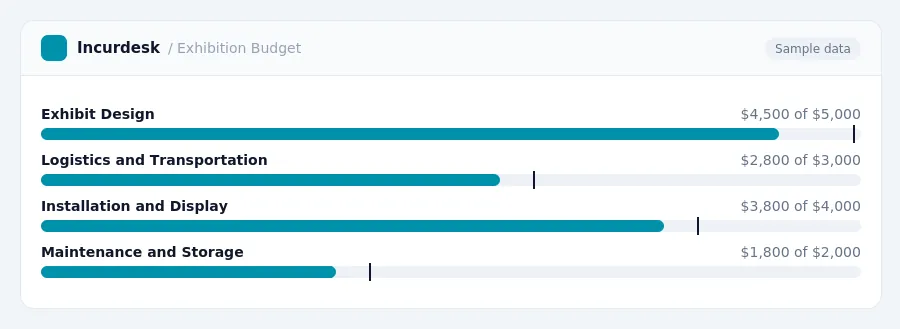
- Logistics and transportation requirements
- Installation and display methods
- Lifecycle requirements, such as maintenance and storage
There is no single, universal cost for a museum exhibition. Costs vary widely based on project scope, exhibit complexity, site conditions, logistics, installation, and lifecycle requirements. As such, it's essential to establish a clear project scope to ensure that you have a realistic budget and to avoid costly changes down the line.
Identify All Cost Components
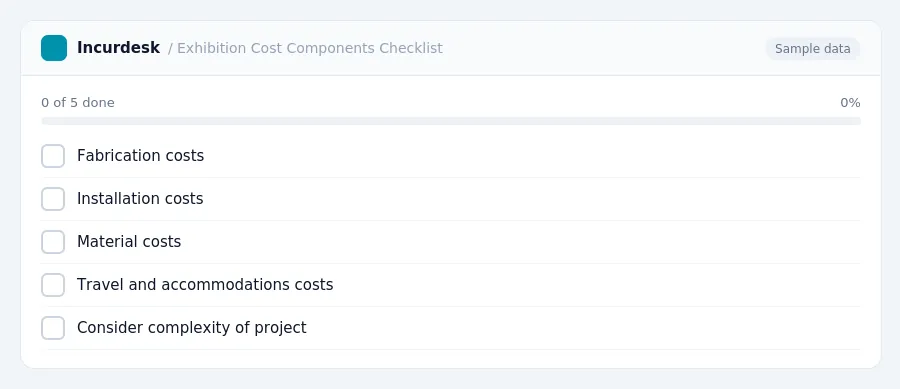
- Identify all cost components for your exhibition project. This includes:
- Fabrication costs, which can be a significant portion of your budget. Simple displays are less expensive than complex animatronic exhibits, so consider the complexity of your project when estimating costs. For example, if you're creating a display with intricate lighting and special effects, you may need to budget more than if you're creating a straightforward display with static images.
- Installation costs, which cover the labor and materials needed to set up your exhibit. This may include hiring contractors or staff to assemble and install your display.
- Material costs, which cover the expenses of any materials you need to purchase, such as display cases, pedestals, or other hardware.
- Travel and accommodations costs, if you need to transport staff or contractors to the installation site.
It's also a good idea to consider any additional costs that may not be immediately apparent, such as insurance, permits, or licensing fees.
Bring your fabricators into the creative process early to help provide accurate cost estimates and material suggestions.
Estimate Fabrication and Installation Costs
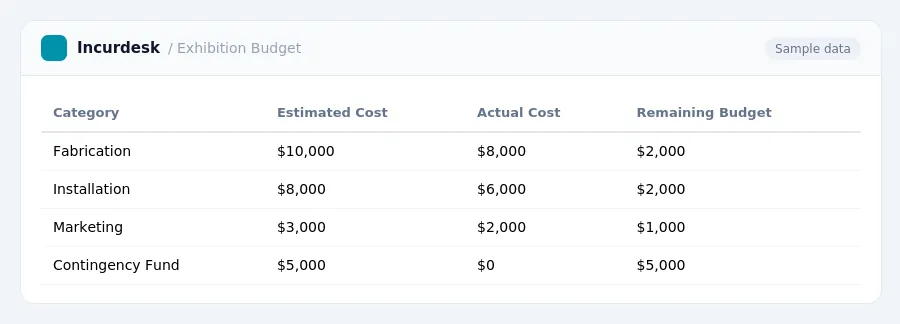
When estimating fabrication and installation costs, consider the major budget drivers, such as oversized exhibits, custom fabrication, complex interactive systems, and specialized installation. Be sure to factor in the costs of materials, labor, and any necessary permits or licenses.
Standardizing elements like casework and details can reduce design time, fabrication costs, and risk. Maximizing in-house skills and resources can also be an efficient way to cut costs.
Consider the costs of commissioning and maintenance, as these can add up quickly. A comprehensive museum exhibition budget should include categories such as Fabrication and Installation, as well as Contingency funds to cover unforeseen costs.
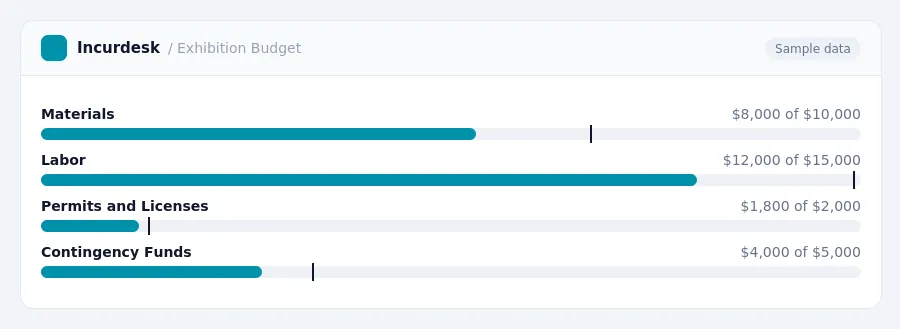
It's also wise to include a contingency fund in the budget to cover unforeseen costs, market increases, or unexpected items and services. This can include both a design contingency and a fabrication contingency.
Create a Contingency Fund
- This fund can help cover any last-minute changes, supplier delays, or other unforeseen costs. Consider allocating funds from donations, grants, or endowments to support this contingency fund. Set aside funds regularly to ensure this fund is well-stocked and ready to support your exhibition budget.
-
Consider the following steps to create and manage your contingency fund:
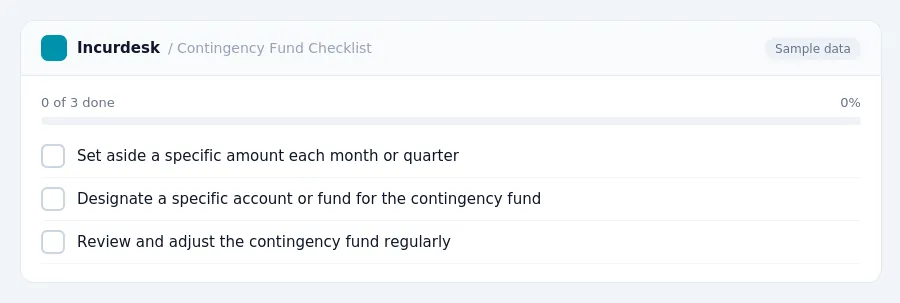
- Set aside a specific amount each month or quarter.
- Designate a specific account or fund for the contingency fund.
- Review and adjust the contingency fund regularly to ensure it remains sufficient.
By creating and managing a contingency fund effectively, you can reduce financial stress and ensure your exhibition budget remains on track, even when unexpected expenses arise.
Track and Monitor Expenses
- Set up a budget tracking system that aligns with your organization's financial reporting requirements. This will help ensure that all exhibition-related expenses are accurately accounted for and reported. To set up your tracking system, create a spreadsheet or use a financial management tool to track income and expenses by category. Be sure to include a column for notes or comments to help explain any unusual or one-time expenses.
- Establish a regular schedule for reviewing and updating your budget. This could be monthly, quarterly, or annually, depending on the size and complexity of your organization. Use this time to review actual expenses compared to projected expenses, identify any discrepancies or areas for improvement, and make adjustments as needed.
- Consider implementing a system for tracking and managing cash flow. This could include setting aside a portion of revenue each month or quarter to cover upcoming expenses, such as exhibition fabrication and installation costs. This will help ensure that you have sufficient funds available when you need them.
- Regularly review your endowment distributions to ensure they are aligned with your organization's spending policy. Make sure to factor these distributions into your budget and adjust your spending accordingly.
- Keep accurate and detailed records of all exhibition-related expenses, including receipts, invoices, and bank statements. This will help ensure that you can accurately track and report expenses, and provide a clear audit trail in case of any discrepancies or issues.
- Use this data to inform future exhibition planning and budgeting decisions. Analyze your past expenses and identify areas where you can cut costs or improve efficiency. Use this information to make data-driven decisions and create more effective and sustainable exhibitions.
Tax rules, limits and rates change. Confirm current figures with the IRS or your accountant before you file.
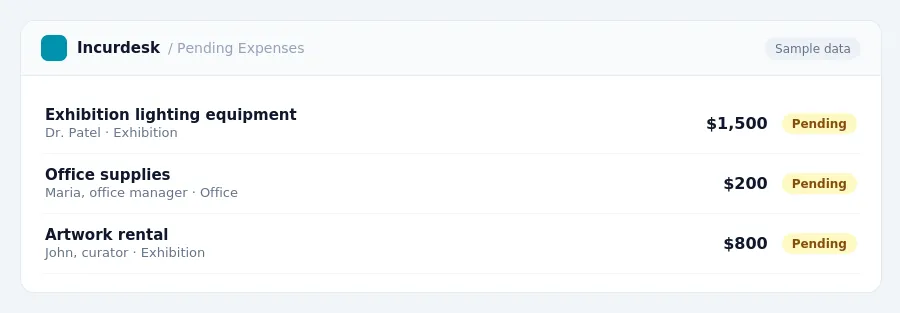
Keeping this simple: Incurdesk collects every receipt and expense report in one place, so spending is easy to review. It is built for small small museum historical society teams. Try it free.
Stop losing 4+ hours a week
30-day free trial · No credit card · Setup in 15 minutes