
How to Choose Expense Software for Property Management
A practical, data-backed guide to controlling costs and automating expense workflows.
As a small property management business owner or office manager, you're likely searching for the best expense software to simplify expense management for property management, track financial transactions, and stay compliant with tax regulations. You need a solution that's easy to use, integrates well with your existing systems, and provides robust reporting capabilities to help you manage budgets effectively and gain clear insights into property profitability. Look for software that meets these key requirements to streamline your expense tracking and financial management processes.
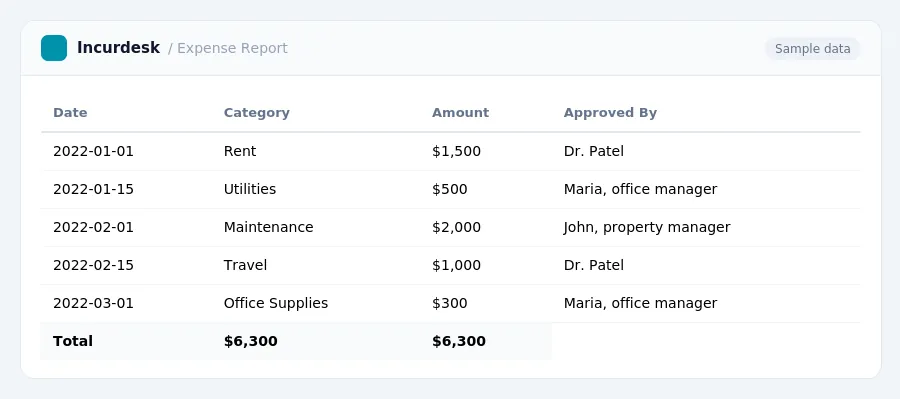
Integrating Expense Software with Accounting and Property Management Systems
When selecting expense software for your property management business, it's essential to consider integration capabilities with your existing accounting and property management systems. This will help streamline your financial processes, reduce manual errors, and provide a more comprehensive view of your business.
To integrate your expense software, start by identifying the systems you currently use. Make a list of your accounting software, property management software, and any other relevant tools. Then, research which expense software can seamlessly integrate with these systems.
Look for software that offers API connectivity, allowing for automatic data exchange between systems. This will enable you to track expenses, reconcile accounts, and generate reports without manual intervention.
Consider the following steps to ensure a smooth integration:
- Check the software vendor's documentation and support resources for integration guides and tutorials.
- Test the integration with a small pilot group or a single user to ensure data accuracy and consistency.
- Establish clear communication channels with your accounting and property management teams to ensure everyone is aware of the integration process and any changes it may bring.
- Monitor the integration's performance regularly to identify and address any issues that may arise.
By integrating your expense software with your existing systems, you'll be better equipped to manage your finances, stay compliant with regulations, and make data-driven decisions for your property management business.
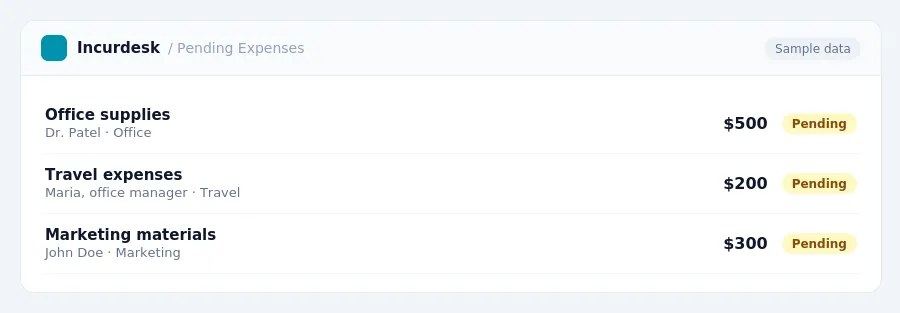
Keeping this simple: Incurdesk keeps receipts and approvals in one place, which makes a written policy easier to follow. It is built for small property management teams. Try it free.
Choosing the Right Expense Software for Your Property Management Business Size
Small businesses with 5-10 staff may benefit from user-friendly software with minimal setup requirements, while larger businesses with 20-50 staff may require more advanced features and scalability.
To determine the right software for your business, consider the following steps:
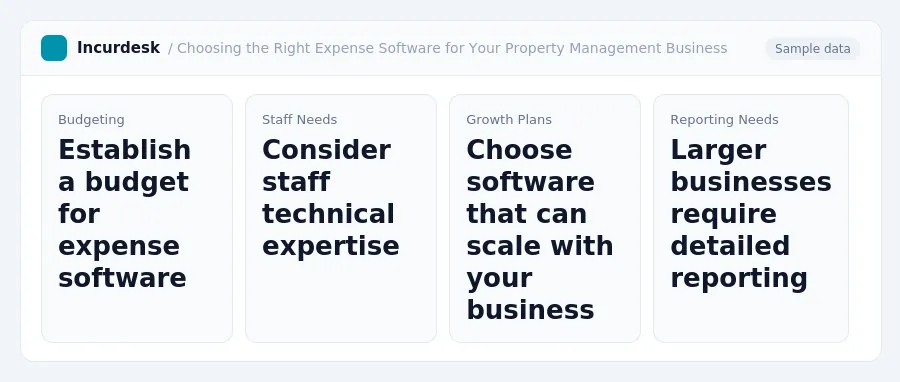
- Determine your budget: Establish a budget for your expense software, taking into account any potential costs for implementation, training, and ongoing support.
- Assess your staff's needs: Consider the level of technical expertise among your staff and ensure the software is user-friendly and accessible to all.
- Evaluate your growth plans: If you anticipate rapid growth, choose software that can scale with your business.
- Consider your reporting needs: Larger businesses may require more detailed reporting and analytics to inform financial decisions.
Ultimately, the key is to find software that balances ease of use with the complexity of your business needs. Be sure to test software options thoroughly before making a final decision.
Assessing Your Property Management Business's Expense Tracking Needs
To choose the right expense software for your property management business, you need to understand your current expense tracking needs. Start by identifying the types of expenses you incur, such as:
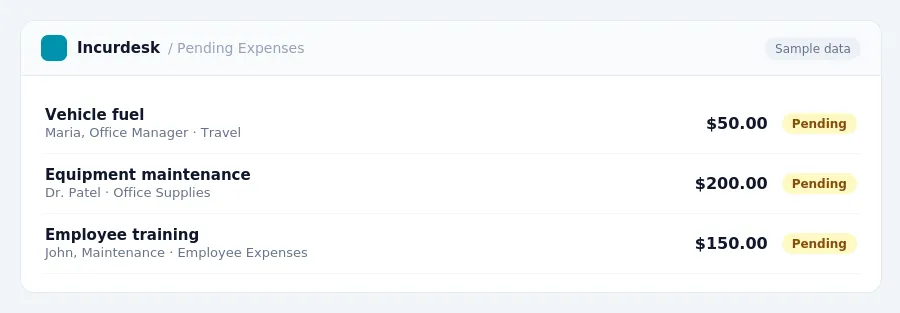
- Vehicle expenses, including mileage and gas
- Travel expenses, including flights, hotels, and meals
- Equipment and supply expenses, including maintenance and repairs
- Employee expenses, including salaries, benefits, and training
You'll need to track and categorize these expenses accurately to ensure compliance with tax regulations.
Also, think about your business's financial reporting needs. Make a list of your specific reporting requirements to ensure the expense software you choose can meet them.
Finally, consider your business's compliance needs, such as deposit interest payments.
Key Features to Look for in Expense Software for Property Management
When choosing expense software for your property management business, there are several key features to look for to ensure you find the right solution for your needs. Here are some must-haves to consider:
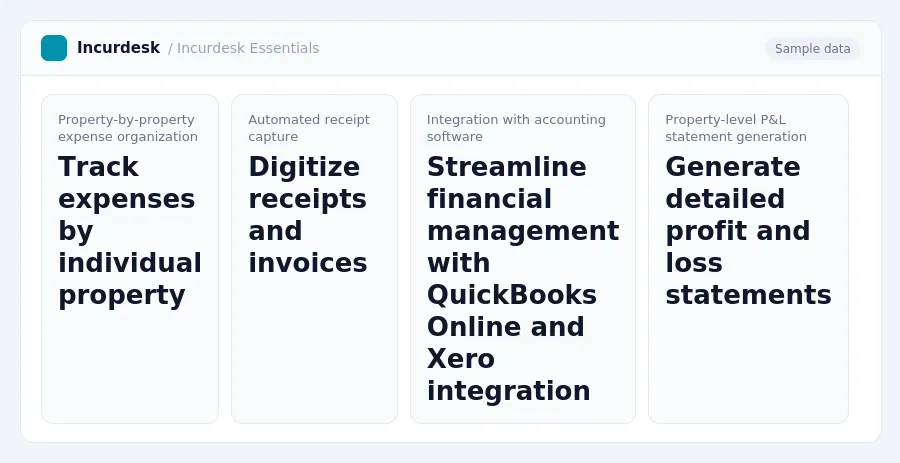
- Property-by-property expense organization: This feature allows you to track and categorize expenses by individual property, making it easier to generate property-level P&L statements and stay on top of financial performance.
- Automated receipt capture: This feature enables you to digitize receipts and invoices, reducing paperwork and increasing efficiency in your expense tracking process.
- Integration with accounting software: Look for software that integrates with popular accounting platforms like QuickBooks Online and Xero to streamline your financial management and reduce errors.
- Property-level P&L statement generation: This feature allows you to generate detailed profit and loss statements for each property, providing valuable insights into financial performance and helping you make informed decisions.
- Compliance with tax regulations: Ensure the software you choose can help you stay compliant with tax regulations, such as deposit interest payments, which vary by state.
Evaluating Expense Software for Property Management Compliance and Reporting Requirements
To ensure you're meeting tax regulations, look for software that can accurately track and categorize expenses, including those related to deposits.
Check the software's ability to track and report interest on deposits, as well as any other relevant expenses.
Verify the software's reporting capabilities, including the ability to generate detailed expense reports, budget vs. actual reports, and financial statements. These reports should be easily exportable to popular accounting software, such as QuickBooks or Xero.
Additionally, consider the software's audit trail and security features to ensure the integrity of your financial data. This includes features like user permissions, data encryption, and regular backups.
When reviewing the software's documentation, look for clear guidance on how to meet compliance requirements, including any relevant tax laws or regulations.
By carefully evaluating the software's compliance and reporting features, you can ensure that your property management business is meeting its financial obligations and staying on top of tax regulations.
Stop losing 4+ hours a week
30-day free trial · No credit card · Setup in 15 minutes