
Month-End Project Expense Review for Architects
A practical, data-backed guide to controlling costs and automating expense workflows.
As an owner or office manager at a small architecture business in the US with 5-50 staff, conducting effective month-end project expense reviews is crucial for ensuring profitability and accurate financial records. A well-managed project expense review process can help you identify and address potential financial discrepancies, reducing the risk of costly errors. For the bigger picture, see our guide to architecture expense management for under $10/user (2026).
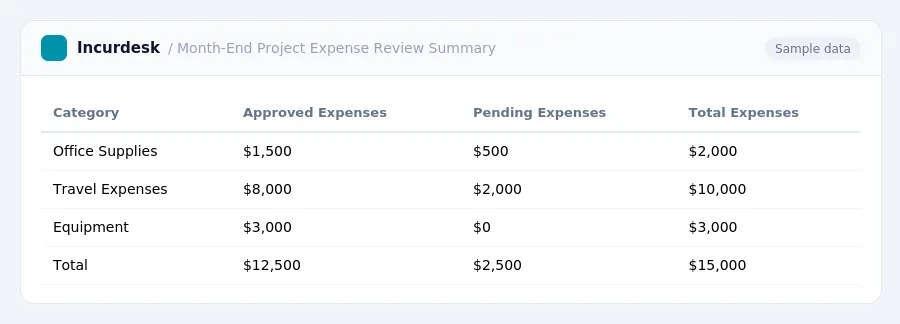
Key Facts and Figures for Month-End Project Expense Reviews
- Define a clear budget for each project, including all expenses and timelines, to ensure accurate financial tracking.
- Assign expenses to projects and tasks to maintain transparency and accountability.
- Track expenses in real-time to identify and address any discrepancies or issues promptly.
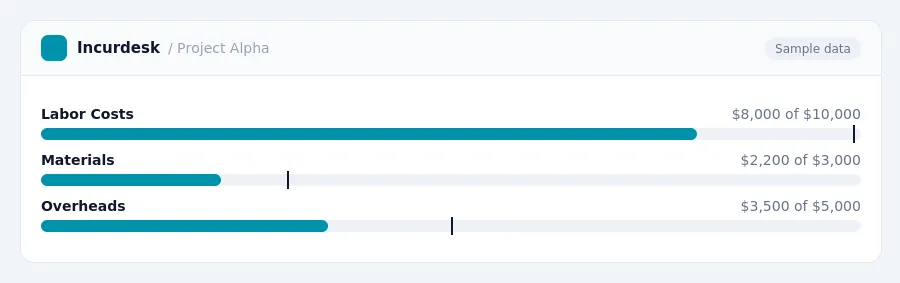
- Monitor planned vs. actual spending to ensure projects stay on track and within budget.
- Using specialized accounting or project management software can streamline expense tracking, invoicing, and financial reporting.
- Local building codes and permitting fees vary by jurisdiction and can significantly impact project budgets and timelines.
- Review and update project budgets regularly to reflect changes in scope, timelines, or other factors that may affect expenses.
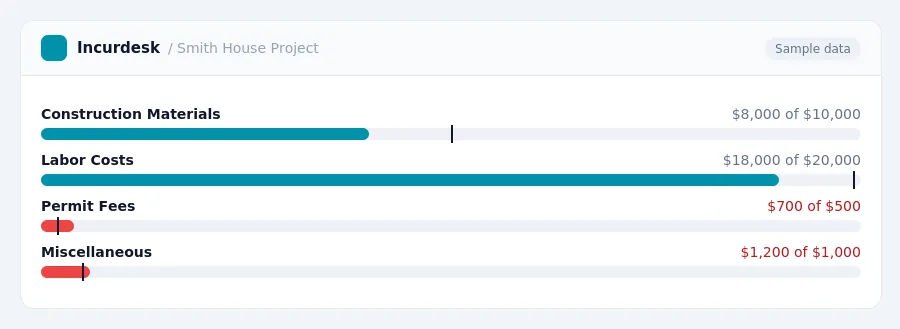
Common Mistakes to Avoid in Month-End Project Expense Reviews
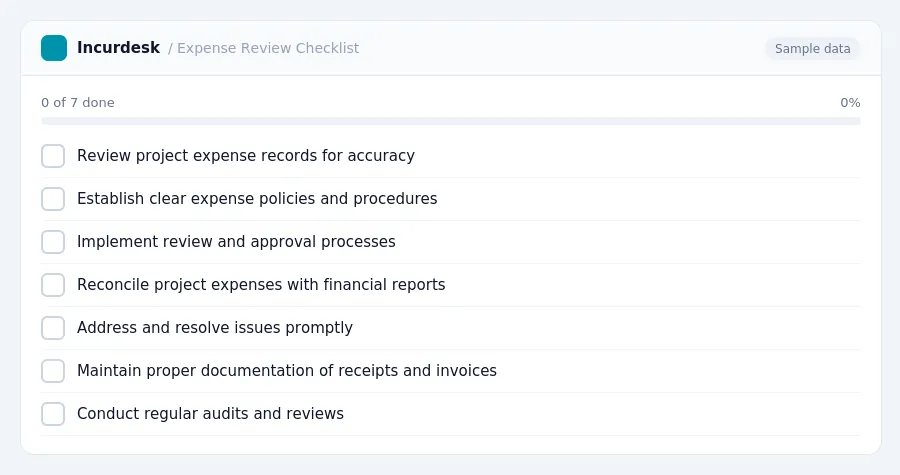
- Failure to maintain accurate and up-to-date project expense records can lead to errors in financial reports and affect profitability.
- Not establishing clear expense policies and procedures can result in inconsistent expense tracking and incorrect expense classification.
- Insufficient review and approval processes can allow unauthorized or unnecessary expenses to be incurred.
- Not reconciling project expenses with project financial reports can lead to discrepancies and inaccuracies in financial statements.
- Not addressing and resolving issues promptly can lead to delays and increased costs.
- Not maintaining proper documentation of receipts and invoices can make it difficult to verify and validate expenses.
- Not conducting regular audits and reviews can lead to unidentified errors and discrepancies in financial records.
- Not providing training to staff on financial management and accounting procedures can lead to errors and inconsistencies.
Best Practices for Conducting Month-End Project Expense Reviews
- Establish clear guidelines and procedures for project expense tracking and submission.
- Designate a specific person or team to oversee month-end project expense reviews.
- Set a deadline for project expense submissions, ensuring timely receipt of all necessary documentation.
- Develop a comprehensive review checklist to ensure all expenses are accurately accounted for and properly categorized.
- Verify that all expenses are properly authorized and aligned with project scope and budget.
- Use a standardized system for tracking and categorizing expenses, ensuring consistency across all projects.
- Regularly review and update project expense reports to ensure accuracy and compliance with financial regulations.
- Consider implementing a tiered approval process for large or unusual expenses, ensuring multiple levels of review and approval.
- Store all project expense documentation securely, both digitally and in paper form, for a minimum of three years.
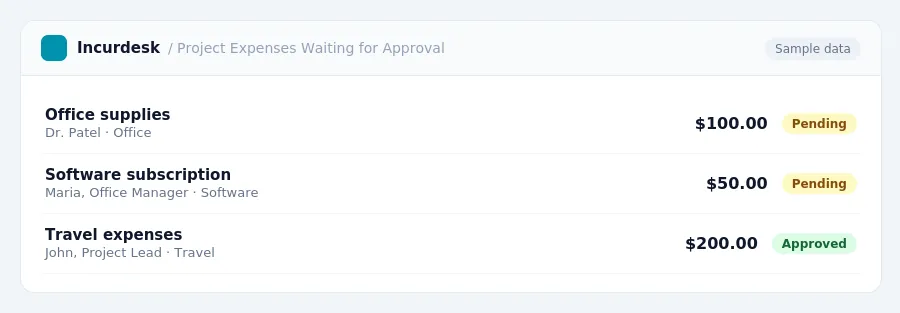
Understanding Revenue Recognition and Expense Tracking
- ASC 606 replaced industry-specific revenue guidance with a single, five-step framework.
- The five steps of ASC 606 are:
- Identify the contract with the customer.
- Identify the performance obligations in the contract.
- Determine the transaction price.
- Allocate the transaction price to the performance obligations.
- Recognize revenue when performance obligations are satisfied.
- Revenue should be recognized as performance obligations are satisfied, not necessarily when the contract starts or payment is received.
- Accurate expense tracking is crucial for understanding project profitability and preventing budget overruns.
When tracking expenses, ensure that all project-related costs are recorded and categorized correctly. This includes labor costs, materials, and other direct and indirect expenses. Regularly reviewing and updating your expense tracking system will help you stay on top of project profitability and make informed decisions about resource allocation.
Streamlining Month-End Project Expense Reviews with Technology
- Automate expense tracking by integrating your project management software with your accounting system. This will help ensure that all expenses are accurately recorded and up-to-date.
- Implement a centralized expense management platform that allows team members to easily submit and track expenses, reducing the likelihood of lost or misplaced receipts.
- Consider using cloud-based accounting software that provides real-time access to financial data, enabling you to quickly review and approve expenses, and make informed decisions about project profitability.
- Use automated expense categorization and approval workflows to streamline the review process and reduce the time spent on manual data entry.
- Take advantage of mobile apps that enable team members to easily capture and submit receipts, and provide instant approval and reimbursement.
- Regularly review and update your technology tools to ensure they continue to meet the evolving needs of your business.
- Provide training and support to your team to ensure they are comfortable using the new technology and can effectively use it to manage expenses.
- Consider implementing a project expense review checklist to ensure that all necessary steps are taken during the review process.
- Use technology to generate reports and analytics on project expenses, enabling you to identify trends, track costs, and make data-driven decisions.
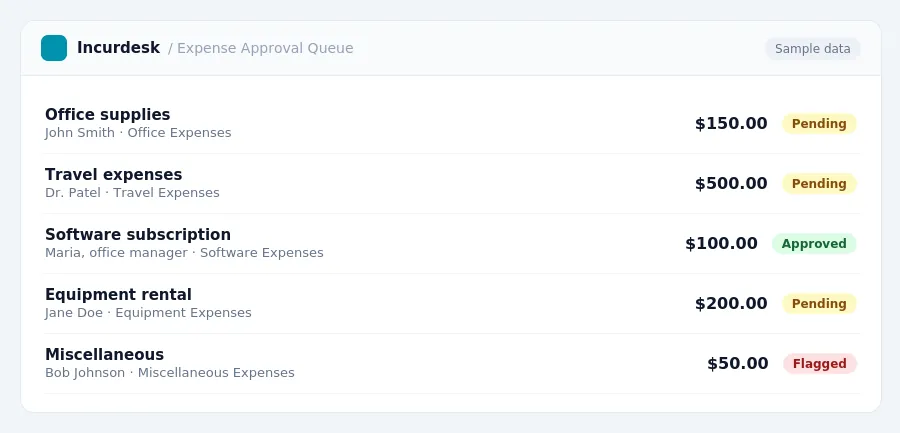
Keeping this simple: Incurdesk turns submitted expenses into clean expense reports. It is built for small architecture teams. Try it free.
Stop losing 4+ hours a week
30-day free trial · No credit card · Setup in 15 minutes