Tracking Parts Used per Field Service Work Order
A practical, data-backed guide to controlling costs and automating expense workflows.
For small field service businesses, accurately tracking parts used on each work order is crucial for proper billing, inventory management, and tax deductions. This includes tracking mileage and associated expenses, with specific IRS rates and tax laws impacting deductions. To ensure expense management for field service businesses, it is essential to understand how to properly track and record parts used, including mileage rates, deductibility of parts not directly charged, and record-keeping requirements. For a complete overview, see our expense management guide.
Tag every case to a dentist
When dealing with work orders, it's essential to track the parts used for each field service visit. This includes identifying the specific parts used, their quantities, and their total cost. This information is crucial for accurate billing, inventory management, and tax deductions.
To tag every case to a dentist, follow these steps:
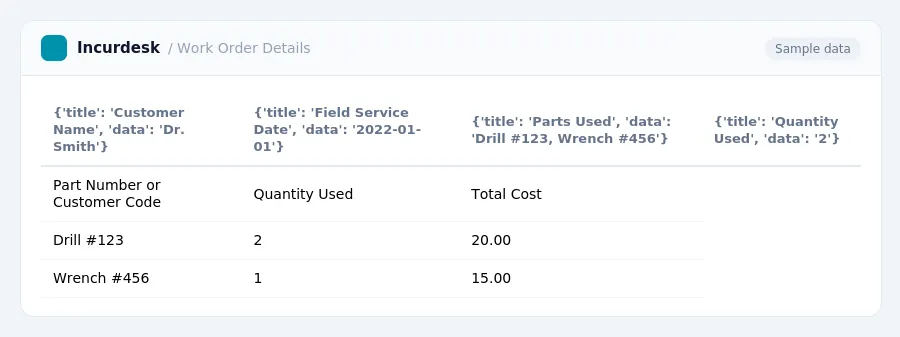
* Create a database or spreadsheet to store the work order details, including the customer name, field service date, and the parts used. Use a unique identifier, such as a part number or a customer code, to distinguish between different work orders. * Attach a separate document or form to each work order, specifically designed for tracking parts. This document should include the following information: + Part number or customer code + Quantity used + Total cost * Ensure that the parts used are properly tagged and documented, including any relevant documentation, such as receipts or invoices. * Consider using a barcode scanning system to quickly and accurately identify the parts used. * Double-check that the parts used are accurately recorded and that their costs are properly applied to the work order. * Review and update the database or spreadsheet regularly to ensure that all information is up-to-date and accurate. * Consider using a template or standard form for tracking parts, as this can help ensure consistency and accuracy across all work orders.
The rules in this guide
| Amount | Required | In Incurdesk |
|---|---|---|
| Above $75 | Itemised receipt | Checked on every expense |
| Above $250 | Written business purpose | Checked on every expense |
| Above $500 | Names of attendees | Checked on every expense |
| Above $2,500 | Senior sign-off; never auto-approved | Checked on every expense |
Each rule is checked on every expense by Incurdesk’s approval agent.
Track mileage and associated expenses
Tracking mileage and associated expenses is a crucial step in maintaining accurate records for small field service businesses. To ensure compliance with IRS rules and regulations, it's essential to follow these guidelines:
- Determine the mileage rate for the specific purpose of the work order. For example, if you need to track mileage for a medical or moving service, you'll use the corresponding rate.
- Keep accurate records of mileage and associated expenses, including dates, locations, and the type of service provided. You can use a simple spreadsheet or a mileage log to track this information.
- Be aware that mileage rates can vary by state or country. If you're operating in a different state or country, you may need to research and adjust your mileage rates accordingly.
- Consider using an online mileage log or app to streamline the process and ensure accuracy.
- You can use Form 2106 to claim moving expenses, and you'll need to attach a copy of the work order and supporting documentation.
- Keep records of mileage and expenses for at least three years in case of an audit.
By following these guidelines, you can ensure that your records are accurate and compliant with IRS rules and regulations, allowing you to properly bill customers and manage your business.
Record-keeping requirements
To accurately track parts used per field service work order, follow these steps:
* Keep a separate log or spreadsheet for each work order to record the parts used, their quantities, and the dates received or issued. * Use a standardized format for recording parts information, such as a table or checklist, to ensure consistency. * Include the following information for each part: + Part number or description + Quantity used + Date received or issued * For mileage, use the IRS-approved mileage rates, which vary by state or country and change yearly. Refer to the IRS website for the most up-to-date rates. * Keep records of all changes to the work order, including updates to parts used, mileage rates, and moving expenses. * For tax deductions, keep accurate records of all expenses related to the work order, including parts used, mileage, and moving expenses. * For depreciation, use the standard depreciation methods, such as the straight-line method or the accelerated method, and keep records of all depreciation calculations. * For employee tracking, use a separate log or spreadsheet to record employee hours worked on each work order, including the employee's name, hours worked, and pay rate.
Separate business and personal mileage
This ensures that the correct expenses are claimed and that the correct rates are applied. Here's how to do it:
- Keep a log of business mileage, including dates, routes, and the number of miles driven.
- When tracking parts and mileage, use the business mileage rate. If the mileage is for a personal trip, use the personal mileage rate instead.
- Be aware that some states or countries may have different mileage rates, so it's essential to check the specific regulations in your area.
- Keep track of which employees are driving business and personal mileage separately, as this will affect the depreciation method and moving expense deductibility.
- Remember that the IRS requires you to keep records of business use for at least five years, so it's essential to maintain accurate records throughout the year.
Note: If you're using a mileage log, you can include a chart or table to help you track the mileage and calculate the total miles driven. However, it's essential to use the correct rate for the specific period to ensure accurate deductions.
Employee tracking
Employee tracking is a crucial aspect of field service business operations, yet it often falls by the wayside. To ensure accurate and compliant tracking, follow these steps:
- Set up a system to record employee hours worked, including start and end times, dates, and job assignments.
- Use a mileage log or mobile app to track employee miles driven for business purposes, ensuring you accurately record business-related miles.
- Separate business and personal mileage by using a mileage log or tracking software, which will help you categorize miles correctly.
- When submitting work orders or invoices, use the employee's name and job title to ensure accurate billing and compliance with tax laws.
- Keep a record of employee time spent on each work order, including dates, hours worked, and job assignments, to facilitate invoicing and tax deductions.
- Consider implementing a time-tracking system for each employee to ensure accurate and consistent recording of hours worked.
- When submitting work orders or invoices, ensure you have attached the required documentation, including the employee's time records and any supporting evidence.
- Review and update your employee tracking system regularly to ensure accuracy and compliance with changing regulations and laws.
Tax rules, limits and rates change. Confirm current figures with the IRS or your accountant before you file.
Keeping this simple: Incurdesk turns submitted expenses into clean expense reports. It is built for small field service teams. Try it free.
AI expense management for finance teams and whoever keeps the books. It checks every expense against your rules, approves the routine ones and chases missing receipts for you.
Try it free for 30 days →Stop losing 4+ hours a week
30-day free trial · No credit card · Setup in 15 minutes