
Why Job Costs Come In Wrong at Month End
A practical, data-backed guide to controlling costs and automating expense workflows.
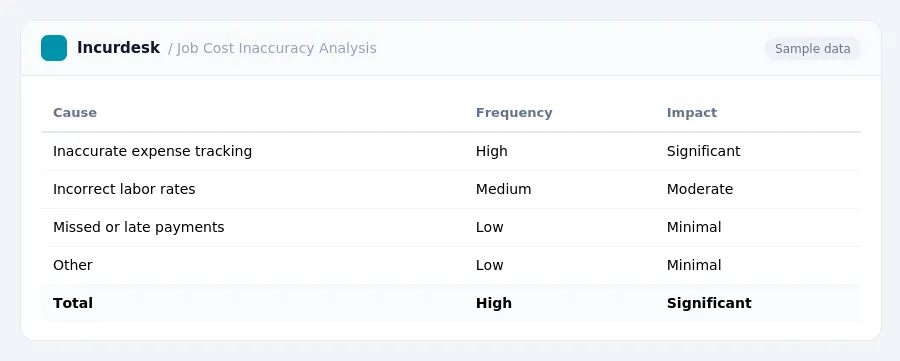
Job costs often come in wrong at month-end due to a combination of factors, including inaccurate or incomplete expense tracking, incorrect labor rates, and missed or late payments from clients. Fortunately, construction expense management for under $10/user (2026) can help small businesses streamline their processes and reduce errors.
Calculating Accurate Labor Costs for Employees
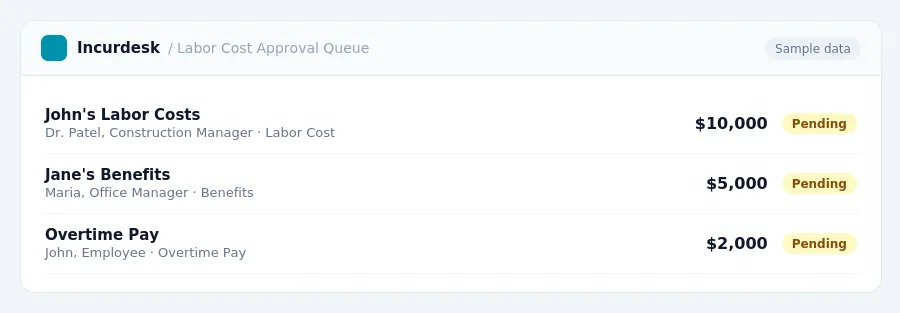
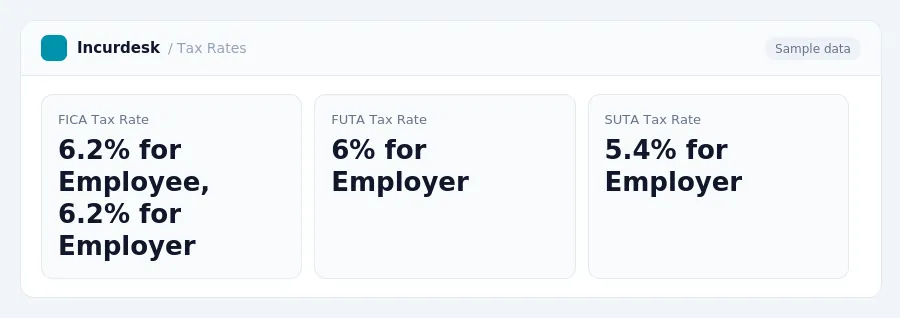
When tracking labor costs for employees, it's essential to consider both direct and indirect costs. Direct costs include the employee's hourly wage, while indirect costs include benefits, such as FICA, FUTA, and SUTA taxes.
To calculate accurate labor costs for employees, follow these steps:
- Calculate the employee's hourly wage, including any overtime rates.
- Determine the employee's benefits, such as health insurance and retirement plans.
- Calculate the employee's FICA, FUTA, and SUTA taxes as a percentage of their gross wages.
- Add the employee's direct and indirect costs together to determine their total labor cost.
By following these steps and accurately calculating direct and indirect costs, you can ensure that your labor costs are accurate and up-to-date.
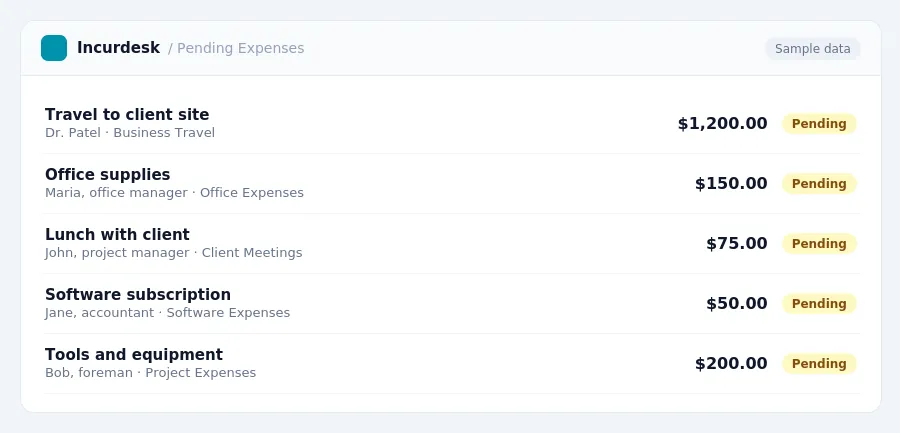
Keeping this simple: Incurdesk turns submitted expenses into clean expense reports. It is built for small construction teams. Try it free.
Correcting for Common Mistakes in Job Cost Accounting
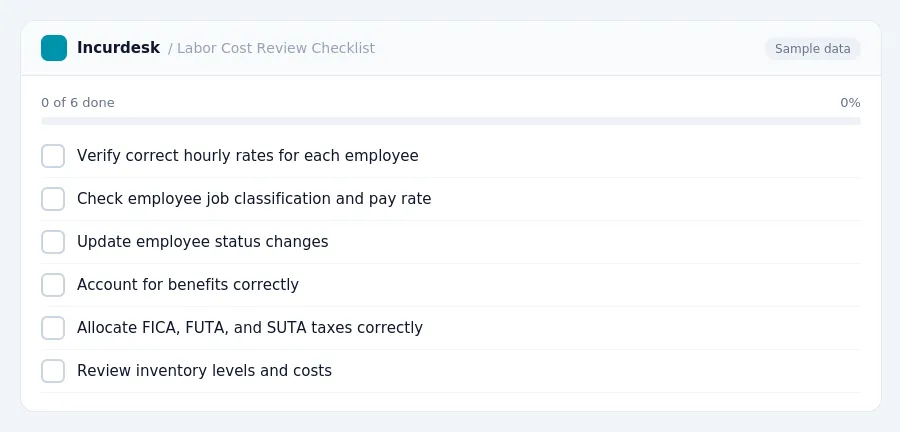
When reviewing job cost reports at month-end, it's essential to identify and correct any errors or inaccuracies. Start by re-examining labor costs for each employee, ensuring that the correct hourly rates are being applied. Check that the employee's job classification and pay rate are accurate, and that any changes to their status have been properly updated.
Make sure you're accounting for these benefits correctly and that they're being allocated to the correct jobs.
Verify that your company is correctly calculating and recording FICA, FUTA, and SUTA taxes. Ensure that you're allocating these taxes to the correct jobs and that you're meeting all applicable tax deadlines.
Check your company's inventory levels and ensure that you're accurately tracking and recording inventory costs. Make sure you're not over- or under-allocating costs to specific jobs.
Regularly review your company's job cost reports to identify any discrepancies or errors. Make adjustments as needed to ensure that your job cost reports are accurate and reliable.
Common Causes of Job Cost Inaccuracy at Month-End
Accurate job cost reporting is crucial for small construction businesses to ensure profitability and compliance with tax laws. However, several factors can lead to inaccuracies at month-end. Here are some common causes:
- Lack of timely updates to employee hours and wages
- Incorrect calculation of FICA, FUTA, and SUTA tax rates
- Insufficient tracking of expenses, such as travel and lodging costs
- Incorrect classification of labor costs, such as overtime and bonuses
If not accounted for, this can lead to inaccuracies in job cost reporting.
Ensuring accurate calculation of these tax rates is essential to avoid errors in job cost reporting.
Understanding FICA, FUTA, and SUTA Tax Rates
- Social Security Earnings Limit: $184,500 (2026)
When calculating labor costs, remember that FICA tax rates apply to all employees, including those who earn above the Social Security earnings limit. You should calculate FICA taxes separately for each employee and include them in your job cost accounting.
For accurate job cost reporting, ensure you're using the correct FICA tax rates and earnings limits. Consult the relevant tax authorities for the most up-to-date information on tax rates and limits.
Best Practices for Ensuring Accurate Job Cost Reporting
To ensure accurate job cost reporting, establish a routine for regular job cost reviews. Schedule these reviews at the start of each job, and then at the midpoint and end of each project. This will help identify and correct any errors or discrepancies early on.
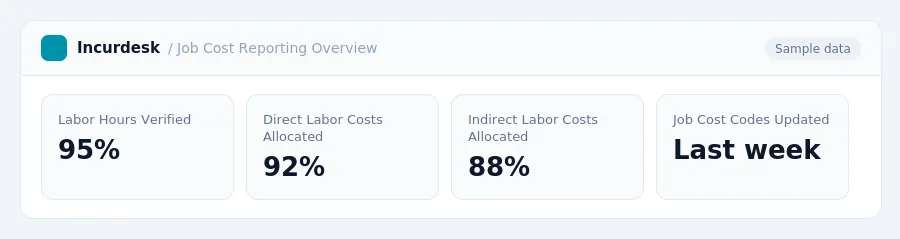
Implement a system for tracking and verifying labor hours worked. This can be done through timesheets, payroll records, or a combination of both. Make sure to verify that labor hours are accurately recorded and that any discrepancies are investigated and corrected.
Establish clear guidelines for categorizing labor costs as direct or indirect. Direct labor costs should be allocated directly to the job, while indirect labor costs should be allocated based on a predetermined percentage of total labor costs.
Review and update your job cost codes and categories regularly to ensure they accurately reflect the work being performed. This will help ensure that job costs are accurately allocated and reported.
Consider implementing a job cost audit process to review and verify job costs on a regular basis. This can help identify and correct any errors or discrepancies, and ensure that job costs are accurately reported.
Stop losing 4+ hours a week
30-day free trial · No credit card · Setup in 15 minutes