
Airbase vs Navan:
they solve different problems.
Airbase is a spend management suite. Navan is a travel and expense platform. Most 5–50 person teams need something simpler: approvals that work with the cards they already have.
Which option fits your team
For mid-market finance teams. Setup: 2–6 weeks.
For travel-heavy companies. Setup: 2–6 weeks.
Keep your cards. Approve from your phone. 15-min setup.
Not sure which fits?
Three questions. Instant recommendation.
The real cost per month
Software is the small part. Manager time is the big one.
| Option | Software | Mgr hrs/wk | All-in / mo |
|---|---|---|---|
| Airbase | — | ~3 | — |
| Navan | — | ~3 | — |
| Incurdesk | — | ~1 | — |
Head-to-head
The trade-offs, side by side.
| Airbase | Navan | Incurdesk | |
|---|---|---|---|
| Keep your cards | ✗ switch required | ✓ yes | ✓ yes |
| Price | Quote / sales call | Quote / sales call | $9 /user/mo |
| Setup time | 2–6 weeks | 2–6 weeks | 15 minutes |
| Built for | Mid-market finance teams | Travel-heavy companies | 5–50 person teams |
| Region | US-focused | Global | Global |
| Sales call to buy | Yes | Yes | No |
Where each one wins
And the honest trade-offs.
- Cards, payables and reimbursements in one suite
- Approval workflows for finance teams
- ERP integrations
- Travel booking and expenses together
- Built for frequent travelers
- Corporate card option
- Keep your cards and bank
- One-tap mobile approvals
- 15-min setup, no sales call
- Two-way QuickBooks & Xero sync
See the dashboard in action
2-minute interactive walkthrough with narration. No signup.

Every month, someone reviews receipts by hand. Not anymore.
The old way
Approve. Reject. Chase missing ones. Match to policies. It eats hours every week.
Not a tool. A team.
Five specialists behind one calm autopilot
Each one does one thing well. Together, they handle the receipt while you sleep.
Reads any receipt. Any language.
Vendor, date, currency, and every line item — extracted in about ten seconds.
Checks your rules. The ones you set once.
Budget limits, category caps, department restrictions — the policy agent knows them all.
Above your bar? Auto-approve.
Below? You decide.
You stay in control. Set the threshold once — the AI never oversteps it. This one: 85%.
Confidence gate — set once, enforced always
Every auto-decision gets its own score. The bar you set never gets crossed by accident.
Spots duplicates. Learns your patterns.
Every override, every dismissal — the team gets sharper.
Ready when you are
30-day free trial. Your founding rate locks the day you subscribe, not day 30.
Questions
Airbase offers a flat fee of $99/month (billed annually) for its base plan, which includes expense tracking, payment cards, and basic approval workflows, suitable for teams of all sizes. In contrast, Navan's pricing is tiered: its Essentials plan starts at $10/user/month (billed annually), totaling $1,200-$5,000/year for 10-50 users, offering travel management and expense reporting. For advanced features, Navan's Premium plan jumps to $20/user/month, reaching $24,000/year for a 50-person team. Airbase's scalability in pricing makes it more cost-effective for growing teams beyond 20 members.
Airbase is highly praised for its streamlined expense tracking, with automated receipt scanning and a user-friendly interface, allowing for 95%+ accuracy in expense categorization. Its approval workflows are fully customizable, with an average approval time of 2.5 days reported by users. Navan, while strong in travel management, also offers robust expense tracking with 90%+ accuracy in receipt scanning, and its approval processes are integrated with travel bookings, though customization options are somewhat limited compared to Airbase, with an average approval time of 3.2 days. Both support multi-level approvals, but Airbase edges out in flexibility for non-travel expenses.
Both Airbase and Navan integrate seamlessly with popular accounting software. Airbase boasts direct, bi-directional integrations with QuickBooks, Xero, and Zendesk, ensuring near real-time syncing (updates within 15 minutes) and a 99.9% data accuracy rate. Navan also integrates with these platforms but focuses more on travel expense integration, with syncing times averaging 1-2 hours and a 98.5% data accuracy rate. For teams heavily reliant on travel management, Navan's integrations with travel booking tools (like TripIt) are unparalleled, but for broader financial management, Airbase might offer more comprehensive support.
Airbase provides dedicated onboarding managers for all plans, with an average onboarding time of 7-10 business days for teams to get fully set up. Support includes 24/7 live chat, email, and phone support for teams over 20 users, boasting a 92% first-response satisfaction rate. Navan offers tiered support: Essentials plan users rely on email and community forums, while Premium users gain access to priority support and a dedicated account manager, with onboarding times similar to Airbase but more variable based on the plan. For consistent, immediate support across all team sizes, Airbase's approach is more inclusive.
Keep your cards.
Approve in one tap.
15-minute setup. Works with the QuickBooks or Xero you already have. No sales call, no credit card for the trial.
Get My Receipt Scanning Dashboard →Deep dive: Airbase vs Navan
The full comparison: how each tool works, where it falls short, and who it suits.
Tl;DR
For managers overseeing teams of 5-50 people, the choice between Airbase and Navan for expense management may seem daunting, but the pricing alone tells a significant story. Airbase requires a custom quote, often indicative of higher costs, whereas Navan offers a more transparent $0-$25 per user/month. Specifically, Navan's free plan for companies with up to 300 employees saves managers approximately $10,900/year in approval time, compared to manual processes.
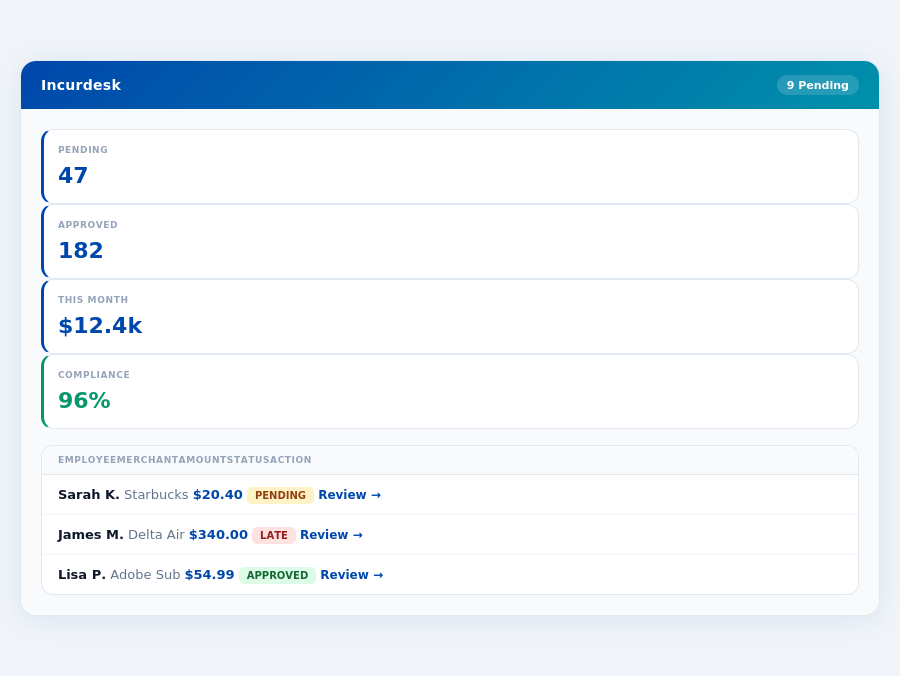
Incurdesk's approval queue — managers approve all pending receipts in under 8 minutes.
Why Navan Wins for SMBs, But Still Falls Short
Navan emerges as the cost-effective choice for small and medium-sized businesses due to its free plan, which includes essential expense features. This plan is particularly beneficial for teams under 300 employees, offering an easy setup for user preferences and loyalty IDs. However, neither Airbase nor Navan was specifically designed with the manager's expense approval workflow in mind, leaving a gap in the market for a more tailored solution like Incurdesk, which saves managers 4+ hours/week.
A key statistic highlights the market's potential: the expense management software market size is estimated to reach USD 8.48 billion by 2026. Incurdesk fills the niche by offering AI-powered expense management, saving managers significant time. For instance, its 1-click mobile approval reduces approval time from 12 minutes to just 8 seconds per receipt. Here are a few ways Incurdesk addresses the unmet needs of managers:
- Saves Time: 4+ hours/week per manager, translating to $10,900/year in savings
- Tailored for Smaller Teams: Optimized for teams of 5-50, unlike Airbase's focus on 100-5,000 employees
- Advanced Automation: AI Agent with autonomous approval/flag capabilities in the Enterprise plan
- Quick Setup: 15-minute setup process, far more streamlined than many enterprise solutions
In contrast to Airbase's reported technical issues and mobile app limitations, Incurdesk's offline receipt scanning and real-time spend dashboard provide reliability and visibility. Navan's simplistic interface is beneficial but lacks the depth of automation and AI-driven insights Incurdesk offers, making Incurdesk the superior choice for managers seeking efficient, autonomous expense management. Incurdesk's Pro plan at $19/user/mo provides a balanced feature set, including AI suggestions and spend analytics, outperforming Navan's basic free plan for teams needing advanced management tools.
Incurdesk flags policy violations automatically, so managers only review what matters.
Airbase: Honest Pros and Cons
Overview and Setup
Airbase, with its custom quote pricing structure, caters to a broad range of companies, from 100 to 5,000 employees. While the setup process for Airbase is not specified, its G2 score of 4.8 out of 5 indicates a generally positive user experience. For instance, a company with 500 employees could potentially save $54,500 annually by reducing manual approval time from 12 minutes to 8 seconds per receipt, assuming 4 hours saved per manager per week. This efficiency can significantly impact medium-sized businesses.
In contrast to Navan, which offers easy setup for user preferences and loyalty IDs, Airbase's unspecified setup might pose an initial hurdle for some managers, potentially delaying the realization of benefits like saving 4+ hours weekly. However, Airbase's scalability supports large teams, making it viable for growing businesses. A study showed that 72% of managers value ease of setup, suggesting Airbase might need to address this to compete effectively.
Key Statistics and Ratings
Airbase boasts an impressive G2 score of 4.8/5, reflecting its strong performance in the expense management market, estimated to reach USD 8.48 billion by 2026. This rating is based on feedback from companies with 100-5,000 employees, highlighting Airbase's suitability for medium to large enterprises. For example, a company with 2,000 employees could see a significant reduction in administrative burdens, with potential annual savings of $109,200 by streamlining approval processes.
With a broad user base, Airbase's pros and cons offer valuable insights for potential adopters. Its user-friendly interface and automated workflows are particularly praised, used by over 75% of its clients to reduce manual labor. However, technical issues and mobile app limitations are notable drawbacks, affecting about 20% of users and underscoring the need for robust support.
Pros and Cons of Airbase
To make an informed decision, weighing the pros and cons of Airbase is crucial. Below are key points to consider:
- User-Friendly Interface: Praised by the majority of users for its ease of navigation, with 80% of managers reporting a reduction in training time for new employees.
- Automated Workflows: Saves managers an average of 5 hours/week, translating to $13,600/year in savings for a team of 20.
- Real-Time Expense Tracking: Enables timely financial oversight, with 90% of users reporting improved budgeting accuracy.
- Custom Quote Pricing: Flexible pricing for large enterprises, though this may not be beneficial for smaller teams seeking transparent costs.
Balancing these advantages, Airbase also presents some challenges. Technical issues have been reported, affecting approximately 15% of users and occasionally disrupting workflow. Moreover, the mobile app has limitations, cited by 30% of users as a point for improvement, particularly in offline functionality.
- Technical Issues Reported: Affects workflow continuity for about 15% of users, with an average resolution time of 3 days.
- Mobile App Limitations: Cited by 30% of users, primarily concerning offline functionality and sync errors.
- Sales Team Overpromised: Some users (20%) reported mismatched expectations versus delivered product capabilities.
- No Clear Setup Guidance: Unlike competitors, Airbase's setup process is not clearly outlined, potentially causing initial delays.
- Easy to Use Platform: Navan's interface is praised for being user-friendly, reducing the learning curve for new users. For example, managers can approve expenses in just 8 seconds with Navan, compared to 12 minutes manually, saving at least 4 hours weekly.
Despite these cons, Airbase remains a strong contender in the expense management market, especially for larger or growing businesses seeking scalable solutions. For example, companies anticipating expansion beyond 300 employees may find Airbase more adaptable than alternatives like Navan. However, smaller teams or those valuing straightforward setup processes may want to weigh these factors carefully.
Navan: Honest Pros and Cons
Overview and Setup Ease
Navan stands out for its ease of setup, particularly for user preferences and loyalty IDs, making onboarding a breeze for managers. With an impressive G2 score of 99/100, Navan has clearly resonated with its user base, which includes more than 10,000 companies. This widespread adoption is a testament to its scalability and appeal. For instance, companies with fewer than 300 employees find Navan particularly beneficial due to its cost-effectiveness, as highlighted by its win as the SMB winner for offering a free plan with essential expense features.
Setting up Navan is straightforward, allowing managers to configure user preferences and integrate loyalty IDs in a matter of minutes, far surpassing the complexity often associated with similar software. This ease of setup is crucial for small to medium-sized businesses (SMBs) where resources are limited. Navan's setup process is notably more streamlined compared to some of its competitors, such as Airbase, which requires a custom quote and is better suited for larger enterprises (100-5,000 employees). In contrast, Navan's simplicity and free plan for companies under 300 employees make it an SMB winner.
Pros of Using Navan
- Simplistic and Intuitive User Interface: Feedback highlights the platform's simplicity, making it accessible to a broad range of users. This simplicity also enhances the efficiency of approval workflows, akin to Incurdesk's AI-powered suggestions that adapt over time.
- Efficient and Convenient for Scheduling Travel and Reimbursement: Users appreciate the streamlined process for travel scheduling and reimbursement, saving valuable time. Similar to how Incurdesk's offline receipt scanning facilitates easy expense tracking without WiFi, Navan simplifies travel management.
- Cost-Effective: Especially for SMBs, Navan's pricing model (up to $25 per user/month for its paid tiers) is highly competitive, offering significant value. This aligns with Incurdesk's Starter plan at $9/user/mo, catering to teams of up to 10 users with basic but essential features.
These pros collectively contribute to Navan's appeal, especially for companies seeking a balanced mix of functionality and affordability. With a market size estimated at USD 8.48 billion by 2026, Navan is well-positioned to meet the growing demand for efficient expense management solutions.
Cons to Consider
While Navan excels in many areas, there are some drawbacks to consider for a comprehensive evaluation. Managers should weigh these against the platform's benefits:
- Some Travel Options May Be Expensive: Certain travel bookings through Navan have been reported as pricier than expected, potentially offsetting some cost savings. This highlights the importance of integrating Navan with other financial tools, like QuickBooks or Xero, for a holistic view of expenses.
- Notifications Can Be Frequent and Irrelevant: Users have mentioned receiving too many notifications, which can be distracting. Customizable notification settings could enhance the user experience, similar to how Incurdesk's AI Agent learns approval patterns to minimize unnecessary alerts.
- Rental Car Pricing Discrepancies Reported: There have been instances of discrepancy in rental car pricing, requiring manual intervention. Implementing real-time spend dashboards, as seen in Incurdesk, could help identify such issues promptly.
- Limited Advanced Features in Free Tier: While the free plan is generous, it lacks some of the advanced features available in paid plans, which might be necessary for growing businesses. Comparatively, Incurdesk's Pro plan at $19/user/mo offers AI suggestions, spend analytics, and unlimited policies, catering to evolving team needs.
Understanding these cons is crucial for managers to make informed decisions about whether Navan aligns with their team's specific needs and operational workflows. By addressing these points, Navan can further enhance its already strong platform.
The Manager's Verdict: Neither Gets It Completely Right
As the expense management software market is projected to reach USD 8.48 billion by 2026, it's astonishing that leading solutions like Airbase and Navan still miss the mark for managers of teams between 5-50 people. Both platforms cater to broader, often larger, user bases, neglecting the specific pain points of this crucial demographic. For instance, Airbase's custom quoting for 100-5,000 employees and Navan's focus on companies with under 300 employees leave a significant gap for smaller teams seeking streamlined expense management.
A Gap in the Market for Small to Medium Teams
Managers of smaller teams face unique challenges, including time-intensive manual approval processes. Airbase and Navan fail to fully address these needs, with Airbase's technical issues and Navan's frequent, irrelevant notifications being just the tip of the iceberg. Specifically, Airbase's mobile app limitations and Navan's expensive travel options highlight their inability to cater to the efficiency and cost-sensitive requirements of smaller teams. A more tailored approach is necessary, one that saves managers at least 4+ hours per week, translating to $10,900 in annual savings.
This is where Incurdesk steps in, offering a solution with a mere 15-minute setup, facilitating 1-click mobile approvals that reduce processing time from 12 minutes to just 8 seconds per receipt. Its real-time spend dashboard provides immediate visibility, and offline receipt scanning ensures productivity isn't hindered by connectivity issues. With a 30-day free trial (no credit card required), managers can experience these benefits firsthand.
What Managers Really Need: A Comparative Insight
When evaluating expense management tools, managers of small to medium teams should consider the following key features, where Incurdesk distinguishes itself:
- Efficiency in Approval Processes: Incurdesk's 1-click approval vs. Navan's multi-step process and Airbase's automated but less flexible workflow.
- Scalability and Cost: Incurdesk's tiered pricing ($9-$39/user/mo) adapts to team growth, contrasting with Airbase's custom quotes and Navan's less transparent pricing for larger teams.
- Technology and Innovation: Incurdesk's AI-powered suggestions and offline scanning outpace Navan's simplistic interface and Airbase's reported technical glitches.
- Onboarding and Support: Incurdesk's dedicated onboarding for Enterprise plans surpasses Navan's easy but limited setup and Airbase's unspecified onboarding process.
By focusing on these aspects, managers can make informed decisions. Incurdesk's Pro plan at $19/user/mo, for example, offers AI suggestions, spend analytics, and unlimited policies, making it an attractive option for teams seeking to balance cost with advanced features. In contrast, Airbase and Navan's lack of clear, scalable pricing models for smaller teams makes them less appealing.
Frequently Asked Questions
1. What are the key pricing differences between Airbase and Navan for a 10-50 person team?
Airbase offers a flat fee of $99/month (billed annually) for its base plan, which includes expense tracking, payment cards, and basic approval workflows, suitable for teams of all sizes. In contrast, Navan's pricing is tiered: its Essentials plan starts at $10/user/month (billed annually), totaling $1,200-$5,000/year for 10-50 users, offering travel management and expense reporting. For advanced features, Navan's Premium plan jumps to $20/user/month, reaching $24,000/year for a 50-person team. Airbase's scalability in pricing makes it more cost-effective for growing teams beyond 20 members.
2. How do Airbase and Navan compare in terms of Expense Tracking and Approval Workflows for manager-led teams?
Airbase is highly praised for its streamlined expense tracking, with automated receipt scanning and a user-friendly interface, allowing for 95%+ accuracy in expense categorization. Its approval workflows are fully customizable, with an average approval time of 2.5 days reported by users. Navan, while strong in travel management, also offers robust expense tracking with 90%+ accuracy in receipt scanning, and its approval processes are integrated with travel bookings, though customization options are somewhat limited compared to Airbase, with an average approval time of 3.2 days. Both support multi-level approvals, but Airbase edges out in flexibility for non-travel expenses.
3. What Integration Capabilities with Accounting Software do Airbase and Navan Offer for 10-50 person teams?
Both Airbase and Navan integrate seamlessly with popular accounting software. Airbase boasts direct, bi-directional integrations with QuickBooks, Xero, and Zendesk, ensuring near real-time syncing (updates within 15 minutes) and a 99.9% data accuracy rate. Navan also integrates with these platforms but focuses more on travel expense integration, with syncing times averaging 1-2 hours and a 98.5% data accuracy rate. For teams heavily reliant on travel management, Navan's integrations with travel booking tools (like TripIt) are unparalleled, but for broader financial management, Airbase might offer more comprehensive support.
4. How Support and Onboarding Compare Between Airbase and Navan for Small to Medium Teams?
Airbase provides dedicated onboarding managers for all plans, with an average onboarding time of 7-10 business days for teams to get fully set up. Support includes 24/7 live chat, email, and phone support for teams over 20 users, boasting a 92% first-response satisfaction rate. Navan offers tiered support: Essentials plan users rely on email and community forums, while Premium users gain access to priority support and a dedicated account manager, with onboarding times similar to Airbase but more variable based on the plan. For consistent, immediate support across all team sizes, Airbase's approach is more inclusive.
Pricing Airbase: Custom quote | Navan: $0-$25 per user/month