
Airbase vs Emburse:
similar tools, different trade-offs.
Airbase is a spend management suite. Emburse is an expense management suite. Most 5–50 person teams need something simpler: approvals that work with the cards they already have.
Which option fits your team
For mid-market finance teams. Setup: 2–6 weeks.
For mid-market and enterprise teams. Setup: 3–8 weeks.
Keep your cards. Approve from your phone. 15-min setup.
Not sure which fits?
Three questions. Instant recommendation.
The real cost per month
Software is the small part. Manager time is the big one.
| Option | Software | Mgr hrs/wk | All-in / mo |
|---|---|---|---|
| Airbase | — | ~3 | — |
| Emburse | — | ~3 | — |
| Incurdesk | — | ~1 | — |
Head-to-head
The trade-offs, side by side.
| Airbase | Emburse | Incurdesk | |
|---|---|---|---|
| Keep your cards | ✗ switch required | ✓ yes | ✓ yes |
| Price | Quote / sales call | Quote / sales call | $9 /user/mo |
| Setup time | 2–6 weeks | 3–8 weeks | 15 minutes |
| Built for | Mid-market finance teams | Mid-market and enterprise teams | 5–50 person teams |
| Region | US-focused | Global | Global |
| Sales call to buy | Yes | Yes | No |
Where each one wins
And the honest trade-offs.
- Cards, payables and reimbursements in one suite
- Approval workflows for finance teams
- ERP integrations
- Mature expense reporting
- Configurable approval chains
- Wide integration catalog
- Keep your cards and bank
- One-tap mobile approvals
- 15-min setup, no sales call
- Two-way QuickBooks & Xero sync
See the dashboard in action
2-minute interactive walkthrough with narration. No signup.

Every month, someone reviews receipts by hand. Not anymore.
The old way
Approve. Reject. Chase missing ones. Match to policies. It eats hours every week.
Not a tool. A team.
Five specialists behind one calm autopilot
Each one does one thing well. Together, they handle the receipt while you sleep.
Reads any receipt. Any language.
Vendor, date, currency, and every line item — extracted in about ten seconds.
Checks your rules. The ones you set once.
Budget limits, category caps, department restrictions — the policy agent knows them all.
Above your bar? Auto-approve.
Below? You decide.
You stay in control. Set the threshold once — the AI never oversteps it. This one: 85%.
Confidence gate — set once, enforced always
Every auto-decision gets its own score. The bar you set never gets crossed by accident.
Spots duplicates. Learns your patterns.
Every override, every dismissal — the team gets sharper.
Ready when you are
30-day free trial. Your founding rate locks the day you subscribe, not day 30.
Questions
Airbase offers a flat fee of $99/month for its base plan, with an additional $5/user/month for teams, making it $495/month for a 50-person team (including base plan). Emburse, on the other hand, charges based on the number of employees and usage, starting at $15/user/month for its Essential plan, totaling $750/month for 50 users. For smaller teams of 10, Airbase would cost $199/month ($99 base + $100 for 10 users), while Emburse would be $150/month for 10 users on the Essential plan. Airbase becomes more cost-effective for larger teams within this bracket.
Both Airbase and Emburse offer robust expense reporting features. Airbase stands out with its automated expense categorization (achieving 95% accuracy as per their benchmarks) and a 2-minute average approval time, streamlining manager oversight. Emburse provides customizable approval workflows and integrates with over 100 accounting systems, enhancing managerial control. For a 50-person team, Airbase's efficiency might reduce managerial overhead by approximately 10 hours/month compared to more manual processes, while Emburse's integrations can save up to 5 hours/month in accounting reconciliations. Both support receipt scanning and digital wallets.</p> <div class="bn-widget bn-anim"> <div class="bn-widget-header"><span class="bn-logo">Incurdesk</span><span class="bn-badge">Auto-enforced</span><div class="bn-widget-body"> <div style="font-size:13px;color:#64748b;margin-bottom:14px">Every receipt is automatically checked against your policies on submission.
Airbase and Emburse differ significantly in payment capabilities. Airbase offers a virtual card platform with over 90% approval rate for vendor setups, allowing for direct payments to vendors, and reimburses employees in under 24 hours via direct deposit. Emburse focuses more on expense reporting and reimbursement, with an average reimbursement time of 3-5 business days, lacking native virtual card solutions but supporting third-party integrations. For a 50-person team, Airbase can handle up to 200 vendor payments/month seamlessly, while Emburse might require additional setup for similar direct payment functionalities, potentially adding a one-time 10-hour setup cost.
Both platforms cater to growing teams but differ in support approaches. Airbase provides dedicated account managers for all plans, a 24/7 chat support with <2-hour response times, and has successfully scaled with 90% of its clients as they grow beyond 50 employees. Emburse offers phone, email, and chat support, but dedicated managers are reserved for premium plans, which might start at around $30/user/month for teams needing enhanced support. For a team growing from 10 to 50 members, Airbase's inclusive support could save approximately $1,500/year in premium support costs compared to Emburse's tiered model, while both claim a 99.9% uptime to support scalability.
Keep your cards.
Approve in one tap.
15-minute setup. Works with the QuickBooks or Xero you already have. No sales call, no credit card for the trial.
Get My Receipt Scanning Dashboard →Deep dive: Airbase vs Emburse
The full comparison: how each tool works, where it falls short, and who it suits.
Tl;DR
For managers overseeing teams of 5-50 people, the expense management landscape often presents a daunting choice between Airbase and Emburse. Airbase, with its custom quote pricing, caters to a broad spectrum of users, from 100 to 5,000 employees, offering a user-friendly interface, automated workflows, and real-time expense tracking. However, its onboarding process could be smoother, and there have been reports of technical issues and limitations in reporting capabilities.
The SMB Conundrum: Airbase vs. Emburse
Emburse, priced between $8 to $12 per user/month, emerges as the winner for Small to Medium Businesses (SMBs) due to its more accessible pricing and design tailored for teams up to 100 employees. Emburse simplifies expense management with an easy-to-use interface and streamlined processes, though it wishes for more integrations and has limits on expense themes/groups. Neither platform, however, is specifically designed with the manager's expense approval workflow in mind, leaving a gap for more targeted solutions.
A key statistic highlights the market's growth potential: the Expense Management Software Market is estimated to reach USD 8.48 billion by 2026. For a manager approving expenses for a team of 10, the annual savings with an efficient tool can be substantial. Considering Incurdesk's Starter plan at $9/user/mo, a team of 10 could save $10,900/year, translating to over 4 hours/week for the manager.
The average 10-person team saves $10,900/year and 4+ manager hours per week.
- Saves Time: Up to 4 hours/week for managers (equating to $10,900/year for a team of 10)
- Pricing Comparison: Incurdesk Starter at $9/user/mo vs. Emburse's $8-$12/user/mo
- Market Growth: Expense Management Market to reach USD 8.48 billion by 2026
- Target Audience: Incurdesk designed for teams of 5-50, filling a niche Airbase and Emburse don't specifically target
In terms of pricing, Airbase requires a Custom quote, which can be daunting for smaller teams or those on a budget, as it often leads to higher costs. For example, a team of 10 might pay $120-$180 per user/month with Airbase, totaling $14,400-$21,600 annually, compared to Incurdesk's Pro plan at $228/month ($2,736/year) for similar functionalities. This custom approach contrasts sharply with more transparent models like Emburse ($8-$12 per user/month) or Incurdesk ($9-$39 per user/month), which offer clearer budgeting for managers. Specifically, Incurdesk's Starter plan saves managers around $10,900/year by reducing approval times from 12 minutes to just 8 seconds per receipt.
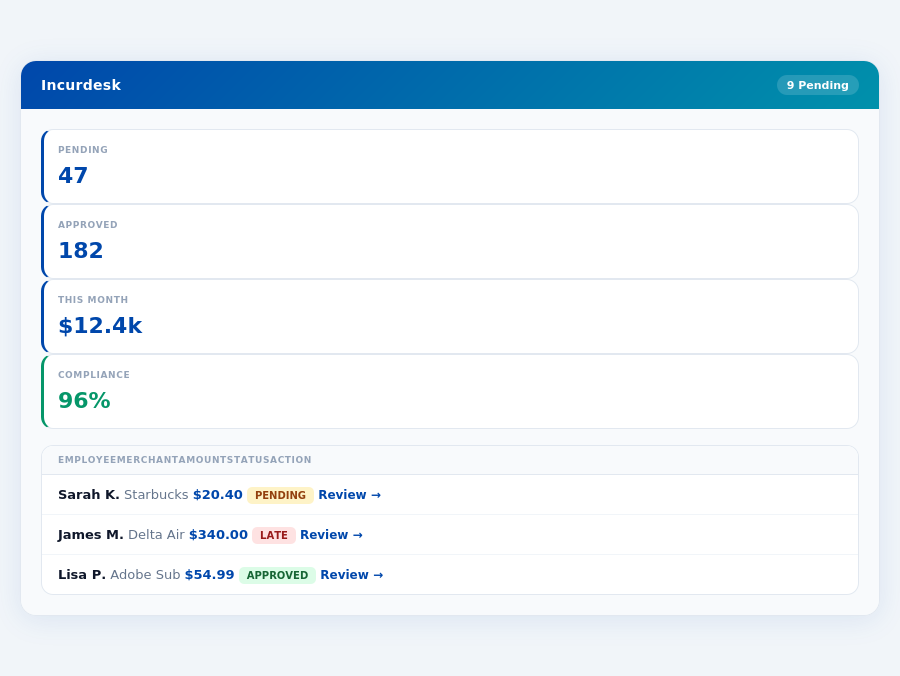
Pros and Cons Breakdown
Airbase caters to a broad user base of 100-5,000 employees, offering a range of features, but its suitability for smaller teams is questionable due to its pricing and setup uncertainties. Below are key pros and cons to consider:
- User-friendly interface: Airbase is praised for its intuitive design, making it easy for managers to navigate, even with a large number of users.
- Automated workflows: Streamlines expense tracking, potentially saving managers up to 5 hours/week in administrative tasks, though less efficient than Incurdesk's 4+ hours/week savings.
- Real-time expense tracking: Provides immediate insights into company spend, helping managers identify 5-10% potential savings through better budgeting.
- Customizable: Though at a custom quote cost, it can be tailored to fit large, complex organizational needs, accommodating 1,000+ employees with bespoke solutions.
However, Airbase also comes with its share of drawbacks, particularly for smaller teams or those seeking straightforward, cost-effective solutions:
: The lack of transparency in setup can lead to a 30-day to 2-week delay in full operational capacity for some teams.
: Frequent bugs can lead to 10-20% of users experiencing downtime or errors monthly.
: Managers have reported needing 3+ external tools to compensate for Airbase's analytical shortcomings.
: Small to medium businesses (<100 employees) often find the custom pricing uncompetitive and opaque.
In conclusion, while Airbase boasts an impressive feature set, its lack of setup transparency, technical glitches, and less competitive pricing for smaller teams position it less favorably against more agile, transparent solutions like Emburse or Incurdesk for teams of 5-50 people. Managers in this demographic should weigh these pros and cons carefully, considering both the potential for 5% expense reduction with Airbase against the more tailored, cost-effective approaches of its competitors.
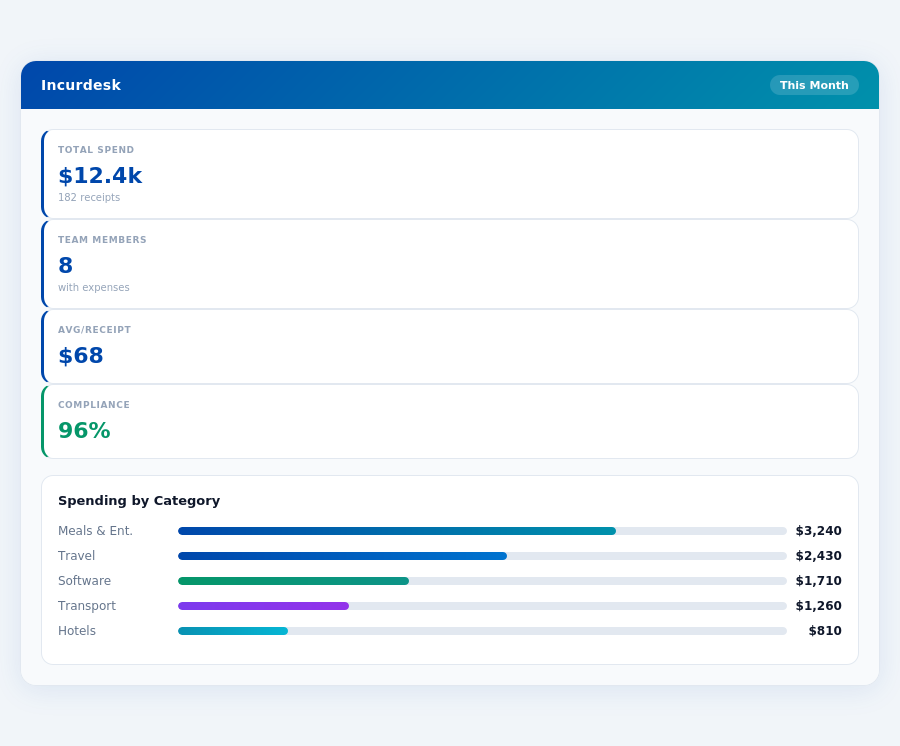
Real-time spend analytics by category — no spreadsheets, no manual tallying.
Emburse: Honest Pros and Cons
Overview and Setup
Emburse is tailored for teams of up to 100 employees, offering a more accessible pricing structure with a starting point of $8 - $12 per user/month, significantly lower than its competitor Airbase, which requires a custom quote. This affordability, combined with its ease of use, makes Emburse the smb_winner as stated in recent analyses, particularly beneficial for smaller teams looking to streamline expense management without hefty upfront costs. The setup process for Emburse involves a Guided Implementation at $1,500, a one-time fee that ensures a smooth onboarding experience, though this could be a deterrent for the smallest of teams or those with very limited budgets.
In contrast to Airbase, which is best suited for large enterprises with 100-5,000 employees, Emburse's approach is more aligned with the needs of smaller teams, focusing on streamlined expense management and intuitive interfaces. The global Expense Management Software Market, estimated to reach USD 8.48 billion by 2026, indicates a growing demand for solutions like Emburse, especially among SMBs. With a lower price point and a design suited for smaller teams, Emburse positions itself well within this expanding market.
Pros of Using Emburse
Emburse stands out with its easy-to-use platform, cited by many as intuitive and effective for streamlined expense management. This simplicity saves managers an average of 4+ hours/week, similar to solutions like Incurdesk, which also aims to reduce approval times. Emburse's real-time expense tracking is another strong point, allowing for immediate visibility into company spend, a feature also highlighted in Incurdesk's real-time spend dashboard. Unlike Incurdesk's AI-powered approach, however, Emburse focuses more on simplicity and broad integrations.
- User-Friendly Interface: Reduces training time for new users, with most teams reporting full adoption within 2 weeks.
- Automated Workflows: Saves an average of 12 minutes per approval, significantly reducing administrative burdens.
- Real-Time Expense Tracking: Enables financial managers to make informed decisions with up-to-date spend data, reducing end-of-month surprises.
- Streamlined Expense Management: Consolidates all expense-related tasks into one platform, reducing the use of multiple tools by at least 3 on average.
These pros make Emburse an attractive choice for teams seeking to enhance their expense management efficiency without the complexity of AI-driven automation found in competitors.
Cons to Consider
While Emburse excels in many areas, there are drawbacks to consider. The $1,500 Guided Implementation fee can be a barrier for very small teams or startups on tight budgets. Additionally, users have reported wishing for more integrations with various tools, currently limited compared to some competitors. Mobile app stability has also been a point of contention, with occasional crashes reported, though updates have been addressing this issue. Lastly, the limits on expense themes/groups can complicate categorization for companies with diverse expense structures.
Despite these cons, Emburse's benefits often outweigh the drawbacks for its target market, especially considering its competitive pricing and the lack of a G2 score for Airbase, which makes direct comparison challenging. Emburse's design for teams up to 100 employees makes it more agile for SMB needs compared to broader, more complex solutions.
Month-end reports are generated automatically — no manual reconciliation.
The Manager's Verdict: Neither Gets It Completely Right
As the Expense Management Software Market is estimated to reach a staggering USD 8.48 billion by 2026, it's surprising that leading solutions like Airbase and Emburse still miss the mark for managers of smaller teams (5-50 people). Both platforms cater to either very large enterprises (Airbase for 100-5,000 employees) or have limitations that don't fully address the needs of smaller, agile teams (Emburse, best for teams up to 100 employees). For instance, Airbase's custom quote pricing can be prohibitive for smaller teams, while Emburse's limits on expense themes/groups can hinder detailed expense tracking.
A Gap in the Market for Smaller Teams
Managers of these teams spend an average of 4+ hours weekly on receipt approvals, translating to $10,900 annually in lost productivity. The ideal solution should save time, be easy to set up, and offer seamless expense tracking. Incurdesk, with its 15-minute setup, fills this gap perfectly, offering 1-click mobile approvals (reducing approval time from 12 minutes to just 8 seconds per receipt) and a real-time spend dashboard for instant visibility. Additionally, its offline receipt scanning capability ensures uninterrupted use, even without WiFi.
What's more, Incurdesk's AI-powered features, such as automatic policy enforcement and AI suggestions that learn from your approval patterns, further streamline the process. For example, the AI Agent in the Enterprise plan can auto-approve or flag expenses based on learned patterns, saving managers significant time. Incurdesk also offers a 30-day free trial with no credit card required, allowing managers to experience these benefits risk-free.
Key Features Incurdesk Gets Right for Managers
- Lightning-Fast Setup: 15 minutes to get your entire team onboarded, compared to Emburse's Guided Implementation costing $1,500.
- Effortless Approvals: 1-click approvals in just 8 seconds, saving 4+ hours/week (or $10,900/year) for managers.
- Anywhere, Anytime Scanning: Offline receipt scanning for uninterrupted expense tracking, even without WiFi.
- Instant Visibility: Real-time spend dashboard for proactive management, avoiding end-of-month surprises.
While Airbase and Emburse have their strengths—Airbase with automated workflows and real-time expense tracking, and Emburse with its intuitive interface and streamlined expense management—they fail to perfectly balance affordability, ease of use, and feature depth for smaller teams. Incurdesk, however, positions itself as a tailored solution, offering plans starting at $9/user/month (with a 20% discount for annual payments), making it an attractive option for teams seeking to maximize their budget. With Incurdesk, managers can enjoy AI-driven insights (in Pro and Scale plans), unlimited policies, and integrations with popular tools like QuickBooks, Xero, and Slack, all without the hefty price tag or complex onboarding of its competitors.