
BILL Spend & Expense vs Coupa:
they solve different problems.
BILL Spend & Expense is a card and budgeting tool from BILL. Coupa is an enterprise spend management suite. Most 5–50 person teams need something simpler: approvals that work with the cards they already have.
Which option fits your team
For US small businesses. Setup: 1–2 weeks.
For large enterprises. Setup: 8+ weeks.
Keep your cards. Approve from your phone. 15-min setup.
Not sure which fits?
Three questions. Instant recommendation.
The real cost per month
Software is the small part. Manager time is the big one.
| Option | Software | Mgr hrs/wk | All-in / mo |
|---|---|---|---|
| BILL Spend & Expense | — | ~3 | — |
| Coupa | — | ~4 | — |
| Incurdesk | — | ~1 | — |
Head-to-head
The trade-offs, side by side.
| BILL Spend & Expense | Coupa | Incurdesk | |
|---|---|---|---|
| Keep your cards | ✗ switch required | ✓ yes | ✓ yes |
| Price | $0 /mo card program | Quote / sales call | $9 /user/mo |
| Setup time | 1–2 weeks | 8+ weeks | 15 minutes |
| Built for | US small businesses | Large enterprises | 5–50 person teams |
| Region | US-only | Global | Global |
| Sales call to buy | No | Yes | No |
Where each one wins
And the honest trade-offs.
- Free with BILL cards
- Budget-based spend controls
- Pairs with BILL for payables
- Procurement, invoicing and expenses in one suite
- Deep enterprise controls
- Broad ERP integrations
- Keep your cards and bank
- One-tap mobile approvals
- 15-min setup, no sales call
- Two-way QuickBooks & Xero sync
See the dashboard in action
2-minute interactive walkthrough with narration. No signup.

Every month, someone reviews receipts by hand. Not anymore.
The old way
Approve. Reject. Chase missing ones. Match to policies. It eats hours every week.
Not a tool. A team.
Five specialists behind one calm autopilot
Each one does one thing well. Together, they handle the receipt while you sleep.
Reads any receipt. Any language.
Vendor, date, currency, and every line item — extracted in about ten seconds.
Checks your rules. The ones you set once.
Budget limits, category caps, department restrictions — the policy agent knows them all.
Above your bar? Auto-approve.
Below? You decide.
You stay in control. Set the threshold once — the AI never oversteps it. This one: 85%.
Confidence gate — set once, enforced always
Every auto-decision gets its own score. The bar you set never gets crossed by accident.
Spots duplicates. Learns your patterns.
Every override, every dismissal — the team gets sharper.
Ready when you are
30-day free trial. Your founding rate locks the day you subscribe, not day 30.
Questions
Cost structures differ significantly between the two. Divvy offers a flat monthly fee starting at $12/user/month (billed annually) with no transaction fees, making it predictable and cost-effective. Coupa's pricing is more tiered and based on the scope of services (e.g., Procure-to-Pay, Expense Management), with costs potentially ranging from $20 to $50+/user/month depending on features activated. For a 30-person team, Divvy might cost $360/month, whereas Coupa could range from $600 to $1,500/month. Incurdesk offers transparent pricing at $9-39/user/mo.
Keep your cards.
Approve in one tap.
15-minute setup. Works with the QuickBooks or Xero you already have. No sales call, no credit card for the trial.
Get My Receipt Scanning Dashboard →Deep dive: BILL Divvy vs Coupa
The full comparison: how each tool works, where it falls short, and who it suits.
The Core Difference
Divvy stands out with its robust automation of tasks, significantly reducing the administrative burden. For example, managers can save up to 4+ hours per week, translating to $10,900 annually, by leveraging automated approval processes. Its user-friendly app ensures a high adoption rate among team members, with a decent dashboard feature providing real-time insights into company spend. However, users have reported some bugs, and notably, Divvy is only available to businesses, potentially limiting its accessibility. Furthermore, the platform's lack of transparency regarding credit score requirements for approval can cause initial hurdles. With a setup time of merely 1-2 days, Divvy proves to be a swift solution for growing businesses.
For managers overseeing growing teams, selecting the right expense management tool is crucial. Divvy and Coupa are two prominent options, but their pricing models differ significantly: Divvy's pricing is not publicly disclosed, while Coupa requires a custom quote. Despite this, Divvy emerges as the winner for small to medium-sized businesses (SMBs) due to its automation capabilities and user-friendly app, catering to over 550,000 unique users.
However, neither Divvy nor Coupa was specifically designed with the manager's approval workflow in mind, leaving a gap in the market. A tailored solution can save managers around 4+ hours per week, translating to $10,900 annually. For instance, a manager overseeing 20 employees could potentially save 80 hours monthly by automating approval processes.
📊 Feature-by-FeatureHead-to-Head Comparison
How Divvy, Coupa, and Incurdesk stack up on the features that matter to managers
Join 550,000+ users who switched See why managers save 4.2 hours every week Try Free for 30 Days →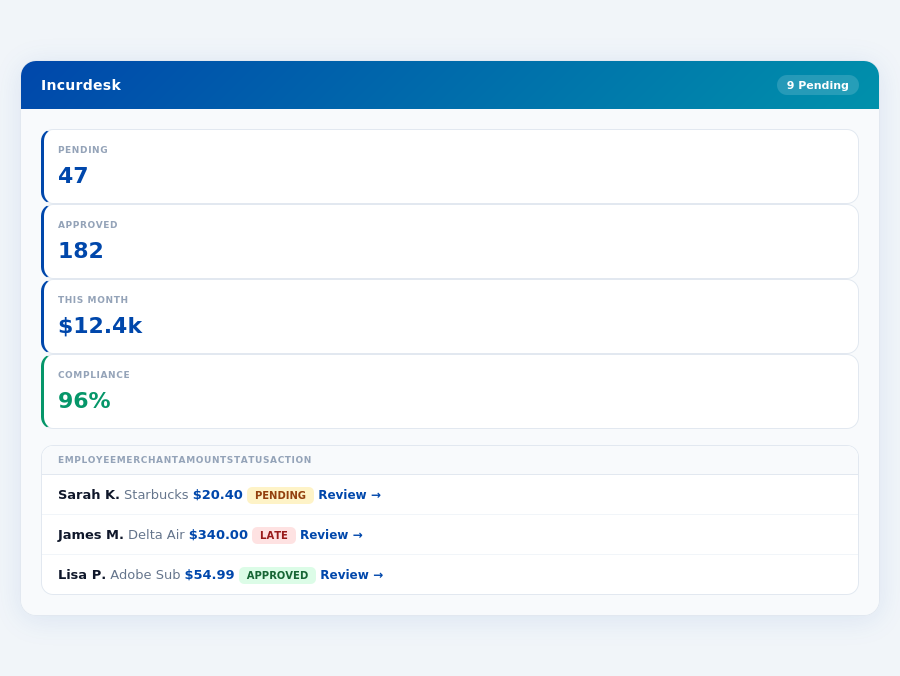
Key Differences and the Unmet Need
The global expense management software market is projected to grow from $9.09 billion in 2026 to $17.26 billion by 2034, at a CAGR of 8.30%. This growth underscores the demand for more tailored solutions. While Divvy excels with SMBs due to its ease of use and decent dashboard features, and Coupa suits large enterprises with its excellent spend management tools despite high costs, managers seek a solution that combines automation with AI-driven insights. For example, AI can learn approval patterns to autonomously manage expenses, a feature lacking in both Divvy and Coupa.
A manager-focused tool, like Incurdesk, could fill this gap by offering features such as 1-click mobile approvals (reducing approval time from 12 minutes to 8 seconds), offline receipt scanning, and an AI agent for autonomous expense management. Such a solution would not only save managers significant time but also provide real-time spend insights, automatic policy enforcement, and smart approval workflows, making it an attractive option in a burgeoning market.
Divvy: Fast Card-Based Control
Despite these cons, Divvy's pros outweigh the drawbacks for growing businesses, given its cost-effectiveness and ease of use. For example, its automation capabilities can reduce approval times from 12 minutes to just 8 seconds per receipt, a significant reduction in administrative time. With the global expense management software market projected to grow at a CAGR of 8.30% from 2026 to 2034, reaching $17.26 billion, tools like Divvy are poised to play a critical role in this expansion, especially among smaller entities seeking scalable solutions.
✗ Divvy limitations✗ Users report occasional bugs✗ Only available to businesses✗ No credit score transparency✗ Limited manager approval UXCoupa is renowned for its ease of use, even with its comprehensive feature set, and boasts an intuitive interface that, despite a steep learning curve, offers excellent spend management tools. Large enterprises appreciate the sophisticated capabilities, though at a high cost. Some users have faced challenges with customer support and invoice submissions, which can be detrimental in high-stakes enterprise environments. Coupa's quick and intuitive setup process, however, ensures that teams can rapidly integrate the platform into their existing workflows.
Coupa: Enterprise Procurement Depth
The choice between Divvy and Coupa ultimately hinges on the size and specific needs of the organization. While Divvy excels in simplicity and cost-effectiveness for growing businesses, Coupa's robust feature set, despite its higher cost and complexity, is better suited for the nuanced expense management requirements of large enterprises. Both tools contribute to the anticipated growth of the expense management market, with Divvy catering to the burgeoning SMB sector and Coupa dominating the enterprise space with its advanced capabilities.
✗ Coupa limitations✗ High cost — custom quote only✗ Steep learning curve✗ Customer support challenges✗ 4–8 week implementationThe market growth projections suggest an increasing demand for efficient expense management tools like Coupa, especially among larger enterprises seeking to optimize their financial processes. Coupa's position in this market, with its high G2 rating, places it as a competitive solution. Its ability to cater to large-scale needs, coupled with its user-friendly approach, makes it an attractive option for businesses looking to streamline expense management.
Coupa stands out with its excellent spend management tools, praised by users for their effectiveness. For example, its automation capabilities can save managers approximately 4 hours weekly, translating to significant yearly savings, similar to the $10,900/year savings highlighted by Incurdesk for its users. However, the high cost of Coupa can be a deterrent, especially for smaller businesses or those on tighter budgets. Unlike Incurdesk's transparent pricing (e.g., $19/user/mo for Pro), Coupa offers custom quotes, which may lead to higher expenses without clear upfront costs.
Detailed Analysis
A key aspect of Coupa is its steep learning curve, which, despite the intuitive interface, can delay full adoption. Some users also face challenges with customer support and invoice submissions, impacting overall satisfaction. In contrast, Divvy is noted for its user-friendly app and decent dashboard feature, though it has its own set of limitations, such as reported bugs and restricted availability. Coupa's advantages in spend management are clear, but these challenges must be weighed against the benefits.
Coupa's excellent spend management tools and intuitive interface make it a strong choice for large enterprises, despite its higher cost and learning curve. The platform's ability to adapt to the needs of bigger businesses is a significant pro, even if it means some trade-offs in accessibility and support. For businesses prioritizing advanced expense management capabilities, Coupa's pros may outweigh its cons, especially considering the market's growth trajectory.
If your organization already runs Coupa across hundreds of employees with dedicated finance ops, migration may not justify the switching cost. For teams where the manager personally handles approvals, the equation looks very different.
As the expense management software market flourishes, projected to grow from $9.09 billion in 2026 to $17.26 billion by 2033 with a CAGR of 8.30%, managers like you are still seeking the perfect fit. Unfortunately, both Divvy and Coupa fall short in fully addressing the manager's use case, particularly for growing teams. For instance, Divvy's automation, though good, often encounters bugs, delaying approval processes that could otherwise take just 8 seconds with more refined tools.
🏷 IncurdeskManager View 10.9kproductivity recovered Time to approve8swas: 12 minThe Manager's Verdict
Managers of growing teams face unique challenges. Divvy's setup, taking 1-2 days, and Coupa's custom quoting for large enterprises, overlook the swift, cost-effective solutions this segment needs. Incurdesk fills this gap with a 15-minute setup, offering 1-click mobile approvals that save managers 4+ hours weekly ($10,900/year). Its real-time spend dashboard provides immediate visibility, unlike waiting until month-end, and features offline receipt scanning for uninterrupted use.
Bottom line Neither Divvy nor Coupa was built for the manager who approves expenses. Both optimize for other roles in the org. Incurdesk fills this gap with a 15-minute setup, 1-click mobile approvals, and an AI agent that learns from your approval patterns. ✓ 8-second approvals ✓ AI Agent learns patterns ✓ Offline receipt scanning ✓ Real-time spend dashboard Start Free Trial See Pricing → Incurdesk — Live Expense Processing Live Demo Processing time per receipt Incoming expense Receipt #4,291 · Just now ☕ Starbucks Reserve Client lunch · Downtown · Visa 4821 Category: Meals & Entertainment Auto-detected Policy engine Within $75/meal limit ✓ Compliant Budget check Q2 Client Entertainment: 64% used ✓ In budget Smart approval Pattern match: 94% similar to auto-approved Auto-approved Synced to QuickBooks → Reimbursement queued Done in 0.3sA Gap in the Manager's Workflow
Key benefits of Incurdesk for managers include:
- Speed: 8-second approvals vs. Coupa's 12-minute manual processes
- Autonomy: AI Agent in Enterprise plan for autonomous approval-flagging, learning from your decisions
- Accessibility: Offline receipt scanning for always-available use
- Insight: Real-time spend dashboard for proactive management
While Divvy excels with its user-friendly app and decent dashboard (used by 550,000 unique riders), and Coupa boasts excellent spend management tools (rated 4.1/5 on G2), neither fully caters to the mid-size team's specific needs for simplicity, speed, and affordability. Incurdesk's plans, including Starter ($9/user/mo) for basic needs and Pro ($19/user/mo) for advanced analytics and integrations (QuickBooks, Xero, Slack), provide a more tailored approach. The Enterprise plan ($39/user/mo) further enhances with an AI Agent and custom API for larger or more complex teams.
IncurdeskAuto-enforced Every receipt is automatically checked against your policies on submission. 📝Notes required (Always)✓ OKBeyond the Comparison
By choosing Incurdesk, managers not only gain a more fitting solution but also contribute to the growing demand for efficient expense management, forecasted to drive the market's 8.30% CAGR. With Incurdesk, the focus remains on what matters most - managing your team's expenses with less hassle and more precision, all within a budget that makes sense for your team's size.
Pricing: What You Will Actually Pay
Coupa's excellent spend management tools and intuitive interface make it a strong choice for large enterprises, despite its higher cost and learning curve. The platform's ability to adapt to the needs of bigger businesses is a significant pro, even if it means some trade-offs in accessibility and support. For businesses prioritizing advanced expense management capabilities, Coupa's pros may outweigh its cons, especially considering the market's growth trajectory.
If your organization already runs Coupa across hundreds of employees with dedicated finance ops, migration may not justify the switching cost. For teams where the manager personally handles approvals, the equation looks very different.
🔒 Limited time 30-day free trial — no credit card, no commitment Join the managers who reclaimed 218 hours this year Start Free Trial See Pricing →