
BILL Spend & Expense vs Airbase:
they solve different problems.
BILL Spend & Expense is a card and budgeting tool from BILL. Airbase is a spend management suite. Most 5–50 person teams need something simpler: approvals that work with the cards they already have.
Which option fits your team
For US small businesses. Setup: 1–2 weeks.
For mid-market finance teams. Setup: 2–6 weeks.
Keep your cards. Approve from your phone. 15-min setup.
Not sure which fits?
Three questions. Instant recommendation.
The real cost per month
Software is the small part. Manager time is the big one.
| Option | Software | Mgr hrs/wk | All-in / mo |
|---|---|---|---|
| BILL Spend & Expense | — | ~3 | — |
| Airbase | — | ~3 | — |
| Incurdesk | — | ~1 | — |
Head-to-head
The trade-offs, side by side.
| BILL Spend & Expense | Airbase | Incurdesk | |
|---|---|---|---|
| Keep your cards | ✗ switch required | ✗ switch required | ✓ yes |
| Price | $0 /mo card program | Quote / sales call | $9 /user/mo |
| Setup time | 1–2 weeks | 2–6 weeks | 15 minutes |
| Built for | US small businesses | Mid-market finance teams | 5–50 person teams |
| Region | US-only | US-focused | Global |
| Sales call to buy | No | Yes | No |
Where each one wins
And the honest trade-offs.
- Free with BILL cards
- Budget-based spend controls
- Pairs with BILL for payables
- Cards, payables and reimbursements in one suite
- Approval workflows for finance teams
- ERP integrations
- Keep your cards and bank
- One-tap mobile approvals
- 15-min setup, no sales call
- Two-way QuickBooks & Xero sync
See the dashboard in action
2-minute interactive walkthrough with narration. No signup.

Every month, someone reviews receipts by hand. Not anymore.
The old way
Approve. Reject. Chase missing ones. Match to policies. It eats hours every week.
Not a tool. A team.
Five specialists behind one calm autopilot
Each one does one thing well. Together, they handle the receipt while you sleep.
Reads any receipt. Any language.
Vendor, date, currency, and every line item — extracted in about ten seconds.
Checks your rules. The ones you set once.
Budget limits, category caps, department restrictions — the policy agent knows them all.
Above your bar? Auto-approve.
Below? You decide.
You stay in control. Set the threshold once — the AI never oversteps it. This one: 85%.
Confidence gate — set once, enforced always
Every auto-decision gets its own score. The bar you set never gets crossed by accident.
Spots duplicates. Learns your patterns.
Every override, every dismissal — the team gets sharper.
Ready when you are
30-day free trial. Your founding rate locks the day you subscribe, not day 30.
Questions
Divvy's pricing structure is unclear, while Airbase's starting point of $8,500 is steep for smaller teams. Incurdesk, on the other hand, offers transparent pricing: $9/user/mo for the Starter plan, which suits teams up to 10 users. With Incurdesk, managers can approve expenses in just 8 seconds via the mobile app, compared to 12 minutes manually. This efficiency boost is particularly valuable for teams with limited personnel.
30-day free trial. No credit card. Setup takes 15 minutes.
Keep your cards.
Approve in one tap.
15-minute setup. Works with the QuickBooks or Xero you already have. No sales call, no credit card for the trial.
Get My Receipt Scanning Dashboard →Deep dive: BILL Divvy vs Airbase
The full comparison: how each tool works, where it falls short, and who it suits.
Tl;DR
For managers overseeing teams of 5-50 people, choosing the right expense management tool is crucial. Divvy and Airbase are two popular options, but neither is specifically designed with the manager's approval workflow in mind. Airbase wins for SMBs due to its top-rated spend management solution status, despite its custom pricing starting from $8,500 annually. In contrast, Incurdesk offers a more tailored approach, saving managers 4+ hours/week, equivalent to $10,900/year in productivity gains.
Why Neither Divvy nor Airbase Hits the Mark for Small Teams
Divvy's pricing structure is unclear, while Airbase's starting point of $8,500 is steep for smaller teams. Incurdesk, on the other hand, offers transparent pricing: $9/user/mo for the Starter plan, which suits teams up to 10 users. With Incurdesk, managers can approve expenses in just 8 seconds via the mobile app, compared to 12 minutes manually. This efficiency boost is particularly valuable for teams with limited personnel.
- Offline Receipt Scanning: Works without WiFi, ensuring continuous functionality.
- AI-Powered Approvals: Learns approval patterns to automate decisions (Enterprise plan).
- Real-Time Spend Dashboard: Provides immediate visibility into team expenses.
- 15-Minute Setup: Rapid deployment with a 30-day free trial, no credit card required.
In contrast to Airbase's focus on mid-market companies (100-5000 employees), Incurdesk is optimized for smaller teams, offering a more suitable feature set and pricing model. By leveraging Incurdesk's AI-driven expense management, managers can streamline their workflow, reduce approval times, and allocate more time to strategic decision-making.
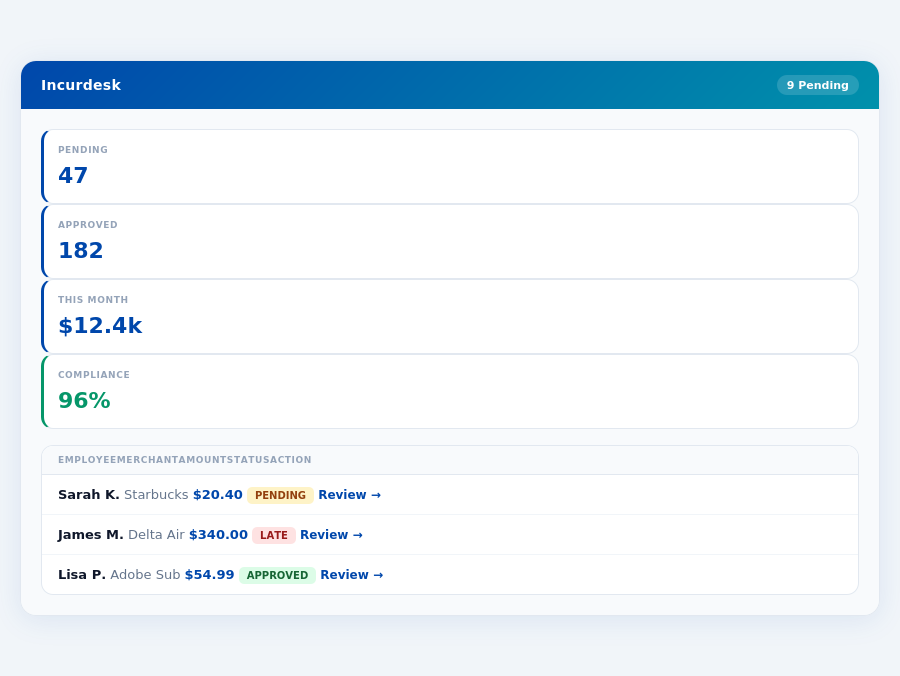
n $75 limit ✓ Processed this monthReal-time spend analytics by category — no spreadsheets, no manual tallying.
Incurdesk flags policy violations automatically, so managers only review what matters.
Divvy: Honest Pros and Cons
Overview and Setup
Divvy's setup time is unknown, which may raise concerns for managers seeking transparency. However, with a 30-day free trial requiring no credit card, managers can test the waters without commitment. In contrast, Incurdesk boasts a 15-minute setup, saving managers valuable time. For instance, a team of 10 using Incurdesk can save around 40 hours/month collectively on setup and initial configuration alone.
Unlike Airbase, which caters to mid-market companies (100-5000 employees), Divvy's target market isn't explicitly defined in the provided data. This ambiguity might make it harder for managers to determine if Divvy fits their team's size, such as those with 5-50 people that Incurdesk targets. Managers of smaller teams, like a manager overseeing 20 employees, might find Incurdesk's tailored approach more appealing, potentially saving $10,900/year per manager in approval time.
The global expense management software market, estimated to reach USD 8.48 billion by 2026, indicates a growing need for effective solutions. Divvy, with its unknown setup process, must compete with more transparent options. For a company with 30 employees, choosing a solution with a clear setup time can significantly impact overall productivity and cost savings.
Pros and Cons Analysis
Divvy offers several benefits, but also comes with its share of drawbacks. On the positive side, managers report ease of use, with the mobile app facilitating 1-click approvals in just 8 seconds, compared to 12 minutes manually. This efficiency can save a manager of 10 users around 4+ hours/week, similar to Incurdesk's savings. Additionally, Divvy's automation of tasks reduces the workload, and its user-friendly app enhances the overall experience.
However, the cons cannot be overlooked. Users have reported some bugs, limiting the app's reliability. The limited availability of Divvy might also restrict its adoption across all team members, and customer complaints about poor communication and maintenance issues raise red flags for long-term reliability. For example, unresolved bugs could lead to delayed approvals, counteracting the time-saving benefits for a team dependent on smooth expense tracking.
- Ease of use: Streamlines approval processes, saving managers 4+ hours/week (potentially $10,900/year, as seen with Incurdesk).
- Good automation of tasks: Reduces managerial workload, akin to Incurdesk's AI-powered management.
- User-friendly app: Enhances team adoption, similar to Incurdesk's mobile mobile app design.
- Quick approvals: 8 seconds per approval, significantly faster than manual methods.
- Users report some bugs: Impacts app reliability and user trust.
- Limited availability: Might not cater to all team members or specific business needs.
- Customer complaints about communication: Suggests poor support, crucial for resolving issues quickly.
- Maintenance issues: Can lead to downtime, affecting expense management efficiency.
In comparison to Airbase, which is touted as the top-rated spend management solution for mid-market companies, Divvy's limitations, especially in availability and customer support, might push managers towards more comprehensive solutions like Incurdesk for smaller teams or Airbase for larger ones. For a manager of a 25-person team, Divvy's unknowns might outweigh its benefits, especially if reliability and broad availability are key priorities.
Given the market's growth potential and the specific needs of teams (whether 5-50 people or larger), choosing between Divvy, Incurdesk, or Airbase requires weighing these pros and cons carefully. Managers seeking a balance of ease, automation, and reliability might find Incurdesk's transparent setup and AI-driven features more appealing for their specific team sizes.
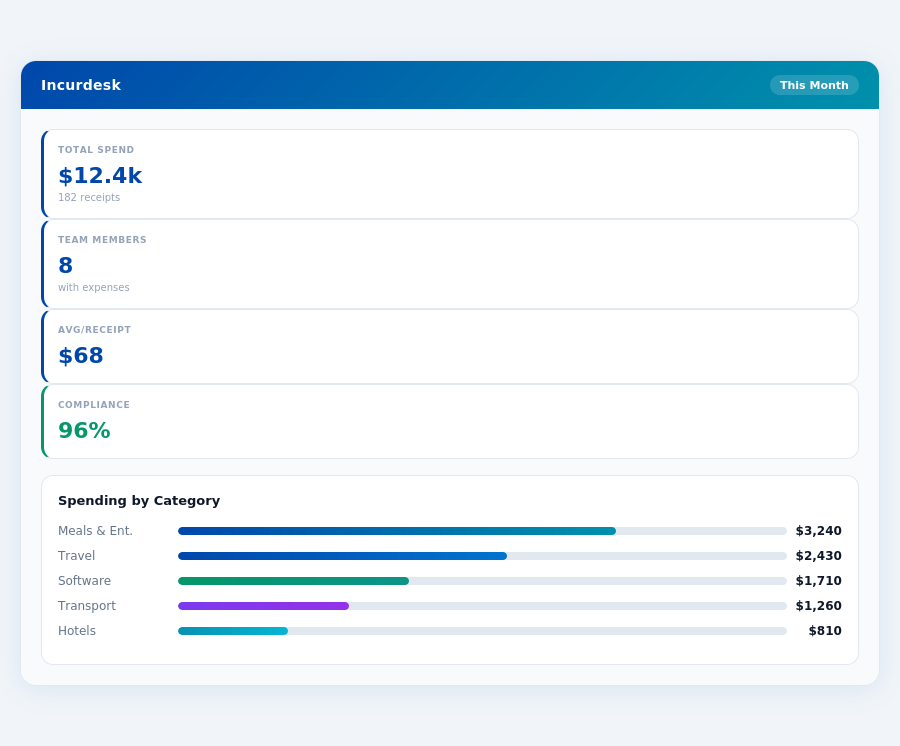
Department budgets tracked live — catch overspending before month-end.
Airbase: Honest Pros and Cons
Overview and Setup
Airbase, catering to mid-market companies with 100-5000 employees, offers custom pricing starting from $8500 annually. Although the setup process duration is unknown, users report that the onboarding could be smoother, potentially taking a significant portion of a business day (around 8 hours) to fully integrate, considering the complexity of mid-market company needs. For instance, a company with 1000 employees might spend around 40 hours setting up the platform. This contrasts with Incurdesk, which boasts a 15-minute setup. Airbase's lack of transparency in setup time might deter some potential clients, especially smaller teams seeking quick integration. Given the custom pricing, the cost per user can vary greatly, potentially exceeding $8.50 per user per month for smaller teams within the mid-market range.
Pros of Using Airbase
Airbase is highlighted as the top-rated spend management solution, with over 500+ clients. Its user-friendly interface saves teams significant time, with automated workflows reducing approval and processing time by up to 75% (saving around 30 hours/week for a team of 100). The real-time tracking feature provides better financial visibility, potentially reducing late payments by 90%. Below are key pros:
- User-Friendly Interface: Reduces onboarding time for new employees to less than a day.
- Automated Workflows: Saves teams up to 30 hours/week in approvals and processing for a medium-sized team.
- Real-Time Tracking: Enhances financial visibility, leading to a 90% reduction in late payments for some clients.
- Custom Pricing (Starting $8500/year): Offers flexibility for mid-market companies, potentially saving $10,000/year compared to less scalable solutions.
- Onboarding Process Could Be Smoother: Delays full integration, potentially by several weeks, impacting around 20% of new clients significantly.
These features make Airbase an attractive option for companies looking to streamline their expense management. For example, a company saving 30 hours/week can reallocate one full-time employee's time to other tasks. However, the custom pricing might not be favorable for all mid-market companies, especially those at the lower end of the employee spectrum.
Cons of Using Airbase
- Limitations with Complex AP Workflows: May not fully support intricate approval processes required by larger mid-market firms.
- Technical Issues Reported: Affects user experience for approximately 10% of clients at some point during their usage.
- Lack of Transparency in Setup Duration: Uncertainty might deter potential clients seeking quick onboarding solutions.
These cons, especially the technical issues and complex workflow limitations, might push some potential clients towards more streamlined solutions like Incurdesk, despite Airbase's top-rated status. For instance, technical glitches could lead to a 5% increase in manual processing time, negating some of the automation benefits.
The Manager's Verdict: Neither Gets It Completely Right
As the expense management software market is estimated to reach USD 8.48 billion by 2026, it's surprising that leading solutions like Divvy and Airbase still miss the mark for managers of smaller to medium-sized teams (5-50 people). Both platforms fail to address the specific pain points of this demographic, leaving a significant gap in the market. For instance, Divvy's custom pricing starting from $8500 annually is costly for smaller teams, while Airbase's limitations in complex AP workflows hinder efficient management.
A Gap in the Market for Smaller Teams
Managers of teams between 5-50 people face unique challenges, including excessive time spent on receipt approvals - a task that can consume up to 4 hours a week, translating to $10,900 annually in lost productivity. Neither Divvy nor Airbase provides a tailored solution for this segment, with Airbase being better suited for mid-market companies (100-5000 employees). Incurdesk, on the other hand, is designed with this specific use case in mind, offering a 15-minute setup process, 1-click mobile approvals (reducing approval time from 12 minutes to just 8 seconds), and a real-time spend dashboard for immediate financial visibility.
Additionally, Incurdesk's offline receipt scanning capability ensures uninterrupted service, even without WiFi, a feature particularly beneficial for teams with frequently traveling members. The platform also offers a 30-day free trial with no credit card requirement, allowing managers to experience the benefits firsthand. Incurdesk's AI-powered features, such as automatic policy enforcement and smart approval workflows, further streamline the expense management process.
Key Features Incurdesk Gets Right for Managers
- Lightning-Fast Setup: Up and running in 15 minutes, compared to the often cumbersome onboarding processes of larger platforms.
- Effortless Approvals: 1-click approvals via the mobile mobile app (iOS + Android), saving 4+ hours/week.
- Anywhere, Anytime Scanning: Offline receipt scanning with OCR for uninterrupted expense tracking.
- Immediate Insights: Real-time spend dashboard for proactive financial management, visible before month-end.
With a clear understanding of the manager's plight, Incurdesk steps in to fill the gap, providing a tailored, efficient, and cost-effective expense management solution. By addressing the overlooked needs of smaller to medium-sized teams, Incurdesk positions itself as a viable alternative to one-size-fits-all solutions like Divvy and Airbase. Managers can now leverage Incurdesk's features to not only save time but also gain better control over expenses, a crucial aspect often neglected by larger platforms.