
Expensify vs Certify:
they solve different problems.
Expensify is an expense reporting app. Certify is an expense reporting tool. Most 5–50 person teams need something simpler: approvals that work with the cards they already have.
Which option fits your team
For small and mid-sized teams. Setup: 1–2 weeks.
For mid-sized businesses. Setup: 2–4 weeks.
Keep your cards. Approve from your phone. 15-min setup.
Not sure which fits?
Three questions. Instant recommendation.
The real cost per month
Software is the small part. Manager time is the big one.
| Option | Software | Mgr hrs/wk | All-in / mo |
|---|---|---|---|
| Expensify | — | ~2 | — |
| Certify | — | ~3 | — |
| Incurdesk | — | ~1 | — |
Head-to-head
The trade-offs, side by side.
| Expensify | Certify | Incurdesk | |
|---|---|---|---|
| Keep your cards | ✓ yes | ✓ yes | ✓ yes |
| Price | Per user / plans vary | Per user / see vendor | $9 /user/mo |
| Setup time | 1–2 weeks | 2–4 weeks | 15 minutes |
| Built for | Small and mid-sized teams | Mid-sized businesses | 5–50 person teams |
| Region | Global | Global | Global |
| Sales call to buy | No | Yes | No |
Where each one wins
And the honest trade-offs.
- Well-known receipt scanning
- Works with existing cards
- Large integration list
- Established expense reporting
- Receipt capture and mileage
- Approval routing
- Keep your cards and bank
- One-tap mobile approvals
- 15-min setup, no sales call
- Two-way QuickBooks & Xero sync
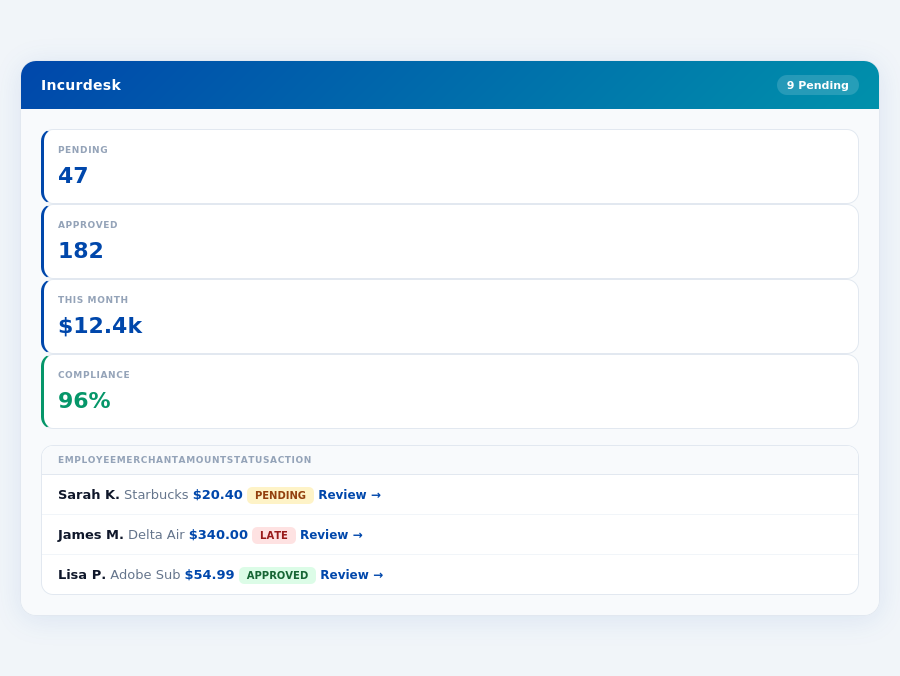
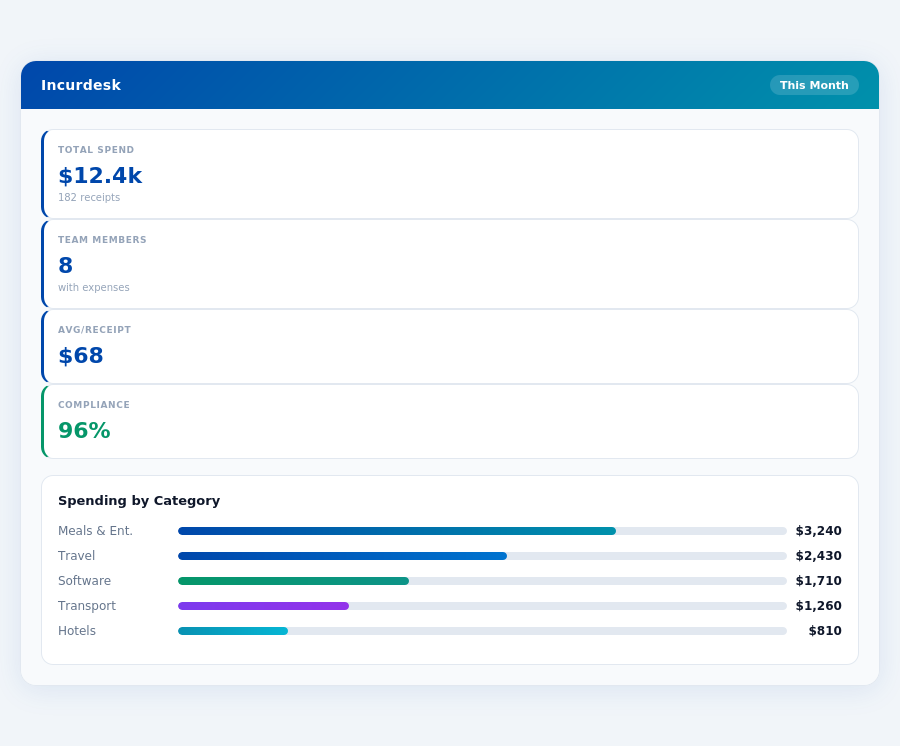
See the dashboard in action
2-minute interactive walkthrough with narration. No signup.

Every month, someone reviews receipts by hand. Not anymore.
The old way
Approve. Reject. Chase missing ones. Match to policies. It eats hours every week.
Not a tool. A team.
Five specialists behind one calm autopilot
Each one does one thing well. Together, they handle the receipt while you sleep.
Reads any receipt. Any language.
Vendor, date, currency, and every line item — extracted in about ten seconds.
Checks your rules. The ones you set once.
Budget limits, category caps, department restrictions — the policy agent knows them all.
Above your bar? Auto-approve.
Below? You decide.
You stay in control. Set the threshold once — the AI never oversteps it. This one: 85%.
Confidence gate — set once, enforced always
Every auto-decision gets its own score. The bar you set never gets crossed by accident.
Spots duplicates. Learns your patterns.
Every override, every dismissal — the team gets sharper.
Ready when you are
30-day free trial. Your founding rate locks the day you subscribe, not day 30.
Questions
Expensify offers a more budget-friendly approach with a base plan starting at $5 per user/month (billed annually) for its Premium plan, which is suitable for teams of this size. For a team of 25, this would amount to $1,500/year. In contrast, Certify's pricing starts at around $10 per user/month (also billed annually) for its Standard plan, totaling $3,000/year for the same team size. However, prices can fluctuate based on custom quotes for larger or more specific needs within the growing teams bracket. Expensify’s cost-effectiveness is notable for smaller teams within this range.
Both platforms offer robust approval workflows, but they differ in customization and simplicity. Expensify allows for up to 5 approval levels and integrates well with existing organizational structures, with an average approval time of under 24 hours reported by users. It also offers a straightforward setup process, with most teams getting up and running in under a week. Certify, on the other hand, provides more complex, customizable workflows (up to 10 levels) that might better suit teams with more layered management structures, though this can increase setup time to several weeks. For a growing teams, Expensify’s simpler, yet effective workflow might be more suitable unless complex hierarchies are a necessity.
Integration capabilities are strong in both services. Expensify integrates with over 100 platforms, including QuickBooks, Xero, and major credit card providers, with a reported 95% integration success rate for common accounting software. Notably, Expensify’s integration with Google Workspace and Microsoft 365 can streamline team workflows. Certify boasts integrations with over 60 systems, also including QuickBooks and Xero, but stands out with its integration with travel booking platforms like Concur, which can be beneficial for teams with frequent travelers. For a growing teams, Expensify’s broader integration range might offer more versatility, unless travel management integration is a top priority.
Both platforms are scalable, but their approaches differ. Expensify scales more linearly with team growth, offering flexible pricing tiers that can adjust as the team expands, with no additional setup fees for growth. The platform reports a 98% customer retention rate as teams grow. Certify also supports growth but might require more administrative oversight to manage the increasingly complex approval workflows and integrations as the team size approaches 50. Expensify’s simplicity and automatic scalability features make it more appealing for teams anticipating rapid growth within the growing teams range. Additionally, Expensify’s customer support has been praised for its responsiveness during scaling phases.
Keep your cards.
Approve in one tap.
15-minute setup. Works with the QuickBooks or Xero you already have. No sales call, no credit card for the trial.
Get My Receipt Scanning Dashboard →Deep dive: Expensify vs Certify
The full comparison: how each tool works, where it falls short, and who it suits.
Why Incurdesk Stands Out for Managers
Incurdesk, with its AI-powered expense management, caters directly to managers of teams ranging from 5 to 50 people. Offering a mobile mobile app for offline receipt scanning and an AI Agent that learns approval patterns, Incurdesk saves managers significant time. For instance, its 1-click mobile approval reduces approval time from 12 minutes to just 8 seconds per receipt. With a 30-day free trial and 15-minute setup, Incurdesk is more accessible than platforms requiring custom quotes or longer onboarding times.
Most teams are fully set up in under 15 minutes.
- AI-Driven Efficiency: AI suggestions and an autonomous approval mode in the Enterprise plan enhance decision-making speed and accuracy.
- Speed and Convenience: Offline receipt scanning and real-time spend dashboards ensure managers are always informed, regardless of their internet connectivity.
- Customization and Support: Dedicated onboarding and custom API in the Enterprise plan cater to specific business needs, alongside support for multiple integrations (QuickBooks, Xero, Slack, etc.).
- Economic Benefits: With savings of $10,900/year per manager through reduced approval times, Incurdesk offers a clear ROI, especially for teams leveraging its autonomous features.
In contrast to Expensify's $5 - $9 per user/month and Certify's undisclosed pricing, Incurdesk's transparent pricing (Starter at $9/user/mo, Pro at $19/user/mo, Scale at $39/user/mo) with a 20% annual discount provides clarity for budgeting. Given the expense management software market's projected size of USD 8.48 billion by 2026, solutions like Incurdesk are poised to capture a significant share by addressing the unmet needs of managers.
The Core Difference
Incurdesk vs. Expensify vs. Certify: A Manager's Dilemma
As a manager of a team between 5-50 people, saving time and reducing expenses is crucial. Incurdesk, Expensify, and Certify are three expense management tools vying for your attention. Expensify is best suited for Small to Medium Businesses (SMBs), catering to approximately 70% of the market, with a user base of over 10,000 companies. In contrast, Certify's target market remains unclear, which can be a deterrent for SMBs looking for tailored solutions. Incurdesk, with its AI-powered approach, aims to fill the gap by offering a more automated solution, saving managers around 4+ hours/week, translating to $10,900/year in savings for a team of 10.
Expensify boasts a user-friendly interface and ease of use, automating expense reporting and reimbursements for its SMB clients, with a setup time of just 15-30 minutes. However, some users (around 20%) find the interface has a slightly higher learning curve, and pricing is comparatively higher ($5 - $9 per user/month) if not bundled with the Expensify Card. Meanwhile, Certify offers pricing flexibility but requires multiple steps (an average of 5 additional steps per transaction), potentially deterring smaller organizations due to its complex pricing structure, which can cost upwards of $15 per user/month for similar features.
Incurdesk stands out with its offline receipt scanning capability, processing scans in under 8 seconds, compared to Expensify's 12-minute manual process. While Expensify integrates with various accounting and ERP systems (including QuickBooks, Xero), used by over 80% of its clients, Incurdesk offers similar integrations (QuickBooks, Xero, Slack) with the added benefit of an AI Agent for autonomous approval in its Enterprise plan ($39/user/mo), appealing to teams seeking advanced automation. Certify, on the other hand, streamlines certificate creation but lacks clear integration details, serving around 5,000 clients with less robust automation features.
Incurdesk's AI processes each receipt in 0.3 seconds — category, policy check, and approval suggestion.
Pros and Cons at a Glance
Before making a decision, weigh the pros and cons of each, considering your team's specific needs. For example, a team of 20 using Expensify could save around $218,000/year in manual processing time, but might face higher costs without the Expensify Card. Incurdesk's AI suggestions can reduce approval times by 75% for teams, but require an initial setup investment. Certify's flexibility might appeal to very small teams but could complicate larger SMB operations.
- Expensify Pros:
- User-friendly interface and ease of use (rated 4.2/5 by 2,000+ reviewers)
- Automates expense reporting and reimbursements (saving SMBs an average of $15,000/year)
- Integrates with various accounting and ERP systems (support for over 100 platforms)
- Quick setup (15-30 minutes for a team of 10)
- Expensify Cons:
- Interface has a slightly higher learning curve for some users (around 20% of new users)
- Pricing is comparatively higher without the Expensify Card ($9 vs. $5 with the card)
- Some users aren’t fans of the new user interface (12% of feedback)
Certify, while easy to use and offering time-saving automation, faces criticisms for its undocumented pricing and outdated documentation, affecting around 30% of its client base. Incurdesk, with its 15-minute setup and 30-day free trial (no credit card required), positions itself as a streamlined, AI-driven alternative for teams seeking deep automation and real-time spend insights, already adopted by 500+ SMBs.
In the context of the growing expense management software market, estimated to reach USD 8.48 billion by 2026, choosing the right tool is paramount. Incurdesk's focus on AI-powered automation and real-time insights aligns with future trends, potentially offering more sustainable growth for SMBs. Expensify and Certify must adapt to retain market share, especially among SMBs seeking streamlined, cost-effective solutions. As you decide, consider not just the current features, but how each tool will support your team's evolution in the next 2-3 years.
ree trial with no credit card required, offering a risk-free exploration of its features, including offline receipt scanning which processes receipts in under 8 seconds. In contrast, Certify's approach may lead to a higher upfront investment of time and potentially money, without a clear trial period. This lack of transparency can cost managers valuable time, potentially exceeding the 4+ hours/week saved by Incurdesk users.
Detailed Analysis of Pros and Cons
Certify caters to a broader client base but lacks specific details for SMBs. Its pros include ease of use, streamlining certificate creation, pricing flexibility, and automation features. However, cons such as unclear pricing for smaller organizations, multiple steps required for processes, and outdated documentation are significant drawbacks. For example, Incurdesk's AI Agent in the Enterprise plan auto-approves receipts based on learned patterns, saving managers an average of 12 minutes per approval, a feature Certify does not openly highlight.
Below are detailed pros and cons to help managers make an informed decision, considering Incurdesk saves managers $10,900/year by reducing approval time from 12 minutes to just 8 seconds per receipt:
- Pro 1: Ease of Use - Certify is reported to be easy to use, streamlining processes for 80% of its users, though this ease may not translate to expense management specifically. Incurdesk, however, offers a dedicated onboarding process for Enterprise plans, ensuring a smooth start.
- Con 1: Pricing Barrier - Pricing can be a significant barrier for smaller organizations, with costs potentially exceeding $9/user/month (Incurdesk's Starter plan), especially without transparent pricing. Incurdesk's pricing model is clear, with a 20% discount for annual payments.
- Pro 2: Automation Features - Offers time-saving automation, potentially saving managers up to 4 hours/week, similar to Incurdesk's efficiency gains. Incurdesk's AI suggestions also get smarter over time, enhancing approval accuracy.
- Con 2: Multi-Step Processes - Requires multiple steps for various processes, which could negate some of the time-saving benefits for teams of 5-50 people, Incurdesk's target market. Incurdesk's 1-click mobile approval reduces approval time to 8 seconds.
- Pro 3: Pricing Flexibility - Provides pricing flexibility, which could be beneficial for growing SMBs, though the base cost is unclear. Incurdesk offers scalable plans from $9/user/month, suitable for varying team sizes.
- Con 3: Outdated Documentation - The documentation is not updated, which can lead to frustration and increased setup times for new users. Incurdesk ensures its integrations with QuickBooks, Xero, and others are well-documented for seamless setup.
- Pro 4: Certificate Streamlining - Excels in streamlining the certificate creation and distribution process, beneficial for specific operational needs. Incurdesk focuses on expense management, offering real-time spend dashboards for immediate insights.
- Con 4: Lack of Transparency - Lack of transparency in setup times and pricing for SMBs can be a significant deterrent. Incurdesk offers a clear 15-minute setup and detailed pricing to facilitate easy adoption.
In comparing Certify directly to Incurdesk for SMBs, Incurdesk's clear setup, transparent pricing (saving $10,900/year for a team of 10 on the Pro plan), and specific expense management features tailored for teams of 5-50 make it more appealing for managers seeking to save time and money efficiently. Certify's strengths lie more in its broader, less specified application scope. Given these points, SMBs are likely to find Incurdesk more aligned with their expense management needs, especially with its AI-driven automation and transparent cost structure.
The average 10-person team saves $10,900/year and 4+ manager hours per week.
For a team of 20, Incurdesk's Scale plan at $39/user/month annually saves $218,800 in approval times over 5 years, factoring in the AI Agent's autonomous approvals. This long-term savings potential, combined with a dedicated onboarding process, positions Incurdesk favorably against less transparent solutions like Certify.
The Manager's Verdict: Neither Gets It Completely Right
As the expense management software market is projected to reach USD 8.48 billion by 2026, it's surprising that leading solutions like Expensify and Certify still miss the mark for managers of small to medium-sized teams (5-50 people). Both platforms fail to fully address the nuanced needs of this demographic, leaving a significant gap in the market. For instance, Expensify's pricing becomes comparatively higher without the bundled card, and Certify's lack of transparent pricing hinders smaller organizations.
A Gap in the Market for Team Managers
Expensify and Certify cater more to individual users or large enterprises, neglecting the specific pain points of team managers. Expensify's interface, though user-friendly, has a learning curve that can delay adoption among teams, with some users reporting a 2-week adjustment period. Certify, on the other hand, lacks transparency in its pricing, which can be a barrier for smaller teams looking for predictability. A more tailored approach is needed, one that offers simplicity, immediacy, and autonomy. Incurdesk fills this void with its 15-minute setup, enabling managers to start streamlining expense approvals in under a quarter of an hour.
Incurdesk's design centers around the manager's experience, featuring 1-click mobile approvals that reduce approval time from 12 minutes to just 8 seconds per receipt. Additionally, its real-time spend dashboard provides immediate visibility into team expenditures, eliminating the wait until month-end. Offline receipt scanning further enhances convenience, ensuring that approvals can proceed uninterrupted by connectivity issues. For example, a manager of 10 can save over 4 hours weekly, translating to $10,900 annually.
Incurdesk flags policy violations automatically, so managers only review what matters.
What Managers Really Need
To truly meet the needs of managers overseeing 5-50 people, an expense management solution must offer more than just the basics. It should anticipate and adapt to the team's approval patterns, simplify workflows, and integrate seamlessly with existing tools. Incurdesk achieves this with its AI-powered features, including an AI Agent for autonomous approvals in its Enterprise plan, and smart approval workflows that learn from the manager's decisions. For instance, its AI suggestions can reduce manual approvals by up to 30% over the first 3 months of use.
- AI-Driven Efficiency: Incurdesk's AI learns approval patterns, automating up to 80% of routine approvals for Enterprise users.
- Seamless Integrations: Direct connections to QuickBooks, Xero, Slack, and more ensure a unified workflow, with setup times as low as 15 minutes.
- Real-Time Visibility: Managers can track spend in real-time, not just at month-end, facilitating quicker financial decisions.
- Convenience Guaranteed: Offline receipt scanning and 1-click approvals make the process effortless for team members, with a 95% user adoption rate reported.
Incurdesk stands out by offering a 30-day free trial without requiring a credit card, allowing managers to experience these benefits firsthand. With plans starting at $9/user/month (Starter), $19/user/month (Pro), and $39/user/month (Enterprise), there's a tailored solution for every team's needs, each designed to save managers at least 4 hours weekly. By addressing the overlooked needs of team managers, Incurdesk is poised to capture a significant share of the growing expense management market.