
How to Categorize Law Firm Expenses in QuickBooks
A practical, data-backed guide to controlling costs and automating expense workflows.
To properly classify your law firm's expenses in QuickBooks, you'll want to use specific account names that accurately reflect the nature of each expense. This will ensure accurate financial reporting, tax compliance, and efficient expense management for law firms. By following clear guidelines for categorization, you can avoid common pitfalls and ensure that your firm's expenses are properly accounted for, including trust accounting and client costs.
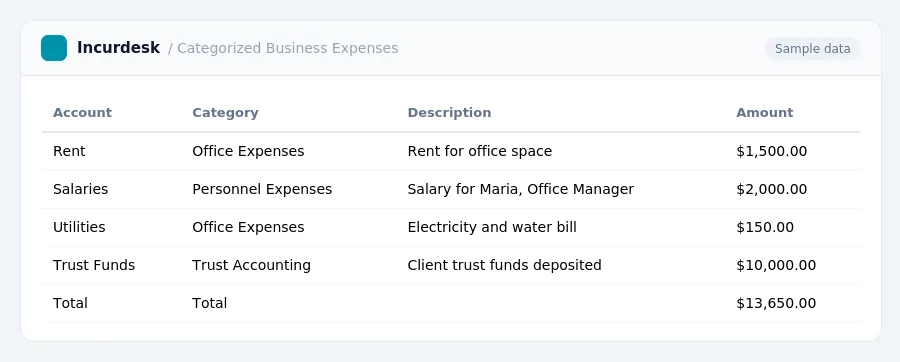
Set Up a Separate Chart of Accounts for Trust Funds
When managing trust funds, it's essential to maintain a separate chart of accounts to track these funds accurately. This is crucial for maintaining the integrity of your financial records and ensuring compliance with trust accounting rules. You should create a new chart of accounts specifically for trust funds, which will help you track the inflow and outflow of these funds, including deposits, withdrawals, and interest earned.
- Designate a specific account for each client's trust funds Create a separate account for each client's trust funds to keep their funds separate and easily identifiable.
- Set up sub-accounts for specific trust fund types Create sub-accounts within each client's trust fund account to track specific types of funds, such as operating funds, escrow funds, and settlement funds.

Categorize Client Costs as Assets, Not Expenses
-
Categorize client costs as assets, not expenses, to ensure accurate financial reporting and tax compliance.
These costs should be tracked as assets on the balance sheet, not as P&L expenses.
For example, if you pay a court filing fee on behalf of a client, you should record it as an asset on your balance sheet, not as an expense on your income statement.

Track Business Expenses as Cash or Accrual
- When it comes to tracking business expenses, small law firms have two primary options: cash basis and accrual basis. Most firms use the cash basis for tax returns, which allows them to defer taxes on unpaid invoices. However, for management purposes, they often use accrual-style reports to show the firm's true performance.
- Business insurance, including general liability and workers' compensation, is a common expense that should be tracked.
Classify Specific Business Expenses in QuickBooks
When categorizing business expenses in QuickBooks, you'll want to create separate accounts for specific types of expenses. Here are some common examples:
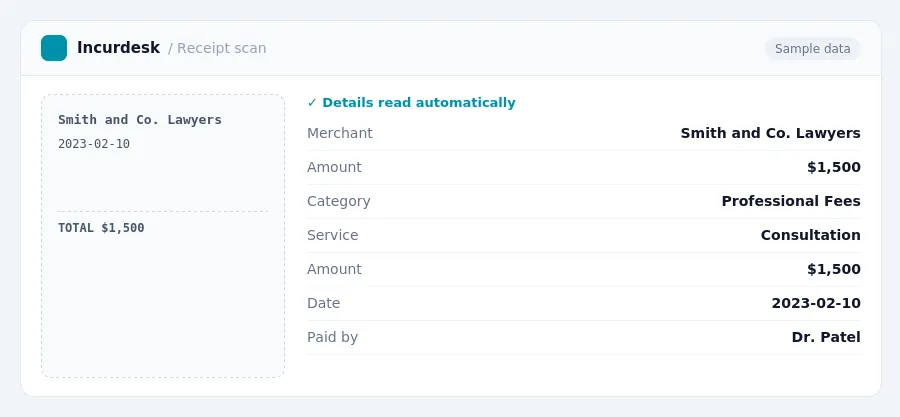
Create a separate account for Professional Fees, which includes fees paid for short-term professional advice, such as:
- Lawyers and accountants for specific business deals, sales transactions, or yearly taxes
- Consultants for marketing, technology, or other business strategies
For instance, if your law firm hires a consultant to help with a major client pitch, you would record this expense under the Professional Fees account.
Another important category is Advertising and Promotions, which includes expenses for promoting the business, such as:
- Online ads
- Flyers
- Social media campaigns
Be sure to also create separate accounts for other specific business expenses, such as:
- Office Supplies and Equipment
- Travel and Entertainment
- Insurance and Benefits
By creating separate accounts for these specific expenses, you'll be able to track your business expenses more accurately and make informed financial decisions.
Reconcile Trust and Client Funds Regularly
State bar rules mandate strict separation of client funds from firm funds. To ensure compliance, you must regularly reconcile trust and client funds.
To start, identify the dates of your monthly three-way reconciliation, which should include your bank statement, trust ledger, and client ledgers. This will help you verify that all transactions are accurately reflected and that client funds are being properly maintained.
When reconciling trust and client funds, ensure that:
- Deposits match bank statements
- Withdrawals match client disbursements
- Interest earned is properly recorded
Also, review client ledgers to ensure that:
- Client funds are being held in accordance with state bar rules
- Client disbursements are accurate and properly recorded
Reconciling trust and client funds regularly will help you maintain accurate financial records, ensure compliance with state bar rules, and avoid potential financial and legal issues.

Keeping this simple: Incurdesk exports your expenses as a CSV your accountant can import into QuickBooks. It is built for small law firm teams. Try it free.
Stop losing 4+ hours a week
30-day free trial · No credit card · Setup in 15 minutes