How to Choose Expense Software for a Healthcare Team
A practical, data-backed guide to controlling costs and automating expense workflows.
To choose the right expense software for your healthcare team, consider solutions that integrate with your existing accounting system and provide easy expense tracking, approval, and reimbursement processes. For small healthcare businesses with 5-50 employees, look for software that offers healthcare expense management for under $10/user (2026) to stay within budget. Additionally, ensure the software meets IRS mileage and per diem rates, HIPAA requirements, and employee leave policies like FMLA to maintain compliance.
Managing Employee Leave Policies and Expenses
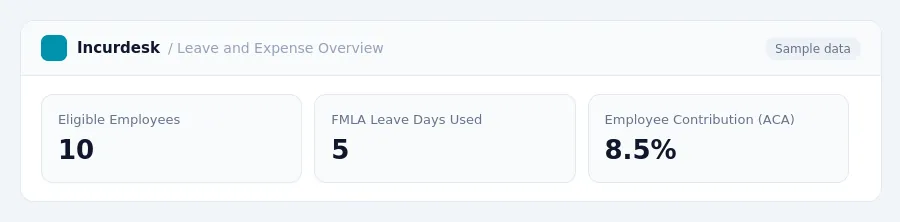
When managing employee leave policies and expenses, it's essential to consider the Family and Medical Leave Act (FMLA) and the Affordable Care Act (ACA). To be eligible for FMLA, an employee must work for a covered employer, have at least 12 months of service, have worked at least 1,250 hours in the preceding 12 months, and work at a site with at least 50 employees within 75 miles. Private-sector employers with 50 or more employees in 20 or more workweeks in the current or previous calendar year are also covered by FMLA. Eligible employees are entitled to up to 12 weeks of unpaid, job-protected leave per 12-month period for qualifying reasons.
- Verify FMLA eligibility by checking if your business meets the employee and employer requirements.
- Determine the employee's required contribution for self-only coverage under the ACA, which cannot exceed 9.96% of their household income for 2026.
- Keep track of employee hours worked and leave taken to ensure compliance with FMLA.
- Use expense software to manage employee leave and related expenses, such as travel costs, to ensure accurate reimbursement and compliance with FMLA.
Some states have their own Paid Family and Medical Leave (PFML) programs, which may have different eligibility thresholds and benefits. For example, Washington state has a lower employee threshold for PFML. It's essential to research the specific requirements for your state or locality.
When choosing an expense software, ensure it can handle the complexities of FMLA and ACA compliance. Consider the following features:
- Automated tracking of employee hours worked and leave taken.
- Integration with payroll systems to ensure accurate reimbursement and compliance.
- Easy reporting and analytics to monitor compliance and identify areas for improvement.
Keeping this simple: Incurdesk lets your team snap a photo of a receipt and fills in the details for you. It is built for small healthcare teams. Try it free.
Streamlining Financial Operations with Expense Software
Once you've chosen the right expense software, it's time to focus on streamlining your financial operations. This involves automating tasks, reducing manual errors, and improving visibility into your team's spending. To achieve this, consider the following steps:
- Implement a centralized system for tracking and approving expenses. This will help you keep all your financial data in one place and ensure that everyone is on the same page.
- Set up automated workflows to assign tasks and notifications to team members, ensuring that expenses are reviewed and approved in a timely manner.
- Use reporting and analytics tools to gain insights into your team's spending habits, identify areas for cost savings, and make data-driven decisions.
- Integrate your expense software with your accounting system to ensure seamless financial reporting and compliance.
By implementing these steps, you'll be able to reduce administrative burdens, improve financial visibility, and make more informed decisions about your business. This, in turn, will help you stay compliant with regulations like the Affordable Care Act (ACA) for Small Businesses, which requires that an employee's required contribution for self-only coverage not exceed 9.96% of their household income.
Navigating IRS Mileage and Per Diem Rates for Healthcare Teams
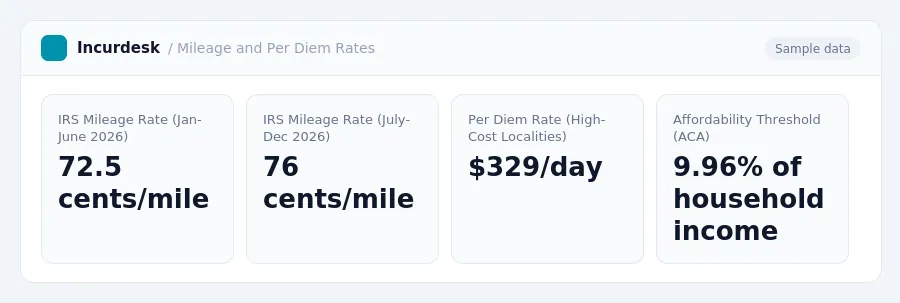
The IRS mileage reimbursement rate varies throughout the year. For the first six months of 2026, the rate is 72.5 cents per mile for business use. From July 1 to December 31, 2026, the rate increases to 76 cents per mile for business use. If your team is using their vehicles for medical or moving purposes, the rate is 23.5 cents per mile from July 1 to December 31, 2026. For charitable driving, the rate is 14 cents per mile for the entire year.
When it comes to per diem rates, the IRS sets rates for high-cost localities. For the period from October 1, 2026, to September 30, 2027, the rate for high-cost localities is $329 per day, which includes lodging, meals, and incidental expenses. To ensure compliance, keep in mind that the Affordable Care Act (ACA) for Small Businesses sets the affordability threshold at 9.96% of an employee's household income for self-only coverage.
When tracking employee expenses, make sure to record the date, mileage, and purpose of each trip. For mileage reimbursement, calculate the total miles driven and multiply by the applicable rate. For per diem expenses, keep receipts for lodging, meals, and incidental expenses and calculate the total amount within the daily limit. By accurately tracking and reimbursing expenses, you can ensure compliance with IRS regulations and maintain accurate financial records.
- January 1 - June 30, 2026: 72.5 cents per mile for business use
- July 1 - December 31, 2026: 76 cents per mile for business use
- July 1 - December 31, 2026: 23.5 cents per mile for medical and moving purposes
- All year: 14 cents per mile for charitable driving
- October 1, 2026 - September 30, 2027: $329 per day for high-cost localities
Example:
| Date | Mileage | Purpose |
|---|---|---|
| February 15, 2026 | 100 miles | Business use |