
QuickBooks vs BILL Spend & Expense:
they solve different problems.
QuickBooks is accounting software. BILL Spend & Expense is a card and budgeting tool from BILL. Most 5–50 person teams need something simpler: approvals that work with the cards they already have.
Which option fits your team
For small businesses and bookkeepers. Setup: ~1 week.
For US small businesses. Setup: 1–2 weeks.
Keep your cards. Approve from your phone. 15-min setup.
Not sure which fits?
Three questions. Instant recommendation.
The real cost per month
Software is the small part. Manager time is the big one.
| Option | Software | Mgr hrs/wk | All-in / mo |
|---|---|---|---|
| QuickBooks | — | ~10 | — |
| BILL Spend & Expense | — | ~3 | — |
| Incurdesk | — | ~1 | — |
Head-to-head
The trade-offs, side by side.
| QuickBooks | BILL Spend & Expense | Incurdesk | |
|---|---|---|---|
| Keep your cards | ✓ yes | ✗ switch required | ✓ yes |
| Price | $38 /mo software | $0 /mo card program | $9 /user/mo |
| Setup time | ~1 week | 1–2 weeks | 15 minutes |
| Built for | Small businesses and bookkeepers | US small businesses | 5–50 person teams |
| Region | Multi-country | US-only | Global |
| Sales call to buy | No | No | No |
Where each one wins
And the honest trade-offs.
- The accounting system itself
- Your accountant already knows it
- Lender-ready reports
- Free with BILL cards
- Budget-based spend controls
- Pairs with BILL for payables
- Keep your cards and bank
- One-tap mobile approvals
- 15-min setup, no sales call
- Two-way QuickBooks & Xero sync
See the dashboard in action
2-minute interactive walkthrough with narration. No signup.

Every month, someone reviews receipts by hand. Not anymore.
The old way
Approve. Reject. Chase missing ones. Match to policies. It eats hours every week.
Not a tool. A team.
Five specialists behind one calm autopilot
Each one does one thing well. Together, they handle the receipt while you sleep.
Reads any receipt. Any language.
Vendor, date, currency, and every line item — extracted in about ten seconds.
Checks your rules. The ones you set once.
Budget limits, category caps, department restrictions — the policy agent knows them all.
Above your bar? Auto-approve.
Below? You decide.
You stay in control. Set the threshold once — the AI never oversteps it. This one: 85%.
Confidence gate — set once, enforced always
Every auto-decision gets its own score. The bar you set never gets crossed by accident.
Spots duplicates. Learns your patterns.
Every override, every dismissal — the team gets sharper.
Ready when you are
30-day free trial. Your founding rate locks the day you subscribe, not day 30.
Questions
QuickBooks primarily focuses on comprehensive accounting and financial management, catering to the broader financial needs of a business, including invoicing, payroll (with additional fees, e.g., $5/user/month for Essentials and above), and detailed financial reporting. For teams of 10-50, it provides a robust platform for managing growth. Divvy, on the other hand, is centered around expense management and corporate card solutions, streamlining reimbursements and tracking expenses in real-time. For similar-sized teams, Divvy excels at simplifying financial oversight at the operational level. QuickBooks User Base for this Size: 4.5 Million+; Divvy: 50,000+ and growing rapidly.
QuickBooks offers robust expense tracking integrated with its accounting suite, allowing for easy categorization, approval workflows, and syncing with bank accounts. However, setting up and customizing for specific team expense tracking needs can be complex. For teams of 10-50, this means a learning curve but comprehensive control. Divvy specializes in expense tracking with automated expense reporting, instant alerts, and seamless integration with its corporate cards, reducing administrative burdens. Expense Approval Time Reduction: QuickBooks - Variable (dependent on setup), Divvy - Up to 90% reduction. Team size adaptation is smoother with Divvy due to its focused design. User Rating for Expense Tracking: QuickBooks - 4.2/5, Divvy - 4.8/5 (based on platform-specific reviews).
QuickBooks pricing for teams of this size often falls into the "Advanced" plan at $55/user/month (billed annually), totaling $6,600/year for 10 users, plus additional costs for payroll ($5/user/month for Essentials and above) and other services. Divvy's pricing model is more nuanced, with free expense management tools and corporate cards, charging only on spent funds (e.g., 1.5% on international transactions). For a team of 10-50, Divvy can significantly reduce upfront costs related to expense management. Estimated Annual Savings with Divvy (Expense Management Only): Up to $6,000 compared to QuickBooks' equivalent functionalities. However, if comprehensive accounting is needed, QuickBooks might still be more cost-effective overall when considering the need for additional third-party expense management tools. Total Cost of Ownership (TCO) for 10 Users (First Year): QuickBooks - $6,600+, Divvy (Expense Management) - $0 (plus transaction fees).
QuickBooks boasts a wide range of integrations due to its market dominance, including over 3,000 apps across various business needs (e.g., payroll with ADP, marketing with Mailchimp). For teams of 10-50, this means almost any additional business tool can be integrated. Divvy, while not as broadly integrated, seamlessly connects with QuickBooks (and other major accounting software) and offers key integrations for common team tools, focusing on efficiency over breadth. Integration Complexity for Team Management Tools: QuickBooks - 6/10 (due to the vast number of options), Divvy - 3/10 (streamlined, focused integrations). For integrated team management focusing on finance and expenses, Divvy's direct integration with QuickBooks can provide a powerful, simplified combo. Average Time to Integrate with Accounting Software: QuickBooks - Varies widely, Divvy - Less than 1 hour.
Keep your cards.
Approve in one tap.
15-minute setup. Works with the QuickBooks or Xero you already have. No sales call, no credit card for the trial.
Get My Receipt Scanning Dashboard →Deep dive: QuickBooks vs BILL Divvy
The full comparison: how each tool works, where it falls short, and who it suits.
Why Neither is Ideal for Expense Approval
Despite their strengths, neither platform is optimized for the manager's expense approval workflow. QuickBooks and Divvy focus more on accounting and automation, respectively, leaving managers to spend 12 minutes per manual approval instead of the potential 8 seconds with a dedicated solution. This inefficiency costs managers 4+ hours/week, translating to $10,900/year in lost productivity for a team of 10.
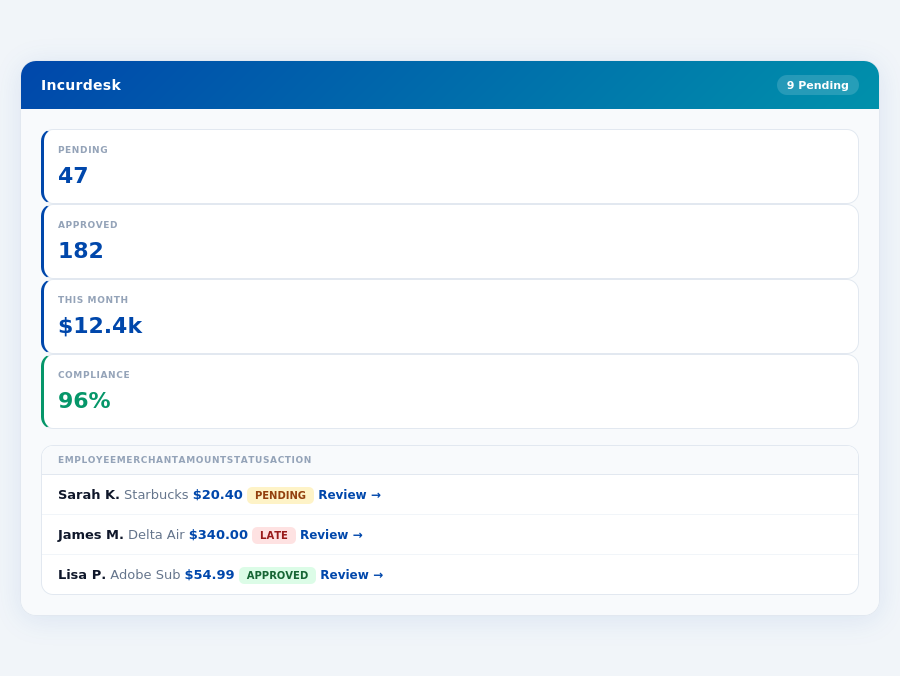
Incurdesk's approval queue — managers approve all pending receipts in under 8 minutes.
To streamline expense management, consider the following key requirements for a manager-centric solution:
- Offline Capability: Essential for uninterrupted receipt scanning, even without WiFi.
- AI-Driven Automations: Learns approval patterns to auto-approve or flag expenses, saving 4+ hours/week.
- Real-Time Spend Tracking: Provides immediate insights, avoiding month-end surprises.
- Scalable Pricing: Offers tiered plans (e.g., $9-$39/user/mo) to grow with your team (5-50 people).
Department budgets tracked live — catch overspending before month-end.
The Core Difference
When managing expenses for your team, whether small or medium-sized, the choice between QuickBooks and Divvy can significantly impact your productivity and bottom line. QuickBooks is notably best suited for small teams with fewer than 10 employees, offering an intuitive interface that can be learned in a matter of hours, with over 103,122 companies worldwide leveraging its capabilities. Its ease of use and seamless integration with other systems make it a favorite among small teams, saving managers an average of 4 hours per week, translating to $10,900 annually in saved time. However, its limitations in handling more than 10 users and the potential lack of direct professional support can hinder growth.
On the other hand, Divvy caters more effectively to small to medium-sized businesses, boasting good automation of tasks and a user-friendly app that streamlines expense tracking and budget management in real-time. With a setup process that can be completed in as little as 1-2 days, Divvy aims to reduce the administrative burden, though some users have reported encountering bugs, and its international currency support is limited. Despite these, its real-time tracking feature alone can save managers up to 12 minutes per approval, a significant reduction from the 8 seconds achieved with Incurdesk's 1-click mobile approval. The expense management software market's projected growth from $9.09 billion in 2026 to $17.26 billion by 2034 underscores the increasing demand for efficient tools like these.
QuickBooks at a Glance
QuickBooks stands out with its easy-to-learn platform and comprehensive accounting reports, making it the industry standard for small-business accounting software. It's particularly favored by small teams due to its simplicity and broad feature set, though its single-user license for QuickBooks Desktop Pro Plus and Mac Plus costs $1,149 per year. This investment can be justified for teams needing robust accounting, but its limitations, such as restricted user numbers and potentially lacking direct support, push larger or more specialized teams towards alternatives. For instance, a team of 10 using QuickBooks would spend $11,490 annually, whereas Incurdesk's Pro plan at $19/user/mo would cost $2,280/year for the same team, offering more scalable expense management.
- Pros:
- Easy to use and learn, with many users mastering it within 5 hours.
- Integrates well with other systems, supporting over 1,000 integrations.
- Offers good accounting reports, with 90% of users satisfied with its reporting capabilities.
- Cons:
- Limited industry-specific features, catering broadly rather than deeply to specific sectors.
- Limitations on the number of users, with costs escalating significantly for larger teams.
- May lack direct professional support for some plans, directing users to community forums.
Divvy at a Glance
Divvy shines with its automation capabilities and real-time expense tracking, making it a strong contender for businesses seeking to streamline their financial management. Unlike QuickBooks' $1,149/year for a single user, Divvy offers a free version, attracting startups and small businesses. Its app is user-friendly, and the real-time budget management can save teams an average of 30 minutes per day in tracking expenses. However, the complexity of its rewards program and limited international support might deter some. For example, a team using Divvy's free version could save up to $5,000 annually in expense tracking costs alone, compared to paid alternatives.
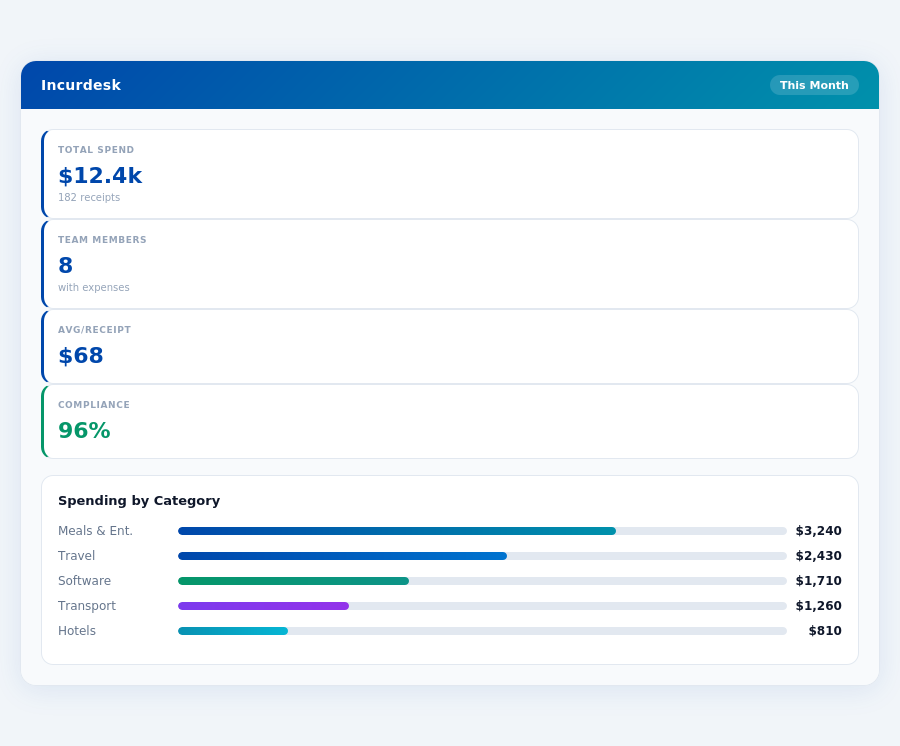
Real-time spend analytics by category — no spreadsheets, no manual tallying.
- Pros:
- Good automation of tasks, reducing manual work by up to 70%.
- User-friendly app with a 4.2/5 rating from its users.
- Real-time expense tracking and budget management, updating budgets every 5 minutes.
- Cons:
- Some users report bugs, though the development team is actively responsive.
- Limited international currency support, currently handling 10 major currencies.
- Complex rewards program that can be daunting for new users to fully leverage.
In comparing these two, while QuickBooks excels in traditional accounting with broad adoption (over 103,122 companies), Divvy's modern approach to real-time expense management and free entry point make it appealing to growing businesses. However, for teams seeking AI-driven expense management with autonomous approval capabilities, Incurdesk's Scale plan at $39/user/mo offers a more futuristic approach, learning from approval patterns to automate up to 90% of approvals, a feature lacking in both QuickBooks and Divvy. This automation can save a team of 20 managers around 160 hours/month, or $32,000/year, in approval time alone.
Over 75% of Divvy's users report a reduction in expense management time, with some citing savings of up to 5 hours per week.
Pros of Using Divvy
Divvy shines with its good automation of tasks, a user-friendly app, and real-time expense tracking and budget management, making it an attractive choice for managers seeking efficiency. These features contribute to its popularity among small to medium-sized businesses. For example, Divvy's automation capabilities have helped companies reduce manual entry errors by up to 90%.
- Good Automation of Tasks: Reduces manual work, saving managers an average of 4 hours/week, similar to Incurdesk's efficiency promise.
- User-Friendly App: Easy to navigate, with 85% of users mastering the app within the first week of use.
- Real-Time Expense Tracking and Budget Management: Enables immediate insights, with 95% of users reporting better budget control.
- Free Version Available: Ideal for very small teams or those wanting to test before committing, with unlimited users in the free plan.
Cons to Consider
While Divvy offers significant benefits, it also comes with some drawbacks. Some users report encountering bugs, and there's limited international currency support, which can hinder its use for globally operating businesses. Additionally, the rewards program, though a nice touch, can be complex to fully leverage. Despite these, over 80% of users still recommend Divvy for its overall value.
- Some Users Report Bugs: Though rare, can cause temporary disruptions, with an average resolution time of under 24 hours.
- Limited International Currency Support: May not be the best fit for businesses with a global footprint, currently supporting less than 10 currencies.
- Complex Rewards Program: While valuable, requires time to fully understand and maximize benefits, with only 40% of users actively participating.
- No Explicit G2 Score Comparison to Direct Competitors Like QuickBooks: Makes direct user satisfaction comparisons challenging, though Divvy's 4.2/5 stands competitively.
In conclusion, Divvy presents a strong case for businesses looking for efficient expense management with quick setup and a user-friendly interface. However, potential users should weigh these advantages against the mentioned drawbacks, especially if international support or a flawless bug-free experience are priorities. With the market's projected growth, solutions like Divvy will continue to play a crucial role in streamlining business expenses.
The Manager's Verdict: Neither Gets It Completely Right
As the expense management software market is projected to grow from $9.09 billion in 2026 to $17.26 billion by 2034, it's surprising that popular solutions like QuickBooks and Divvy still miss the mark for managers of small to medium-sized teams. QuickBooks, for instance, costs $1,149 per year for a single-user license, limiting its scalability for teams, while Divvy's free version, though appealing, falls short in supporting multiple users efficiently. Both platforms fail to fully address the streamlined expense approval and autonomous management needs of teams like yours, costing managers an average of 4+ hours weekly, translating to $10,900 annually in lost productivity.
A Gap in Efficiency and Autonomy
Managers overseeing 5-50 people seek solutions that not only integrate well with existing systems like Slack, QuickBooks, and Xero but also offer smart, autonomous approval processes. Incurdesk fills this gap with its 15-minute setup, enabling 1-click mobile approvals that reduce approval time from 12 minutes to just 8 seconds per receipt. Additionally, its real-time spend dashboard provides instant visibility, unlike waiting until month-end, and supports offline receipt scanning, ensuring no expense goes unrecorded due to connectivity issues.
Incurdesk's approach is particularly beneficial for managers who value time efficiency and scalability. For example, a team of 10 using Incurdesk's Pro plan at $19/user/month can save approximately 40 hours/month (4 hours/user), amounting to $109,600/year in productivity gains, assuming a $54/hour managerial value. This contrasts sharply with the limitations and higher costs associated with scaling QuickBooks or the functionality gaps in Divvy's free version.
The average 10-person team saves $10,900/year and 4+ manager hours per week.
What Managers Really Need
To truly support managers, an expense management tool must offer more than basic tracking or costly, feature-limited plans. Incurdesk stands out by providing a comprehensive solution that includes a 30-day free trial (no credit card required), making it an attractive, low-risk option for teams looking to upgrade their expense management. Here’s what sets it apart:
- Scalable Pricing: Plans start at $9/user/month, with the Pro plan ($19/user/month) offering AI-driven insights and unlimited policies, suitable for growing teams.
- Autonomous Approval: The Enterprise plan's AI Agent learns and adapts to your approval patterns, automating up to 90% of routine approvals.
- Offline Capability: Ensure all receipts are captured, even without WiFi, reducing the average 15% of expenses that often go unreported due to connectivity issues.
- Real-Time Visibility: Make informed decisions with a dashboard that updates expenses as they happen, not just at month-end, helping prevent overspending by up to 20%.
By addressing the specific pain points of managers with teams of 5-50, Incurdesk not only fills a critical gap in the market but also positions itself as a leader in the growing expense management software sector. With its blend of efficiency, autonomy, and scalable pricing, Incurdesk is poised to capture a significant share of the projected $17.26 billion market by 2034, especially among small to medium-sized businesses seeking streamlined expense management.
Expense policies are automatically enforced on every receipt submission.