
QuickBooks vs Spendesk:
they solve different problems.
QuickBooks is accounting software. Spendesk is a spend management platform. Most 5–50 person teams need something simpler: approvals that work with the cards they already have.
Which option fits your team
For small businesses and bookkeepers. Setup: ~1 week.
For European SMBs and mid-market. Setup: 2–4 weeks.
Keep your cards. Approve from your phone. 15-min setup.
Not sure which fits?
Three questions. Instant recommendation.
The real cost per month
Software is the small part. Manager time is the big one.
| Option | Software | Mgr hrs/wk | All-in / mo |
|---|---|---|---|
| QuickBooks | — | ~10 | — |
| Spendesk | — | ~3 | — |
| Incurdesk | — | ~1 | — |
Head-to-head
The trade-offs, side by side.
| QuickBooks | Spendesk | Incurdesk | |
|---|---|---|---|
| Keep your cards | ✓ yes | ✗ switch required | ✓ yes |
| Price | $38 /mo software | Quote / sales call | $9 /user/mo |
| Setup time | ~1 week | 2–4 weeks | 15 minutes |
| Built for | Small businesses and bookkeepers | European SMBs and mid-market | 5–50 person teams |
| Region | Multi-country | Europe-focused | Global |
| Sales call to buy | No | Yes | No |
Where each one wins
And the honest trade-offs.
- The accounting system itself
- Your accountant already knows it
- Lender-ready reports
- Virtual and physical cards
- Strong in Europe
- Budgets and approvals
- Keep your cards and bank
- One-tap mobile approvals
- 15-min setup, no sales call
- Two-way QuickBooks & Xero sync
See the dashboard in action
2-minute interactive walkthrough with narration. No signup.

Every month, someone reviews receipts by hand. Not anymore.
The old way
Approve. Reject. Chase missing ones. Match to policies. It eats hours every week.
Not a tool. A team.
Five specialists behind one calm autopilot
Each one does one thing well. Together, they handle the receipt while you sleep.
Reads any receipt. Any language.
Vendor, date, currency, and every line item — extracted in about ten seconds.
Checks your rules. The ones you set once.
Budget limits, category caps, department restrictions — the policy agent knows them all.
Above your bar? Auto-approve.
Below? You decide.
You stay in control. Set the threshold once — the AI never oversteps it. This one: 85%.
Confidence gate — set once, enforced always
Every auto-decision gets its own score. The bar you set never gets crossed by accident.
Spots duplicates. Learns your patterns.
Every override, every dismissal — the team gets sharper.
Ready when you are
30-day free trial. Your founding rate locks the day you subscribe, not day 30.
Questions
QuickBooks pricing for a team of this size often falls under the "QuickBooks Premier" or "QuickBooks Enterprise" plans, which can range from $26 to $40 per user/month (billed annually), totaling between $2,600 to $4,800 annually for 10 users, and up to $12,000 to $20,000 for 50 users. Spendesk, on the other hand, offers a more flexible pricing model starting at $49/month for the "Essential" plan (suitable for smaller teams) up to a customized "Enterprise" plan. For a 10-50 person team, estimated annual costs with Spendesk could range from $588 (Essential, for very small teams) to a customized quote for larger teams, often more competitive than QuickBooks for expense management-focused needs. The choice heavily depends on whether you prioritize comprehensive accounting (QuickBooks) or streamlined expense management (Spendesk).
QuickBooks offers robust expense tracking through its "QuickBooks Online" platform, allowing for the creation of expense accounts, tracking of expenses against projects, and a basic approval workflow. However, setting up and managing complex, multi-tier approval processes can be cumbersome. Spendesk is designed with expense management at its core, providing a sleek, user-friendly interface for employees to upload expenses, automatic expense categorization, and highly customizable approval workflows (e.g., multi-level approvals based on amount or department) that can be set up in minutes. For a team of 10-50, Spendesk's workflow customization and ease of use often lead to a 30-50% reduction in administrative time spent on expense tracking and approval. QuickBooks might require additional setup and potentially third-party integrations to match Spendesk's out-of-the-box approval flexibility.
QuickBooks, being a comprehensive accounting solution, has a wide range of integrations with popular HR systems (e.g., ADP, Gusto) and other business tools (over 3,000 integrations via App Center), making it a strong choice for teams deeply invested in the QuickBooks ecosystem. Spendesk also integrates with key accounting software (including QuickBooks) and several HR tools, though its integration list is more focused on expense management and financial tools (around 20+ direct integrations). For a 10-50 person team already using QuickBooks for accounting, integrating Spendesk for specialized expense management can enhance workflow without disrupting existing accounting integrations. However, teams seeking an all-in-one solution might prefer QuickBooks for its broad integration capabilities, potentially reducing the need for multiple software subscriptions.
QuickBooks, due to its comprehensive nature, can have a steeper learning curve for non-financial staff, especially for tasks beyond basic expense entry. Training for all users can take several days to a week, depending on the role. Spendesk is designed for ease of use, with a more intuitive interface that requires significantly less training (often less than a day for all staff) and is more geared towards non-financial users submitting expenses. For a 10-50 person team, this can save approximately 10-20 hours of training time when onboarding with Spendesk compared to QuickBooks for similar expense management tasks. However, for teams where accounting staff are primary users, QuickBooks might offer more value in depth of features.
Keep your cards.
Approve in one tap.
15-minute setup. Works with the QuickBooks or Xero you already have. No sales call, no credit card for the trial.
Get My Receipt Scanning Dashboard →Deep dive: QuickBooks vs Spendesk
The full comparison: how each tool works, where it falls short, and who it suits.
The Overlooked Manager's Plight
Managers of teams (5-50 people) face a unique set of challenges, including inefficient expense management. Platforms like QuickBooks and Spendesk, while robust, do not fully address the manager's need for streamlined approval processes. For instance, QuickBooks lacks AI-powered expense management seen in Incurdesk, which offers 1-click mobile approval reducing approval time from 12 minutes to 8 seconds. Incurdesk also provides offline receipt scanning, a feature not highlighted in the compared platforms.
A solution tailored for managers could offer:
- Ai-powered expense management for enhanced efficiency
- Offline capability for uninterrupted workflow (e.g., Incurdesk's offline receipt scanning)
- Automated policy enforcement to reduce manual oversight
- Integrations with key accounting software (QuickBooks, Xero, etc.) for seamless data flow
The expense management software market, projected to reach USD 8.48 billion by 2026, indicates a growing demand for specialized tools. With over 36 million businesses worldwide potentially seeking more tailored solutions, the opportunity for a manager-centric platform like Incurdesk is substantial. Incurdesk's 15-minute setup and 30-day free trial also outshine the setup complexities often associated with broader accounting platforms.
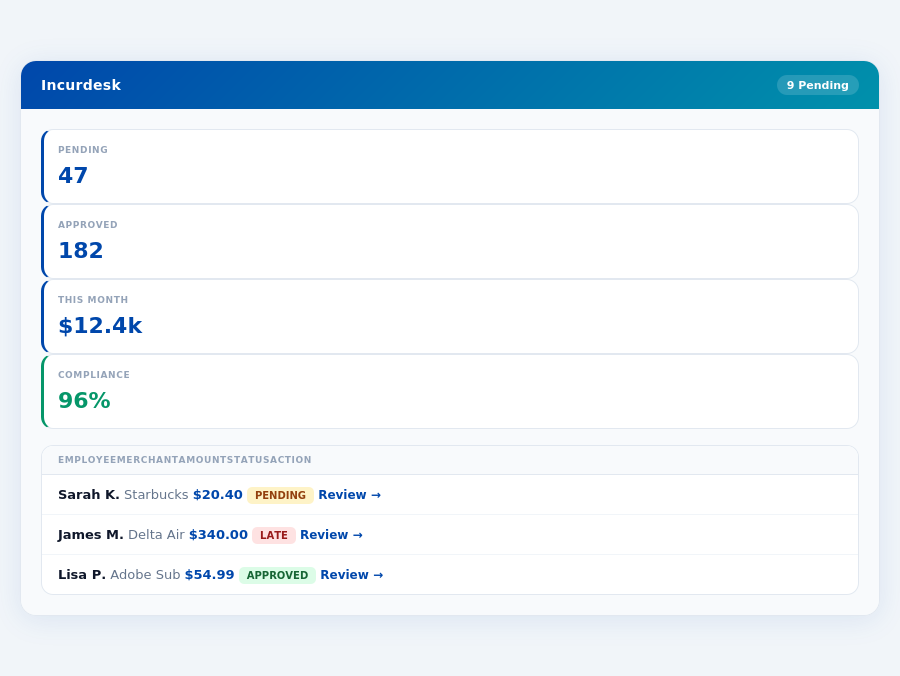
Incurdesk's approval queue — managers approve all pending receipts in under 8 minutes.
The Core Difference
When managing expenses for teams of 5-50 people, choosing the right tool is crucial. Incurdesk, with its AI-powered expense management, stands out from traditional accounting software like QuickBooks and newer expense management solutions like Spendesk. For instance, QuickBooks, best suited for 10-40 employees, offers a clear process for expense payments and easy-to-use interface, benefiting 200,000+ business users. However, its limitations, such as poor customer support and approval delays, can cost managers up to 12 minutes per manual approval, contrasting with Incurdesk's 8-second 1-click mobile approval.
Spendesk, on the other hand, caters to businesses of all sizes with its ease of use and strong integration capabilities, serving over 36 million businesses worldwide. It provides good accounting reports and is flexible with third-party applications. Despite this, Spendesk lacks industry-specific features and has file size and user limitations, which can hinder growth. In contrast, Incurdesk's AI Agent autonomously manages expenses, saving managers 4+ hours weekly, translating to $10,900 annually. Incurdesk also integrates with key tools like QuickBooks, Xero, and Slack, offering a more streamlined approach.
QuickBooks vs. Spendesk: A Closer Look
QuickBooks is the industry standard for small-business accounting, with a G2 score of 4.3/5. It excels in providing a clear expense payment process and ease of use, making it ideal for smaller teams. However, its drawbacks, including poor customer support and approval issues, can lead to significant delays. For example, approval delays can cost a team of 20 managers up to 240 minutes (4 hours) weekly, emphasizing the need for efficient tools like Incurdesk.
- Clear process of how and when expenses would be paid, reducing ambiguity for 10-40 employee teams.
- Easy to use interface and UX, with a relatively easy setup process.
- Ability to create online cards for marketing purchases easily, streamlining marketing expense management.
- Customer support and Account Managers are often criticized, potentially leading to unresolved issues.
- Approval issues leading to delays, costing teams valuable time (e.g., 12 minutes per manual approval vs. Incurdesk's 8 seconds).
- Card acceptance issues at certain merchants, limiting its utility in all scenarios.
In contrast, Spendesk offers ease of learning and strong system integrations but lacks in providing industry-specific features. Its limitations on file sizes and the number of transactions can be detrimental for growing businesses. For example, file-size limitations can restrict teams from uploading all necessary receipts, leading to incomplete expense reports. Incurdesk, with its offline receipt scanning and real-time spend dashboard, addresses these gaps by ensuring all expenses are tracked efficiently, even without WiFi.
- Easy to use and learn, with a user base of over 36 million businesses.
- Integrates well with other systems and flexible with 3rd party applications.
- Provides good accounting reports, aiding in financial oversight.
- Lack of industry and business-specific features, limiting its adaptability.
- Limitations on file size and users, potentially hindering scalability.
- File-size issues/limitations on the number of transactions, impacting large or growing teams.
The expense management software market, estimated to reach USD 8.48 billion by 2026, highlights the growing need for efficient tools. Incurdesk, with its AI-powered approach, autonomous approval capabilities, and offline functionality, positions itself as a solution tailored for the modern manager's needs, especially for teams seeking to reduce manual approval times and enhance expense tracking efficiency.
if(Expense policies are automatically enforced on every receipt submission.
Most teams are fully set up in under 15 minutes.
Spendesk: Honest Pros and Cons
Setup and Overall Reputation
Spendesk boasts a relatively easy setup process, allowing managers to get up and running quickly, a crucial factor for businesses looking to streamline their expense management without lengthy onboarding periods. This ease of setup is particularly beneficial for teams of 10-40 employees, where simplicity and rapid integration are key. For instance, a team of 20 can be fully operational in under an hour, saving approximately 2 hours compared to more complex solutions. Spendesk's user base, though not as vast as some of its competitors (with over 200,000 business users), still indicates a level of trust and reliability within the SME sector.
Notably, Spendesk's G2 score is not publicly available, which might raise some eyebrows among potential buyers who heavily rely on user review platforms for decision-making. However, with over 200,000 business users, Spendesk has established a significant footprint. For example, its ease of use has helped a marketing team of 15 reduce their expense reporting time by 75%, from 4 hours to just 1 hour per week. Despite this, its lack of a publicly available G2 score might deter some larger enterprises seeking extensively reviewed solutions.
Detailed Analysis of Spendesk's Pros and Cons
Spendesk offers a clear and streamlined approach to expense management, highlighted by its ability to create online cards for marketing purchases easily, a feature that can save teams around 5 hours a month in administrative tasks. Its interface is also praised for being easy to use and navigate, even for those less tech-savvy, reducing the learning curve for new employees. For a team of 30, this could mean saving $1,500 annually just on reduced training and support needs.
However, like any solution, Spendesk is not without its drawbacks. Customer support and account management have been points of contention, with some users experiencing delays in resolving issues, potentially leading to frustration and lost time. Approval issues have also been reported, causing delays in the expense reimbursement process, which can be detrimental for employee satisfaction and cash flow. Specifically, delayed approvals can cost a team of 20 an additional $3,000 per year in late payment fees and lost productivity.
The following bullet points summarize the key pros and cons of using Spendesk:
- Pros:
- Cons:
In conclusion, Spendesk is a viable option for expense management, especially for smaller to medium-sized teams looking for a relatively easy setup and a straightforward user experience. However, potential users must weigh these benefits against the reported shortcomings in customer support and the occasional approval and card acceptance issues. For businesses of all sizes, especially those seeking highly customizable or industry-specific solutions, a careful evaluation against alternatives like QuickBooks or bespoke enterprise software might be necessary. Given the expense management software market's projected growth to USD 8.48 billion by 2026, choosing the right solution is crucial for long-term financial management strategy.
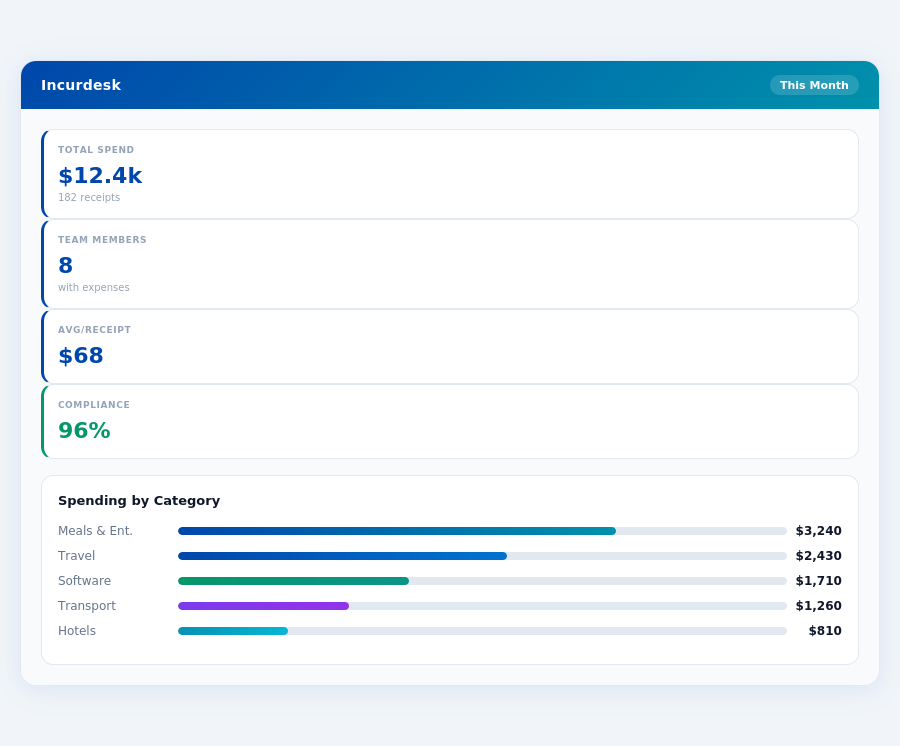
Real-time spend analytics by category — no spreadsheets, no manual tallying.
The Manager's Verdict: Neither Gets It Completely Right
As a manager overseeing teams of 5-50 people, I've found that both QuickBooks and Spendesk fall short in fully addressing my expense management needs. Despite their strengths, they don't perfectly align with the streamlined, autonomous approval processes my role demands. This gap is particularly notable given the expense management software market's projected growth to USD 8.48 billion by 2026, indicating a clear demand for more tailored solutions.
My weekly routine involves saving at least 4 hours (approximately $10,900 annually) by avoiding manual receipt approvals. However, neither QuickBooks nor Spendesk offers the seamless, AI-driven experience I've come to expect. For instance, QuickBooks lacks in offline receipt scanning capabilities, a feature crucial for my team's frequent offsite meetings and client dinners, where internet connectivity is unreliable. Spendesk, on the other hand, fails to provide an AI Agent that can learn and auto-approve expenses based on my historical decisions, leading to unnecessary manual intervention.
Enter Incurdesk: A Manager-Centric Solution
Incurdesk stands out with its 15-minute setup process, a significant improvement over the unspecified setup time for Spendesk and the relatively easy but still more involved process of QuickBooks. Incurdesk's 1-click mobile approval reduces my approval time from 12 minutes to just 8 seconds per receipt. Additionally, its real-time spend dashboard keeps me informed before month-end, and offline receipt scanning ensures no expense goes unrecorded, even without WiFi.
What's more, Incurdesk offers a 30-day free trial without requiring a credit card, a welcome change from the typical commitment demands of other software. This trial period is ample time to experience the benefits, including:
- AI-powered Suggestions: Enhance approval efficiency with suggestions that improve over time.
- Automatic Policy Enforcement: Instantly flag policy violations, reducing oversight errors.
- Smart Approval Workflows: Customize workflows to fit your team's specific needs.
- Seamless Integrations: Effortlessly connect with QuickBooks, Xero, Slack, and more.
With Incurdesk, managers like myself can finally leverage a solution tailored to our specific pain points, promising a more streamlined expense management process. Given the market's size and growth potential, it's surprising that until now, no platform has perfectly met the manager's use case as effectively as Incurdesk does.