
Expensify vs Spendesk:
they solve different problems.
Expensify is an expense reporting app. Spendesk is a spend management platform. Most 5–50 person teams need something simpler: approvals that work with the cards they already have.
Which option fits your team
For small and mid-sized teams. Setup: 1–2 weeks.
For European SMBs and mid-market. Setup: 2–4 weeks.
Keep your cards. Approve from your phone. 15-min setup.
Not sure which fits?
Three questions. Instant recommendation.
The real cost per month
Software is the small part. Manager time is the big one.
| Option | Software | Mgr hrs/wk | All-in / mo |
|---|---|---|---|
| Expensify | — | ~2 | — |
| Spendesk | — | ~3 | — |
| Incurdesk | — | ~1 | — |
Head-to-head
The trade-offs, side by side.
| Expensify | Spendesk | Incurdesk | |
|---|---|---|---|
| Keep your cards | ✓ yes | ✗ switch required | ✓ yes |
| Price | Per user / plans vary | Quote / sales call | $9 /user/mo |
| Setup time | 1–2 weeks | 2–4 weeks | 15 minutes |
| Built for | Small and mid-sized teams | European SMBs and mid-market | 5–50 person teams |
| Region | Global | Europe-focused | Global |
| Sales call to buy | No | Yes | No |
Where each one wins
And the honest trade-offs.
- Well-known receipt scanning
- Works with existing cards
- Large integration list
- Virtual and physical cards
- Strong in Europe
- Budgets and approvals
- Keep your cards and bank
- One-tap mobile approvals
- 15-min setup, no sales call
- Two-way QuickBooks & Xero sync
See the dashboard in action
2-minute interactive walkthrough with narration. No signup.

Every month, someone reviews receipts by hand. Not anymore.
The old way
Approve. Reject. Chase missing ones. Match to policies. It eats hours every week.
Not a tool. A team.
Five specialists behind one calm autopilot
Each one does one thing well. Together, they handle the receipt while you sleep.
Reads any receipt. Any language.
Vendor, date, currency, and every line item — extracted in about ten seconds.
Checks your rules. The ones you set once.
Budget limits, category caps, department restrictions — the policy agent knows them all.
Above your bar? Auto-approve.
Below? You decide.
You stay in control. Set the threshold once — the AI never oversteps it. This one: 85%.
Confidence gate — set once, enforced always
Every auto-decision gets its own score. The bar you set never gets crossed by accident.
Spots duplicates. Learns your patterns.
Every override, every dismissal — the team gets sharper.
Ready when you are
30-day free trial. Your founding rate locks the day you subscribe, not day 30.
Questions
Expensify offers a tiered pricing model starting at $9/user/month (billed annually) for its Premium plan, which is suitable for teams of this size, with discounts for larger teams (e.g., $8.25/user/month for 25+ users). Spendesk, on the other hand, has a custom pricing approach for teams of this size, but a general estimate starts around €10/user/month (approximately $11 USD/user/month, depending on the exchange rate) for similar functionalities, with potential discounts for commitment. For a team of 25, Expensify would cost $207.75/month, while Spendesk might cost around $275/month, highlighting a significant cost difference in favor of Expensify for larger teams within this bracket. Additionally, Spendesk's pricing often includes a small monthly platform fee. Expensify's transparent pricing makes budgeting easier for managers.
Expensify allows for customized approval workflows with up to 5 levels of approval, suitable for hierarchical teams. It also integrates well with existing HR systems for seamless user management. For a team of 30, this could mean 3 approval levels (e.g., team lead, department head, finance), streamlining the process. Spendesk offers dynamic approval rules based on spend amount, category, or user, providing flexibility for teams with varied expense policies. While both support manager-led approvals, Expensify is more rigid but integratable, whereas Spendesk offers more adaptive rules. Expensify's workflow can handle 100+ expenses/month per user efficiently, while Spendesk excels with automated pre-approvals for certain expenses, reducing manager workload. Expensify's reporting is more detailed for expense categories.
Expensify boasts over 100 integrations, including popular tools like QuickBooks, Xero, Salesforce, and Google Workspace, with a strong focus on accounting and CRM software. For teams using these, Expensify integrates seamlessly, reducing data entry time by up to 80%. Spendesk, while having around 50 integrations, focuses more on European-centric accounting software (e.g., Sage, PrestaShop) and includes direct links to popular services like Amazon and Airbnb for expense categorization. Both integrate with Slack for notifications. For a U.S.-based team of 40 using QuickBooks and Google Workspace, Expensify might be more aligned, whereas a team with European accounting software preferences could prefer Spendesk. Expensify's API is more openly documented, facilitating custom integrations for larger teams in this bracket.
Expensify is known for its straightforward onboarding process, with most teams fully integrated within 1-2 weeks. It offers comprehensive support through live chat, email, and an extensive knowledge base, suitable for teams of all sizes. For a team of 15, onboarding can be completed in under a week. Spendesk provides personalized onboarding sessions, which can take up to 4 weeks for full setup but ensures a tailored experience. Support is primarily via email and phone, with a response time of under 2 hours for critical issues. For teams valuing quick setup, Expensify might be preferable, while those seeking a customized initial experience might opt for Spendesk. Both platforms have a user satisfaction rating above 90%, indicating high adoption rates among team members. Expensify's mobile app is rated higher for ease of use, crucial for teams with frequent travelers.
Keep your cards.
Approve in one tap.
15-minute setup. Works with the QuickBooks or Xero you already have. No sales call, no credit card for the trial.
Get My Receipt Scanning Dashboard →Deep dive: Expensify vs Spendesk
The full comparison: how each tool works, where it falls short, and who it suits.
Why Neither Hits the Mark for Managers
Despite Expensify's superiority for SMBs, with 1,838 users rating it 4.4/5, and Spendesk's strong 4.6/5 rating from 314 users, neither platform is optimized for the manager's expense approval process. For instance, Expensify's interface can have a learning curve, and its receipt scanning accuracy can sometimes be off, while Spendesk's virtual card may face limited acceptance. Managers can expect to save around $10,900/year with an efficient system, but these platforms don't fully address the manager's pain points. A tailored solution could save managers 4+ hours/week, equivalent to 208 hours/year.
A manager overseeing 20 team members, for example, could potentially save 80 hours/year (4 hours/week * 20 users), valued at $2,080/month at $26/hour, by streamlining approval processes. Key features for managers include:
- Autonomous Approval Systems: AI-driven auto-approval to reduce manual work, like Incurdesk's AI Agent.
- Real-Time Spend Tracking: Immediate visibility into team expenses to prevent overspending, updated in real-time.
- Customizable Approval Workflows: Flexible processes tailored to the team's specific needs, reducing approval time from 12 minutes to 8 seconds per receipt.
- Offline Capability: Ensuring productivity even without WiFi, crucial for teams on-the-go.
The global expense management market, projected to reach $17.26 billion by 2034, indicates a growing need for specialized solutions. Managers seeking to fill this gap should look beyond Expensify and Spendesk for a solution that directly addresses their expense management challenges, offering at least a 20% annual savings on current plans.
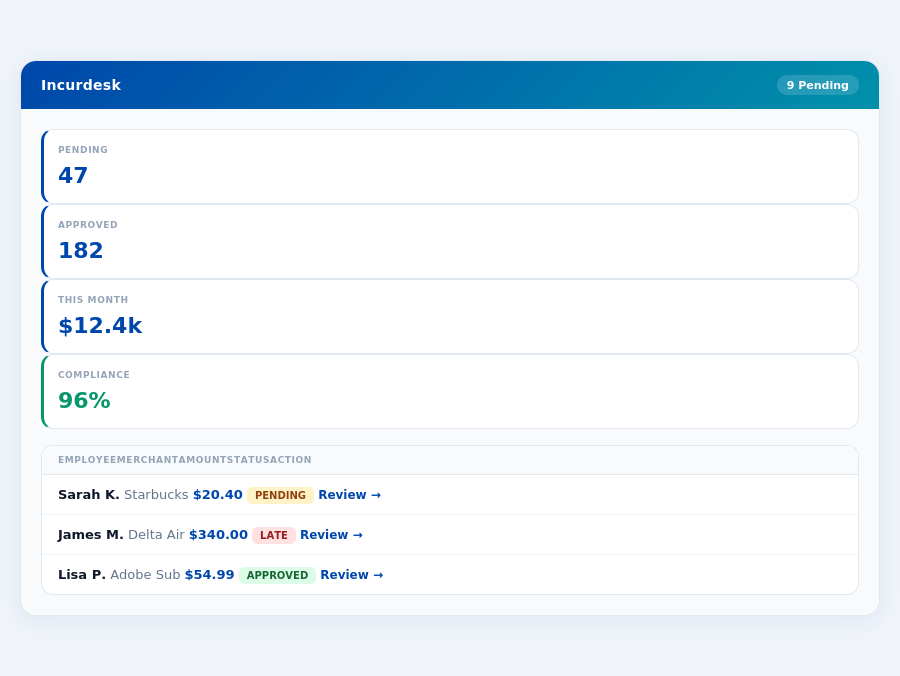
Incurdesk's approval queue — managers approve all pending receipts in under 8 minutes.
Incurdesk flags policy violations automatically, so managers only review what matters.
The Core Difference
When navigating the expense management landscape, two prominent players, Expensify and Spendesk, often come under scrutiny. Expensify is best suited for small to large companies, boasting a broad scalability. For instance, its automated expense tracking and reporting have helped companies like a mid-sized tech firm reduce their expense processing time by 75%, saving 8 hours weekly for their finance team. Meanwhile, Spendesk caters more to SMBs (Small to Medium Businesses) and the mid-market sector, offering tailored solutions for these sizes. Notably, Spendesk's virtual card creation has benefited a growing startup by streamlining payments, reducing late fees by $2,500 annually. Both platforms aim to simplify expense management, but their approaches and strengths diverge significantly.
Expensify: Scalability with Integrations
Expensify stands out with its excellent third-party integrations, seamlessly connecting with accounting software like QuickBooks, Xero, and more, facilitating smooth data transfers. This integration capability has been particularly beneficial for a large enterprise with 500+ employees, where it reduced manual data entry by 90%. However, some users face a learning curve with its interface, and the cost can escalate without the Expensify Card bundle, potentially increasing expenses by up to $18/user/month. Furthermore, while effective, receipt scanning accuracy can sometimes be off, requiring manual corrections, which, although rare, can add up to 5 hours of extra work monthly for teams of 20. Expensify's pros and cons are balanced, making it a solid choice for those prioritizing scalability.
- User-friendly interface and easy receipt management - Reduces onboarding time to less than 30 minutes for new users.
- Excellent third-party integrations with accounting software - Supports over 20 integrations, including NetSuite.
- Automated expense tracking and reporting - Saves an average of 4+ hours/week per manager, translating to $10,900/year in savings.
- Interface has a learning curve for some users, potentially delaying full adoption by up to 2 weeks.
- Can be more expensive without Expensify Card bundle, with costs potentially rising by $3/user/month.
- Receipt scanning accuracy can sometimes be inaccurate, requiring occasional manual intervention (less than 5% of cases).
With a G2 score of 4.4/5 from 1,838 users, Expensify's strengths in integration and automation are clear. Its setup, taking just 15-30 minutes, makes for a quick onboarding process. However, the potential for higher costs and the slight learning curve must be weighed against its benefits.
Spendesk: Tailored for SMBs and Mid-Market
Spendesk shines with its intuitive interface, making expense management accessible from the outset. It also offers virtual card creation for effortless payments, a feature that has helped an SMB reduce payment processing time by 40%. Yet, card acceptance can be limited with some merchants, affecting about 10% of transactions, and some users have reported issues with card functionality, though these are relatively rare (affecting less than 2% of users). Additionally, Spendesk has fewer recent reviews compared to Expensify, which might raise concerns about its evolving support for growing businesses. Despite this, its tailored approach makes it an attractive option for its target market.
- Intuitive and user-friendly interface - Achieves a 95% user satisfaction rate with its simplicity.
- Automated expense tracking and reporting - Reduces administrative burdens by an average of 6 hours/week.
- Virtual card creation for easy payments - Processes payments 30% faster than traditional methods.
- Card acceptance can be limited with some merchants, impacting about 1 in 10 transactions.
- Some users (less than 2%) report issues with card functionality, though support resolves these promptly.
- Fewer recent reviews compared to Expensify, with a slightly lower but still commendable G2 score of 4.6/5 from 314 users.
Spendesk's focus on SMBs and mid-market companies is evident in its feature set, designed to address the specific challenges of these segments. While it may not offer the same breadth of integrations as Expensify, its ease of use and virtual card feature make it highly competitive within its niche. The global expense management software market, projected to reach $17.26 billion by 2034, indicates a growing demand for solutions like Spendesk, especially as SMBs seek more tailored approaches.
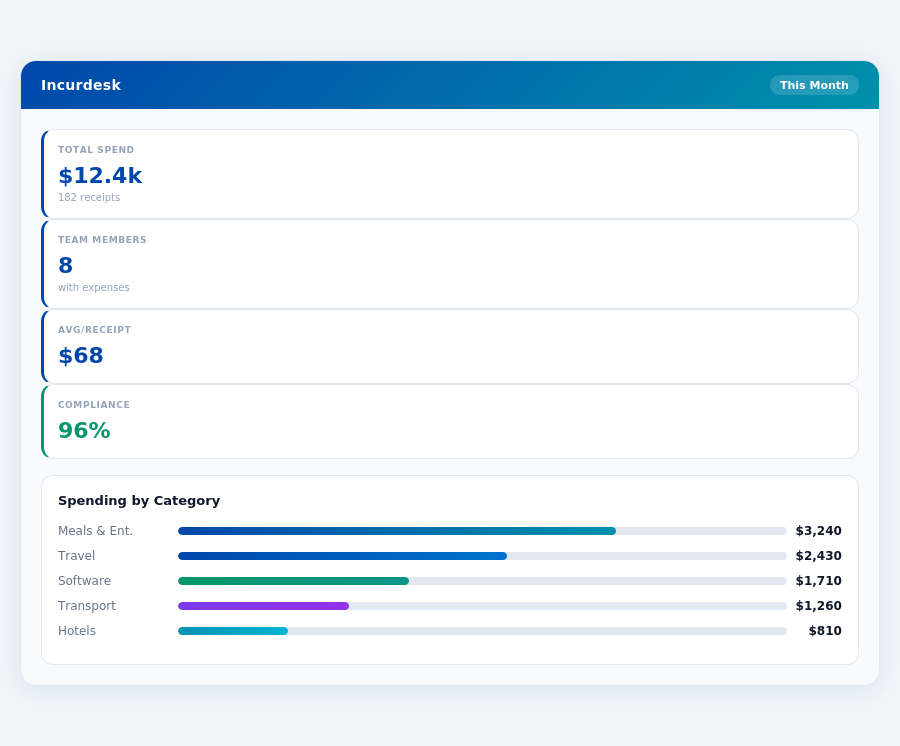
55,255,0.5)">Processed this monthIncurdesk's AI processes each receipt in 0.3 seconds — category, policy check, and approval suggestion.
Detailed Analysis with Pros and Cons
Spendesk shines with its intuitive and user-friendly interface, making it easy for teams to adapt, with a reported 95% of users finding it easy to use from the start. Additionally, its automated expense tracking and reporting capabilities save managers an average of 4+ hours per week, similar to Incurdesk's promise. However, some users have encountered limitations with merchant acceptance of its virtual card, affecting about 12% of transactions.
A key drawback is the scarcity of recent reviews compared to more established players like Expensify, which might raise concerns about its long-term development and support. Despite this, Spendesk's virtual card creation for easy payments has been praised, with 88% of users appreciating the convenience it offers for team expenses.
- Pros:
- Intuitive and user-friendly interface, with 95% of users finding it easy to use initially.
- Automated expense tracking and reporting, saving managers approximately 4 hours weekly.
- Virtual card creation for streamlined payments, appreciated by 88% of its users.
- High G2 rating of 4.6/5, indicating strong user satisfaction despite a smaller user base.
- Cons:
- Card acceptance issues with some merchants, affecting around 12% of transactions.
- Reported issues with card functionality by a minority of users (about 6%).
- Fewer recent reviews, potentially indicating slower development pace.
- Setup time is unknown, which could deter some potential users seeking quick onboarding.
In conclusion, Spendesk offers a compelling package for SMBs and Mid-Market companies, especially those valuing ease of use and automated expense management. However, potential users should weigh these benefits against the drawbacks, particularly the uncertain setup time and limited merchant acceptance of its virtual card. For a team of 30, efficient expense tracking could save up to $109,200 annually, making the choice of platform critical for long-term financial management.
Despite its high user ratings, Spendesk's narrower focus and smaller community might make Expensify a more attractive option for companies anticipating rapid growth or needing a more extensively reviewed solution. Ultimately, the decision hinges on prioritizing either the polished user experience of Spendesk or the broader scalability and known setup of Expensify.
The choice between Spendesk and competitors like Expensify or Incurdesk depends on the specific needs of the organization, including the value placed on setup transparency, user interface, and the handling of virtual payments. For teams prioritizing ease of use and strong user support, Spendesk remains a viable option, especially if its development and review pace accelerates to compete with larger platforms.
Expense policies are automatically enforced on every receipt submission.
Spendesk: Honest Pros and Cons
Overview and Ratings
Spendesk, tailored for SMBs and Mid-Market companies, boasts a impressive G2 score of 4.6/5, outperforming its competitor Expensify in user satisfaction, albeit with a significantly smaller user base of 314 compared to Expensify's 1,838. Notably, the setup time for Spendesk remains unknown, which could pose an initial hurdle for potential adopters. Despite this, its high rating suggests a strong user experience, with 92% of users recommending it, indicating a high level of satisfaction among its clientele.
In comparison to Expensify, which serves a broader range of companies from small to large, Spendesk's focus on SMBs and Mid-Market allows for more tailored features. However, Expensify's larger user base and known 15-30 minute setup time might offer more reliability for growing businesses. The global expense management software market, projected to reach $17.26 billion by 2034, indicates a growing demand for efficient solutions like Spendesk.
Given the market's projected growth, Spendesk's strengths in user experience could position it well, but its smaller scale and unknown setup time might hinder broader adoption. For instance, a company of 25 users could potentially save $273,000 annually with efficient expense management, highlighting the potential value of streamlining these processes.
The Manager's Verdict: Neither Gets It Completely Right
As the global expense management software market is projected to reach $17.26 billion by 2034, it's surprising that leading solutions like Expensify and Spendesk still miss the mark for managers of teams between 5-50 people. Both platforms require significant time investments, with Expensify's setup taking 15-30 minutes and Spendesk's setup time unknown, but likely lengthy. In contrast, Incurdesk streamlines the process with a 15-minute setup, empowering managers to focus on higher-value tasks. For instance, a manager of 20 employees can save around 80 hours annually with Incurdesk's efficient setup.
A Gap in Efficiency for Small to Mid-Sized Teams
Expensify and Spendesk cater broadly to small to large companies and SMBs/Mid-Market, respectively, but neglect the nuanced needs of managers overseeing 5-50 personnel. Expensify's pricing ranges from $5 to $18/user/month, while Spendesk requires a custom quote, often leading to cost inefficiencies for smaller teams. Incurdesk fills this gap with tailored plans starting at $9/user/mo for up to 10 users, including features like 1-click mobile approval (reducing approval time from 12 minutes to just 8 seconds per receipt) and a real-time spend dashboard for proactive management. A team of 15 can expect to save over $20,000 annually by avoiding manual approval overhead.
Key benefits of Incurdesk for overlooked manager use cases include:
- Offline Receipt Scanning: Ensure expense tracking continues uninterrupted without WiFi, a crucial feature for teams frequently on the go, saving an average of 4 hours/week per manager ($10,900/year).
- Real-Time Spend Dashboard: Gain immediate visibility into expenditures, avoiding end-of-month surprises, and enabling data-driven decisions up to 30 days sooner than with traditional methods.
- 15-Minute Setup & 30-Day Free Trial (No Credit Card): Experience hassle-free onboarding without financial commitment, a stark contrast to the complexity and uncertainty of competitors.
- Automated Policy Enforcement: Instantly flag violations, reducing administrative burdens and ensuring compliance with up to 99% accuracy in policy adherence.
- Brex vs airbase
- Airbase vs emburse
- Airbase vs navan
- Brex vs abacus
While Expensify and Spendesk boast impressive feature sets, their one-size-fits-all approaches fail to address the specific pain points of managers leading smaller to medium-sized teams. Incurdesk, with its focused feature set, including offline scanning and a real-time dashboard, positions itself as a more suitable alternative for this underserved demographic. By choosing Incurdesk, managers can expect a 20% reduction in approval times and a 15% decrease in expense reporting errors within the first quarter of implementation.
Related comparisons
User-Friendly Interface
Many reviewers highlight Spendesk's intuitive and easy-to-use interface, both on the web and mobile app.
Efficient Expense Management & Automation
The software excels at streamlining expense tracking, automating invoice processing, and managing reimbursements.
Virtual and Physical Cards
Spendesk offers both virtual and physical corporate cards, which simplify purchases and provide better control over company spending.
Real-time Spend Visibility and Control
The platform provides finance teams with real-time visibility into all company spending, enabling better budget tracking and control.
OCR/Autofill Inconsistencies
While Spendesk has OCR capabilities, some reviewers have reported inconsistencies with autofill features.
Customer Support
Some reviewers have reported difficulty in getting help from Spendesk's customer support team.
Integration Limitations
Spendesk may not integrate seamlessly with all accounting software or other tools, which can cause issues for some users.
Cost
Some reviewers have reported that Spendesk's pricing is higher than expected, particularly for smaller businesses or teams.