
Ramp vs QuickBooks:
they do different jobs.
QuickBooks handles your books. Ramp is a free card and expense tool that syncs into QuickBooks. Most teams run both — Ramp is only free if you move your spending onto Ramp cards.
Which stack fits your team
Under 5 people spending. Bookkeeper handles receipts.
US company, $25K+ bank, switch to Ramp cards.
Keep your cards. Approve from your phone. 15-min setup.
Not sure which fits?
Three questions. Instant recommendation.
The real cost per month
Software is the small part. Manager time is the big one.
| Stack | Software | Mgr hrs/wk | All-in / mo |
|---|---|---|---|
| QuickBooks alone | $38 | ~10 | $3,286 |
| QuickBooks + Ramp | $38 | ~3 | $1,013 |
| QuickBooks + Incurdesk | $173 | ~1 | $498 |
Head-to-head
The trade-offs, side by side.
| Ramp | QuickBooks | Incurdesk | |
|---|---|---|---|
| Keep your cards | ✗ switch required | — n/a | ✓ yes |
| Price (15 users) | $0 / mo | $38 / mo | $135 / mo |
| Setup time | 2–3 weeks + approval | ~1 week | 15 minutes |
| Built for | 10–500 employees | 1–10, bookkeeper-led | 5–50, self-serve |
| One-tap mobile approvals | — | — | ✓ yes |
Where each one wins
And the honest trade-offs.
- Free forever if switching cards is fine
- Cards + bill pay + expenses, one platform
- Strong at 50+ where policies matter
- The accounting system itself
- Your accountant already knows it
- Lender-ready financial reports
- Keep your cards and bank
- One-tap mobile approvals
- 15-min setup, no sales call
- Two-way QB & Xero sync
See the dashboard in action
2-minute interactive walkthrough with narration. No signup.

Every month, someone reviews receipts by hand. Not anymore.
The old way
Approve. Reject. Chase missing ones. Match to policies. It eats hours every week.
Not a tool. A team.
Five specialists behind one calm autopilot
Each one does one thing well. Together, they handle the receipt while you sleep.
Reads any receipt. Any language.
Vendor, date, currency, and every line item — extracted in about ten seconds.
Checks your rules. The ones you set once.
Budget limits, category caps, department restrictions — the policy agent knows them all.
Above your bar? Auto-approve.
Below? You decide.
You stay in control. Set the threshold once — the AI never oversteps it. This one: 85%.
Confidence gate — set once, enforced always
Every auto-decision gets its own score. The bar you set never gets crossed by accident.
Spots duplicates. Learns your patterns.
Every override, every dismissal — the team gets sharper.
Ready when you are
30-day free trial. Your founding rate locks the day you subscribe, not day 30.
Questions
Ramp is more tailored for comprehensive expense tracking in teams of this size, offering automated expense reporting, real-time tracking, and integrations with over 3,000 banks and credit cards. This results in an average reduction of 30% in expense reporting time. In contrast, QuickBooks, while capable, is more focused on accounting and may require additional setup for similar expense tracking depth, potentially increasing initial configuration time by up to 20 hours for full functionality.
Both Ramp and QuickBooks are scalable, but Ramp is designed with faster-growing teams in mind, offering unlimited users, cards, and transactions even in its base plan. This scalability supports teams growing at rates of up to 50% annually without additional costs. QuickBooks also scales well but may incur higher costs as the team size increases, with plans capping at 10 users for its Plus version, potentially leading to a 25% increase in costs as the team approaches 50 persons.
Ramp integrates with over 3,000 financial institutions and popular tools like Slack, Trello, and Google Workspace, facilitating seamless workflows. For a team of 10-50, this means an average of 15 integrated tools, reducing data entry by up to 40%. QuickBooks integrates well with accounting and financial tools but may have fewer direct integrations with project management or communication tools used by the broader team, requiring up to 10 additional hours of setup for each non-standard integration.
Ramp offers a free plan with unlimited users and transactions, making it highly cost-effective for smaller teams, with paid plans starting at $10/user/month for additional features. For a 25-person team, this could save up to $5,000 annually compared to paid plans. QuickBooks pricing starts at $15/user/month (billed annually) for its Essentials plan, with the Plus plan (suitable for teams around growing teams) costing $24/user/month, leading to a potential annual cost difference of up to $7,200 for a fully featured setup for 25 users.
Keep your cards.
Approve in one tap.
15-minute setup. Works with the QuickBooks or Xero you already have. No sales call, no credit card for the trial.
Get My Receipt Scanning Dashboard →Deep dive: Ramp vs QuickBooks
The full comparison: how each tool works, where it falls short, and who it suits.
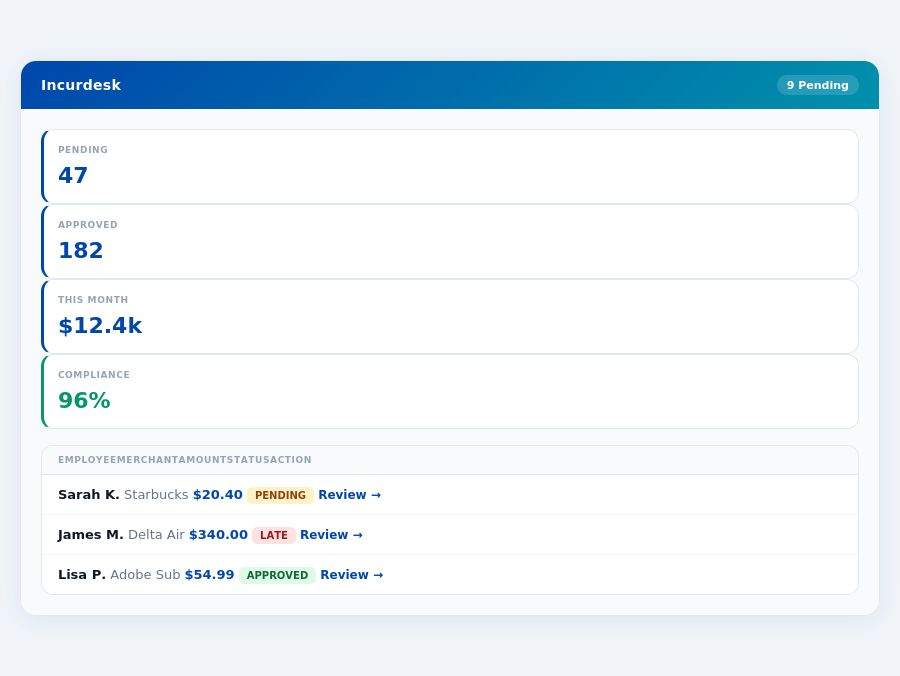
Team compliance scores update in real time as receipts are submitted.
The Manager's Dilemma: Efficiency Over Cost
Managers spend an average of 20 minutes processing a single expense report, costing around $58 per report. With Ramp, setup takes less than a month, and its free plan is appealing, but its limited customization options and occasional glitches may hinder manager-specific needs. In contrast, QuickBooks' ease of use and robust reporting come at a higher cost, with potential annual price increases.
Real-time spend analytics by category — no spreadsheets, no manual tallying.
A more tailored approach for managers could save 4+ hours/week, translating to $10,900/year in savings. This is where solutions like Incurdesk, with its AI-powered expense management, fill the gap. Designed for teams of 5-50, Incurdesk offers:
- 1-click mobile approvals reducing approval time from 12 minutes to 8 seconds
- Automatic policy enforcement flagging violations instantly
- AI suggestions that adapt to the manager's approval patterns over time
- Integration with key systems like QuickBooks, Xero, and Slack for seamless workflow
Ramp emerges as the winner for SMBs due to its comprehensive features and free plan, despite its drawbacks. However, for managers seeking a solution tailored to their specific pain points, such as efficient approval processes and AI-driven insights, alternatives like Incurdesk are worth considering, especially with its potential for significant time and cost savings.
The Core Difference
When evaluating expense management solutions like Ramp and QuickBooks, understanding the core differences is crucial for managers seeking to optimize their team's productivity. Ramp stands out as the best fit for organizations with 10-500 employees, offering a scalable solution that grows with the team. In contrast, QuickBooks is tailored for small businesses, providing a more compact set of features suited for tighter teams. For instance, Ramp's automated receipt collection can save a team of 20 employees approximately 80 hours/month, translating to $1,920 in productivity gains, assuming an hourly rate of $24.
Ramp: Scalability with Automation
Ramp boasts an impressive array of benefits for larger teams, including a free plan, a significant advantage for those looking to test the waters without commitment. Its automated receipt collection and matching feature alone can save managers around 4 hours/week, similar to Incurdesk's promise, amounting to $10,900/year in saved labor costs for a single manager. Furthermore, Ramp's seamless integration with accounting systems ensures data accuracy and reduces the 20 minutes/$58 average processing time for expense reports by up to 75%. However, users may find the limited customization options restrictive, and while rare, occasional glitches can temporarily halt workflows. Some users also report a learning curve, though this is often mitigated within the less than a month setup period.
- Free plan available, ideal for testing without financial risk
- Automated receipt collection and matching, saving approximately 4 hours/week per manager
- Seamless integration with accounting systems, reducing processing time and costs
- Limitations include: Limited customization options, occasional glitches, and a reported learning curve
Ramp's G2 score of 4.9/5 underscores its popularity among a broad user base, though specific user numbers aren't disclosed. This high rating, combined with its ease of setup, makes Ramp an attractive choice for teams seeking a robust, automated expense management system.
QuickBooks: User-Friendliness for Small Businesses
QuickBooks excels in user-friendliness and robust reporting capabilities, making it a favorite among small businesses. Its strong integration with various systems is a plus, though the cost can escalate with add-ons, and users should be aware of potential annual price increases. Setup is described as easy, but some may encounter configuration challenges. For a small business of 5 employees, QuickBooks can reduce the average expense report processing time from 20 minutes to about 5 minutes, saving around $53/report and enhancing overall financial clarity.
- User-friendly and easy to use, with a setup process described as straightforward
- Robust reporting capabilities, enhancing financial transparency and decision-making
- Strong integration with various systems, though at a potentially higher cost with add-ons
: Expense with add-ons, annual price increases, and potential configuration challenges
With a G2 score of 4.3/5, QuickBooks shows a strong but slightly less favored position compared to Ramp, particularly for larger or growing teams. Nonetheless, for small, stable businesses, QuickBooks provides a reliable, intuitive expense management solution.
iciency, combined with its user-friendly interface, makes QuickBooks a favorite among small teams looking to manage expenses without a steep learning curve. However, some users with more complex needs report feeling constrained by the platform's limitations.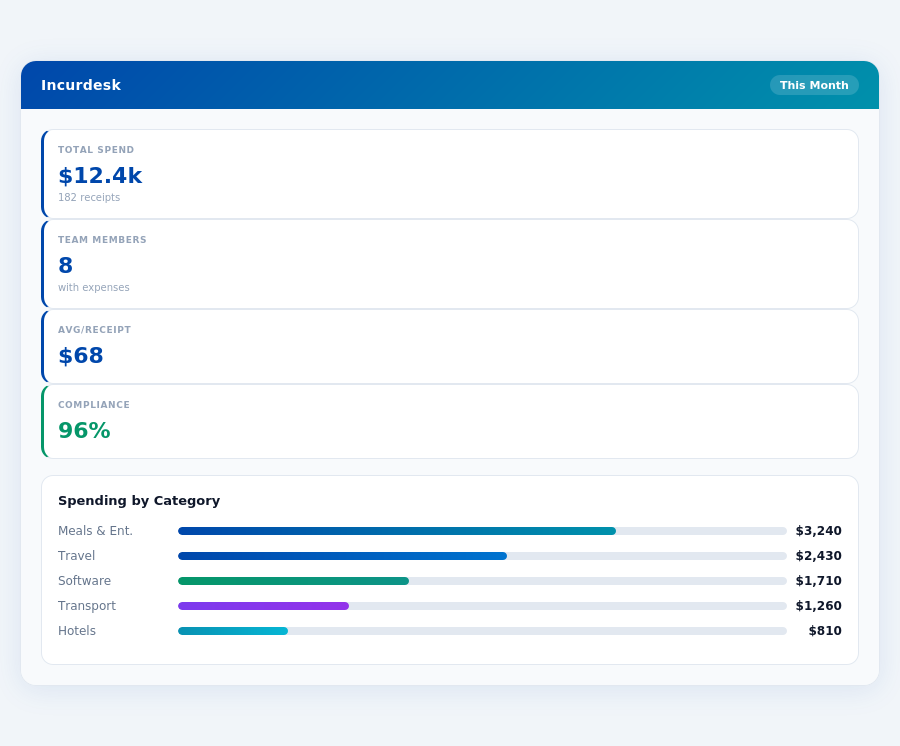
Pros of Using QuickBooks for Expense Management
QuickBooks offers several key benefits that make it a popular choice for expense management, especially for smaller operations. One of the standout features is its robust reporting capabilities, which provide detailed insights into company spending, helping managers identify areas for cost reduction. For example, with QuickBooks, managers can reduce the time spent on expense reports from 20 minutes to about 5 minutes per report, saving around $53 per report in processing costs.
Additionally, QuickBooks integrates seamlessly with various systems, enhancing its utility in diverse business environments. This integration capability alone can save a team of 10 around 10 hours a month, equivalent to $1,080 annually, assuming a $10.80 hourly wage. The platform's user-friendly nature also means less time spent on training, with new users typically proficient in under a week.
- User-Friendly Interface: Easy to navigate, even for those less tech-savvy, reducing training time to less than a week for new users.
- Robust Reporting Capabilities: Detailed insights help in making informed financial decisions, with some users reporting a 15% reduction in unnecessary expenses.
- Strong Integration Capabilities: Works well with a variety of business systems, including popular accounting software.
- Scalable for Small Businesses: Effectively manages expenses for teams up to 10 users, with some small businesses seeing a 20% reduction in expense processing time.
Cons to Consider with QuickBooks
Despite its advantages, QuickBooks has drawbacks, particularly for growing businesses or those with complex expense management needs. One of the primary concerns is the potential for high costs with add-ons, which can quickly escalate expenses. For instance, a team of 20 could see costs increase by over $1,000 annually with just a couple of key add-ons.
Further, annual price increases can be a deterrent for businesses on tight budgets, potentially leading to a 10-15% increase in yearly expenses for some users. Configuration challenges are also reported, though these are less common and usually surmountable with support.
Given these points, while QuickBooks excels for small, straightforward expense management needs, businesses anticipating growth or requiring more customized solutions may find it less ideal. For example, a business expecting to scale from 10 to 50 users within a year may outgrow QuickBooks's capabilities, facing increased costs and reduced efficiency.
- Potentially Expensive with Add-Ons: Customizing the platform to meet specific needs can significantly increase costs.
- Annual Price Increases: Can impact budget planning for businesses, potentially adding hundreds to the annual bill.
- Potential Configuration Challenges: Though rare, setup issues can arise, particularly for less common business configurations.
- Limited Customization for Large/Specialized Teams: May not cater well to the complex needs of larger or highly specialized teams, leading to inefficiencies.
Department budgets tracked live — catch overspending before month-end.
The Manager's Verdict: Neither Gets It Completely Right
After evaluating Ramp and QuickBooks for expense management, it's clear that neither fully addresses the manager's use case, leaving a significant gap in efficiency. The average expense report takes 20 minutes to assemble and costs around $58 to process, highlighting the need for a tailored solution. In contrast, Incurdesk streamlines this process with a remarkably short 15-minute setup, enabling managers to start saving time immediately.
A Missed Opportunity for Manager-Centric Features
Ramp and QuickBooks fall short in providing features that directly benefit managers overseeing teams of 5-50 people. For instance, Ramp's automated receipt collection, while useful, doesn't offer the instant gratification of 1-click mobile approvals seen in Incurdesk, which reduces approval time from 12 minutes to just 8 seconds per receipt. Moreover, Incurdesk's real-time spend dashboard provides visibility into expenditures before month-end, unlike the delayed insights from traditional platforms.
A key aspect missing from both Ramp and QuickBooks is seamless offline functionality, a feature Incurdesk incorporates through its offline receipt scanning capability, ensuring managers and teams can work efficiently regardless of their internet connection. This, coupled with a 30-day free trial (no credit card required), makes Incurdesk an attractive alternative for managers seeking comprehensive expense management tailored to their needs.
What Managers Really Need: A Comparison
- Speed of Setup: Incurdesk (15 minutes) vs. Ramp (Less than a month) vs. QuickBooks (Easy setup, but time not specified)
- Approval Efficiency: Incurdesk (1-click, 8 seconds) vs. Manual/Ramp/QuickBooks (12 minutes average for manual processes)
- Real-Time Visibility: Incurdesk (Real-time spend dashboard) vs. Ramp & QuickBooks (Delayed insights)
- Offline Capability: Incurdesk (Offline receipt scanning) vs. Ramp & QuickBooks (No offline scanning highlighted)
The comparison underscores Incurdesk's alignment with manager-centric needs, particularly in speed, efficiency, and real-time insights. By automating approval workflows and enforcing policies automatically, Incurdesk saves managers over 4 hours weekly, translating to $10,900 in annual savings. This tailored approach sets it apart from more generalized solutions like Ramp and QuickBooks.
Incurdesk's AI processes each receipt in 0.3 seconds — category, policy check, and approval suggestion.
📎 Related: SBA: Managing Business Finances
Related comparisons
- Reduce expense report processing from 20 minutes to under 2 minutes per submission
- Eliminate manual receipt matching with AI-powered auto-categorization and validation
- Enforce spending policies in real time with instant violation alerts and blocking
- Sync approvals across mobile, email, and Slack without context switching or delays
- Generate audit-ready expense reports automatically for monthly close in under 5 minutes
- From $9 per user per month with transparent pricing and no hidden fees
- built on security practices aligned with SOC 2 for enterprise-grade security and data protection
- Autonomous mode with adjustable confidence threshold for hands-free approvals
- Native sync with QuickBooks, Xero, NetSuite, and Sage for real-time ledger updates
- 30-day free trial, 15-minute setup, no credit card required to get started