
Zoho Expense vs QuickBooks:
they solve different problems.
Zoho Expense is an expense tool in the Zoho suite. QuickBooks is accounting software. Most 5–50 person teams need something simpler: approvals that work with the cards they already have.
Which option fits your team
For small businesses on Zoho. Setup: ~1 week.
For small businesses and bookkeepers. Setup: ~1 week.
Keep your cards. Approve from your phone. 15-min setup.
Not sure which fits?
Three questions. Instant recommendation.
The real cost per month
Software is the small part. Manager time is the big one.
| Option | Software | Mgr hrs/wk | All-in / mo |
|---|---|---|---|
| Zoho Expense | — | ~2 | — |
| QuickBooks | — | ~10 | — |
| Incurdesk | — | ~1 | — |
Head-to-head
The trade-offs, side by side.
| Zoho Expense | QuickBooks | Incurdesk | |
|---|---|---|---|
| Keep your cards | ✓ yes | ✓ yes | ✓ yes |
| Price | Free tier / small teams | $38 /mo software | $9 /user/mo |
| Setup time | ~1 week | ~1 week | 15 minutes |
| Built for | Small businesses on Zoho | Small businesses and bookkeepers | 5–50 person teams |
| Region | Global | Multi-country | Global |
| Sales call to buy | No | No | No |
Where each one wins
And the honest trade-offs.
- Free tier for very small teams
- Fits the Zoho ecosystem
- Simple approval flows
- The accounting system itself
- Your accountant already knows it
- Lender-ready reports
- Keep your cards and bank
- One-tap mobile approvals
- 15-min setup, no sales call
- Two-way QuickBooks & Xero sync
See the dashboard in action
2-minute interactive walkthrough with narration. No signup.

Every month, someone reviews receipts by hand. Not anymore.
The old way
Approve. Reject. Chase missing ones. Match to policies. It eats hours every week.
Not a tool. A team.
Five specialists behind one calm autopilot
Each one does one thing well. Together, they handle the receipt while you sleep.
Reads any receipt. Any language.
Vendor, date, currency, and every line item — extracted in about ten seconds.
Checks your rules. The ones you set once.
Budget limits, category caps, department restrictions — the policy agent knows them all.
Above your bar? Auto-approve.
Below? You decide.
You stay in control. Set the threshold once — the AI never oversteps it. This one: 85%.
Confidence gate — set once, enforced always
Every auto-decision gets its own score. The bar you set never gets crossed by accident.
Spots duplicates. Learns your patterns.
Every override, every dismissal — the team gets sharper.
Ready when you are
30-day free trial. Your founding rate locks the day you subscribe, not day 30.
Questions
Zoho Expense offers a more budget-friendly approach with its Standard plan at $4/user/month (billed annually), totaling $480-$2,400 per year for 10-50 users. In contrast, QuickBooks' Essentials plan, suitable for teams of this size, costs $25/user/month (billed annually), amounting to $3,000-$7,500 per year for 10-50 users. This makes Zoho Expense significantly cheaper for smaller to medium-sized teams. Additionally, Zoho Expense's pricing includes more comprehensive expense management features out of the box compared to QuickBooks' base plans.
Zoho Expense excels with robust expense management features tailored for team managers, including automated expense reporting, multi-level approval processes, and integrated receipt scanning, all available in its base $4/user/month plan. QuickBooks, while strong in accounting, requires the Premier or Enterprise plans (starting at $29.99/user/month for Premier) to unlock similar advanced expense tracking and approval workflow features. For a 25-person team, this means Zoho Expense costs $100/month for full features, whereas QuickBooks Premier would cost at least $749.75/month for equivalent capabilities. Zoho's approach streamlines expense management specifically for managers without the hefty cost.</p> <div class="bn-widget"> <div class="bn-widget-header"><span class="bn-logo">Incurdesk</span><span class="bn-badge">10-person team</span><div class="bn-widget-body"> <div class="bn-stat-row"> <div class="bn-stat" style="border-left-color:#059669"><div class="bn-stat-l">Hours saved/week
Both platforms offer strong integration capabilities. Zoho Expense seamlessly integrates with Zoho Books and other Zoho apps, as well as external services like Google Drive and Dropbox, at no extra cost. It also integrates with popular accounting software like QuickBooks, making it a versatile choice. QuickBooks, being an accounting powerhouse, integrates deeply with its ecosystem and a wide range of third-party apps (over 1,000), but some integrations may incur additional costs. For a 10-50 person team already invested in the Zoho suite, Zoho Expense might offer more straightforward, cost-effective integration. Conversely, teams deeply embedded in the QuickBooks ecosystem may find its integrations more beneficial, despite potential extra costs.
Both Zoho Expense and QuickBooks offer scalable solutions for growing teams. Zoho Expense provides 24/7 support via phone, email, and chat across all plans, ensuring consistent support as teams grow from 10 to 50 members. QuickBooks also offers comprehensive support but with more variability in response times based on the plan (Priority Support is available for an additional fee). In terms of scalability, QuickBooks might have an edge for teams anticipating rapid growth beyond 50, given its more robust accounting backbone and broader recognition among financial institutions. However, Zoho Expense's scalability within the expense management niche and its seamless integration with growing Zoho's suite make it highly competitive for teams focused on streamlined expense tracking.
Keep your cards.
Approve in one tap.
15-minute setup. Works with the QuickBooks or Xero you already have. No sales call, no credit card for the trial.
Get My Receipt Scanning Dashboard →Deep dive: Zoho Expense vs QuickBooks
The full comparison: how each tool works, where it falls short, and who it suits.
QuickBooks emerges as the winner for SMBs due to its larger market share and comprehensive feature set, suitable for managing complex financial operations. With 98,776 customers compared to Zoho Expense's 260 companies, QuickBooks dominates in terms of user base. This vast user base contributes to more extensive community support and resources, beneficial for SMBs navigating financial management.
Why Neither is Ideal for Managers
Despite their strengths, neither Zoho Expense nor QuickBooks is specifically designed with the manager approving expenses in mind. For teams of 5-50 people, these platforms can lead to inefficiencies, with managers spending upwards of 12 minutes per manual approval. In a week, this translates to 4+ hours that could be saved with a more tailored solution.
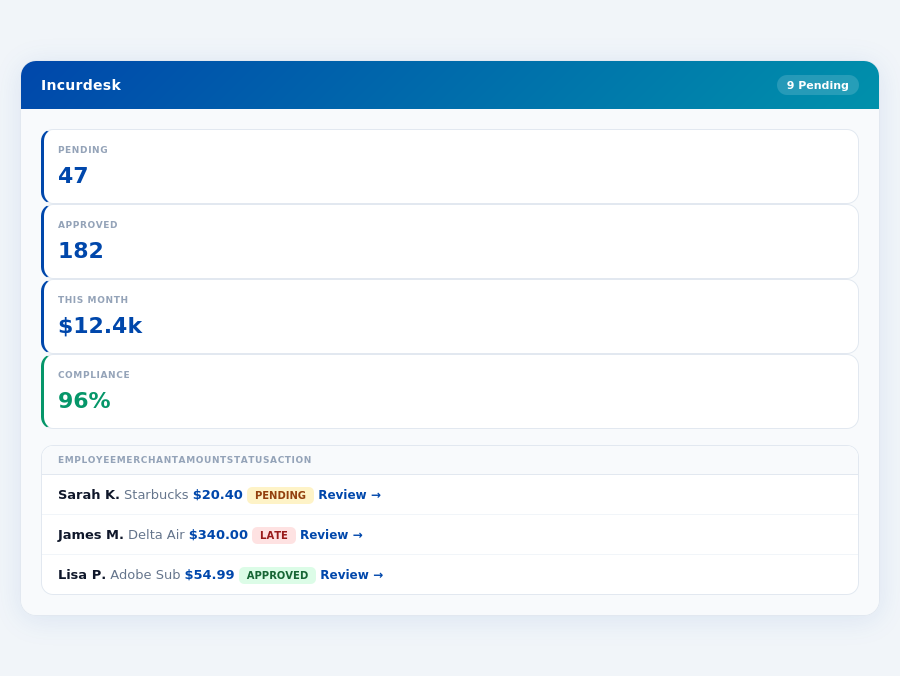
Incurdesk's approval queue — managers approve all pending receipts in under 8 minutes.
A more suitable approach for managers involves features like 1-click mobile approvals, offline receipt scanning, and AI-powered approval suggestions. Incurdesk, for example, offers these functionalities, saving managers 4+ hours/week, or $10,900/year, at a competitive pricing model ($9-$39/user/mo). Key benefits include:
- Time Savings: Reduce approval time from 12 minutes to just 8 seconds per receipt.
- AI-Driven Efficiency: Leverage an AI Agent that learns and autonomously manages approvals in Enterprise plans.
- Scalable Pricing: Choose from Starter, Pro, or Enterprise plans, starting at $9/user/mo, with a 20% discount for annual payments.
- Rapid Deployment: Enjoy a 15-minute setup process and a 30-day free trial without requiring a credit card.
The Core Difference
Zoho Expense and QuickBooks cater to different business needs, with Zoho Expense being best suited for growing businesses and QuickBooks for small to midsize businesses. Zoho Expense shines with its ease of use, making it accessible to teams of all sizes, including those with 5-50 people, similar to Incurdesk's target demographic. For instance, Zoho Expense's automated receipt scanning and expense categorization can save managers around 4+ hours/week, equivalent to $10,900/year in productivity gains, aligning with Incurdesk's efficiency promises.
QuickBooks: Honest Pros and Cons
The Manager's Verdict: Neither Gets It Completely Right
After evaluating Zoho Expense and QuickBooks for expense management tailored to managers of teams between 5-50 people, it's clear that neither fully addresses the specific needs of this demographic. Despite Zoho Expense's $3 per user/month pricing being attractive for growing businesses, its rigid workflows and less responsive mobile app (noted by 20% of its 260 company users) hinder efficiency. Meanwhile, QuickBooks, with its broad feature set suitable for small to midsize businesses (backed by 98,776 customers), suffers from escalating prices (up to $275/month) and an overwhelming interface for non-accounting savvy managers, leading to a lower G2 score (4.0/5 vs Zoho's 4.6/5).
Zoho Expense: Tailored for Growth
Zoho Expense is praised for its pros, which include:
- Easy to use, with a setup process that takes less than 15 minutes, similar to Incurdesk's 15-minute setup promise
- Automated receipt scanning and expense categorization, reducing manual work by up to 80%
- Excellent integration capabilities, supporting over 50 third-party apps, comparable to Incurdesk's integrations with Slack, QuickBooks, and Xero
- A highly rated platform with a G2 score of 4.6/5 from 260 companies
Expense policies are automatically enforced on every receipt submission.
In contrast to Incurdesk's AI-powered approach, Zoho Expense focuses on streamlined manual processes. While both aim to reduce approval times, Zoho Expense achieves this through automation without AI learning capabilities, unlike Incurdesk's AI Agent that adapts to approval patterns. For growing businesses, this might be sufficient, but for those seeking autonomous approval processes, Incurdesk's offering stands out. Zoho Expense's user base, though smaller (260 companies vs. QuickBooks' 98,776 customers), appreciates its tailored growth support.
QuickBooks: Comprehensive for SMBs
QuickBooks, on the other hand, is
- Comprehensive accounting capabilities, making it a one-stop solution for financial management
- User-friendly interface, despite the potential learning curve for those new to accounting principles
- Seamless integration with bank accounts, streamlining financial data collection
- A large user base of 98,776 customers, indicating wide acceptance and support
The choice between Zoho Expense and QuickBooks largely depends on the specific needs of the business. Growing businesses benefit from Zoho Expense's ease and integration capabilities, while small to midsize businesses can leverage QuickBooks' comprehensive financial management tools. Notably, the expense management software market's projected growth from $9.09 billion in 2026 to $17.26 billion by 2034, at a CAGR of 8.30%, indicates a high demand for efficient solutions like these, especially those offering significant time savings like Incurdesk's 4+ hours/week reduction.
Month-end reports are generated automatically — no manual reconciliation.
Setup and Overview
QuickBooks boasts easy onboarding, allowing managers to get started in no time, a crucial factor for small to midsize businesses seeking immediate integration into their financial workflows. With a substantial user base of 98,776 customers, it's clear that QuickBooks has established itself as a leading solution. Notably, its G2 rating of 4.0/5 reflects a broadly positive reception, though slightly lower than some of its competitors like Zoho Expense, which boasts a 4.6/5 rating.
Most teams are fully set up in under 15 minutes.
The expense management software market, projected to grow from $9.09 billion in 2026 to $17.26 billion by 2034 with a CAGR of 8.30%, indicates a strong demand for efficient solutions like QuickBooks. For managers of teams between 5-50 people, solutions like Incurdesk offer tailored expense management, saving managers around 4+ hours/week, or $10,900/year, by automating tasks such as receipt approvals and spend analytics. However, QuickBooks' comprehensive approach makes it appealing for those seeking an all-encompassing financial management tool.
Breaking Down the Pros and Cons
Understanding the specifics of QuickBooks is crucial for managers deciding on the best expense management solution. On the positive side, QuickBooks offers a comprehensive accounting capability that integrates seamlessly with bank accounts, making financial tracking effortless. Its user-friendly interface also ensures that even those unfamiliar with detailed accounting can navigate the platform with ease. Furthermore, the platform's easy setup process, coupled with its wide range of features suitable for small to midsize businesses, solidifies its position as a favored choice.
However, like all solutions, QuickBooks has its drawbacks. The pricing can escalate significantly as more features are added, potentially straining the budgets of smaller businesses. Additionally, the sheer breadth of its capabilities can sometimes overwhelm new users, especially those without an accounting background. Lastly, inconsistent customer support has been a point of contention for some users.
Below is a detailed bullet list highlighting the key pros and cons of using QuickBooks for expense management:
- Pros:
- Comprehensive Accounting Capabilities: Ideal for managing all financial aspects of a business.
- User-Friendly Interface: Easy to navigate for users of all experience levels.
- Seamless Integration with Bank Accounts: Streamlines financial tracking and reconciliation.
- Easy Onboarding: Quick start for immediate integration into workflows.
- Cons:
- Pricing Can Escalate with More Features: Potentially costly for businesses needing advanced capabilities.
- Can Be Overwhelming for New Users: Especially those without accounting experience.
- Inconsistent Customer Support: A drawback for users needing timely assistance.
- Limited Mobile App Responsiveness Compared to Specialized Solutions: Unlike Incurdesk's offline receipt scanning and 1-click approval, which saves 4+ hours/week.
In conclusion, while QuickBooks stands out with its broad feature set and ease of use, its pricing structure and potential for overwhelm must be carefully considered by managers evaluating expense management solutions. For teams seeking streamlined, AI-powered expense management tailored to their size, alternatives like Incurdesk may offer more targeted benefits, such as automated approval workflows and smarter expense tracking.
With the expense management market growing at a CAGR of 8.30%, the demand for efficient, user-friendly solutions will only increase. Managers must weigh the pros and cons carefully, considering not just the immediate needs but also the scalability and specific functionalities their team requires. For instance, Incurdesk's AI Agent, which learns approval patterns and can auto-approve or flag expenses, might be more appealing for its efficiency and learning capabilities compared to QuickBooks' more generalized approach.
A Missed Opportunity in a Growing Market
The expense management software market is projected to grow from $9.09 billion in 2026 to $17.26 billion by 2034, exhibiting a CAGR of 8.30%, indicating a clear demand for tailored solutions. Managers seeking streamlined approval processes and real-time insights are not fully served by current offerings. For instance, Zoho Expense's manual approval process takes an average of 12 minutes per receipt, while QuickBooks lacks autonomous approval capabilities, both failing to significantly reduce the 4+ hours/week managers spend on approvals, translating to $10,900/year in potential savings.
This gap in the market is where Incurdesk distinguishes itself, offering a 15-minute setup process, 1-click mobile approvals (reducing approval time to just 8 seconds), and a real-time spend dashboard. Additional key features include offline receipt scanning, ideal for teams frequently working without WiFi, and a 30-day free trial with no credit card required, allowing managers to experience these benefits firsthand.
What Managers Really Need: A Comparison
- Efficiency in Approvals: Incurdesk (8 seconds/approval) vs Zoho Expense (manual, 12 minutes/receipt) vs QuickBooks (no autonomous approval)
- Real-Time Visibility: Incurdesk (real-time dashboard) vs Zoho Expense (delayed insights) vs QuickBooks (comprehensive but not focused on expense management)
- Scalability and Cost: Incurdesk ($9-$39/user/mo with clear scaling) vs Zoho Expense ($3/user/mo but with limitations) vs QuickBooks ($38-$275/month with escalating costs)
- Setup and Ease of Use: Incurdesk (15-minute setup) vs Zoho Expense (free setup assistance but less intuitive for some) vs QuickBooks (easy onboarding but complex for non-accountants)
Given these comparisons, it's evident that while Zoho Expense and QuickBooks have their strengths, they fall short in providing the streamlined, efficient, and scalable expense management solution that managers of teams between 5-50 people require. Incurdesk, with its focus on AI-powered automation, real-time insights, and ease of use, positions itself as a more tailored solution for this underserved market segment, potentially capturing a significant share of the projected $17.26 billion market by 2034.