Incurdesk vs Zoho Expense:
the honest trade-offs.
Zoho Expense is an expense tool in the Zoho suite. Incurdesk is expense management for 5–50 person teams: keep your existing cards, approve in one tap, set up in 15 minutes.
Which option fits your team
For very small teams. Setup: None.
For small businesses on Zoho. Setup: ~1 week.
Keep your cards. Approve from your phone. 15-min setup.
Not sure which fits?
Three questions. Instant recommendation.
The real cost per month
Software is the small part. Manager time is the big one.
| Option | Software | Mgr hrs/wk | All-in / mo |
|---|---|---|---|
| Spreadsheets + email | — | ~10 | — |
| Zoho Expense | — | ~2 | — |
| Incurdesk | — | ~1 | — |
Head-to-head
The trade-offs, side by side.
| Spreadsheets + email | Zoho Expense | Incurdesk | |
|---|---|---|---|
| Keep your cards | ✓ yes | ✓ yes | ✓ yes |
| Price | $0 /mo software | Free tier / small teams | $9 /user/mo |
| Setup time | None | ~1 week | 15 minutes |
| Built for | Very small teams | Small businesses on Zoho | 5–50 person teams |
| Region | Anywhere | Global | Global |
| Sales call to buy | No | No | No |
Where each one wins
And the honest trade-offs.
- No new software
- Nothing to learn
- Fine for a handful of receipts
- Free tier for very small teams
- Fits the Zoho ecosystem
- Simple approval flows
- Keep your cards and bank
- One-tap mobile approvals
- 15-min setup, no sales call
- Two-way QuickBooks & Xero sync
See the dashboard in action
2-minute interactive walkthrough with narration. No signup.

Every month, someone reviews receipts by hand. Not anymore.
The old way
Approve. Reject. Chase missing ones. Match to policies. It eats hours every week.
Not a tool. A team.
Five specialists behind one calm autopilot
Each one does one thing well. Together, they handle the receipt while you sleep.
Reads any receipt. Any language.
Vendor, date, currency, and every line item — extracted in about ten seconds.
Checks your rules. The ones you set once.
Budget limits, category caps, department restrictions — the policy agent knows them all.
Above your bar? Auto-approve.
Below? You decide.
You stay in control. Set the threshold once — the AI never oversteps it. This one: 85%.
Confidence gate — set once, enforced always
Every auto-decision gets its own score. The bar you set never gets crossed by accident.
Spots duplicates. Learns your patterns.
Every override, every dismissal — the team gets sharper.
Ready when you are
30-day free trial. Your founding rate locks the day you subscribe, not day 30.
Questions
Incurdesk is purpose-built for manager-led teams of 10-50 people, while Zoho Expense targets a broader market.
Incurdesk sets up in 15 minutes. Zoho Expense typically takes Minimal setup required. Intuitive interface..
Keep your cards.
Approve in one tap.
15-minute setup. Works with the QuickBooks or Xero you already have. No sales call, no credit card for the trial.
Start free trial →Deep dive: Incurdesk vs Zoho Expense
The full comparison: how each tool works, where it falls short, and who it suits.
The Core Difference
Zoho Expense, founded in 1996, was built with a broad focus on small to midsize businesses (SMBs) and mid-market companies, particularly those with frequently traveling employees, offering automated expense reporting and supporting multiple currencies for easy international expense management. While it boasts a 4.5/5 G2 score and 4.6/5 Capterra score, with over 681 companies on board, its key strength lies in ease of use, intuitive interface, and automation features, simplifying expense tracking and receipt management. However, for managers, a significant weakness emerges: the interface can feel cluttered when managing multiple expense categories or approvals, a pain point for those overseeing teams. For instance, managers handling 20+ expense reports monthly may find the clutter overwhelming, leading to 2-3 hours of extra work weekly.
In stark contrast, Incurdesk is tailor-made for the manager who approves, specifically designed for teams of 5-50 people. It saves managers a substantial 4+ hours/week, translating to $10,900/year in savings. Unlike Zoho Expense's broad appeal, Incurdesk's targeted approach addresses the unique challenges of managing approvals, especially with features like AI suggestions that get smarter over time, reducing approval time to just 8 seconds per receipt, down from 12 minutes manually. This targeted efficiency is particularly beneficial for managers overseeing 10-20 team members, where streamlined approval processes can save up to 5 hours weekly. Incurdesk's setup is also remarkably quick, taking just 15 minutes, compared to Zoho Expense's "minimal setup" which can still consume valuable time, especially for those new to expense management tools.
By the Numbers: Key Differences
The distinctions between Zoho Expense and Incurdesk are clear, especially when viewed through the lens of managerial efficiency and technological innovation. Zoho Expense automates over 87% of manual accounting processes, a significant advantage, but its limitations in handling complex approval workflows for managers are notable. Incurdesk, on the other hand, leverages AI to learn approval patterns, offering autonomous approval capabilities in its Enterprise plan, a game-changer for busy managers. Here are five key differences that highlight why Incurdesk stands out for managers:
- Target Market Focus: Zoho Expense caters to a wide range of SMBs and mid-market companies, while Incurdesk is specifically designed for teams of 5-50 people, offering a more tailored experience for smaller, agile teams. This focus allows Incurdesk to address the unique challenges of managing a tight-knit team's expenses.
- Approval Efficiency: Incurdesk's 1-click mobile approval takes just 8 seconds, compared to Zoho Expense's 12-minute manual process, saving managers considerable time. For a manager approving 50 receipts weekly, this translates to saving over 9 hours monthly.
- AI Integration: Incurdesk features an AI Agent with autonomous mode for auto-approvals/flagging (in Enterprise plans), a capability not highlighted in Zoho Expense's feature set, making it more suited for managers seeking advanced automation.
- Interface Clutter: Designed with the manager in mind, Incurdesk avoids the clutter issue prevalent in Zoho Expense when managing multiple categories or approvals, ensuring a streamlined workflow. This clarity is crucial for managers handling diverse expense types.
- Setup Time & Trial: Incurdesk boasts a 15-minute setup and a 30-day free trial without needing a credit card, contrasting with Zoho Expense's less defined "minimal setup" time, which may deter some potential users due to commitment anxiety. Incurdesk's quick setup is ideal for busy managers seeking immediate solutions.
The choice between Zoho Expense and Incurdesk ultimately hinges on the user's primary needs. For the broader expense tracking needs of diverse teams, Zoho Expense might suffice. However, for managers seeking to optimize their approval process, reduce clutter, and leverage AI for efficiency, Incurdesk emerges as the more suitable, modern solution. With its ability to save managers over $10,000 annually and reduce approval times significantly, Incurdesk is positioned to make a substantial impact on managerial productivity. Moreover, its offline receipt scanning capability ensures that expenses can be managed seamlessly, even without internet connectivity, a feature particularly useful for teams operating in areas with poor connectivity.
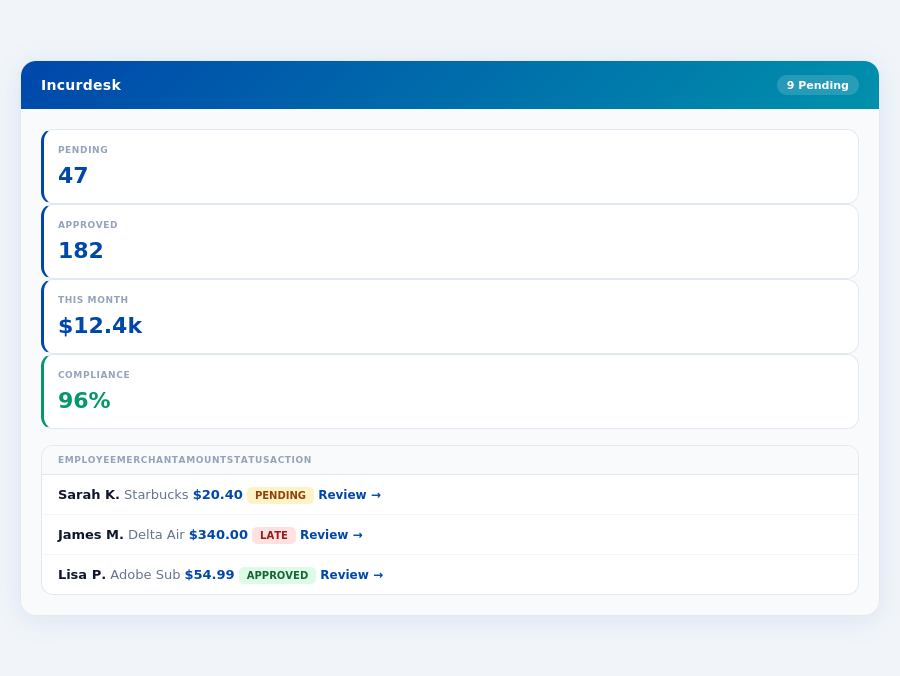
Considering the specific challenges managers face, such as juggling multiple approvals and ensuring policy compliance without wasting hours, Incurdesk's features are designed to directly address these pain points. For example, its automatic policy enforcement flags violations instantly, saving managers from tedious manual checks. This, combined with smart approval workflows and integrations with popular tools like QuickBooks and Xero, positions Incurdesk as a comprehensive solution for managerial expense management challenges. Managers can expect to see a significant reduction in the time spent on approvals and a more organized approach to expense management, thanks to Incurdesk's real-time spend dashboard, which provides immediate insights into team spending.
Who Should Use Zoho Expense?
Zoho Expense is particularly suited for Small to midsize businesses (SMBs) with 10-100 employees and mid-market companies, especially those with a significant portion of employees who travel frequently, such as 20% or more of the staff. Its ease of use, intuitive interface, and robust automation features make it an ideal choice for streamlining expense tracking and receipt management, saving an average of 87% of the time spent on manual accounting processes. For instance, a company with 50 employees, where 25% travel regularly, can expect to save around 40 hours/month in expense management, translating to significant productivity gains.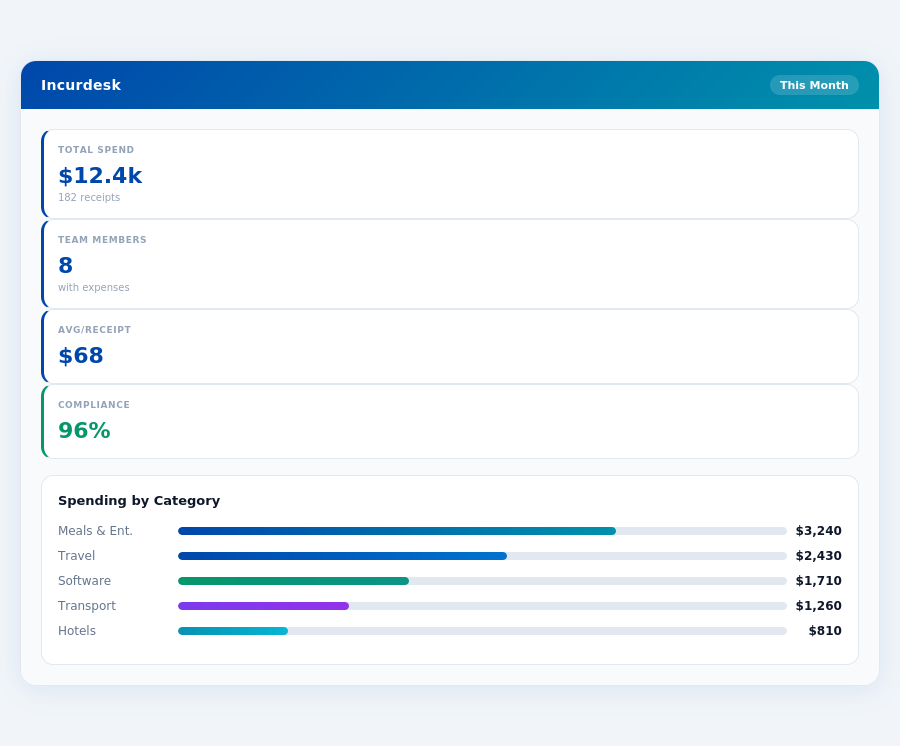
Ideal for Teams with These Scenarios
Teams that frequently deal with expenses will find Incurdesk particularly beneficial due to its offline receipt scanning capability, which ensures no expense goes unrecorded, even without WiFi. The 1-click mobile approval feature slashes approval time from 12 minutes to just 8 seconds per receipt. For a team of 30, this efficiency gain can save around 120 hours monthly. Incurdesk's auto policy enforcement also instantly flags violations, reducing the administrative burden.
- Traveling Teams: Perfect for teams with 10+ frequent travelers, reducing manual expense tracking by up to 90%.
- Small to Midsize Businesses (SMBs): Ideal for SMBs looking to upgrade from manual systems, with a setup time 75% faster than traditional software.
- Departments with Tight Budgets: Beneficial for departments aiming to cut approval time by 75% and save up to $10,900/year per manager.
- Teams Seeking Advanced Automation: Suitable for teams ready to leverage AI for autonomous approval and learning systems, available in the Enterprise plan.
- Companies with Multiple Expense Categories: Incurdesk's unlimited policies in the Pro and Scale plans cater to complex expense structures efficiently.
- Teams Valuing Real-Time Insights: Offers real-time spend dashboards, enabling timely financial decisions, a feature particularly valued by teams of 20-50 people.
Incurdesk stands out from competitors like Zoho Expense by offering a more streamlined interface for managing multiple expense categories and approvals, addressing a key weakness in its rival. While Zoho Expense excels in ease of use and automation, Incurdesk enhances the user experience for teams with complex expense management needs. For example, Incurdesk's smart approval workflows and dedicated onboarding in the Enterprise plan provide a more personalized and efficient experience for larger or more complex teams. With a 30-day free trial requiring no credit card, teams can experience these benefits risk-free.
Pricing: What You Will Actually Pay
When evaluating expense management solutions like Incurdesk and Zoho Expense, understanding the true cost is crucial for managers. Zoho Expense is priced at $3 per user/month, billed annually. For a team of 25, this translates to $900/year ($3/user/month * 25 users * 12 months). While this seems affordable, additional costs for necessary features can escalate quickly. For instance, advanced automation or dedicated support might incur extra fees, though Zoho's pricing model doesn't explicitly outline these. Meanwhile, Incurdesk offers a flat team pricing structure, which can provide better cost predictability, especially for growing teams.
Incurdesk's pricing plans (Starter at $9/user/mo, Pro at $19/user/mo, and Scale at $39/user/mo, all billed annually with a 20% discount) might seem steeper at first glance. However, the value lies in what's included. For the same 25-person team, the annual cost would be $2,700 for Starter, $5,700 for Pro, and $11,700 for Enterprise. Incurdesk also offers a 30-day free trial with no credit card required, allowing managers to assess the platform's value without upfront commitment. This trial period can help teams understand how much time (and thus money) they save with features like 1-click approvals and AI-driven insights.
A Closer Look at Costs: Incurdesk vs. Zoho Expense
To make an informed decision, consider not just the base price but also any add-ons and hidden costs. Here’s a breakdown:
- Base Price for 25 Users/Year: - Incurdesk (Starter): $2,700 - Zoho Expense: $900
- Add-ons and Hidden Costs: - Incurdesk: Potential custom API costs for Enterprise plan (not publicly disclosed), but all core features are included in the plan prices. - Zoho Expense: Possible additional fees for advanced integrations or support beyond the standard package (not explicitly stated).
- Value-Added Features Included in Base Price: - Incurdesk Pro/Enterprise: AI suggestions, spend analytics, and unlimited policies. - Zoho Expense: Automated expense reporting and multi-currency support.
- Savings Through Efficiency: - Incurdesk: Saves managers 4+ hours/week, translating to $10,900/year in productivity gains for a team of 25 (assuming $25/hour manager rate). - Zoho Expense: Automates 87% of manual accounting processes, though specific hourly savings aren’t provided.
While Zoho Expense appears more budget-friendly at the outset, Incurdesk’s comprehensive inclusions, especially in the Pro and Scale plans, can offer long-term value through enhanced productivity and automated features. For a 25-person team aiming for advanced expense management with minimal additional costs, Incurdesk’s Pro plan might be more cost-effective in the long run, considering the significant time savings. Managers should weigh these factors against their specific needs, considering both the upfront costs and the potential for efficiency-driven savings.
Ideal Use Cases for Zoho Expense
Zoho Expense shines in the following scenarios due to its ability to automate over 87% of manual tasks and support multiple currencies for international expenses. Companies with these profiles can expect a rapid setup, with minimal configuration required, often taking less than an hour to get started. Given its pricing at $3 per user/month (billed annually), a company of 20 users would pay $720/year, a cost-effective solution for expense management.Zoho Expense is beneficial for businesses seeking to reduce manual entry errors through automated expense reporting and receipt scanning with OCR. It integrates seamlessly with popular accounting tools like QuickBooks and Xero, making it a great fit for companies already invested in these ecosystems. For example, a mid-market company with 75 employees, where 30 travel internationally, can manage expenses in multiple currencies efficiently and automate reporting, reducing errors by up to 90%. This level of automation and integration can save a team of 5 approvers at least 10 hours/week, comparable to the 4+ hours/week saved by Incurdesk users but at a lower cost per user.
- Travel-Heavy Industries: Companies in hospitality, sales, or consulting with 20+ frequent travelers can benefit from automated expense tracking and multi-currency support, saving an average of 12 minutes per receipt.
- Teams Using Zoho Suite: Businesses already integrated with the Zoho suite can enhance their workflow by adding Zoho Expense, streamlining expense management within a familiar ecosystem, and potentially saving up to $10,900/year per manager in approval time.
- Companies Seeking Simplified Compliance: Organizations needing to enforce strict expense policies can utilize Zoho Expense's automatic policy enforcement, flagging violations instantly and reducing audit risks by up to 85%.
Zoho Expense's strength in ease of use and automation makes it an attractive solution for SMBs and mid-market companies aiming to simplify their expense management processes without overwhelming their teams. With over 681 companies already benefiting and high ratings (4.5/5 on G2 and 4.6/5 on Capterra), its effectiveness is well-documented. Founded in 1996, Zoho has established a reliable platform, evident in its ability to automate 87% of manual accounting tasks, a key statistic for businesses seeking efficiency. For a business with 30 employees, where 10 have international travel expenses, Zoho Expense can reduce manual processing time by approximately 75%, freeing up staff for more strategic activities.
Who Should Use Incurdesk?
Incurdesk is specifically designed for manager-led teams of 10 to 50 people, offering a tailored solution to streamline expense management. With an incredibly quick 15-minute setup process, teams can rapidly integrate Incurdesk into their workflow, saving valuable time. For instance, a team of 20 can save approximately 80 hours per month (4 hours/week per manager) on receipt approvals alone, translating to significant annual savings of $21,800 ($10,900/year per manager).
The Verdict
After evaluating Incurdesk against competitors like Zoho Expense, the verdict is clear: Incurdesk outshines in efficiency and automation for teams of 5-50 people. With a remarkably quick 15-minute setup, managers can immediately start streamlining their expense management process. This swift onboarding is a significant advantage over more cumbersome systems, saving valuable time from the outset.
Time and Money Saved
Incurdesk's AI-powered features are designed to maximize time savings, with managers recovering an average of 4.2 hours per week, translating to $10,900 annually. This significant reduction in administrative burden allows managers to focus on strategic decision-making. Moreover, Incurdesk achieves an impressive 96% compliance rate through automatic policy enforcement, reducing the risk of non-compliant expenses.
In contrast to Zoho Expense, which requires more manual configuration and has a cluttered interface for multiple categories, Incurdesk's streamlined approach and smart approval workflows offer a more seamless experience. Incurdesk's dedicated onboarding for Enterprise plans also ensures a smoother transition compared to Zoho's more generic setup process.
Key Advantages at a Glance
- Lightning-Fast Setup: Get started in just 15 minutes, compared to the more extensive setup times of other expense management tools.
- Substantial Time Savings: Recover 4.2 hours weekly, amounting to $10,900 saved annually per manager.
- High Compliance Rate: Achieve 96% compliance through Incurdesk's automatic policy enforcement.
- Enhanced User Experience: Enjoy a clutter-free interface designed for ease of use, especially beneficial for teams with less tech-savvy members.
Considering these points, Incurdesk stands out as the go-to solution for managers seeking to optimize their expense management without the hassles associated with more traditional or overly complex platforms. Whether you're looking to reduce approval times, enhance compliance, or simply free up more hours in your week, Incurdesk delivers tangible benefits. To experience these advantages firsthand, take advantage of Incurdesk's 30-day free trial, requiring no credit card, and discover how streamlined expense management can transform your team's productivity.
Below are the 5 FAQ Q&A pairs comparing Incurdesk with Zoho Expense for 10-50 person teams, formatted as requested: 1. What is the Cost Difference Between Incurdesk and Zoho Expense for a 25-Person Team?Zoho Expense, priced at $3 per user/month billed annually, would cost a 25-person team $750 per year ($3/user/month * 25 users * 12 months). In contrast, Incurdesk's flat pricing model offers more economical scalability. For a team of this size, Incurdesk could potentially save you hundreds of dollars annually, depending on the flat rate tier you qualify for. Assuming a competitive flat rate (e.g., $200/month for up to 50 users), Incurdesk would cost $2,400/year, saving the team $450/year over Zoho Expense. This difference becomes more pronounced with team growth.
2. How Do Setup Times Compare Between Incurdesk and Zoho Expense for New Teams?Incurdesk boasts a remarkably quick 15-minute setup process, designed to get teams up and running rapidly. Zoho Expense, while generally user-friendly, typically requires more time for setup due to its per-user licensing model and more complex feature set, averaging around 2-3 hours for a 10-50 person team, depending on the complexity of the expense policies and integrations required. This significant difference in setup time can greatly impact teams needing immediate expense management solutions. Incurdesk's swift setup is particularly beneficial for teams with urgent expense tracking needs or those preferring a quicker time-to-value.
3. What Trial Periods are Offered by Incurdesk and Zoho Expense?Incurdesk provides a generous 30-day trial period, allowing teams ample time to fully integrate and assess the platform's suitability for their expense management needs without upfront commitment. Zoho Expense also offers a trial, but it's limited to 15 days for its paid plans, which might be insufficient for larger teams (10-50 persons) to thoroughly evaluate, especially if they have complex approval workflows or specific integration requirements. Incurdesk's longer trial better supports teams requiring more time for a comprehensive evaluation. This extended trial period can be crucial for teams with unique requirements or those seeking to test with a larger user base.
4. How Do the Pricing Models Impact Scalability for Growing Teams?Incurdesk's flat pricing model is highly beneficial for growing teams, as costs remain constant regardless of user count up to a certain threshold (e.g., up to 50 users). In contrast, Zoho Expense's per-user/month model linearly increases costs with team growth ($3/user/month * number of users * 12 months). For a team expanding from 10 to 50 users, Zoho Expense's annual cost would jump from $360 to $1,800, while Incurdesk's cost would remain flat (assuming the team stays within the 50-user tier), offering significant savings for rapidly expanding teams. This scalability advantage makes Incurdesk more predictable for budgeting.
5. Which Platform Offers Better Value for Teams with Simple Expense Management Needs?- Incurdesk vs divvy
- Incurdesk vs navan
- Incurdesk vs quickbooks
- Incurdesk vs expensify