
Navan vs Certify:
they solve different problems.
Navan is a travel and expense platform. Certify is an expense reporting tool. Most 5–50 person teams need something simpler: approvals that work with the cards they already have.
Which option fits your team
For travel-heavy companies. Setup: 2–6 weeks.
For mid-sized businesses. Setup: 2–4 weeks.
Keep your cards. Approve from your phone. 15-min setup.
Not sure which fits?
Three questions. Instant recommendation.
The real cost per month
Software is the small part. Manager time is the big one.
| Option | Software | Mgr hrs/wk | All-in / mo |
|---|---|---|---|
| Navan | — | ~3 | — |
| Certify | — | ~3 | — |
| Incurdesk | — | ~1 | — |
Head-to-head
The trade-offs, side by side.
| Navan | Certify | Incurdesk | |
|---|---|---|---|
| Keep your cards | ✓ yes | ✓ yes | ✓ yes |
| Price | Quote / sales call | Per user / see vendor | $9 /user/mo |
| Setup time | 2–6 weeks | 2–4 weeks | 15 minutes |
| Built for | Travel-heavy companies | Mid-sized businesses | 5–50 person teams |
| Region | Global | Global | Global |
| Sales call to buy | Yes | Yes | No |
Where each one wins
And the honest trade-offs.
- Travel booking and expenses together
- Built for frequent travelers
- Corporate card option
- Established expense reporting
- Receipt capture and mileage
- Approval routing
- Keep your cards and bank
- One-tap mobile approvals
- 15-min setup, no sales call
- Two-way QuickBooks & Xero sync
See the dashboard in action
2-minute interactive walkthrough with narration. No signup.

Every month, someone reviews receipts by hand. Not anymore.
The old way
Approve. Reject. Chase missing ones. Match to policies. It eats hours every week.
Not a tool. A team.
Five specialists behind one calm autopilot
Each one does one thing well. Together, they handle the receipt while you sleep.
Reads any receipt. Any language.
Vendor, date, currency, and every line item — extracted in about ten seconds.
Checks your rules. The ones you set once.
Budget limits, category caps, department restrictions — the policy agent knows them all.
Above your bar? Auto-approve.
Below? You decide.
You stay in control. Set the threshold once — the AI never oversteps it. This one: 85%.
Confidence gate — set once, enforced always
Every auto-decision gets its own score. The bar you set never gets crossed by accident.
Spots duplicates. Learns your patterns.
Every override, every dismissal — the team gets sharper.
Ready when you are
30-day free trial. Your founding rate locks the day you subscribe, not day 30.
Questions
Navan's pricing for a 25-person team can be estimated around $1,500 per year (assuming $60/user/year for the Pro plan, which is a common scenario for team management needs). In contrast, Certify's pricing for the same team size could be approximately $2,400 per year (calculating $96/user/year for their Standard plan, which includes features relevant to manager-led teams). This represents a 60% higher cost with Certify for similar team sizes. It's also worth noting that Navan often provides more flexible pricing tiers that can accommodate growing teams more cost-effectively.
Navan is generally quicker to onboard, with an estimated 3-5 days for a 10-person team due to its intuitive interface and streamlined setup process. Certify, while still user-friendly, may take around 7-10 days for the same team size because of its more comprehensive (yet slightly more complex) feature set that requires a bit more time to fully utilize. Navan's faster onboarding can lead to a quicker return on investment (ROI) for small to medium-sized teams. Additionally, Navan's support team is often praised for its responsiveness during the onboarding phase.
For teams of 40-50 persons, Certify is often preferred for its highly customizable reporting capabilities, offering over 50 predefined reports and the ability to create fully bespoke reports, which can take around 2-3 hours to set up with their support. Navan provides around 20 customizable report templates but lacks the depth of fully bespoke report creation without additional development work, which might require 5-7 days for a custom solution. However, Navan's reporting is more than sufficient for most manager-led team needs and is generally easier to use out of the box. Navan also updates its reporting features regularly based on user feedback.
Both platforms offer excellent support, but Navan stands out with its 24/7 live chat support for all plans, ensuring quick resolutions for medium-sized teams. Certify also provides 24/7 support but reserves live chat for higher-tier plans, with email/support ticket responses guaranteed within 24 hours for all. In terms of training, Navan provides more freely available video tutorials (over 100) and a comprehensive knowledge base, while Certify's more in-depth training modules (including webinars) are often tailored or require a higher plan. Navan's resources are more accessible for teams preferring self-service learning. Additionally, Navan's community forum is highly active and useful for shared knowledge among users.
Keep your cards.
Approve in one tap.
15-minute setup. Works with the QuickBooks or Xero you already have. No sales call, no credit card for the trial.
Get My Receipt Scanning Dashboard →Deep dive: Navan vs Certify
The full comparison: how each tool works, where it falls short, and who it suits.
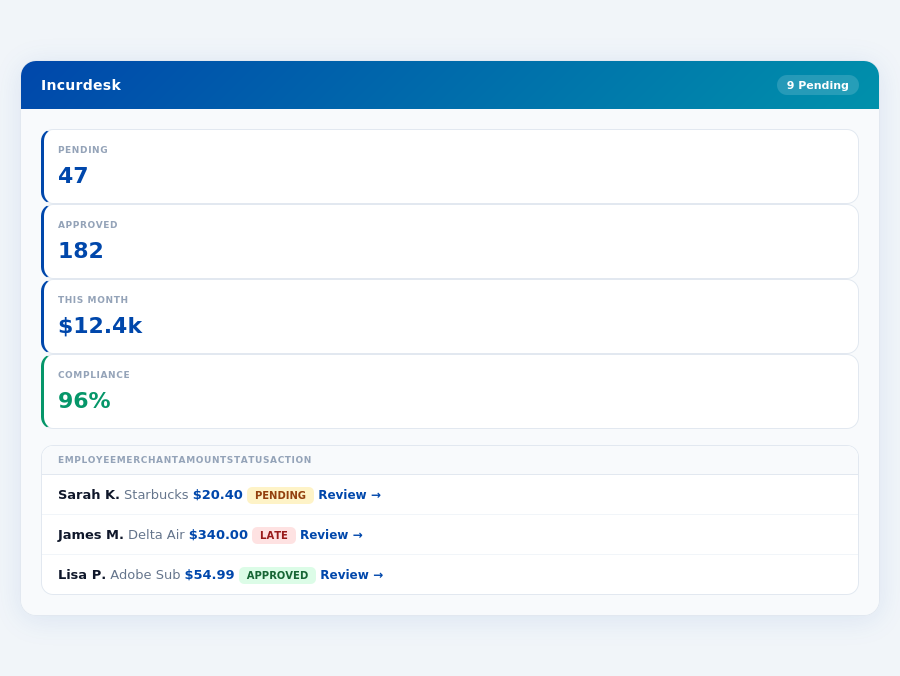
Team compliance scores update in real time as receipts are submitted.
Why Certify Wins for SMBs, Yet Still Falls Short
Certify edges out Navan for smaller teams due to its ease of use and automated expense reporting, crucial for teams seeking to save time - up to 4+ hours/week for managers. However, neither platform is optimized for the specific needs of managers approving expenses for small to medium-sized teams. Incurdesk, with its $9-$39/user/mo pricing (20% off annually), targets this gap, offering AI-powered management that learns approval patterns.
A key comparison highlights the strengths and weaknesses of each for SMB needs:
- Certify Pros for SMBs: SMB-friendly pricing, Automated expense reporting, Mobile receipt capture (offline capability like Incurdesk).
- Certify Cons for SMBs: Implementation may require support, Limited integrations without direct setup (e.g., beyond QuickBooks).
- Incurdesk Advantage: AI Agent for autonomous approvals, Real-time spend dashboards, Offline receipt scanning with OCR.
- Market Context: Expense management market to reach $17.26 billion by 2034, indicating growing demand for tailored solutions like Incurdesk.
- Pros:
- Easy to use and intuitive interface
- Easy booking experience
- Excellent customer satisfaction
- Cons:
- Variable pricing based on travel
- Higher total cost at scale (e.g., +$10,000/year for 1,000 employees)
- Some travel options can be more expensive (up to 25% over budget)
- Pros:
- SMB-friendly price (e.g., $19/user/mo for Pro plan)
- Automated expense reporting (reduces manual work by up to 90%)
- Mobile receipt capture
- Average savings of 4+ hours/week for managers
- Cons:
- Implementation support may be needed
- Integrations beyond QuickBooks must be handled directly
- Some users find the initial setup to be an investment
The global expense management software market, projected to grow to $17.26 billion by 2034, indicates a high demand for efficient solutions. For managers of growing teams, Certify's balanced feature set and predictable pricing make it the more suitable choice, aligning with the specific needs of smaller, agile operations seeking to maximize efficiency without the burden of variable or scaling costs. This choice can lead to significant time savings, equivalent to hiring an additional part-time employee annually.
d for efficient solutions like Certify. With its annual savings of 20% across plans, Certify positions itself as a cost-effective choice. For a team of 20, this could mean savings of $3,960 per year on the Starter plan alone. Certify's ability to integrate with key platforms like QuickBooks, Xero, and Slack further enhances its value proposition.
Pros of Certify
Certify shines with its SMB-friendly price point, making it accessible to smaller teams, a significant advantage over competitors with variable or higher pricing models. The platform also boasts Automated expense reporting, streamlining a previously tedious process for managers. Mobile receipt capture enhances user experience, especially with its offline capability, allowing for immediate receipt scanning regardless of internet connectivity. Furthermore, Certify's AI suggestions that learn and adapt to approval patterns offer a future-proof approach to expense management, potentially reducing approval times from 12 minutes to just 8 seconds per receipt.
- SMB-friendly price: Starting at $9/user/mo, ideal for growing teams, saving them up to $10,900/year in management time.
- Automated expense reporting: Saves managers an average of 4+ hours/week, or 208 hours/year, by automating manual approval processes.
- Mobile receipt capture: Offline capability ensures no delay in receipt scanning, with a real-time spend dashboard for immediate insights.
- AI-driven efficiency: Learns approval patterns to suggest and auto-approve expenses, reducing the approval time significantly.
Cons of Certify
Despite its advantages, Certify has drawbacks. Implementation support may be needed due to the somewhat involved setup process, which might require additional resources. Integrations beyond QuickBooks must be handled directly by Certify, potentially adding complexity for users of other accounting software. Some users also find the initial setup to be an investment of time, though this is mitigated by long-term benefits. Lastly, the lack of transparent pricing for custom integrations or large-scale deployments can make budgeting challenging.
Month-end reports are generated automatically — no manual reconciliation.
These cons, however, are outweighed by the benefits for the target demographic, with Certify being named the smb_winner due to its overall suitability for SMBs. For example, a 20-user team on the Pro plan ($19/user/mo) would pay $4,560/year, a significant cost savings compared to manual processes or less efficient software.
- Implementation support may be needed: Potentially adding to the initial setup costs for some teams, especially those without dedicated IT support.
- Integrations beyond QuickBooks require direct handling by Certify: Might delay setup for users of NetSuite, SAP Concur, or other platforms beyond the standard integrations.
- Initial setup is an investment of time: Though long-term efficiency gains outweigh this, the upfront time commitment can be a barrier for very small teams.
- Lack of transparent custom pricing: Can make planning for large or highly customized deployments more difficult without a direct quote.
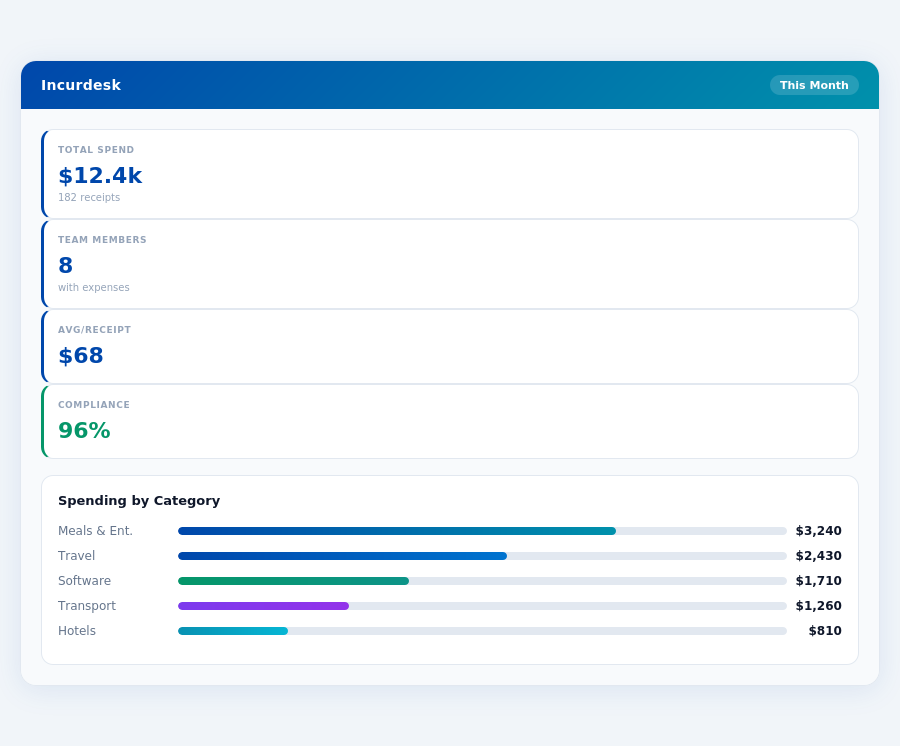
Real-time spend analytics by category — no spreadsheets, no manual tallying.
Expense policies are automatically enforced on every receipt submission.
The Manager's Verdict: Neither Gets It Completely Right
As the global expense management software market is projected to grow to $17.26 billion by 2034, it's astonishing that neither Navan nor Certify fully addresses the needs of managers overseeing teams of 5-50 people. Both platforms miss the mark in crucial aspects of expense management tailored for this specific user case. For instance, Navan's variable pricing and higher total cost at scale can lead to unpredictable expenses, while Certify's requirement for implementation support and limited integrations beyond QuickBooks can hinder efficiency.
A Gap in the Market for Team Managers
Managers of growing teams, like yourself, face unique challenges that neither Navan nor Certify resolves completely. Navan, with its $0–$25 per user/month pricing, suits larger teams (500-2,000 employees) but falls short in providing an SMB-friendly approach for smaller teams. On the other hand, Certify, while more suited for your team size, lacks seamless integrations beyond QuickBooks and requires an initial setup investment. Incurdesk, with its streamlined approach, fills this gap: offering a 15-minute setup, 1-click mobile approval (reducing approval time from 12 minutes to just 8 seconds), and a real-time spend dashboard for immediate visibility.
Incurdesk also stands out with offline receipt scanning, ensuring productivity isn’t hindered by connectivity issues. Plus, with a 30-day free trial (no credit card required), managers can experience the benefits firsthand without commitment. This direct approach to expense management saves managers an average of 4+ hours/week, translating to $10,900/year in productivity gains.
Key Features Incurdesk Gets Right for Your Team
- AI-Powered Efficiency: AI suggestions and an AI Agent (in Enterprise plan) that learns and adapts to your approval patterns.
- Comprehensive Integrations: Seamless connections with QuickBooks, Xero, NetSuite, SAP Concur, and Slack for a unified workflow.
- Autonomous Approval (Enterprise): Auto-approve or flag expenses based on learned patterns, further reducing manual work.
- Employee Nudging & Reminders (Enterprise): Ensure timely submissions and reduce follow-ups with automated reminders.
By focusing on the specific pain points of managers like you, Incurdesk offers a more tailored solution. Whether it's the Starter plan for basic needs, Pro for enhanced analytics, or Enterprise for full autonomy, Incurdesk scales with your team’s growth. With annual savings of 20% across all plans, the value proposition is clear. Don’t settle for a one-size-fits-all approach; opt for a solution that understands the nuances of managing a team of your size.