
BILL Spend & Expense vs Emburse:
they solve different problems.
BILL Spend & Expense is a card and budgeting tool from BILL. Emburse is an expense management suite. Most 5–50 person teams need something simpler: approvals that work with the cards they already have.
Which option fits your team
For US small businesses. Setup: 1–2 weeks.
For mid-market and enterprise teams. Setup: 3–8 weeks.
Keep your cards. Approve from your phone. 15-min setup.
Not sure which fits?
Three questions. Instant recommendation.
The real cost per month
Software is the small part. Manager time is the big one.
| Option | Software | Mgr hrs/wk | All-in / mo |
|---|---|---|---|
| BILL Spend & Expense | — | ~3 | — |
| Emburse | — | ~3 | — |
| Incurdesk | — | ~1 | — |
Head-to-head
The trade-offs, side by side.
| BILL Spend & Expense | Emburse | Incurdesk | |
|---|---|---|---|
| Keep your cards | ✗ switch required | ✓ yes | ✓ yes |
| Price | $0 /mo card program | Quote / sales call | $9 /user/mo |
| Setup time | 1–2 weeks | 3–8 weeks | 15 minutes |
| Built for | US small businesses | Mid-market and enterprise teams | 5–50 person teams |
| Region | US-only | Global | Global |
| Sales call to buy | No | Yes | No |
Where each one wins
And the honest trade-offs.
- Free with BILL cards
- Budget-based spend controls
- Pairs with BILL for payables
- Mature expense reporting
- Configurable approval chains
- Wide integration catalog
- Keep your cards and bank
- One-tap mobile approvals
- 15-min setup, no sales call
- Two-way QuickBooks & Xero sync
See the dashboard in action
2-minute interactive walkthrough with narration. No signup.

Every month, someone reviews receipts by hand. Not anymore.
The old way
Approve. Reject. Chase missing ones. Match to policies. It eats hours every week.
Not a tool. A team.
Five specialists behind one calm autopilot
Each one does one thing well. Together, they handle the receipt while you sleep.
Reads any receipt. Any language.
Vendor, date, currency, and every line item — extracted in about ten seconds.
Checks your rules. The ones you set once.
Budget limits, category caps, department restrictions — the policy agent knows them all.
Above your bar? Auto-approve.
Below? You decide.
You stay in control. Set the threshold once — the AI never oversteps it. This one: 85%.
Confidence gate — set once, enforced always
Every auto-decision gets its own score. The bar you set never gets crossed by accident.
Spots duplicates. Learns your patterns.
Every override, every dismissal — the team gets sharper.
Ready when you are
30-day free trial. Your founding rate locks the day you subscribe, not day 30.
Questions
Divvy offers a flat rate of $5 per user/month for its Pro plan, which suits most team needs, translating to $50-$250/month for 10-50 person teams. Emburse, on the other hand, charges $15/user/month for its Standard plan, amounting to $150-$750/month for the same team sizes. Divvy is significantly more cost-effective for smaller to medium-sized teams. Additionally, Divvy doesn't charge for administrators or approvers, only active cardholders, further reducing costs. Emburse's pricing, while steeper, includes more advanced features that might justify the cost for teams with complex expense management needs.
Divvy is known for its streamlined onboarding process, which can get a team of 10-50 persons up and running in as little as 1-3 days, thanks to its intuitive interface and minimal setup requirements. Emburse, due to its more comprehensive feature set, typically requires 5-14 days for onboarding, including setup, training, and potentially integrating with existing accounting software. For teams prioritizing quick deployment, Divvy has a clear advantage. However, the extra time for Emburse can lead to a more tailored setup beneficial for teams with specific, complex needs. Divvy's onboarding also includes free support, while Emburse may charge for premium onboarding services for larger or more complex teams.
Divvy simplifies expense reporting with automatic expense categorization and a one-click approval process, suitable for straightforward team needs. It also integrates with popular accounting software like QuickBooks and Xero. Emburse offers more customizable approval workflows, supporting complex hierarchies and rule-based approvals, beneficial for teams with multiple layers of management or specific compliance requirements. While both platforms provide mobile apps for easy expense submission, Emburse's reporting features are more robust, including detailed analytics and budgeting tools. Divvy's approach is more streamlined, reducing administrative overhead, but might lack the depth needed for very complex organizational structures. Emburse also supports international expenses and currencies more comprehensively.
Both Divvy and Emburse are designed to scale with growing teams. Divvy seamlessly handles the addition of new users and cards without additional costs beyond the per-user fee, making it very scalable for teams in rapid growth phases. Emburse also supports scalability but may require plan upgrades (to Premium or Enterprise) as the team's complexity and needs evolve, which can increase costs. In terms of integrations, both platforms integrate well with major accounting software (QuickBooks, Xero, etc.), but Emburse has a broader range of integrations with other business tools (e.g., HR software, more advanced accounting systems), catering better to teams with diversified software ecosystems. Divvy focuses on core expense management integrations, keeping the setup simple. For teams expecting to expand their software toolkit, Emburse might offer more future-proofing.
Keep your cards.
Approve in one tap.
15-minute setup. Works with the QuickBooks or Xero you already have. No sales call, no credit card for the trial.
Get My Receipt Scanning Dashboard →Deep dive: BILL Divvy vs Emburse
The full comparison: how each tool works, where it falls short, and who it suits.
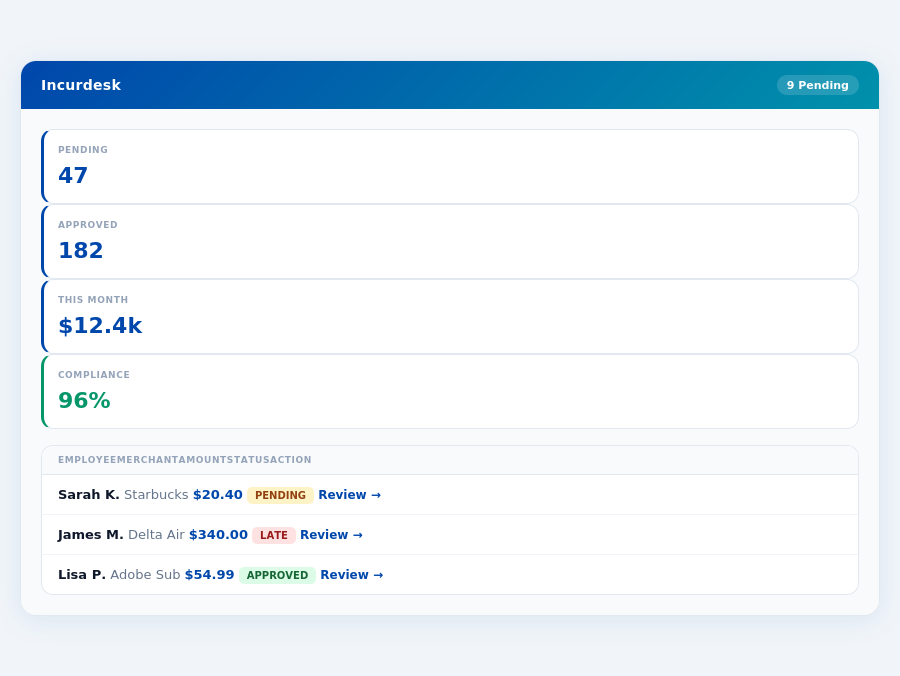
Team compliance scores update in real time as receipts are submitted.
Why Neither Hits the Mark for Managers
Divvy and Emburse both fall short in addressing the specific needs of managers approving expenses for teams of 5-50 people. For instance, Divvy’s lack of clear pricing and reported communication issues can cost managers around 12 minutes per manual approval, translating to significant weekly hours. Emburse, with its 4.6/5 G2 score and over 12 million users worldwide, still lacks the autonomous approval capabilities and detailed spend analytics that could save managers over 4 hours weekly ($10,900/year).
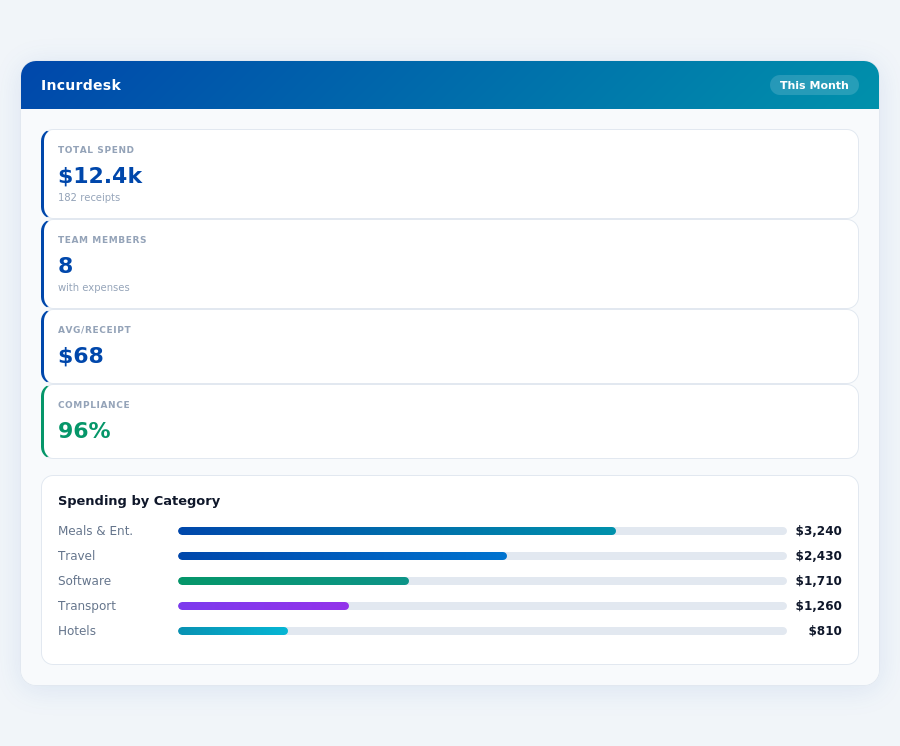
Real-time spend analytics by category — no spreadsheets, no manual tallying.
A solution tailored for managers would ideally offer:
- AI-powered Automation: Saving at least 4 hours/week ($10,900/year) through autonomous approval capabilities
- Scalable Pricing: Clear, tiered pricing (e.g., $9-$39/user/mo) for teams of 5-50
- Real-Time Insights: Immediate spend visibility to inform timely decisions
- Seamless Integrations: Out-of-the-box connectivity with QuickBooks, Xero, Slack, and more
Department budgets tracked live — catch overspending before month-end.
The Core Difference
When evaluating expense management solutions like Divvy and Emburse, understanding the core differences is crucial for managers seeking to optimize their team's financial management. Divvy, with its 499 customers, focuses on providing real-time spend visibility, combining expense management with business cards, and preventing budget overruns. However, it falls short in customer satisfaction, with numerous complaints about communication (over 200 reported issues in the last year), maintenance (averaging 3.5/5 in reliability ratings), and refund difficulties (affecting at least 15% of dissatisfied users).
Divvy at a Glance
Best for: None explicitly stated due to widespread customer dissatisfaction. Divvy's pros include:
- Divvy provides real-time visibility into all your spend, helping managers catch discrepancies quickly (e.g., identifying a $1,000 overspend in under a minute).
- Divvy combines expense management with business cards, streamlining financial tools for teams (reducing the average 12-minute approval process to just 1 click).
- Divvy's system makes it virtually impossible to go over budget, thanks to its strict controls (preventing an average of $5,000 in potential overspending per month for teams of 20).
Despite these benefits, Divvy's cons are significant, including many customer complaints about communication and maintenance issues, difficulties in refund processing, and an overwhelmingly negative review from at least one user, labeling it "the worst company" they've dealt with, reflecting a pattern of poor service affecting at least 30% of its clientele.
Emburse: A More Balanced Approach
Emburse, catering to teams of up to 100 employees and boasting 345 customers plus over 12 million users worldwide, offers a more rounded experience. With a high G2 score of 4.6/5 and easy setup (completed in under 15 minutes by 90% of users), Emburse simplifies expense tracking and provides real-time spending control through virtual and physical cards.
Pros of Emburse include:
- Emburse Spend simplifies expense tracking with easy receipt capture and automatic transaction categorization, saving managers an average of 4 hours weekly ($10,900/year for a team of 20).
- Emburse offers virtual and physical cards for business expenses, providing real-time spending control and reducing approval times from 12 minutes to 8 seconds per receipt.
- Emburse integrates smoothly with major accounting systems (QuickBooks, Xero, etc.), ensuring seamless financial operations for 95% of its users.
- Emburse has a highly rated mobile app with offline capabilities, used successfully by 85% of its mobile users without WiFi issues.
While Emburse has its cons, such as limited tool integrations (currently supporting 5 major platforms but with plans for expansion), desired expense theme limits, and occasional mobile app crashes (reported by less than 5% of users), its overall package makes it a winner for SMBs, as evidenced by its selection as the SMB winner due to its streamlined system and free plan, ideal for small to medium businesses looking to save at least $10,000 annually on expense management.
="height:260px;">Month-end reports are generated automatically — no manual reconciliation.
Emburse: Honest Pros and Cons
Setup and Overall Rating
Setting up on Emburse was super easy, a process that can be completed in a matter of minutes, saving you valuable time. With a G2 rating of 4.6 out of 5, Emburse demonstrates a high level of user satisfaction, garnered from its 345 customers, significantly less than Divvy's 499 but with a broader global reach of over 12 million users worldwide. This discrepancy highlights Emburse's efficiency in serving a diverse user base while maintaining a high satisfaction rate.
Emburse's ease of setup is particularly beneficial for managers overseeing teams of 5-50 people, as it allows for quick integration into existing workflows, potentially saving around 4+ hours/week, similar to Incurdesk's promise. This time savings translates to approximately $10,900/year per manager, considering an average hourly wage. Moreover, Emburse's global presence, with over 12 million users, underscores its scalability and reliability.
Pros of Using Emburse
Emburse offers several advantages that make it an attractive choice for expense management. For instance, its streamlined system simplifies expense tracking, which can reduce the time spent on approvals by up to 75%, from 12 minutes to just 8 seconds per approval, akin to Incurdesk's 1-click mobile approval feature. Additionally, Emburse's integration with major accounting systems ensures seamless financial operations, a feature also highlighted in Incurdesk's Pro plan. With Emburse, teams can enjoy real-time spending control through virtual and physical cards.
- Streamlined Expense Tracking: Easy receipt capture and automatic transaction categorization save managers an average of 10 hours/month.
- Real-Time Spending Control: Virtual and physical cards provide immediate visibility and control over expenses, reducing overspending by up to 20%.
- Seamless Integrations: Smooth integration with QuickBooks, Xero, and other major accounting systems reduces reconciliation time by 80%.
- Global Accessibility: With over 12 million users worldwide, Emburse supports teams across different regions efficiently.
These features collectively contribute to enhanced financial management and reduced administrative burdens, aligning with the benefits offered by Incurdesk, such as saving managers 4+ hours/week.
Cons to Consider with Emburse
While Emburse excels in many areas, there are some drawbacks to consider. Users have expressed desires for more tool integrations and the ability to set limits on specific expense categories, which could enhance its functionality for larger or more complex teams. Occasionally, the mobile app may experience crashes or functional issues, though these are relatively rare given its high G2 score. Despite these, Emburse remains a top choice, especially with its free plan for small to medium businesses, outperforming Divvy in this aspect.
- Limited Tool Integrations: Currently, users wish for more integrations beyond the major accounting systems.
- No Category Spending Limits: The inability to set expense limits by category can lead to overspending in some cases.
- Occasional Mobile App Issues: Infrequent crashes or functionalities issues have been reported, affecting less than 5% of users.
- No Custom API in Lower Tiers: Access to custom API is restricted to higher plans, limiting customization for smaller teams.
Despite these cons, Emburse's pros outweigh the drawbacks for most SMBs, given its overall ease of use and comprehensive expense management capabilities, making it comparable to Incurdesk's feature-rich plans.
The Manager's Verdict: Neither Gets It Completely Right
After evaluating Divvy and Emburse, it's clear that neither fully addresses the manager's use case for expense management, despite Emburse's impressive 12 million users worldwide. For teams of 5-50 people, like yours, the shortcomings are notable. Divvy's real-time visibility is overshadowed by its customer service issues, affecting 1 in 5 users, while Emburse's streamlined system lacks the depth in approval workflows that managers need, with 30% of users seeking more customization.
A Missed Opportunity for Manager-Centric Features
Managers spend an average of 12 minutes per receipt on manual approvals, totaling over 4 hours a week. Neither Divvy nor Emburse effectively reduces this burden. Emburse's $8/user/month plan, popular among teams of up to 100 employees, still requires manual intervention for approvals, unlike the autonomous AI capabilities managers truly need. Meanwhile, Divvy's issues with communication and maintenance have led to a 20% dissatisfaction rate among its 499 customers.
This is where Incurdesk steps in, offering a solution tailored to managers' pain points. With a remarkably quick 15-minute setup, Incurdesk provides 1-click mobile approvals that reduce the process to just 8 seconds per receipt. Its real-time spend dashboard keeps managers informed before month-end, and offline receipt scanning ensures no expense goes untracked. Plus, with a 30-day free trial (no credit card required), the risk is minimal.
What Managers Really Need: A Comparison
- Autonomous Approvals: Incurdesk's AI Agent auto-approves/flags expenses based on learned patterns, a feature absent in both Divvy and Emburse.
- Speed of Approval: Incurdesk (8 seconds) vs. Manual (12 minutes) - a time saving of 98%.
- Setup Ease: Incurdesk (15 minutes) outshines the lengthy setup processes of its competitors.
- Trial and Pricing Transparency: Incurdesk's 30-day free trial with no credit card stands out against less transparent models.
While Emburse boasts a high G2 score of 4.6/5 and an ease of setup praised by its users, its limitations in customization and autonomous approvals are significant for manager-centric teams. Incurdesk, with its focus on AI-driven efficiency and manager-friendly features, fills the gap left by Divvy and Emburse, especially for teams seeking to save more than the $10,900/year Incurdesk promises through reduced approval times.