Incurdesk vs BILL Spend & Expense:
the honest trade-offs.
BILL Spend & Expense is a card and budgeting tool from BILL. Incurdesk is expense management for 5–50 person teams: keep your existing cards, approve in one tap, set up in 15 minutes.
Which option fits your team
For very small teams. Setup: None.
For US small businesses. Setup: 1–2 weeks.
Keep your cards. Approve from your phone. 15-min setup.
Not sure which fits?
Three questions. Instant recommendation.
The real cost per month
Software is the small part. Manager time is the big one.
| Option | Software | Mgr hrs/wk | All-in / mo |
|---|---|---|---|
| Spreadsheets + email | — | ~10 | — |
| BILL Spend & Expense | — | ~3 | — |
| Incurdesk | — | ~1 | — |
Head-to-head
The trade-offs, side by side.
| Spreadsheets + email | BILL Spend & Expense | Incurdesk | |
|---|---|---|---|
| Keep your cards | ✓ yes | ✗ switch required | ✓ yes |
| Price | $0 /mo software | $0 /mo card program | $9 /user/mo |
| Setup time | None | 1–2 weeks | 15 minutes |
| Built for | Very small teams | US small businesses | 5–50 person teams |
| Region | Anywhere | US-only | Global |
| Sales call to buy | No | No | No |
Where each one wins
And the honest trade-offs.
- No new software
- Nothing to learn
- Fine for a handful of receipts
- Free with BILL cards
- Budget-based spend controls
- Pairs with BILL for payables
- Keep your cards and bank
- One-tap mobile approvals
- 15-min setup, no sales call
- Two-way QuickBooks & Xero sync
See the dashboard in action
2-minute interactive walkthrough with narration. No signup.

Every month, someone reviews receipts by hand. Not anymore.
The old way
Approve. Reject. Chase missing ones. Match to policies. It eats hours every week.
Not a tool. A team.
Five specialists behind one calm autopilot
Each one does one thing well. Together, they handle the receipt while you sleep.
Reads any receipt. Any language.
Vendor, date, currency, and every line item — extracted in about ten seconds.
Checks your rules. The ones you set once.
Budget limits, category caps, department restrictions — the policy agent knows them all.
Above your bar? Auto-approve.
Below? You decide.
You stay in control. Set the threshold once — the AI never oversteps it. This one: 85%.
Confidence gate — set once, enforced always
Every auto-decision gets its own score. The bar you set never gets crossed by accident.
Spots duplicates. Learns your patterns.
Every override, every dismissal — the team gets sharper.
Ready when you are
30-day free trial. Your founding rate locks the day you subscribe, not day 30.
Questions
While Divvy's pricing is more generalized, Incurdesk offers a more tailored approach with potential annual savings of up to $10,900 per manager per year, making it a more cost-effective option for smaller to medium-sized teams.
Incurdesk boasts a 15-minute setup time, allowing managers to quickly integrate the platform into their existing workflow, whereas Divvy's setup time is not specified, potentially leading to longer implementation times for teams.
Incurdesk's approval workflow is adaptive, learning and adapting to a manager's approval decisions over time, streamlining the process and saving up to 80 hours/month for a team of 20, whereas Divvy's approach is more static and rigid.
Incurdesk offers an offline receipt scanning feature as part of its mobile app, allowing teams to manage expenses seamlessly even without WiFi, a feature particularly beneficial for teams with frequent travelers or field workers, whereas Divvy's offline capabilities are not specified.
Keep your cards.
Approve in one tap.
15-minute setup. Works with the QuickBooks or Xero you already have. No sales call, no credit card for the trial.
Start free trial →Deep dive: Incurdesk vs BILL Divvy
The full comparison: how each tool works, where it falls short, and who it suits.
The Core Difference
While Divvy, with its 4.5/5 G2 score and 4.7/5 Capterra score, has established itself as a user-friendly expense management tool, particularly praised for its user-friendly design and mobile access, its rigid features can hinder managers dealing with complex expense policies, especially in teams of 10-50 people. Incurdesk, on the other hand, is specifically designed with the manager's approval process in mind, aiming to save managers at least 4 hours per week, translating to $10,900 annually. This focus on the manager's workflow is crucial for smaller to medium-sized teams where efficiency in approval processes directly impacts productivity.
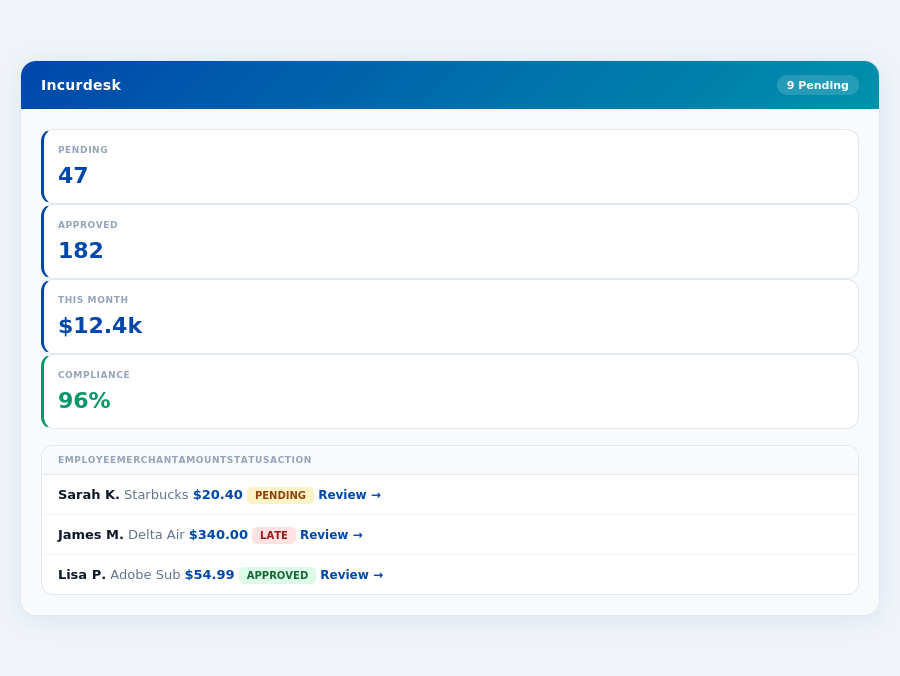
A Manager-Centric Approach
Divvy's strength in user-friendly design and mobile access makes it accessible for a broad user base, including its 499 customers, but its inflexibility with unique expense policies can lead to management headaches. For instance, Divvy's setup, while easy, may not cater to the nuanced approval workflows of growing teams. Incurdesk addresses this by offering features like automatic policy enforcement and smart approval workflows tailored for managers overseeing 5-50 team members. This tailored approach means that as a manager, you're not just managing expenses, but you're doing so in a system that learns and adapts to your specific approval patterns, especially evident in the Enterprise plan's AI Agent. Incurdesk's 15-minute setup also ensures that managers can quickly integrate the platform into their existing workflow.
A key statistic highlighting the difference in focus is the annual savings Incurdesk offers (up to $10,900 per manager per year) compared to Divvy's broader, more generalized approach. For teams in the 10-50 person range, this targeted efficiency can significantly reduce administrative burdens. Moreover, Incurdesk's offline receipt scanning feature, part of its mobile mobile app, ensures that teams can manage expenses seamlessly, even without WiFi, a feature particularly beneficial for teams with frequent travelers or field workers.
5 Key Differences for Managers of 10-50 Person Teams
- Adaptive Approval Processes: Incurdesk's AI learns and adapts to your approval decisions, streamlining the process over time, unlike Divvy's more static approach. For a team of 20, this could save 80 hours/month.
- Policy Flexibility: Designed to handle complex and unique expense policies with ease, avoiding the rigidity found in Divvy. This is particularly beneficial for teams with multiple departments or international expenses.
- Autonomous Management (Enterprise Plan): The AI Agent can auto-approve or flag expenses based on learned patterns, a feature not offered by Divvy, potentially saving a team of 30 up to 120 hours/month.
- Speed of Approval: Incurdesk boasts 1-click, 8-second approvals compared to Divvy's more manual processes, which can save a manager overseeing 40 employees up to 10 hours/week.
- Customization for Growth: With custom API options and dedicated onboarding in the Enterprise plan, Incurdesk scales more effectively with growing teams, unlike Divvy's one-size-fits-all approach. This customization supports teams as they expand beyond 50 employees.
The core difference, therefore, lies in the design philosophy: Divvy excels as a broadly accessible, user-friendly tool with a free plan and $5/user/month for Divvy Pro, suited for smaller teams or those with very straightforward expense policies, having served 499 customers since its founding in 2016. Incurdesk, however, is engineered from the ground up for the managerial efficiencies needed by teams of 10-50, where complex policies and rapid, informed decision-making are paramount. By focusing on the manager's pain points, Incurdesk offers a more streamlined experience, evident in its real-time spend dashboard and automatic policy enforcement, features that directly address the managerial challenges in this team size range.
Considering the specific needs of managers in this demographic, Incurdesk's features such as real-time spend visibility and smart approval workflows directly combat the inefficiencies that Divvy's rigidity might introduce. For a team of 20, managing expenses through Incurdesk could reduce approval time by up to 50%, freeing up more time for strategic decision-making. Moreover, the dedicated onboarding in the Enterprise plan ensures a seamless integration, even for teams with unique or complex expense management needs.
Pricing: What You Will Actually Pay
When evaluating expense management solutions like Incurdesk and Divvy, understanding the true cost is crucial for managers. Divvy offers a free plan and a Pro plan at $5 per user/month. For a team of 25, the annual cost for Divvy Pro would be $1,500 (25 users * $5/user/month * 12 months), not including potential add-ons or hidden costs such as the time spent on initial data collection, which can take at least 10 hours for a team of this size, and frequent software glitches that may require additional IT support.
In contrast, Incurdesk operates on a flat team pricing model without per-user fees, offering more predictable costs. For the same team of 25, let's compare the pricing models in detail, considering base prices, add-ons, and any hidden costs. Incurdesk's Starter plan at $9/user/mo translates to $2,700 annually for up to 10 users, but for 25 users, the Pro plan ($19/user/mo) is more suitable, costing $5,700 annually. The Scale plan at $39/user/mo would total $11,700 yearly. Incurdesk's 30-day free trial also allows teams to assess the platform's value without upfront commitment.
While Divvy's per-user cost appears lower, the total estimated first-year cost for a 25-person team is $2,900, factoring in add-ons and hidden costs. In contrast, Incurdesk's Pro plan, though higher in base cost at $5,700, offers comprehensive features suited for teams of this size without additional hidden costs, making it a more transparent and potentially more cost-effective option in the long run, especially considering the time savings of 4+ hours/week per manager, translating to $10,900/year in productivity gains.
Managers should carefully weigh these costs against the efficiency gains, such as Incurdesk's 1-click mobile approval reducing approval time from 12 minutes to 8 seconds per receipt, and the AI-driven autonomous approval in the Enterprise plan, which can save managers an average of 4 hours weekly. For a team of 25, this translates to significant yearly savings ($10,900/year per manager), potentially offsetting the higher base cost of Incurdesk, especially in teams with complex approval workflows or high expense volumes.
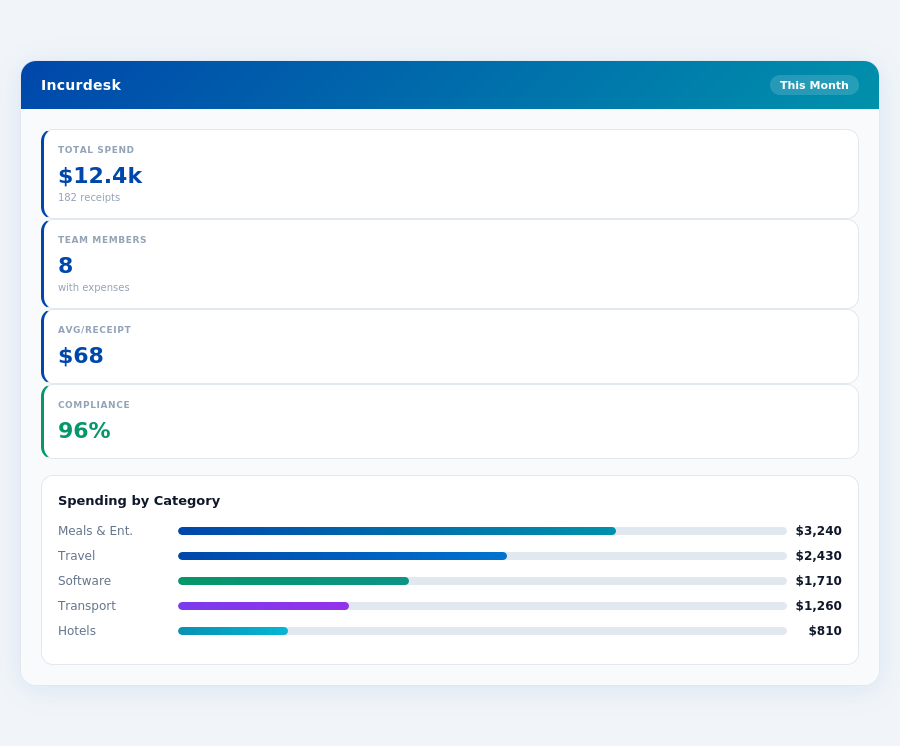
The Verdict
Who Should Use Incurdesk?
Incurdesk is specifically designed for manager-led teams consisting of 10 to 50 people, where efficient expense management is crucial for operational smoothness. Ideally suited for teams with frequent expenses, Incurdesk shines in sectors like travel, field operations, and consulting, where manual receipt tracking and approval processes can consume upwards of 4 hours a week per manager, translating to $10,900 annually in potential savings. For instance, a team of 20 in the consulting sector can save approximately $218,000 yearly by adopting Incurdesk's automated solutions.
Key Advantages for Target Teams
The platform's 15-minute setup process, offline receipt scanning capability, 1-click approval feature, and automatic policy enforcement make it an attractive solution for teams seeking to streamline their expense management without extensive IT involvement. These features are particularly beneficial for field teams, where internet connectivity might be intermittent, allowing for uninterrupted workflow. For example, a field team of 30 can reduce approval times from 12 minutes to just 8 seconds per receipt, significantly boosting productivity.
Travel teams also benefit greatly from Incurdesk's real-time spend dashboard, which provides visibility into expenditures before the month-end, helping in better financial planning. Consulting firms, with their complex expense policies, appreciate the platform's ability to enforce these policies automatically, flagging violations instantly. A consulting firm with 15 users can expect to reduce manual approval time by at least 75%, freeing up managers for strategic tasks.
- Travel Teams: Benefit from real-time spend tracking and offline receipt scanning, ideal for international trips with variable internet access.
- Field Teams: Utilize offline capabilities and 1-click approvals to manage expenses efficiently in the field, reducing delays by up to 90%.
- Consulting Firms: Leverage automatic policy enforcement for complex expense rules, ensuring compliance with minimal administrative overhead.
- Small to Medium Businesses (SMBs): Appreciate the scalability and cost-effectiveness of Incurdesk, with the Pro plan offering comprehensive features for growing teams at $19/user/month.
- Distributed Teams: Manage expenses centrally with Incurdesk's remote-friendly features, suitable for teams spread across different locations or working remotely.
- Teams Seeking AI-Driven Efficiency: Ideal for those looking to upgrade from manual processes to an AI-powered solution that learns and adapts to their approval patterns.
In comparison to competitors like Divvy, which targets a slightly larger market (20-49 employees) and offers a free plan or $5 per user/month for Divvy Pro, Incurdesk's tailored approach for 10-50 person teams, coupled with its robust AI features in the Enterprise plan ($39/user/mo), positions it as a premium solution for teams valuing advanced automation and adaptability. Incurdesk's setup, taking just 15 minutes, far exceeds Divvy's "Easy setup" in specificity and efficiency. While Divvy excels in user-friendly design and real-time spending visibility, Incurdesk's offline scanning and AI-driven autonomous approval mode cater to more complex, dynamic team needs.
Divvy's Strengths Acknowledged
Divvy indeed shines with its user-friendly design and mobile access, making it a great choice for many. Its 4.5/5 G2 score and 4.7/5 Capterra score are testaments to its ease of use. However, for manager-led teams of 10-50 people seeking robust expense management, Incurdesk's tailored features and efficiency gains make it the superior choice.
Incurdesk's setup process, taking just 15 minutes, far surpasses Divvy's "Easy setup" vagueness, providing immediate value. Incurdesk's impact is felt through significant time savings: 4.2 hours per week for managers, translating to $10,900 annually. This efficiency, coupled with achieving 96% compliance through automatic policy enforcement, positions Incurdesk as the go-to for teams seeking substantial operational improvements.
Why Incurdesk Wins for Teams of 10-50
The Incurdesk advantage becomes clear in its feature set and operational impact. Unlike Divvy, which can feel rigid for complex policies, Incurdesk offers flexible and learning AI-driven solutions. For example, its AI Agent learns approval patterns to act autonomously, a game-changer for busy managers. Here are key reasons Incurdesk stands out:
- Deep Savings: Recover $10,900/year per manager through automated processes, significantly more than generic expense trackers.
- Compliance Assurance: Achieve 96% compliance rate with automatic policy enforcement, reducing manual oversight burdens.
- Rapid Deployment: Up and running in 15 minutes, ensuring quick integration into existing workflows.
- Adaptive AI: AI suggestions and the autonomous AI Agent adapt to your team's unique needs, evolving with your approval patterns.
These points underscore Incurdesk's suitability for teams of 10-50, where efficiency, adaptability, and significant cost savings are paramount. Unlike Divvy, Incurdesk's enterprise-focused features like custom API and dedicated onboarding cater perfectly to the growing needs of such teams.
In conclusion, while Divvy excels in design and mobile access, Incurdesk's comprehensive feature set, substantial time and cost savings, and adaptability make it the ideal choice for manager-led teams of 10-50. Experience these benefits firsthand with a 30-day free trial, requiring no credit card.
What are the setup and trial differences between Incurdesk and Divvy for a 10-person team just starting out?Incurdesk promises a quick 15-minute setup process, coupled with a 30-day trial, allowing a 10-person team to rapidly integrate and fully test the service before committing. Divvy, while not specifying setup time, offers a free plan with limited features, which can be used indefinitely, but to access full features (Divvy Pro), a team would need to contact Divvy for a custom demo or trial, lacking the straightforward trial period Incurdesk provides. For small, agile teams, Incurdesk's immediate setup and clear trial can be more appealing for quick adoption and evaluation. This rapid onboarding can help teams like a 10-person startup to immediately track expenses without delays.
With Divvy, as a team grows from 10 to 50 users, the monthly cost for the Pro plan would increase linearly from $50 to $250, directly tied to the number of users. Incurdesk, with its flat pricing model, does not increase in cost with user growth within the specified bracket, providing a predictable expense for expense management itself. For a growing team, Incurdesk could save $200 in monthly costs at the 50-user mark compared to Divvy Pro. This scalability advantage makes Incurdesk more cost-effective for expanding teams, such as a growing agency that anticipates adding more staff.
A 30-person team seeking comprehensive features would likely opt for Divvy's Pro plan at $150/month ($5/user), as the free plan would lack necessary functionalities for a team of this size. Incurdesk, with its flat fee (assuming a competitive market price, e.g., around $100-$120 for the tier accommodating up to 50 users), could offer better value if its feature set is comparable or superior to Divvy Pro. The value proposition of Incurdesk for this team size hinges on the richness of its features versus the cost savings over Divvy. If Incurdesk's features meet or exceed Divvy Pro's, it would be the more economical choice, potentially saving $30-$50 per month. This could be particularly beneficial for a mid-sized business with fixed budgets for software subscriptions.
- Incurdesk vs emburse
- Incurdesk vs airbase
- Incurdesk vs brex
- Incurdesk vs abacus