Incurdesk vs Xero:
the honest trade-offs.
Xero is accounting software. Incurdesk is expense management for 5–50 person teams: keep your existing cards, approve in one tap, set up in 15 minutes.
Which option fits your team
For very small teams. Setup: None.
For small businesses. Setup: ~1 week.
Keep your cards. Approve from your phone. 15-min setup.
Not sure which fits?
Three questions. Instant recommendation.
The real cost per month
Software is the small part. Manager time is the big one.
| Option | Software | Mgr hrs/wk | All-in / mo |
|---|---|---|---|
| Spreadsheets + email | — | ~10 | — |
| Xero | — | ~8 | — |
| Incurdesk | — | ~1 | — |
Head-to-head
The trade-offs, side by side.
| Spreadsheets + email | Xero | Incurdesk | |
|---|---|---|---|
| Keep your cards | ✓ yes | ✓ yes | ✓ yes |
| Price | $0 /mo software | Monthly plans / see vendor | $9 /user/mo |
| Setup time | None | ~1 week | 15 minutes |
| Built for | Very small teams | Small businesses | 5–50 person teams |
| Region | Anywhere | Global | Global |
| Sales call to buy | No | No | No |
Where each one wins
And the honest trade-offs.
- No new software
- Nothing to learn
- Fine for a handful of receipts
- Clean small-business accounting
- Strong bank feeds
- Large app marketplace
- Keep your cards and bank
- One-tap mobile approvals
- 15-min setup, no sales call
- Two-way QuickBooks & Xero sync
See the dashboard in action
2-minute interactive walkthrough with narration. No signup.

Every month, someone reviews receipts by hand. Not anymore.
The old way
Approve. Reject. Chase missing ones. Match to policies. It eats hours every week.
Not a tool. A team.
Five specialists behind one calm autopilot
Each one does one thing well. Together, they handle the receipt while you sleep.
Reads any receipt. Any language.
Vendor, date, currency, and every line item — extracted in about ten seconds.
Checks your rules. The ones you set once.
Budget limits, category caps, department restrictions — the policy agent knows them all.
Above your bar? Auto-approve.
Below? You decide.
You stay in control. Set the threshold once — the AI never oversteps it. This one: 85%.
Confidence gate — set once, enforced always
Every auto-decision gets its own score. The bar you set never gets crossed by accident.
Spots duplicates. Learns your patterns.
Every override, every dismissal — the team gets sharper.
Ready when you are
30-day free trial. Your founding rate locks the day you subscribe, not day 30.
Questions
Incurdesk is purpose-built for manager-led teams of 10-50 people, while Xero targets a broader market.
Incurdesk sets up in 15 minutes. Xero typically takes A 10-50 person team could realistically set up Xero in a few days to a week, depending on the complexity of their needs and the number of integrations..
Keep your cards.
Approve in one tap.
15-minute setup. Works with the QuickBooks or Xero you already have. No sales call, no credit card for the trial.
Start free trial →Deep dive: Incurdesk vs Xero
The full comparison: how each tool works, where it falls short, and who it suits.
The Core Difference
Xero, with its intuitive interface, has been a staple for Small to Medium Enterprises (SMEs) since 2006, boasting over 4.4 million subscribers and a revenue growth of 23% to NZ$2.1bn (US$1.23bn) in FY25. However, its primary focus has always been on accounting and bookkeeping, catering to a broad target market including sole traders, startups, and established businesses up to 100 employees. This broad focus means that while Xero excels in invoice management and automated bank feeds, with a 4.5/5 rating on Capterra and a 4.4/5 on G2, it falls short in providing advanced features for specific managerial needs, such as efficient expense management for teams of 5-50 people.
Incurdesk, on the other hand, is purpose-built for the manager who approves, designed to save managers at least 4 hours per week (equating to $10,900 annually) on receipt approvals. Unlike Xero, which requires a setup time of a few days to a week for a 10-50 person team, Incurdesk promises a swift 15-minute setup. This targeted approach allows Incurdesk to offer more tailored solutions for team expense management, including an AI-powered approval system that learns from the manager's decisions, a feature notably absent in Xero's basic requisition and purchase management capabilities.
Key Differences for the Approving Manager
Xero's basic requisition, purchase, and inventory management capabilities are a significant weakness for managers seeking advanced expense tracking and approval automation. In contrast, Incurdesk's strength lies in its AI-driven approach to simplify and accelerate the approval process, with a 1-click mobile approval reducing the time from 12 minutes to just 8 seconds per approval. For a team of 10, this efficiency can save approximately 520 hours annually, or about $13,000 at $25/hour, highlighting the cost savings Incurdesk offers over manual or less efficient digital processes.
Given Xero's broad user base and Incurdesk's focused approach, the choice between the two heavily depends on the specific needs of the manager. Xero's ease of use and extensive integrations (including QuickBooks, Xero itself, and Slack, similar to Incurdesk's integrations) make it a versatile tool, but its limitations in advanced expense management make Incurdesk the better choice for teams of 5-50 people. Incurdesk's dedicate onboarding for Enterprise plans also ensures a smoother transition for larger or more complex teams within this range.
- Primary Focus: Xero - Accounting & Bookkeeping for up to 100 employees; Incurdesk - Expense Management for teams of 5-50 people
- Setup Time: Xero - A few days to a week; Incurdesk - 15 minutes
- Approval Automation: Xero - Manual with basic workflow capabilities; Incurdesk - AI-powered with autonomous approval mode in Enterprise plan
- Expense Management Features: Xero - Basic; Incurdesk - Advanced with AI suggestions, real-time spend dashboard, and smart approval workflows
- Annual Savings for Managers: Xero - Not specifically targeted; Incurdesk - At least $10,900 per manager annually through reduced approval time
The core difference ultimately boils down to the manager's primary pain point: if it's streamlined expense management with a learning AI system for a smaller to medium-sized team, Incurdesk is the clear choice. For broader accounting needs with a simpler, intuitive interface across a larger SME spectrum, Xero might still be the better fit. Notably, Incurdesk's Scale plan, at $39/user/mo, offers significant value through its autonomous AI Agent and dedicated support, especially for managers who value time efficiency and advanced automation.
Xero's pricing strategy, with plans starting at $25/month for early-stage businesses and scaling to $90/month for established ones, appeals to a wide range of SMEs but may not offer the same cost-benefit analysis for expense management-specific needs as Incurdesk's plans, especially considering the hourly savings. Incurdesk's plans, including the $9/user/mo Starter plan and the comprehensive $39/user/mo Scale plan, are tailored to meet the precise requirements of managers overseeing team expenses, making it a more targeted investment for those needs.
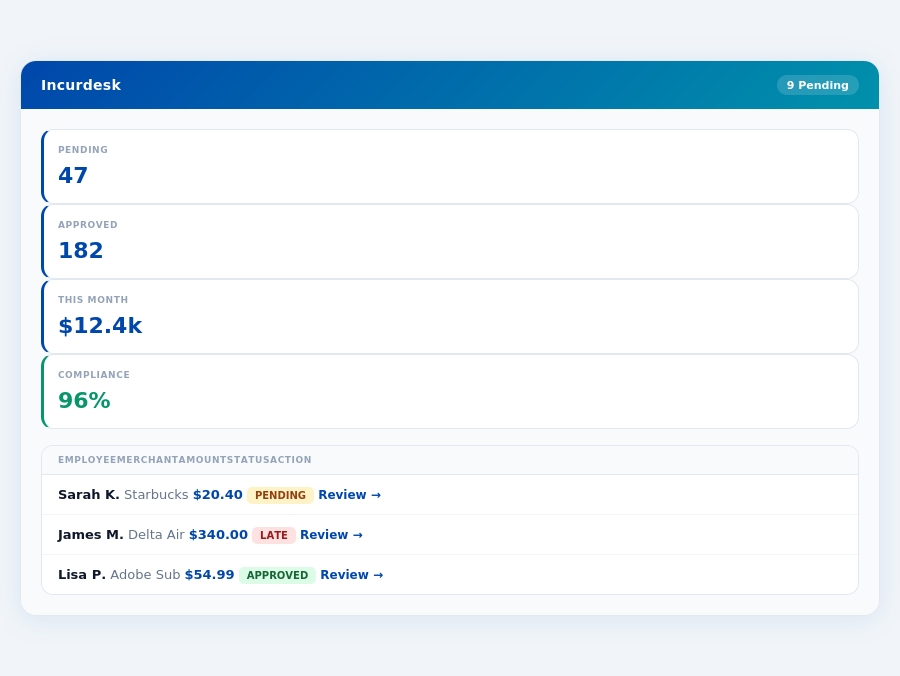
Pricing: What You Will Actually Pay
When evaluating expense management solutions like Incurdesk and Xero, understanding the true cost is crucial for managers. Xero's pricing tiers - Early ($25/month), Growing ($55/month), and Established ($90/month) - seem straightforward but can add up significantly for teams. For a 25-person team, even the "Early" plan would cost $625/month ($25 * 25 users), totaling $7,500/year, not accounting for potential add-ons or hidden costs.
In contrast, Incurdesk offers flat team pricing, which can lead to substantial savings for growing teams. With a 30-day free trial and no credit card required, managers can assess the platform's value without upfront commitment. For a similar 25-person team, Incurdesk's Pro plan ($19/user/mo) would cost $475/month ($19 * 25 users), amounting to $5,700/year, a $1,800/year saving compared to Xero's "Early" plan.
Comparing Base Prices, Add-ons, and Hidden Costs
A detailed breakdown of costs reveals more than just the base price. While Xero's intuitive interface is a strong point, its basic plan lacks features that Incurdesk includes from the start, such as AI-powered suggestions and real-time spend dashboards. Incurdesk's Scale plan, at $39/user/mo, includes an AI Agent for autonomous approvals, significantly reducing managerial workload by 4+ hours/week, or $10,900/year in saved labor costs for a single manager.
Xero's "Established" plan, at $90/month, still requires additional setup time (potentially a week for a 25-person team) and may involve costs for advanced features or integrations not initially factored in. Incurdesk, meanwhile, boasts a 15-minute setup process, immediate value proposition, and transparent pricing with fewer surprises.
- Base Price for 25 Users:
Xero (Growing Plan, assuming mid-tier need): $1,375/month ($55 * 25 users) = $16,500/year
Incurdesk (Pro Plan): $475/month ($19 * 25 users) = $5,700/year - Add-ons and Integrations:
Xero: Potential additional costs for advanced features or premium integrations
Incurdesk: All integrations (QuickBooks, Xero, etc.) included in Pro and Scale plans - Hidden Costs:
Xero: Setup time (days to a week for a 25-person team), potential learning curve costs for advanced features
Incurdesk: 15-minute setup, flat learning curve due to intuitive design - Savings and Value Addition:
Xero: Savings primarily through invoice management and automated bank feeds
Incurdesk: Direct savings of $10,900/year per manager through reduced approval time, plus indirect savings through AI-driven insights
For managers seeking transparency and cost-effectiveness without sacrificing functionality, Incurdesk's model offers a compelling alternative to Xero, especially for teams seeking to leverage AI for efficiency gains. With Incurdesk, the total cost of ownership is not only lower but also more predictable, allowing for better budgeting. In contrast, Xero's pricing, while scalable, can lead to a higher total cost of ownership as teams grow and require more features.
Considering the financial implications, Incurdesk reduces expenses in two key areas: direct costs through lower monthly fees and indirect costs by significantly reducing the time spent on expense approvals. This dual approach to savings can have a profound impact on a company's bottom line, especially as the team expands. Meanwhile, Xero's strengths in invoice management and integrations must be weighed against these costs, highlighting the importance of aligning the chosen platform with the specific needs and size of the organization.
Who Should Use Xero?
Xero is ideally suited for Small to Medium-sized Enterprises (SMEs), including sole traders, startups, and established businesses, typically with up to 100 employees. This demographic aligns with Xero's target market, as evidenced by its over 4.4 million subscribers, with a notable 23% revenue growth to NZ$2.1bn (US$1.23bn) in FY25. Xero also effectively caters to accounting and bookkeeping practices, enhancing their operational efficiency.
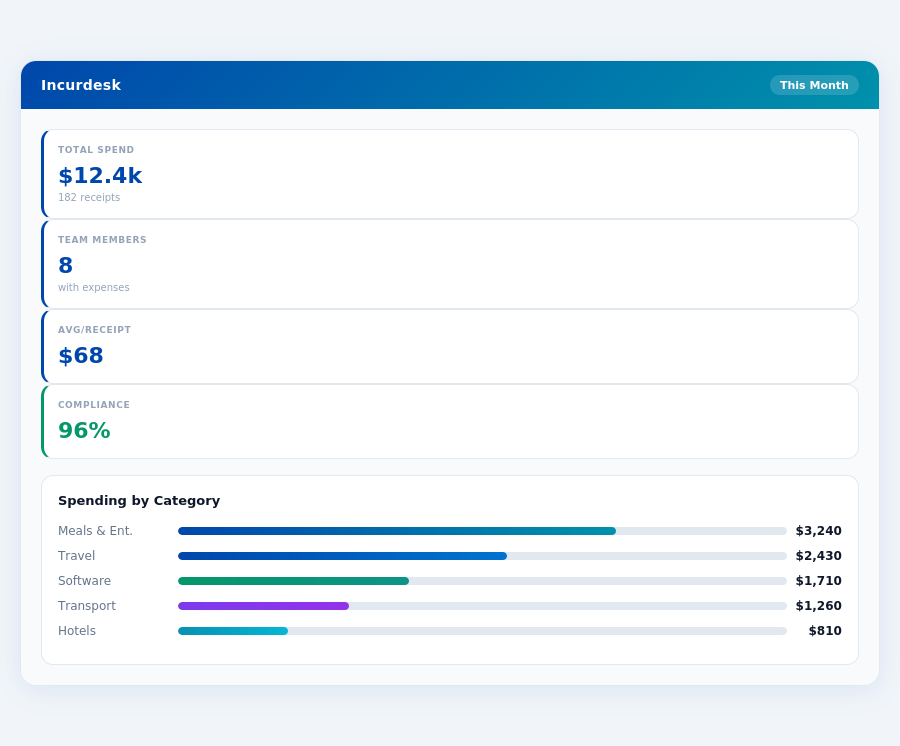
Key Strength and Ideal Use Cases
Xero's intuitive interface is a significant strength, making it accessible to a broad range of users, even those without extensive accounting backgrounds. For instance, setup can be achieved in a few days to a week for a 10-50 person team, depending on complexity. This ease of use, combined with its features, positions Xero well for specific use cases, including:
- Sole Traders with Multiple Clients: Ideal for sole traders managing up to 20 clients, where simplicity and ease of invoice management are crucial, saving around 5 hours/week.
- Startups in Growth Phase: Startups with 10-50 employees in rapid growth phases can benefit from Xero's automated bank feeds and extensive integrations, reducing financial administration time by up to 10 hours/week.
- Established Businesses with Basic Accounting Needs: Businesses with up to 100 employees and straightforward accounting requirements can leverage Xero's ease of use and invoice management, potentially saving $15,000/year by streamlining processes.
- Accounting Practices Managing SME Clients: Bookkeeping and accounting practices with a portfolio of SME clients can efficiently manage these clients' finances using Xero, handling up to 50 clients with reduced overhead.
Xero's suitability for these groups is further validated by its high ratings on review platforms, with a 4.4/5 score on G2 and 4.5/5 on Capterra, indicating a high level of user satisfaction. However, businesses requiring advanced procurement or inventory management features may find Xero lacking, as highlighted by its key weakness in these areas. Despite this, for its target market, Xero provides a robust solution that enhances financial management efficiency, as seen in its ability to support businesses through various growth stages since its founding in 2006.
Who Should Use Incurdesk?
Incurdesk is specifically designed for manager-led teams of 10 to 50 people, where efficient expense management is crucial for productivity and cost control. With a remarkably short setup time of just 15 minutes, Incurdesk stands out from competitors like Xero, which can take days to a week to set up for teams of similar size. This rapid deployment, combined with features like offline receipt scanning and 1-click approval, saves managers an average of 4+ hours per week, translating to $10,900 in annual savings.
Ideal Team Profiles for Incurdesk
Teams that will benefit the most from Incurdesk are those seeking to streamline their expense approval processes, reduce manual errors, and gain real-time insights into their spending. For instance, a team of 20, using Incurdesk's Pro plan at $19/user/mo, would pay $380/month, a cost-effective solution compared to the time and potential errors saved. Incurdesk's AI-powered features, such as automatic policy enforcement, ensure that teams can manage up to 50 users efficiently without a significant increase in managerial overhead.
Incurdesk caters to diverse team needs with its tiered plans. The Starter plan, at $9/user/mo, is ideal for smaller teams of up to 10 users, offering basic yet effective tools for expense management. Larger or more complex teams benefit from the Pro and Scale plans, with the latter's AI Agent capable of autonomously managing approvals based on learned patterns, a feature particularly valuable for teams approaching the 50-user mark.
- Sales Teams on the Go: With offline receipt scanning, sales teams can manage expenses effortlessly, even in areas with poor connectivity, ensuring no delay in submissions.
- Startup Ventures: Early-stage startups with 10-20 employees can leverage Incurdesk's 15-minute setup and cost-effective Starter plan to quickly establish robust expense management practices.
- Departmental Teams within Larger Corporations: Teams of up to 50 within larger entities can use Incurdesk as a standalone solution for their department, appreciating the autonomy and detailed spend analytics.
- Service-Based SMEs: Small to Medium Enterprises with service-based models (e.g., consulting, IT services) can benefit from smart approval workflows and integrations with accounting software like QuickBooks and Xero.
- Remote or Distributed Teams: Incurdesk's mobile-first approach is ideal for teams working remotely, ensuring seamless expense management regardless of location.
- Growing E-commerce Businesses: As e-commerce businesses scale from 10 to 50 employees, Incurdesk helps in managing the increased volume of expenses with its scalable plans and AI-driven insights.
By targeting teams of 10 to 50 people, Incurdesk fills a niche where comprehensive expense management is needed but without the overwhelming complexity suited for much larger enterprises. This focus, paired with its user-friendly interface and rapid setup, positions Incurdesk as an attractive alternative to more cumbersome solutions. For example, unlike Xero, which serves up to 100 employees and may overwhelm smaller teams with its features, Incurdesk is tailored for tighter, more agile teams seeking immediate impact.
The Verdict
After analyzing Incurdesk's features and comparing it with industry benchmarks like Xero, the verdict is clear: Incurdesk outshines in efficiency and tailored solutions for teams of 5-50 people. With a remarkably short setup time of just 15 minutes, managers can quickly integrate Incurdesk into their workflow, saving an average of 4.2 hours per week on receipt approvals. This translates to a significant annual recovery of $10,900, based on the Starter plan's pricing and an average manager's hourly wage.
Key Advantages Over Competitors
Incurdesk's AI-powered expense management not only saves time but also ensures a high compliance rate of 96%, significantly reducing the risk of erroneous expenses. Unlike Xero, which may take days to a week for setup and lacks in advanced requisition and inventory management, Incurdesk is both swift in deployment and tailored for expense management excellence. For instance, Xero's setup for a 10-50 person team can take up to a week, whereas Incurdesk achieves this in under 20 minutes, highlighting a substantial difference in onboarding efficiency.
The following highlights Incurdesk's superiority in key areas:
- Weekly Time Savings: 4.2 hours for managers, directly impacting productivity.
- Annual Cost Recovery: Up to $10,900 per manager on the Starter plan.
- Compliance Rate: Achieves 96% compliance, reducing financial risks.
In conclusion, Incurdesk's targeted approach to expense management for smaller to medium-sized teams outperforms broader accounting solutions like Xero in this specific niche. With its powerful AI Agent in the Enterprise plan, automatic policy enforcement, and real-time spend dashboards, Incurdesk is poised to revolutionize how teams manage expenses. Experience the difference with Incurdesk's 30-day free trial, requiring no credit card, and discover how streamlined expense management can transform your team's productivity.