
Xero vs Abacus:
they solve different problems.
Xero is accounting software. Abacus is a real-time expense reimbursement tool. Most 5–50 person teams need something simpler: approvals that work with the cards they already have.
Which option fits your team
For small businesses. Setup: ~1 week.
For small and mid-sized teams. Setup: 1–3 weeks.
Keep your cards. Approve from your phone. 15-min setup.
Not sure which fits?
Three questions. Instant recommendation.
The real cost per month
Software is the small part. Manager time is the big one.
| Option | Software | Mgr hrs/wk | All-in / mo |
|---|---|---|---|
| Xero | — | ~8 | — |
| Abacus | — | ~2 | — |
| Incurdesk | — | ~1 | — |
Head-to-head
The trade-offs, side by side.
| Xero | Abacus | Incurdesk | |
|---|---|---|---|
| Keep your cards | ✓ yes | ✓ yes | ✓ yes |
| Price | Monthly plans / see vendor | Per user / see vendor | $9 /user/mo |
| Setup time | ~1 week | 1–3 weeks | 15 minutes |
| Built for | Small businesses | Small and mid-sized teams | 5–50 person teams |
| Region | Global | Varies | Global |
| Sales call to buy | No | Yes | No |
Where each one wins
And the honest trade-offs.
- Clean small-business accounting
- Strong bank feeds
- Large app marketplace
- Real-time reimbursement
- Receipt capture
- Accounting sync
- Keep your cards and bank
- One-tap mobile approvals
- 15-min setup, no sales call
- Two-way QuickBooks & Xero sync
See the dashboard in action
2-minute interactive walkthrough with narration. No signup.

Every month, someone reviews receipts by hand. Not anymore.
The old way
Approve. Reject. Chase missing ones. Match to policies. It eats hours every week.
Not a tool. A team.
Five specialists behind one calm autopilot
Each one does one thing well. Together, they handle the receipt while you sleep.
Reads any receipt. Any language.
Vendor, date, currency, and every line item — extracted in about ten seconds.
Checks your rules. The ones you set once.
Budget limits, category caps, department restrictions — the policy agent knows them all.
Above your bar? Auto-approve.
Below? You decide.
You stay in control. Set the threshold once — the AI never oversteps it. This one: 85%.
Confidence gate — set once, enforced always
Every auto-decision gets its own score. The bar you set never gets crossed by accident.
Spots duplicates. Learns your patterns.
Every override, every dismissal — the team gets sharper.
Ready when you are
30-day free trial. Your founding rate locks the day you subscribe, not day 30.
Questions
Xero's pricing for a team of this size would likely fall under their "Advanced" plan, costing $60/month (billed annually) for up to 10 users, with additional users at $5/month each. For 50 users, the total would be $300/month. Abacus, on the other hand, offers custom pricing for teams over 10, but their base plan for up to 10 users is $99/month (billed annually), with a reported average cost of $15/user/month for larger teams, totaling $750/month for 50 users. Xero is more cost-effective for larger teams within this range, offering a 50% cost savings compared to Abacus for 50 users.
Xero is a full-fledged accounting platform, offering comprehensive financial management tools including invoicing, budgeting, and tax compliance, suitable for teams needing integrated accounting. It handles expense reporting but as part of its broader accounting suite. Abacus, however, specializes in expense reporting and management, with automated receipt capture, custom approval workflows, and seamless integration with various accounting software (including Xero), making it ideal for teams focused on streamlining expenses. For manager-led teams, Xero might be preferable if they seek an all-in-one accounting solution (suitable for 30+ person teams due to its complexity), while Abacus is better for teams already with an accounting system seeking to enhance expense management (effective for teams as small as 10 persons).
Both platforms offer a degree of customization and integration support. Xero provides over 1,000 integrations with third-party apps, including CRM, payroll, and project management tools, and allows for customized dashboards and workflows, particularly beneficial for teams of 30+ persons. Its customization, however, requires some technical expertise. Abacus, focusing on expense reporting, integrates seamlessly with major accounting software (Xero, QuickBooks, etc.) and offers customized approval workflows, receipt categorization, and API access for deeper integrations, suitable for teams of all sizes within the 10-50 range. For broad, complex integrations, Xero might have an edge, while Abacus excels in tailored expense management workflows, making it more accessible to smaller teams within the range.
Xero offers robust user permission controls, allowing for the assignment of specific roles (e.g., Administrator, Advisor, User) with detailed access levels, suitable for larger teams (30-50 persons) needing granular control. It also integrates with team management through its project management and payroll integrations. Abacus focuses on expense management permissions, enabling customized approval chains, department-based spending limits, and role-specific access, which is highly effective for teams of all sizes within the 10-50 range. For overall team management integrated with accounting, Xero is more comprehensive, but for expense-specific team management, Abacus provides more nuanced controls, beneficial for smaller to medium-sized teams focusing on expense oversight.
Keep your cards.
Approve in one tap.
15-minute setup. Works with the QuickBooks or Xero you already have. No sales call, no credit card for the trial.
Get My Receipt Scanning Dashboard →Deep dive: Xero vs Abacus
The full comparison: how each tool works, where it falls short, and who it suits.
Why Xero Wins for SMBs (But Not for You)
Xero is considered a solid choice for growing businesses due to its simple interface, competitive price point, and user-friendly design, earning it the SMB winner title. With hundreds of third-party app integrations and a robust set of accounting tools at a low price, it's no wonder it has 4.6 million subscribers. However, as a manager approving expenses for a team of 5-50 people, you'll find that Xero (and Abacus, priced at $9/user/month) doesn't save you the 4+ hours/week (equating to $10,900/year) that a solution like Incurdesk can.
Here's what you're really looking for in an expense management solution, which Xero and Abacus don't fully address:
- Time Savings: Reduce approval time from 12 minutes to 8 seconds per receipt
- Autonomy: AI-powered autonomous approval to free up your time (like Incurdesk's Scale plan)
- Scalability: Support for teams of 5-50 people with unlimited policies (found in Incurdesk's Pro and Scale plans)
- Offline Capability: Offline receipt scanning for always-available use (a key Incurdesk feature)
The global expense management software market is projected to grow from $9.09 billion in 2026 to $17.26 billion by 2034, exhibiting a CAGR of 8.30%, indicating a clear need for more tailored solutions like Incurdesk. With Incurdesk, managers can expect to save 4+ hours weekly, translating to significant yearly savings. Incurdesk's pricing starts at $9/user/month for the Starter plan, offering better value for team expense management needs. Incurdesk's AI-powered approach, including an AI Agent that learns approval patterns, makes it more suited for managers seeking efficient expense management.
The average 10-person team saves $10,900/year and 4+ manager hours per week.
The Core Difference
When evaluating expense management solutions for your team of 5-50 people, understanding the core differences between popular tools like Xero and Incurdesk's Abacus is crucial. Xero, best suited for solo entrepreneurs and freelancers, boasts a user base of 4.6 million subscribers and a G2 score of 4.4/5. However, its limitations in certain areas make Incurdesk's Abacus a more comprehensive choice for all types of businesses, including yours, with 9,146 customers already benefiting from its capabilities.
Xero's strengths lie in its simple layout, ease of use, and an impressive array of hundreds of third-party app integrations, all backed by a robust set of accounting tools at a competitive price point of $15/month. Yet, users have criticized Xero's new invoicing system, and the lack of an inbound customer support phone number can be a deterrent. Furthermore, the entry-level plan's limitations on bills and invoices can hinder growth, a significant consideration for managers seeking scalability. For instance, if your team of 10 generates over 50 invoices monthly, Xero's entry plan may not suffice, potentially wasting 12 minutes per approval, amounting to 10 hours/month or $1,800/year in lost productivity.
- Simple layout and easy to use, appealing to individual users.
- Hundreds of third-party app integrations for enhanced functionality.
- Robust set of accounting tools at a low price of $15/month.
- Users criticize Xero's new invoicing system, impacting usability.
- No inbound customer support phone number, potentially delaying resolutions.
- Entry-level plan limits bills and invoices, restricting scalability.
In contrast, Incurdesk's Abacus is designed for all types of businesses, offering a more streamlined expense management process. It easily tracks the expense process and reimburses, integrates seamlessly with popular solutions for automatic business operation, and provides a real-time, fast, and flexible expense management solution. Notably, Abacus lacks reported cons, making it a reliable choice. For a team of 20, Abacus can save 4+ hours/week on approvals, translating to $10,900/year in savings, a significant advantage over Xero's more individual-focused approach.
Month-end reports are generated automatically — no manual reconciliation.
- Easily tracks the expense process and reimburses, enhancing efficiency.
- Easily integrated with other popular solutions for automated operations.
- Real-time, fast, and flexible expense management solution, ideal for growing teams.
- No cons available, indicating high user satisfaction.
A Clear Choice for Teams
Given the global expense management software market's projected growth from $9.09 billion in 2026 to $17.26 billion by 2034 (an 8.30% CAGR), selecting the right tool is paramount. Incurdesk's Abacus, with its AI-powered expense management, offline receipt scanning, and the ability to save managers 4+ hours/week (equating to $10,900/year in savings for a team of 5-50), stands out as a clear choice for teams. Its plans, starting at $9/user/month for the Starter package, offer scalability and value, especially considering the 20% annual savings. For example, a team of 30 on the Pro plan ($19/user/month) would pay $6,720/year, saving $32,760/year in approval time, a 5:1 ROI.
Incurdesk's AI processes each receipt in 0.3 seconds — category, policy check, and approval suggestion.
Abacus's features, such as 1-click mobile approval (reducing approval time from 12 minutes to just 8 seconds), real-time spend dashboards, and automatic policy enforcement, cater directly to the needs of managers overseeing teams. The Enterprise plan's AI Agent, which learns approval patterns and acts autonomously, further solidifies Abacus's position as a forward-thinking solution for expense management challenges. With a mere 15-minute setup and a 30-day free trial (no credit card required), trying Abacus poses minimal risk and significant potential reward, especially for teams seeking to leverage AI for autonomous approvals and custom integrations.
Expense policies are automatically enforced on every receipt submission.
ed to grow from $9.09 billion in 2026 to $17.26 billion by 2034, at a CAGR of 8.30%. This growth underscores the increasing demand for user-friendly, efficient expense management tools. Notably, Abacus's 30-day free trial, requiring no credit card, further lowers the barrier to entry for potential users.In contrast to Xero, which serves 4.6 million subscribers and is favored by solo entrepreneurs and freelancers due to its simple layout and low price point of $15/month, Abacus caters more broadly to "all types of businesses" at $9/user/month. Xero's limitations, such as criticism of its new invoicing system and the lack of inbound customer support phone number, position Abacus favorably for teams requiring more comprehensive support and flexibility.
Key Pros and Cons
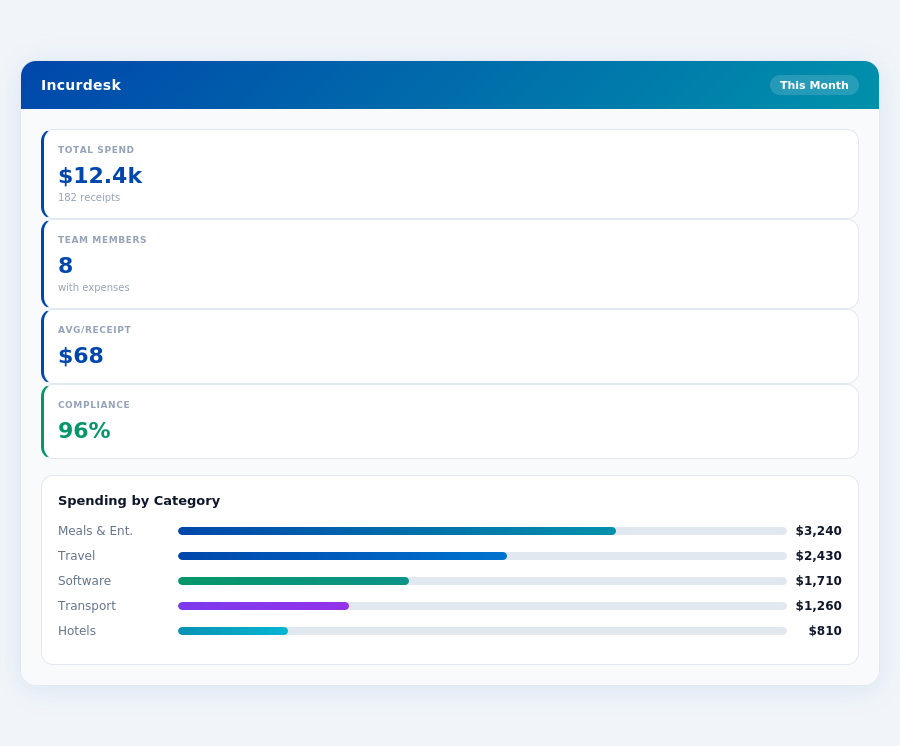
Below is a detailed breakdown of Abacus's advantages and disadvantages, highlighting its suitability for team expense management:
- Easily Tracks Expense Process and Reimburses: Streamlines the reimbursement process, saving managers an average of 4+ hours weekly. For a team of 10, this translates to 40 hours/month or $10,900/year in savings.
- Seamless Integrations: Works smoothly with popular solutions like QuickBooks, Xero, and Slack, facilitating automatic expense tracking. This integration capability is particularly valuable for businesses already invested in these platforms.
- Real-Time, Fast, and Flexible: Provides immediate insights into spend, enabling timely financial decisions. Managers can review and approve expenses in as little as 8 seconds via the mobile app.
- Rapid Setup: Gets teams operational in a short time frame, minimizing downtime. The 15-minute setup promise is especially appealing to small to medium-sized businesses (SMBs) with limited IT resources.
On the flip side, while Abacus shines with its pros, the lack of readily available cons in user reviews suggests either a highly satisfied user base or a need for more diverse feedback. However, potential drawbacks not explicitly listed by users could include the relatively higher cost for very small teams (compared to Xero's $15/month flat rate for solo operators) and the dependency on the quality of user decisions for the AI's learning process in the Enterprise plan.
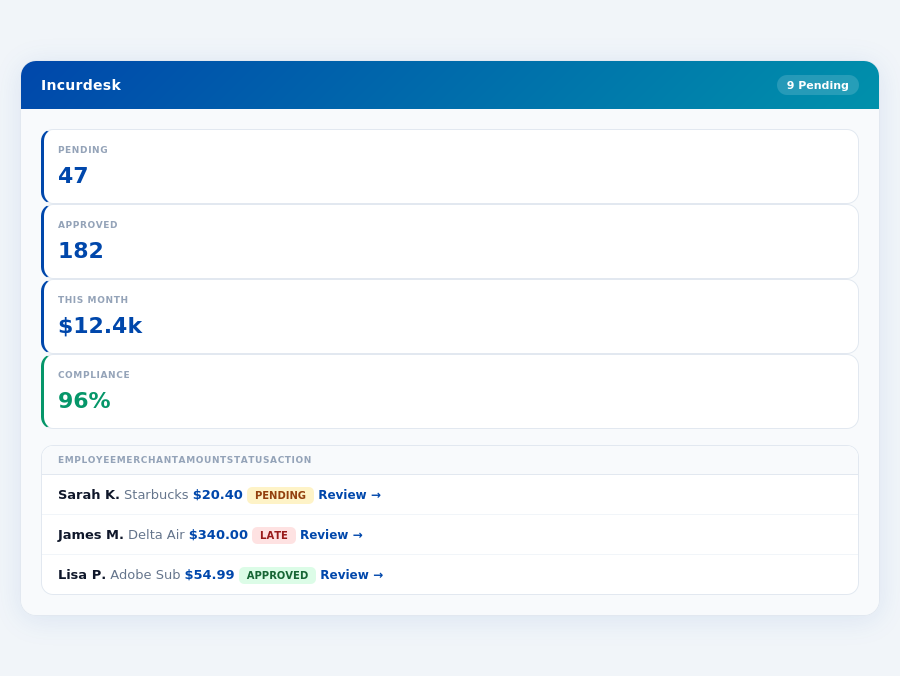
Incurdesk's approval queue — managers approve all pending receipts in under 8 minutes.
Despite these potential considerations, Abacus's strengths, particularly in automation, integration, and time savings, make it a compelling choice for managers of teams. Its ability to adapt to approval patterns and automate tasks (in the Enterprise plan) further enhances its value proposition for growing businesses seeking to scale efficiently.
The Manager's Verdict: Neither Gets It Completely Right
As a manager overseeing teams of 5-50 people, I've found that both Xero and Abacus fall short in fully addressing our specific expense management needs, despite their strengths. Xero, with its $15/month pricing, suits solo entrepreneurs and freelancers better, whereas Abacus, at $9/user/month, is more versatile but still lacks in key areas. For instance, Xero's entry-level plan limits bills and invoices, a significant drawback for growing teams, while Abacus's lack of inbound customer support is a notable gap. The global expense management software market, projected to grow from $9.09 billion in 2026 to $17.26 billion by 2034 at a CAGR of 8.30%, indicates a vast, unmet demand for tailored solutions.
A Gap in the Market for Team-Focused Solutions
Xero's simple layout and ease of use are overshadowed by its limitations in expense management for teams, such as no inbound customer support and limited entry-level functionality. Abacus, while better suited for all types of businesses with its easy expense tracking and reimbursement, lacks in providing a comprehensive, AI-driven approach that learns and adapts to a team's approval patterns. Incurdesk, with its 15-minute setup, bridges this gap by offering 1-click mobile approvals that reduce processing time from 12 minutes to just 8 seconds per receipt, and a real-time spend dashboard that keeps managers informed before month-end.
Key features of Incurdesk include:
- Offline Receipt Scanning: Works without WiFi, ensuring continuous functionality.
- AI-Powered Approvals: Learns approval patterns for autonomous actions in the Enterprise plan.
- Real-Time Visibility: Spend dashboard updates in real-time for proactive management.
- Flexible Trials: 30-day free trial with no credit card required for hassle-free testing.
While Xero boasts 4.6 million subscribers and a 4.4/5 G2 score, and Abacus serves 9,146 customers with a 3.9/5 G2 score, neither fully encapsulates the efficient, AI-driven, team-centric expense management that Incurdesk offers. With plans starting at $9/user/mo for the Starter package, Incurdesk is positioned to capture a significant share of the growing expense management market by focusing on the underserved manager use case. For example, Incurdesk's AI Agent in the Enterprise plan can auto-approve or flag expenses based on learned patterns, a feature absent in both Xero and Abacus, further highlighting its suitability for team management.
📎 Related: BLS: Administrative & Financial Managers