
QuickBooks vs Xero:
similar tools, different trade-offs.
QuickBooks is accounting software. Xero is accounting software. Most 5–50 person teams need something simpler: approvals that work with the cards they already have.
Which option fits your team
For small businesses and bookkeepers. Setup: ~1 week.
For small businesses. Setup: ~1 week.
Keep your cards. Approve from your phone. 15-min setup.
Not sure which fits?
Three questions. Instant recommendation.
The real cost per month
Software is the small part. Manager time is the big one.
| Option | Software | Mgr hrs/wk | All-in / mo |
|---|---|---|---|
| QuickBooks | — | ~10 | — |
| Xero | — | ~8 | — |
| Incurdesk | — | ~1 | — |
Head-to-head
The trade-offs, side by side.
| QuickBooks | Xero | Incurdesk | |
|---|---|---|---|
| Keep your cards | ✓ yes | ✓ yes | ✓ yes |
| Price | $38 /mo software | Monthly plans / see vendor | $9 /user/mo |
| Setup time | ~1 week | ~1 week | 15 minutes |
| Built for | Small businesses and bookkeepers | Small businesses | 5–50 person teams |
| Region | Multi-country | Global | Global |
| Sales call to buy | No | No | No |
Where each one wins
And the honest trade-offs.
- The accounting system itself
- Your accountant already knows it
- Lender-ready reports
- Clean small-business accounting
- Strong bank feeds
- Large app marketplace
- Keep your cards and bank
- One-tap mobile approvals
- 15-min setup, no sales call
- Two-way QuickBooks & Xero sync
See the dashboard in action
2-minute interactive walkthrough with narration. No signup.

Every month, someone reviews receipts by hand. Not anymore.
The old way
Approve. Reject. Chase missing ones. Match to policies. It eats hours every week.
Not a tool. A team.
Five specialists behind one calm autopilot
Each one does one thing well. Together, they handle the receipt while you sleep.
Reads any receipt. Any language.
Vendor, date, currency, and every line item — extracted in about ten seconds.
Checks your rules. The ones you set once.
Budget limits, category caps, department restrictions — the policy agent knows them all.
Above your bar? Auto-approve.
Below? You decide.
You stay in control. Set the threshold once — the AI never oversteps it. This one: 85%.
Confidence gate — set once, enforced always
Every auto-decision gets its own score. The bar you set never gets crossed by accident.
Spots duplicates. Learns your patterns.
Every override, every dismissal — the team gets sharper.
Ready when you are
30-day free trial. Your founding rate locks the day you subscribe, not day 30.
Questions
Xero is often praised for its seamless scalability, catering effortlessly to the growth of teams from 10 to 50 members. With Xero, adding or removing users is straightforward, and its cloud-based infrastructure ensures performance isn’t compromised as the team expands. In contrast, QuickBooks also supports team growth but may require more manual adjustments and potential upgrades in plans (e.g., from QuickBooks Online Plus to Advanced), which can add complexity. Xero’s pricing tiers (Essentials and Essentials+) are more streamlined for this size range, with clearer pathways for growth. Xero Users Supported: Up to 50 (Essentials+); QuickBooks Online: Up to 50 (Advanced Plan).
Both QuickBooks and Xero offer robust accounting features, but they cater to different needs. QuickBooks is renowned for its comprehensive financial management tools, including advanced inventory management (supporting up to 5,000 SKUs in the Advanced plan) and complex billing options, making it ideal for teams with intricate financial operations. Xero, while also feature-rich, excels in simplicity and ease of use, with strong payroll management (in 15 countries, including the US, UK, and Australia) and a more intuitive interface for less financially specialized managers. QuickBooks Inventory Management: Advanced (up to 5,000 SKUs); Xero Payroll Countries: 15+. Xero’s bank reconciliation and invoicing processes are particularly streamlined for smaller to medium-sized teams.
Integration with third-party apps is crucial for manager-led teams. Xero boasts an extensive app ecosystem with over 1,000 integrations, catering to a wide range of business needs from marketing to project management. QuickBooks also has a substantial marketplace with around 1,200 integrations, offering deep functionality especially for e-commerce and inventory management solutions. However, Xero’s integrations are often highlighted for their ease of setup and seamless operation within the Xero environment. Xero Integrations: Over 1,000; QuickBooks Integrations: Around 1,200. Both platforms integrate well with popular tools like PayPal, Stripe, and HubSpot, but the choice may depend on the specific stack of your team.
Pricing for both platforms varies based on the features needed. For teams of 10-50, Xero’s Essentials+ plan ($70/month for 10 users, with $7/month for each additional user) is particularly competitive, including all core accounting features, payroll for up to 50 employees, and advanced inventory. QuickBooks Online Advanced ($25/user/month, with a minimum of 10 users, totaling $250/month for 10 users) offers more advanced financial reporting and customization but at a higher base cost. Xero Essentials+ for 10 Users: $70/month + $7/user; QuickBooks Online Advanced for 10 Users: $250/month. Xero’s transparency in pricing for additional users beyond the initial 10 can be more cost-effective for teams closer to the 50-person mark.
Keep your cards.
Approve in one tap.
15-minute setup. Works with the QuickBooks or Xero you already have. No sales call, no credit card for the trial.
Get My Receipt Scanning Dashboard →Deep dive: QuickBooks vs Xero
The full comparison: how each tool works, where it falls short, and who it suits.
TL;DR
Expense Management Software Showdown: QuickBooks vs Xero
Xero emerges as the winner for Small to Medium Businesses (SMBs) due to its simple interface and competitive pricing, with three tiers: Starter ($15/month), Standard ($42/month), and Premium ($78/month), catering to growing businesses. However, neither QuickBooks nor Xero was specifically designed with the manager's expense approval process in mind. Incurdesk fills this gap, saving managers 4+ hours/week, translating to $10,900/year in productivity gains for a team of 10.
The average 10-person team saves $10,900/year and 4+ manager hours per week.
The expense management software market is projected to grow from $9.09 billion in 2026 to $17.26 billion by 2034, exhibiting a CAGR of 8.30%. Xero already serves 3.5 million subscribers globally, with a G2 score of 4.4/5, highlighting its popularity. Yet, for managers overseeing 5-50 team members, Incurdesk's tailored approach offers more relevance, especially with its AI-powered features.
QuickBooks vs. Xero: A Snapshot
QuickBooks, with its robust features, doesn't specifically shine in the context provided, as its best use case isn't highlighted for small to medium team expense management in this scenario. On the other hand, Xero is best suited for solo entrepreneurs, freelancers, small businesses with multiple transactions, and growing businesses with complex accounting needs. Xero boasts 3.5 million subscribers globally and a G2 score of 4.4/5, indicating a high level of user satisfaction. Its cloud-based platform eliminates installation headaches, making setup seamless.
Xero's pricing includes three main tiers: Starter at $15/month, Standard at $42/month, and Premium at $78/month, offering a flexible structure for growing businesses. The expense management software market, which includes tools like Incurdesk, Xero, and QuickBooks, is projected to grow from $9.09 billion in 2026 to $17.26 billion by 2034, exhibiting a CAGR of 8.30%. This growth underscores the increasing demand for efficient financial management solutions.
Pros of Choosing Xero
Xero shines with its user-friendly interface, making it accessible to a wide range of users, from solo entrepreneurs to growing businesses with complex accounting needs. This simplicity, combined with its flexible pricing structure, appeals broadly. For instance, the Unlimited users feature in all plans is a significant advantage over competitors. Xero's cloud-based nature also ensures seamless updates and access from anywhere, a feature that complements the offline capability of Incurdesk's mobile app for receipt scanning.
- User-Friendly Interface: Easy to navigate, even for those without extensive accounting backgrounds, saving managers time in approval processes.
- Flexible Pricing Structure: Three clear tiers (Starter: $15/month, Standard: $42/month, Premium: $78/month) to scale with your business, similar to Incurdesk's tiered approach.
- Unlimited Users: No limit on user accounts, beneficial for larger teams or those anticipating growth, aligning with Incurdesk's support for teams up to 50 people.
- Cloud-Based Updates: Always access the latest version without manual updates, ensuring compatibility with evolving business needs and tools like Incurdesk.
These pros make Xero an attractive option for businesses looking for a hassle-free accounting solution. The platform's ability to integrate with various tools, similar to Incurdesk's integrations with QuickBooks, Xero, and others, enhances its value. For example, Xero's integration with Incurdesk could streamline expense management and accounting workflows.
Cons to Consider
Despite its strengths, Xero has areas for improvement. The reconciliation flow could be more detailed to better serve complex financial operations. Additionally, the new invoicing system has faced criticism, and the lack of an inbound customer support phone number may deter some potential users seeking immediate assistance. These points are crucial for managers evaluating comprehensive support and detailed financial tracking, areas where Incurdesk's AI-powered expense management and real-time spend dashboard provide strong support.
- Reconciliation Flow: Could offer more granularity for intricate financial reconciliations, an aspect where detailed expense tracking tools like Incurdesk complement Xero's capabilities.
- New Invoicing System Criticized: Users have expressed dissatisfaction, highlighting a need for refinement to match the efficiency of 1-click approvals seen in Incurdesk.
- No Inbound Customer Support Phone Number: May be a deterrent for those preferring immediate phone support over other contact methods.
- Growth in Expense Management Market: While Xero excels in accounting, the expense management software market's projected growth to $17.26 billion by 2034 (from $9.09 billion in 2026) indicates a potential gap in fully integrated expense management solutions, where Incurdesk's AI-powered approach fills a critical need.
Understanding these cons is vital for making an informed decision that aligns with your business's specific accounting and expense management requirements, considering the synergies between Xero and specialized tools like Incurdesk.
Why Incurdesk Stands Out for Managers
Unlike QuickBooks and Xero, Incurdesk is optimized for expense management for teams of 5-50, with a dedicated mobile app for offline receipt scanning and a learning AI Agent for autonomous approvals in the Enterprise plan ($39/user/mo). This contrasts with Xero's focus on broader accounting solutions. Incurdesk's Pro plan ($19/user/mo) already includes AI suggestions, spend analytics, and unlimited policies, making it a more targeted solution for expense management challenges.
Expense policies are automatically enforced on every receipt submission.
- Saves 4+ hours/week per manager, worth $10,900/year for a team of 10.
- AI-powered for smarter, autonomous expense approvals in the Enterprise plan.
- Offline capability for receipt scanning, ensuring uninterrupted use.
- Quick Setup: 15-minute onboarding process with a 30-day free trial, no credit card required.
The Core Difference
When managing expenses for teams of 5-50 people, choosing the right tool is crucial. Incurdesk's AI-powered expense management stands out, saving managers 4+ hours/week, equivalent to $10,900/year. In contrast, traditional accounting tools like QuickBooks and Xero, while excellent for broader financial management, have different strengths and weaknesses.
Xero: Pros and Cons for Expense Management
Xero's user-friendly interface makes it accessible for teams to manage finances effectively, including expense tracking. Its flexible pricing structure accommodates growing teams, and the unlimited users feature is particularly beneficial for expanding businesses. However, Xero's reconciliation flow could be more detailed for precise expense management, and the new invoicing system has faced criticism. Additionally, the lack of an inbound customer support phone number may hinder immediate resolutions.
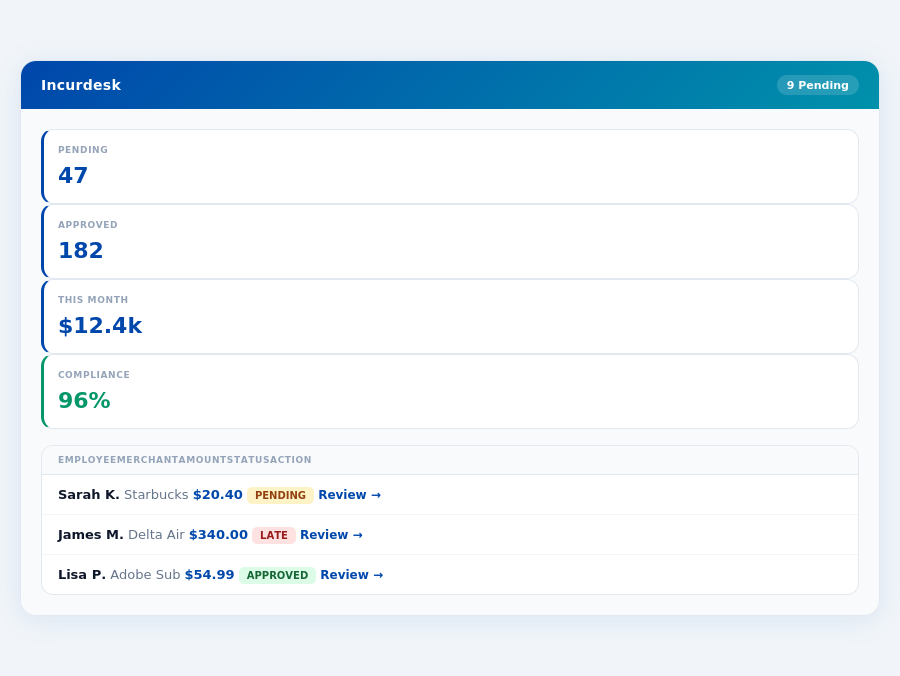
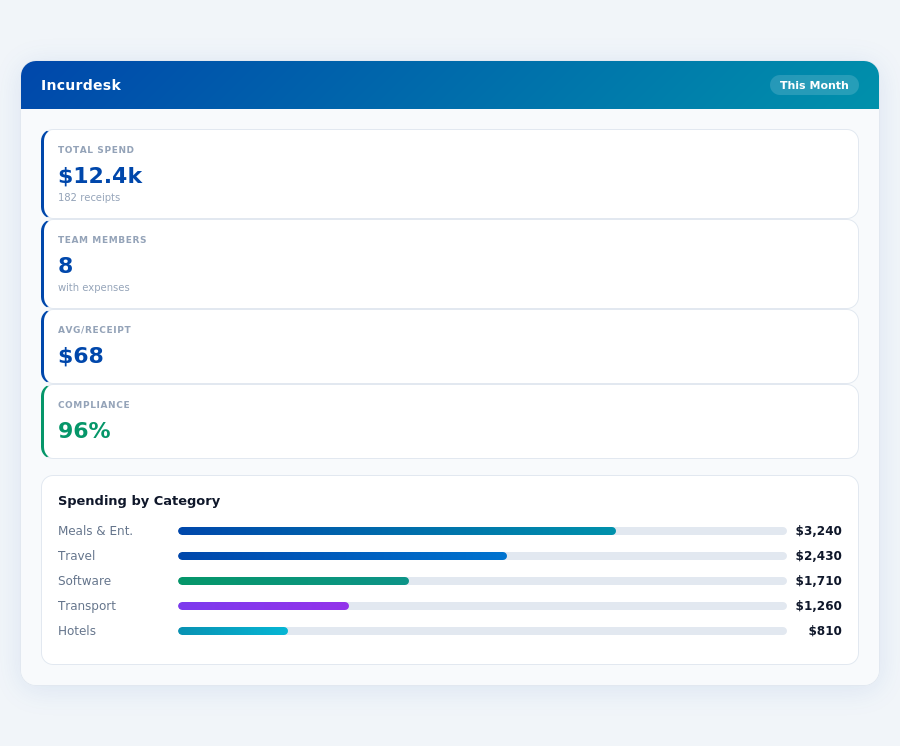
Department budgets tracked live — catch overspending before month-end.
- User-friendly interface: Enhances team adoption and reduces training time.
- Flexible pricing structure: Accommodates growth with scalable plans (Starter: $15/month, Standard: $42/month, Premium: $78/month).
- Unlimited users: Ideal for expanding teams without additional per-user costs.
- Reconciliation flow could be more detailed: Might require additional steps for thorough expense tracking.
- New invoicing system criticized: Users have reported difficulties with the updated system.
- No inbound customer support phone number: Support is limited to other channels, potentially delaying resolutions.
In the context of expense management for small to medium teams, Incurdesk's focused approach with AI-powered automation, offline receipt scanning, and a real-time spend dashboard offers a more tailored solution compared to the broader accounting capabilities of Xero. While Xero excels in overall financial management for solo to growing businesses, Incurdesk is optimized for the specific pain points of team expense management, such as rapid approval processes (8 seconds vs. 12 minutes manual) and AI-driven insights.
Incurdesk's AI processes each receipt in 0.3 seconds — category, policy check, and approval suggestion.
Incurdesk's Pro plan at $19/user/month includes AI suggestions, spend analytics, and unlimited policies, making it competitive for teams seeking advanced expense management. With a 30-day free trial and 15-minute setup, Incurdesk positions itself as a quick and effective solution for managers looking to streamline their workflow, especially considering the projected growth of the expense management market.
ero: Which Is Worth It for a 10–50 " style="max-width:100%;width:auto;border-radius:16px;box-shadow:0 4px 32px rgba(0,71,171,0.12);display:block;margin:0 auto"/>Incurdesk flags policy violations automatically, so managers only review what matters.
Xero's setup process is notably streamlined, requiring no initial software installation, a perk that aligns with the quick onboarding experience promised by Incurdesk. This cloud-first approach ensures that teams can begin using the platform immediately, with the Starter plan available for $15/month, catering to solo entrepreneurs and small businesses. For growing businesses, the Standard ($42/month) and Premium ($78/month) plans offer more comprehensive features. Xero's pricing strategy is competitive, especially when compared to manual processes that can cost businesses like yours up to $10,900/year in wasted manager time, as highlighted by Incurdesk's savings estimates.
The Manager's Verdict: Neither Gets It Completely Right
As a manager overseeing teams of 5-50 people, I've found that both QuickBooks and Xero fall short in fully addressing the expense management needs of my team. While Xero boasts 3.5 million subscribers globally and a commendable 4.4/5 G2 score, its Starter plan at $15/month doesn't fully cater to team expense management complexities. Meanwhile, QuickBooks, though robust, doesn't streamline approval workflows as efficiently as needed for our size of operations. The expense management software market's projected growth from $9.09 billion in 2026 to $17.26 billion by 2034, at a CAGR of 8.30%, highlights the demand for more tailored solutions.
A Gap in the Market for Team-Focused Solutions
This oversight by leading platforms like QuickBooks and Xero leaves a significant gap for solutions tailored to teams of our size. For instance, manual approval processes in these systems can consume up to 12 minutes per receipt, contrasting sharply with the 8-second, 1-click approval offered by Incurdesk, an AI-powered expense management tool. Incurdesk also stands out with its 15-minute setup process, real-time spend dashboard, and offline receipt scanning capability, making it more aligned with the efficient management of team expenses. Additionally, Incurdesk's 30-day free trial, with no credit card required, provides a risk-free opportunity to experience these benefits.
Key features that Incurdesk leverages to fill this gap include:
- AI-Driven Efficiency: Saves managers 4+ hours/week, translating to $10,900/year in productivity gains.
- Scalable Plans: From $9/user/mo (Starter) to $39/user/mo (Enterprise), with a 20% discount for annual payments.
- Intelligent Automation: The AI Agent in the Enterprise plan auto-approves or flags expenses based on learned approval patterns.
- Comprehensive Integrations: Seamless connectivity with Slack, QuickBooks, Xero, and more, ensuring ecosystem compatibility.
- Airbase vs emburse
- Brex vs divvy
- Brex vs certify
- Brex vs abacus
The market's growth projections and our team's specific needs underscore the importance of a solution like Incurdesk, which is designed to efficiently manage expenses for teams of our size. By automating approval workflows and providing real-time insights, Incurdesk addresses the very pain points that QuickBooks and Xero leave unmet for managers like myself. With its user-friendly interface and robust feature set, Incurdesk is well-positioned to capitalize on the expanding expense management market.