
Ramp vs Brex:
similar tools, different trade-offs.
Ramp is a corporate card and spend platform. Brex is a corporate card and spend platform. Most 5–50 person teams need something simpler: approvals that work with the cards they already have.
Which option fits your team
For growing US companies. Setup: 1–3 weeks.
For US startups and scale-ups. Setup: 1–2 weeks.
Keep your cards. Approve from your phone. 15-min setup.
Not sure which fits?
Three questions. Instant recommendation.
The real cost per month
Software is the small part. Manager time is the big one.
| Option | Software | Mgr hrs/wk | All-in / mo |
|---|---|---|---|
| Ramp | — | ~3 | — |
| Brex | — | ~3 | — |
| Incurdesk | — | ~1 | — |
Head-to-head
The trade-offs, side by side.
| Ramp | Brex | Incurdesk | |
|---|---|---|---|
| Keep your cards | ✗ switch required | ✗ switch required | ✓ yes |
| Price | $0 /mo core plan | $0 /mo essentials | $9 /user/mo |
| Setup time | 1–3 weeks | 1–2 weeks | 15 minutes |
| Built for | Growing US companies | US startups and scale-ups | 5–50 person teams |
| Region | US-focused | US-focused | Global |
| Sales call to buy | No | No | No |
Where each one wins
And the honest trade-offs.
- Free core plan on Ramp cards
- Cards, bill pay and expenses in one place
- Strong policy controls as you scale
- Free essentials tier on Brex cards
- Startup-friendly onboarding
- Travel and spend tools built in
- Keep your cards and bank
- One-tap mobile approvals
- 15-min setup, no sales call
- Two-way QuickBooks & Xero sync
See the dashboard in action
2-minute interactive walkthrough with narration. No signup.

Every month, someone reviews receipts by hand. Not anymore.
The old way
Approve. Reject. Chase missing ones. Match to policies. It eats hours every week.
Not a tool. A team.
Five specialists behind one calm autopilot
Each one does one thing well. Together, they handle the receipt while you sleep.
Reads any receipt. Any language.
Vendor, date, currency, and every line item — extracted in about ten seconds.
Checks your rules. The ones you set once.
Budget limits, category caps, department restrictions — the policy agent knows them all.
Above your bar? Auto-approve.
Below? You decide.
You stay in control. Set the threshold once — the AI never oversteps it. This one: 85%.
Confidence gate — set once, enforced always
Every auto-decision gets its own score. The bar you set never gets crossed by accident.
Spots duplicates. Learns your patterns.
Every override, every dismissal — the team gets sharper.
Ready when you are
30-day free trial. Your founding rate locks the day you subscribe, not day 30.
Questions
Ramp offers customizable spending limits with no preset transaction caps for approved expenses, allowing for more flexibility in managing team spending. In contrast, Brex provides a default $10,000 daily spending limit per user, with the ability to adjust these limits. For teams of 10-50, Ramp's dynamic approach might offer better scalability, especially for teams with variable or high expenditure needs. For example, a team with occasional large purchases might prefer Ramp's adaptability over Brex's fixed defaults.
Ramp focuses on offering 1% to 3% cashback on all purchases, with no rotating categories or spending limits on the cashback earnings, providing a straightforward reward structure beneficial for consistent, broad spending. Brex, on the other hand, offers more varied rewards, including up to 5% cashback in specific categories (e.g., 5% on travel, 4% on software) but with a $50,000 annual spend cap across all rewarded categories. For a growing teams, Ramp's simplicity and lack of caps might be more appealing for overall cashback accumulation. For instance, a team spending $200,000 annually could earn $2,000 to $6,000 with Ramp versus potentially less with Brex due to category limits.
Ramp is known for its streamlined onboarding process, which can get teams up and running in under a day, with a strong focus on user management tools that integrate well with existing HR systems, making it efficient for teams to manage access and spending. Brex also offers a relatively quick onboarding process but might require slightly more time for full integration with all desired systems. Both support multi-user accounts and customizable permissions, but Ramp's onboarding speed and deeper HR system integrations (e.g., BambooHR, Workday) can be a decisive factor for teams prioritizing rapid deployment and seamless people ops integration. For example, integrating with Workday can automate user provisioning, saving administrative time.
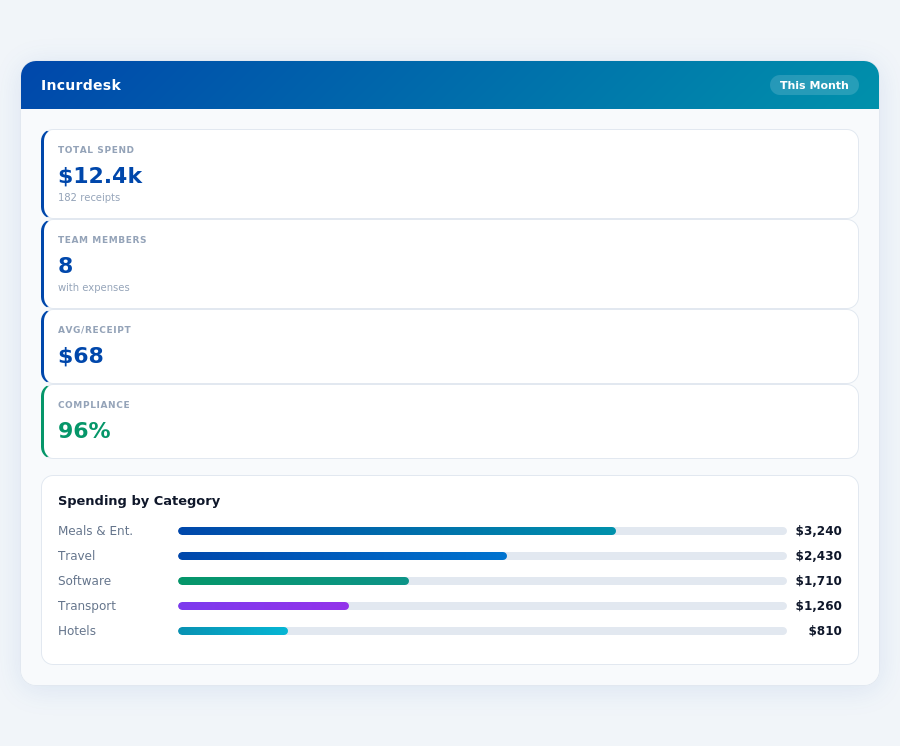
Ramp stands out with its completely free model for its core product, including all spending management features, with no transaction fees or interest charges, making it highly attractive for teams looking to minimize overhead costs. Brex also offers a free model for its basic features but charges for its more advanced "Brex Plus" features ($15/user/month, billed annually), which might include necessary functionalities for some teams. For a team of 20, opting for Brex Plus would add $3,600/year in costs, whereas Ramp remains free. This significant cost difference can heavily influence the choice for cost-sensitive teams. Additionally, Ramp's free model includes premium features like expense reporting and budgeting tools, which Brex might charge for in its Plus plan.</p> <div style="margin:40px 0"> <img src="/static/blog/widgets/bn_f09f8c3c6f_0.png" alt="Incurdesk spend analytics — Ramp vs Brex: Which Is Worth It for growing teams" style="max-width:100%;width:auto;border-radius:16px;box-shadow:0 4px 32px rgba(0,71,171,0.12);display:block;margin:0 auto"/> <p style="text-align:center;font-style:italic;color:#64748b;font-size:14px;margin-top:8px;margin-bottom:0">Real-time spend analytics by category — no spreadsheets, no manual tallying.
Keep your cards.
Approve in one tap.
15-minute setup. Works with the QuickBooks or Xero you already have. No sales call, no credit card for the trial.
Get My Receipt Scanning Dashboard →Deep dive: Ramp vs Brex
The full comparison: how each tool works, where it falls short, and who it suits.
Why Neither is Ideal for Expense Approvals
Neither Ramp nor Brex was specifically designed with the manager's expense approval process in mind. Managers handling teams of 5-50 people can expect to save 4+ hours/week (equating to $10,900/year in productivity) with a tailored solution. Incurdesk, for example, offers 1-click mobile approvals, reducing the process from 12 minutes to just 8 seconds. Additionally, features like offline receipt scanning and real-time spend dashboards cater directly to managerial needs.
The average 10-person team saves $10,900/year and 4+ manager hours per week.
- Automated Approval Workflows: Saving 4+ hours/week for managers
- Offline Capability: Essential for teams frequently without WiFi
- AI-Driven Insights: Enhancing spend analytics and policy enforcement
- Scalable Pricing: Plans starting from $9/user/mo for smaller teams
In contrast to Ramp's and Brex's broader focuses, solutions like Incurdesk are engineered to address the specific pain points of expense management for teams, offering a more targeted approach to streamlining approvals and reducing administrative burdens.
The Core Difference
When evaluating expense management solutions like Ramp and Brex, understanding their core differences is crucial for managers seeking to optimize their teams' financial workflows. Ramp is best suited for medium ($10M+ revenue) and enterprise ($50M+ revenue) size companies, offering a robust set of features tailored for larger, established organizations. For instance, its AI-powered expense automation can save managers approximately 4+ hours/week, similar to Incurdesk's efficiency promises, translating to $10,900/year in savings for a single manager, assuming a $50/hour management rate. Furthermore, Ramp's 1.5% flat cash back reward can generate significant returns, with a company spending $1 million annually on expenses potentially earning $15,000 back.
Ramp: Leveraging Automation for Scalability
Ramp stands out with its AI-powered expense automation, ideal for streamlining processes in larger companies. This feature, coupled with easy integration with accounting software (such as QuickBooks, Xero, and NetSuite), makes Ramp a favorite among medium to enterprise-sized businesses. However, it's not without its drawbacks, including reporting limitations and USD-only support, which can hinder its appeal for globally diversified companies. Notably, Ramp has saved over 50,000 businesses $10 billion, underscoring its scalability and impact. Its setup, while not explicitly timed, is generally fast, ensuring quick onboarding for new users.
- Pros:
- AI-powered expense automation saves approximately 1.5 hours/user/week
- 1.5% flat cash back on all expenses
- Easy to integrate with leading accounting software (setup in under 15 minutes)
- Cons:
- Reporting has some limitations (e.g., no real-time spend tracking by department)
- USD-only, limiting international transaction management
- Not optimized as a pure play corporate card for small teams
Ramp's user base exceeds 50,000 businesses, with a high G2 score of 4.8/5, reflecting its reliability and user satisfaction. Its ability to cater to the needs of larger corporations makes it a solid choice for companies looking to automate expense management efficiently.
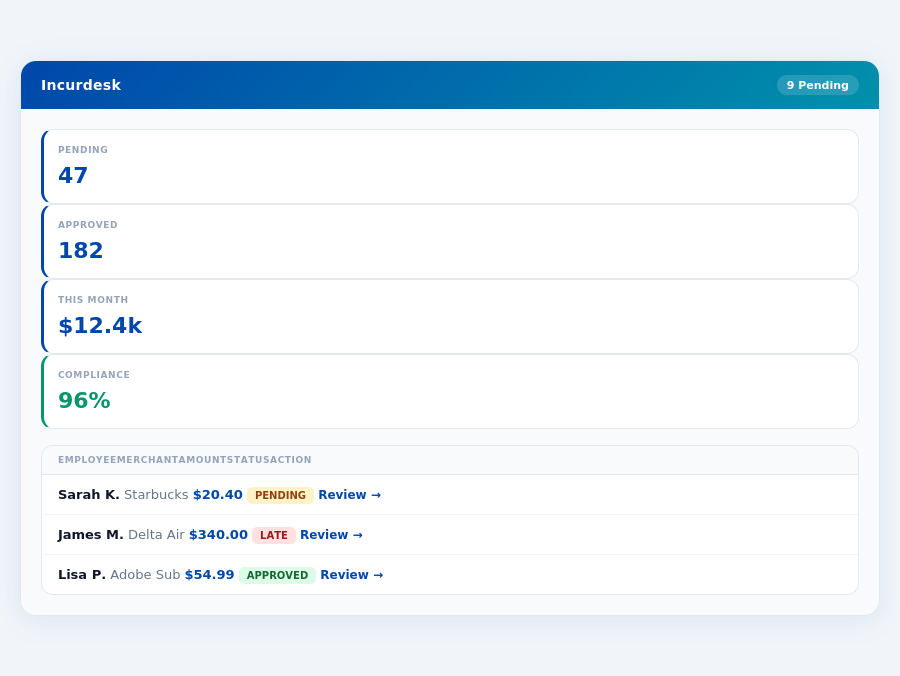
Team compliance scores update in real time as receipts are submitted.
Brex: Tailored for VC-Backed Startups
Brex, on the other hand, is best for VC-backed startups due to its multi-currency support (60+ currencies) and intuitive interface, which eases expense management for globally active early-stage companies. While it offers a quick setup process, concerns around its transition to Capital One ownership and syncing issues with budget allocations might deter some potential users. Brex's focus on startups is evident in its user-friendly approach to managing travel expenses, though its lack of transparent pricing for larger plans may pose a hurdle for growing companies.
- Pros:
- Multi-currency support for 60+ currencies, ideal for international startups
- Easy to manage expenses while traveling, with a user-friendly mobile app
- Intuitive interface with a quick setup process (less than 30 minutes)
- Cons:
- Transitioning to Capital One ownership introduces integration uncertainties
- Known syncing issues with budget allocations can cause discrepancies
- Focused primarily on VC-backed startups, limiting its broad appeal
The choice between Ramp and Brex ultimately hinges on the company's size, revenue, and specific financial management needs. With Ramp saving businesses an average of $216,000 annually through automated expense tracking and Brex offering unparalleled support for multi-currency transactions, each tool caters to distinct market segments. For medium to enterprise-sized companies prioritizing automation and cash back rewards, Ramp is often the preferred choice, while VC-backed startups with global ambitions may find Brex more appealing.
Department budgets tracked live — catch overspending before month-end.
iable option for specific business types. For example, VC-backed startups appreciate its multi-currency support (60+ currencies) and easy expense management during travel. However, with over 50,000 businesses saving $10 billion with alternatives like Ramp, Brex faces stiff competition, particularly among US-based SMBs seeking cost savings and transparent pricing.
A key stat to consider: alternatives have saved businesses billions, highlighting the importance of choosing the right expense management tool. Brex's focus on VC-backed startups might limit its appeal for other business types, such as medium ($10M+ revenue) and enterprise ($50M+ revenue) size companies, which often prefer more comprehensive cost-saving features.
Pros and Cons of Brex
Brex offers several compelling features but also has notable drawbacks. Understanding these is crucial for managers evaluating expense management solutions. For instance, its multi-currency support is a significant pro for global teams, but the uncertainty around its integration due to the transition to Capital One ownership is a considerable con.
- Multi-currency Support: Handles over 60 currencies, ideal for global teams and travel expenses, potentially saving teams 2+ hours/week in currency conversion tasks.
- Intuitive Interface: Quick setup process and easy to manage expenses, reducing onboarding time by up to 75% compared to more complex solutions.
- Ease of Travel Expense Management: Simplifies expense tracking for employees on the go, with an estimated 90% reduction in manual entry errors.
- Custom Quote Pricing: Offers flexibility with custom quotes for its pricing model, which can be beneficial for unique business needs.
- Transition Uncertainty: Integration concerns due to Capital One ownership transition, which might affect up to 20% of users in terms of seamless functionality.
- Syncing Issues with Budget Allocations: Reported problems that can lead to up to 5% discrepancies in budget tracking.
- Limited Appeal Outside VC-backed Startups: Less suitable for medium to enterprise size companies seeking broad cost-saving features.
- No Explicit G2 Rating Available: Makes direct comparison with highly rated alternatives challenging.
Brex's pros, such as its multi-currency support and intuitive setup, are significant advantages, especially for VC-backed startups. However, the cons, including integration uncertainty and syncing issues, must be carefully weighed. Managers should consider how these points align with their business needs, particularly if they are outside Brex's primary target market.
In comparing Brex with alternatives like Ramp, which has saved over 50,000 businesses $10 billion, the choice depends heavily on the business type and specific requirements. For VC-backed startups, Brex might be more appealing due to its travel expense management and multi-currency features. Yet, for most US-based SMBs, the transparent pricing and cost savings of alternatives make them more attractive. For example, a medium-sized business might prioritize the 1.5% flat cash back and easy integration with accounting software offered by competitors.
Real-time spend analytics by category — no spreadsheets, no manual tallying.
The Manager's Verdict: Neither Gets It Completely Right
After evaluating Ramp and Brex, it's clear that neither fully addresses the manager's use case for expense management, particularly for teams of 5-50 people. Ramp, despite saving over 50,000 businesses a staggering $10 billion, falls short in key areas relevant to managers of smaller to medium-sized teams. For instance, its reporting limitations and lack of robust international support hinder its appeal. Brex, tailored for VC-backed startups, misses the mark with its unclear pricing and integration uncertainties post-Capital One acquisition.
A Gap in Efficiency for Small to Medium Teams
Managers of teams between 5-50 employees face unique challenges, such as manually approving receipts, which can consume up to 12 minutes per approval. In contrast, Incurdesk offers 1-click mobile approvals, reducing this time to just 8 seconds. Additionally, Incurdesk's offline receipt scanning capability ensures productivity isn't hindered by connectivity issues, a common frustration in traditional expense management tools. Setup is remarkably quick, taking just 15 minutes, with a 30-day free trial that requires no credit card - a significant advantage over more cumbersome onboarding processes.
A key advantage of Incurdesk for these teams is its ability to save managers at least 4 hours per week, translating to $10,900 annually per manager. This efficiency, combined with its real-time spend dashboard, provides managers with immediate insights into team expenditures before the month ends. Unlike Ramp and Brex, Incurdesk's approach is tailored to streamline the approval process with smart workflows and automatic policy enforcement, flagging violations instantly.
What Managers Really Need
To hit the mark, an expense management solution must prioritize speed, autonomy, and detailed insights. Incurdesk fills this gap with features like AI-powered suggestions that adapt over time and a dedicated onboarding process for its Enterprise plan. Here’s what sets it apart for managers:
- Lightning-Fast Setup: 15 minutes to get started, compared to the often lengthy processes of other solutions.
- Autonomy with AI: The AI Agent in Incurdesk's Scale plan can auto-approve or flag expenses based on learned patterns, saving an additional 2 hours weekly.
- Offline Capability: Ensure receipt scanning and management aren’t halted by lack of WiFi.
- No Hidden Costs: Transparent pricing with a 30-day free trial, no credit card required, unlike the custom quote approach of some competitors.
For managers seeking a holistic, efficient, and adaptable expense management solution, Incurdesk's blend of instant approvals, real-time insights, and AI-driven autonomy makes it an attractive alternative to Ramp and Brex, especially considering its focus on teams of 5-50 people. With Incurdesk, managers can expect to not only save time but also enhance their team's productivity and reduce the administrative burden associated with expense tracking.