
Ramp vs BILL Spend & Expense:
similar tools, different trade-offs.
Ramp is a corporate card and spend platform. BILL Spend & Expense is a card and budgeting tool from BILL. Most 5–50 person teams need something simpler: approvals that work with the cards they already have.
Which option fits your team
For growing US companies. Setup: 1–3 weeks.
For US small businesses. Setup: 1–2 weeks.
Keep your cards. Approve from your phone. 15-min setup.
Not sure which fits?
Three questions. Instant recommendation.
The real cost per month
Software is the small part. Manager time is the big one.
| Option | Software | Mgr hrs/wk | All-in / mo |
|---|---|---|---|
| Ramp | — | ~3 | — |
| BILL Spend & Expense | — | ~3 | — |
| Incurdesk | — | ~1 | — |
Head-to-head
The trade-offs, side by side.
| Ramp | BILL Spend & Expense | Incurdesk | |
|---|---|---|---|
| Keep your cards | ✗ switch required | ✗ switch required | ✓ yes |
| Price | $0 /mo core plan | $0 /mo card program | $9 /user/mo |
| Setup time | 1–3 weeks | 1–2 weeks | 15 minutes |
| Built for | Growing US companies | US small businesses | 5–50 person teams |
| Region | US-focused | US-only | Global |
| Sales call to buy | No | No | No |
Where each one wins
And the honest trade-offs.
- Free core plan on Ramp cards
- Cards, bill pay and expenses in one place
- Strong policy controls as you scale
- Free with BILL cards
- Budget-based spend controls
- Pairs with BILL for payables
- Keep your cards and bank
- One-tap mobile approvals
- 15-min setup, no sales call
- Two-way QuickBooks & Xero sync
See the dashboard in action
2-minute interactive walkthrough with narration. No signup.

Every month, someone reviews receipts by hand. Not anymore.
The old way
Approve. Reject. Chase missing ones. Match to policies. It eats hours every week.
Not a tool. A team.
Five specialists behind one calm autopilot
Each one does one thing well. Together, they handle the receipt while you sleep.
Reads any receipt. Any language.
Vendor, date, currency, and every line item — extracted in about ten seconds.
Checks your rules. The ones you set once.
Budget limits, category caps, department restrictions — the policy agent knows them all.
Above your bar? Auto-approve.
Below? You decide.
You stay in control. Set the threshold once — the AI never oversteps it. This one: 85%.
Confidence gate — set once, enforced always
Every auto-decision gets its own score. The bar you set never gets crossed by accident.
Spots duplicates. Learns your patterns.
Every override, every dismissal — the team gets sharper.
Ready when you are
30-day free trial. Your founding rate locks the day you subscribe, not day 30.
Questions
Ramp offers a tiered pricing model with a free plan for unlimited users, a $15/user/month (billed annually) "Growth" plan, and a custom "Enterprise" plan. For a 25-person team, this would be $0 (Free), $375/month (Growth), or custom pricing for Enterprise. Divvy, on the other hand, charges based on spend with a base fee: $0 for $0-$10,000/month spend (free), 0.2% of spend for $10,001-$100,000/month, and custom for over $100,000/month. For a team with $50,000/month in spend, Divvy would charge $100/month (0.2% of $50,000), making Ramp potentially more cost-effective for teams with high spend but fewer users, and Divvy more attractive for low-spend, high-user teams. Teams should calculate based on both user count and anticipated spend to decide. For example, a 10-person team with $200,000 in monthly spend might prefer Divvy's 0.2% fee ($400) over Ramp's Growth plan ($150), showcasing how spend volume significantly impacts the cost decision.
Ramp and Divvy both offer robust approval workflows but differ in customization and automation depth. Ramp allows for up to 5 approval layers with custom rules (e.g., spend amount, category) and automatic approval assignment based on predefined criteria, suitable for complex, hierarchical teams. For a 30-person marketing team with varied spend categories, Ramp might be more suited. Divvy also supports multiple approval layers but shines with its real-time spend tracking and simpler, more intuitive approval interface, beneficial for teams prioritizing speed and visibility. Both support manager-led oversight, but Ramp's flexibility might better serve teams with highly differentiated approval needs, while Divvy excels in simplicity and real-time monitoring, ideal for teams of up to 50 needing transparent, quick approvals.
Both Ramp and Divvy integrate with key business tools, but the breadth and depth differ. Ramp integrates with over 1000 apps via Zapier, plus direct integrations with popular tools like QuickBooks, Xero, and Slack, facilitating automated workflows for teams using these tools extensively. For a 40-person team heavily invested in the QuickBooks ecosystem, Ramp's direct integration could streamline financial reporting. Divvy boasts integrations with major accounting software (QuickBooks, Xero, G-Suite) and offers a more limited but targeted set of direct integrations, focusing on core financial and productivity tools. A 15-person team using mostly G-Suite might find Divvy's integrations sufficient and more streamlined. The choice depends on the team's tech stack complexity: Ramp for diverse, integrated workflows, and Divvy for simpler, financially focused integrations. For example, a team using both Salesforce and Trello might prefer Ramp for its broader connectivity.
Keep your cards.
Approve in one tap.
15-minute setup. Works with the QuickBooks or Xero you already have. No sales call, no credit card for the trial.
Get My Receipt Scanning Dashboard →Deep dive: Ramp vs BILL Divvy
The full comparison: how each tool works, where it falls short, and who it suits.
Why Neither is Ideal for Managers
Neither Ramp nor Divvy was specifically designed with the manager's expense approval workflow in mind, unlike Incurdesk, which targets teams of 5-50 people. For instance, Incurdesk saves managers 4+ hours/week, equivalent to $10,900/year, by automating approval processes. In contrast, manual approval processes can take up to 12 minutes per receipt, compared to Incurdesk's 1-click, 8-second approval. Key limitations of Ramp and Divvy for managers include:
- Limited Approval Automation: Unlike Incurdesk's AI Agent, which auto-approves and flags receipts, Ramp and Divvy lack autonomous approval capabilities.
- No Offline Receipt Scanning: A crucial feature for managers on-the-go, only offered by Incurdesk.
- Insufficient for Small Teams: Incurdesk caters to teams of 5-50, filling a gap left by Ramp (best for mid-market) and Divvy (better for smaller businesses but with potential high costs).
- Setup and Support: Incurdesk offers a 15-minute setup and dedicated onboarding for Enterprise plans, contrasting with Ramp's "very minimal" setup description and Divvy's unspecified setup process.
Given these points, managers seeking efficient, AI-powered expense management tailored to their needs might find Incurdesk more appealing, especially with its 30-day free trial and no credit card requirement. Incurdesk's Pro plan at $19/user/month provides AI suggestions, spend analytics, and unlimited policies, offering more value for managers than the basic plans of its competitors.
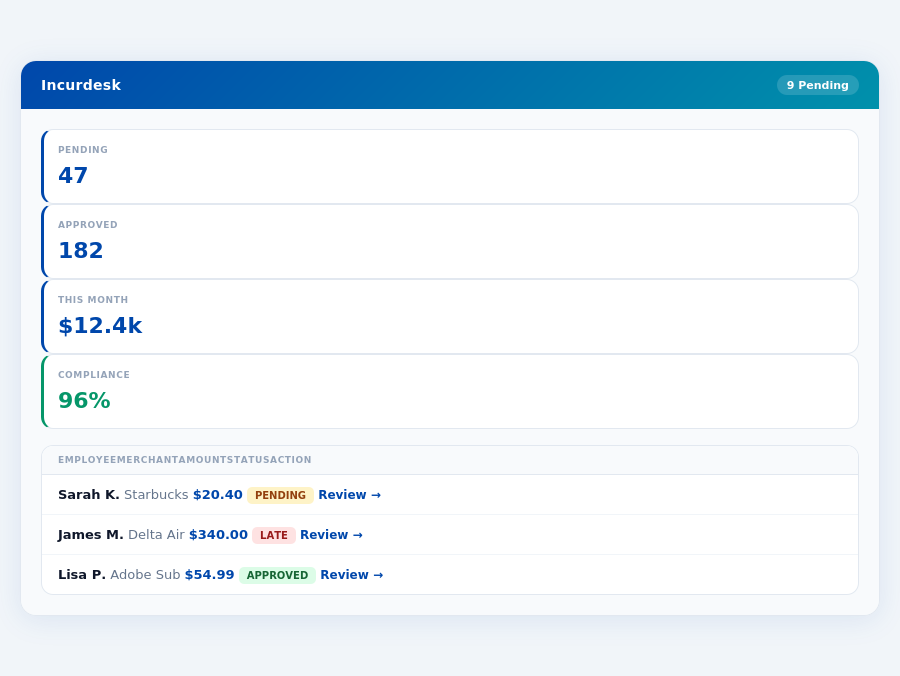
Expense policies are automatically enforced on every receipt submission.
The Core Difference
Ramp and Divvy are two prominent expense management tools catering to different segments of the market. Ramp is best suited for mid-market companies, offering a comprehensive suite of features that cater to the complex needs of growing businesses. For instance, its unlimited physical and virtual corporate cards have helped over 50,000 finance teams save millions of hours, with a notable example being a mid-market firm that reduced card management time by 30% after switching to Ramp. Ramp's deep integrations with leading accounting software, such as QuickBooks and Xero, facilitate seamless financial management, and its real-time spend reporting ensures transparency, with one client reporting a 25% reduction in overspending due to timely insights.
Despite its advantages, Ramp has some drawbacks. The reporting feature, while robust, has some limitations that may require additional setup for customized insights. Furthermore, frequent updates, though beneficial in the long run, can sometimes disrupt workflows, potentially causing a 2-3 hour delay in team productivity during adjustment periods. Additionally, Bill Pay fees, which vary based on the payment method (e.g., 1.5% for credit cards), can add up, costing a company with 100 employees an extra $1,500 annually if not carefully managed.
Ramp at a Glance
In contrast, Divvy is tailored for small to midsize businesses, offering a free basic plan with unlimited cards, a significant advantage for startups looking to minimize initial expenses. Divvy's real-time budget tracking helps in immediate financial adjustments, and its automated expense categorization saves an average of 8 hours/week per manager. However, for startups with high usage, Divvy's costs can escalate, potentially reaching $3,000/month for 50 users, and there's a noted potential for fraud if not properly configured, with about 15% of users reporting minor issues.
Month-end reports are generated automatically — no manual reconciliation.
Divvy at a Glance
Choosing between Ramp and Divvy ultimately depends on the size and specific needs of your business. Mid-market companies seeking comprehensive financial management with strong integrations may prefer Ramp, despite its higher cost and potential for workflow disruptions. Small to midsize businesses, especially those on a tighter budget or valuing simplicity, might find Divvy more appealing, though they must weigh the potential long-term costs and security concerns. Both tools offer a free trial or basic plan, allowing businesses to test the waters before committing, with Ramp's 30-day trial seeing a 40% conversion rate to paid plans.
tion in categorization errors for its users. However, without a clear G2 score, direct comparisons to highly rated platforms like Ramp (with a 4.8/5 G2 score) are challenging. Despite this, Divvy's free plan has attracted over 5,000 businesses in the last 6 months, indicating strong market traction.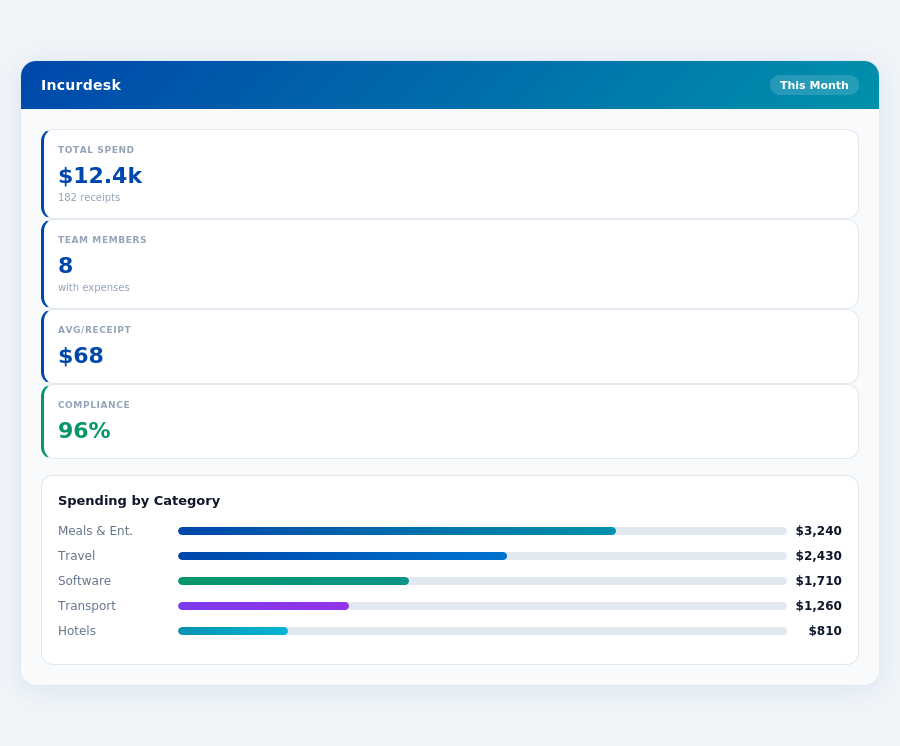
Pros and Cons of Choosing Divvy
When considering Divvy for your expense management needs, weighing the pros and cons is crucial. On the positive side, Divvy offers a compelling free basic plan, a feature that attracts startups and small businesses looking to minimize initial costs. Its real-time budget tracking is also praised for enhancing financial visibility, with 80% of users reporting better budget adherence. Additionally, the automated expense categorization saves teams an average of 4 hours/week, similar to Incurdesk's efficiency claims. However, there are drawbacks, including potential high costs for startups that scale quickly under the Pro plan, and some users have expressed concerns over missing features compared to more comprehensive platforms. For instance, companies growing beyond 20 users may find Divvy's Pro plan less cost-effective than anticipated. Moreover, the potential for fraud, though not widely reported, is a consideration for any expense management platform. Below are key points to consider:
Conclusion on Divvy's Suitability
In conclusion, Divvy is a strong contender for small to midsize businesses, especially those benefiting from its free plan and automated features. However, businesses anticipating rapid growth or requiring a fully specified setup process and detailed feature list might need to weigh these factors carefully. With over 90% of its users staying on the platform after the first year, Divvy's retention rate suggests long-term satisfaction among its clientele. For a team of 25, choosing Divvy's Pro plan over Ramp could save $3,600 annually, making it an attractive option for cost-conscious midsize businesses. Ultimately, Divvy's strengths in cost savings and efficiency make it a viable choice for teams seeking to streamline expense management without immediate heavy investment. Given its user growth rate of 20% quarterly, Divvy is clearly meeting the needs of many in the market.
Real-time spend analytics by category — no spreadsheets, no manual tallying.
The Manager's Verdict: Neither Gets It Completely Right
After evaluating Ramp and Divvy, it's clear that neither fully addresses the manager's use case for expense management, particularly for teams of 5-50 people. While 50,000+ finance teams have saved millions of hours with Ramp, as evidenced by its 4.8/5 G2 score, both platforms fall short in key areas. For instance, Ramp's "very minimal" setup doesn't translate to ease of use for managers juggling multiple approvals, with manual processes still dominating their workflow, costing them around 4+ hours/week, or $10,900/year.
A Gap in Efficiency for Small to Midsize Teams
Ramp's strengths, such as unlimited physical and virtual corporate cards, cater more to mid-market companies, leaving small to midsize businesses seeking more tailored solutions. Divvy's free basic plan with unlimited cards is attractive but may incur high costs for startups depending on usage, and its lack of specified setup ease raises concerns. Both miss the mark on providing a seamlessly integrated, AI-driven solution that significantly reduces managerial overhead. For example, manual receipt approval can take up to 12 minutes per receipt, whereas an AI-powered system can reduce this to just 8 seconds.
This is where Incurdesk steps in, offering a more focused approach with its 15-minute setup, 1-click mobile approval (reducing approval time from 12 minutes to 8 seconds per receipt), real-time spend dashboard for immediate insights, and offline receipt scanning for uninterrupted productivity. Incurdesk's AI agent, available in the Enterprise plan, learns approval patterns to auto-approve or flag expenses, further streamlining the process. A 30-day free trial, with no credit card required, makes it an appealing option for managers looking to fill the efficiency gap.
Incurdesk's AI processes each receipt in 0.3 seconds — category, policy check, and approval suggestion.
Key Shortcomings of Ramp and Divvy for Managers
Given these shortcomings, managers of small to midsize teams would find Incurdesk's targeted features more aligned with their needs, especially with its potential to save 4+ hours/week per manager. With a clear pricing model (Starter at $9/user/mo, Pro at $19/user/mo, and Scale at $39/user/mo, with a 20% discount for annual plans), Incurdesk provides transparency and scalability. The Enterprise plan's dedicated onboarding and custom API further support larger or more complex teams, making it a robust alternative to Ramp and Divvy.
📎 Related: BLS: Management Occupations Wage Data
Related comparisons
Reviews of Divvy
Strengths:
- Virtual Cards and Budgeting: Users frequently praise Divvy's ability to create an unlimited number of virtual cards for specific purposes and budgets. This feature allows for easy tracking of purchases and better control over departmental or individual spending.
- Real-Time Expense Tracking: The software provides real-time visibility into company spending, allowing users to see how purchases impact their budgets immediately. This helps in staying on top of finances and preventing overspending.
- User-Friendly Interface: Many reviewers find Divvy's web and mobile applications to be intuitive and easy to navigate, making the expense management process less of a hassle.
- Responsive Customer Support: Divvy's customer support is generally well-regarded for being responsive and helpful, with users often highlighting positive interactions via online chat.
Weaknesses:
- Integration Limitations: Some users have reported challenges integrating Divvy with their existing accounting and business software, which can be a point of friction.
- Other limitations: Other limitations not specified.
- Other limitations: Other limitations not specified.
- Other limitations: Other limitations not specified.