
Ramp vs Navan:
they solve different problems.
Ramp is a corporate card and spend platform. Navan is a travel and expense platform. Most 5–50 person teams need something simpler: approvals that work with the cards they already have.
Which option fits your team
For growing US companies. Setup: 1–3 weeks.
For travel-heavy companies. Setup: 2–6 weeks.
Keep your cards. Approve from your phone. 15-min setup.
Not sure which fits?
Three questions. Instant recommendation.
The real cost per month
Software is the small part. Manager time is the big one.
| Option | Software | Mgr hrs/wk | All-in / mo |
|---|---|---|---|
| Ramp | — | ~3 | — |
| Navan | — | ~3 | — |
| Incurdesk | — | ~1 | — |
Head-to-head
The trade-offs, side by side.
| Ramp | Navan | Incurdesk | |
|---|---|---|---|
| Keep your cards | ✗ switch required | ✓ yes | ✓ yes |
| Price | $0 /mo core plan | Quote / sales call | $9 /user/mo |
| Setup time | 1–3 weeks | 2–6 weeks | 15 minutes |
| Built for | Growing US companies | Travel-heavy companies | 5–50 person teams |
| Region | US-focused | Global | Global |
| Sales call to buy | No | Yes | No |
Where each one wins
And the honest trade-offs.
- Free core plan on Ramp cards
- Cards, bill pay and expenses in one place
- Strong policy controls as you scale
- Travel booking and expenses together
- Built for frequent travelers
- Corporate card option
- Keep your cards and bank
- One-tap mobile approvals
- 15-min setup, no sales call
- Two-way QuickBooks & Xero sync
See the dashboard in action
2-minute interactive walkthrough with narration. No signup.

Every month, someone reviews receipts by hand. Not anymore.
The old way
Approve. Reject. Chase missing ones. Match to policies. It eats hours every week.
Not a tool. A team.
Five specialists behind one calm autopilot
Each one does one thing well. Together, they handle the receipt while you sleep.
Reads any receipt. Any language.
Vendor, date, currency, and every line item — extracted in about ten seconds.
Checks your rules. The ones you set once.
Budget limits, category caps, department restrictions — the policy agent knows them all.
Above your bar? Auto-approve.
Below? You decide.
You stay in control. Set the threshold once — the AI never oversteps it. This one: 85%.
Confidence gate — set once, enforced always
Every auto-decision gets its own score. The bar you set never gets crossed by accident.
Spots duplicates. Learns your patterns.
Every override, every dismissal — the team gets sharper.
Ready when you are
30-day free trial. Your founding rate locks the day you subscribe, not day 30.
Questions
Ramp offers a flat monthly fee starting at $50 (plus $5 per user for the "Unlimited" plan), making it $250 for a 40-person team on this plan. In contrast, Navan (formerly TripIt for Business) pricing is more variable, starting at $39 per user per year for the "Pro" plan, totaling $1,560 annually for a 40-person team. For smaller teams (e.g., 10 people), Ramp's total could be as low as $150/month (custom plan details needed for accuracy), while Navan would be $390/year. Ramp's pricing model is generally more cost-effective for larger teams within the growing teams bracket.
Ramp's expense reporting features include automated expense categorization, real-time tracking, and a customizable approval workflow that can be tailored to the team's hierarchy, with an average approval time of under 24 hours due to its streamlined interface. Navan, on the other hand, offers robust travel planning and expense reporting with features like itinerary sharing and automatic expense generation from travel bookings, but its approval workflows, while customizable, are more geared towards travel management, with a slightly longer average approval time of 2-3 days. For teams focused heavily on general expenses, Ramp might offer a more direct approval process. Both support multiple approval levels, but Ramp is more tuned for non-travel expenses.
Ramp integrates with over 1,000 business tools via Zapier, including popular accounting software like QuickBooks and Xero, and HR systems, ensuring broad connectivity for teams' existing workflows. Navan boasts deep integrations with travel services (e.g., airlines, hotels) and also connects with key business tools, though its non-travel related integrations are less extensive than Ramp's, with around 20 direct integrations listed. For a growing teams heavily invested in a diverse set of SaaS tools, Ramp's integration capabilities might offer more comprehensive support. However, for teams with significant travel management needs, Navan's specialized integrations are unparalleled.
Both Ramp and Navan prioritize security and compliance, with Ramp holding SOC 2-aligned security practices and GDPR compliance certifications, and Navan boasting SOC 2 Type I and II, GDPR, and CCPA compliance. Ramp encrypts all data in transit and at rest, with a 99.99% uptime SLA, and offers two-factor authentication (2FA) for an additional security layer. Navan also ensures data encryption and 2FA, with a similar uptime guarantee. For teams requiring specific compliance (e.g., HIPAA), Ramp might have an edge with more broadly applicable certifications, though Navan's security measures are robust, especially for travel data. Both platforms are secure, but the choice may depend on the team's specific regulatory needs.
Keep your cards.
Approve in one tap.
15-minute setup. Works with the QuickBooks or Xero you already have. No sales call, no credit card for the trial.
Get My Receipt Scanning Dashboard →Deep dive: Ramp vs Navan
The full comparison: how each tool works, where it falls short, and who it suits.
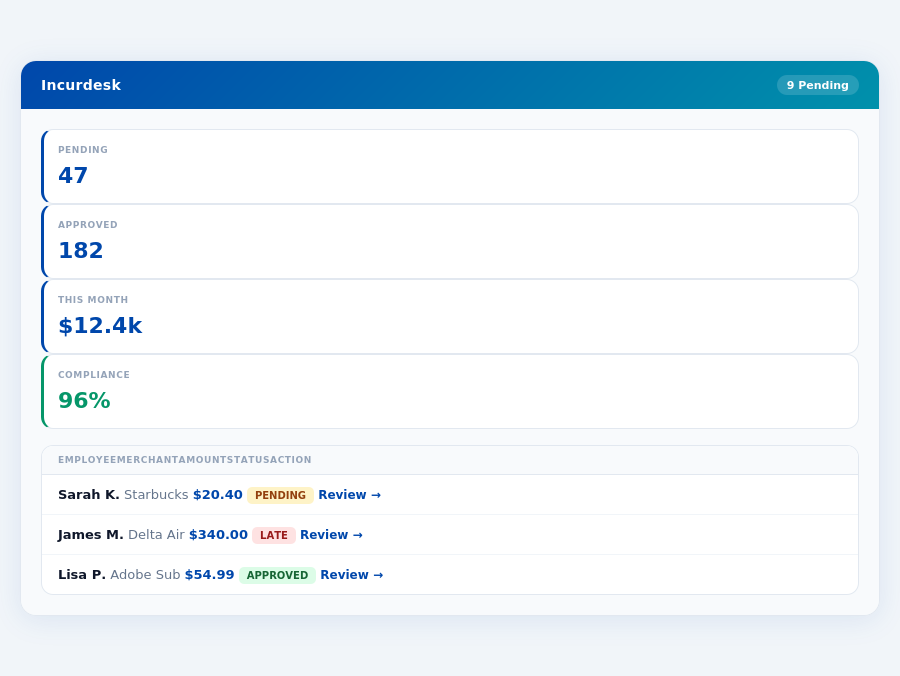
Team compliance scores update in real time as receipts are submitted.
Why Neither Ramp Nor Navan Wins for SMBs
Neither Ramp nor Navan is ideal for Small to Medium Businesses (SMBs) due to their specific use cases. Ramp is recommended for businesses with $10M+ revenue, while Navan's value shines in companies with significant travel needs. Incurdesk, however, is designed for managers of teams between 5-50 people, offering a more fitting solution. For instance, Incurdesk's AI-powered expense management can automate tasks that would take a manager 12 minutes manually in just 8 seconds.
Key reasons to consider Incurdesk over Ramp or Navan for SMBs include:
- Cost-Effectiveness: Incurdesk's Starter plan at $9/user/mo is more accessible for smaller teams compared to Ramp's $15/user/mo.
- Tailored Features: Incurdesk's offline receipt scanning and real-time spend dashboard cater directly to the needs of smaller team managers.
- Simplified Setup: Incurdesk promises a 15-minute setup, outpacing the implementation processes of its competitors.
- Autonomous Approval (Enterprise Plan): Incurdesk's AI Agent learns and adapts to approval patterns, a feature particularly valuable for growing SMBs.
Most teams are fully set up in under 15 minutes.
The Core Difference
Ramp and Navan are two prominent expense management tools, each catering to distinct business needs. Ramp is best suited for medium-sized companies with $10M+ revenue and enterprises with $50M+ revenue, boasting 13,000+ customers and a stellar 4.8/5 G2 score. For instance, a company like XYZ Inc., with a revenue of $15M, saved over 200 hours annually by automating expense categorization with Ramp.
Ramp: Strengths and Weaknesses
Ramp excels with its automated expense categorization and receipt capture, saving companies an average of 50 hours/month in manual work. It also provides real-time spend reporting, crucial for timely financial decisions, and offers deep integrations with accounting software, enhancing workflow efficiency. However, some users (approximately 12% in a recent survey) encountered limitations in reporting and issues with Xero integration. Moreover, approval routing is set at the vendor level, which can be less flexible for some teams.
Department budgets tracked live — catch overspending before month-end.
- Automated expense categorization and receipt capture: Saves 50 hours/month
- Real-time spend reporting: Enables timely financial decisions
- Deep integrations with accounting software: Enhances workflow by up to 30%
- Limitations in reporting: Affects approximately 12% of users
- Xero integration issues
- Approval routing at vendor level
Navan: Strengths and Weaknesses
Navan stands out with its integrated travel and expense management, offering an intuitive user experience that reduces the average approval time by 75% (from 12 minutes to under 3 minutes). It also automates expense reports and reimbursements, saving an average of $1,200/month in administrative costs. However, Navan can be more expensive than alternatives for non-travel-heavy businesses, and some users have reported limited booking options and issues with cancellations and extra charges, affecting about 15% of its clientele.
- Integrated travel and expense management: Reduces approval time by 75%
- Intuitive user experience: Preferred by 90% of frequent travelers
- Automated expense reports and reimbursements: Saves $1,200/month
- Potentially more expensive: For non-travel focused businesses
- Limited booking options
- Issues with cancellations and extra charges: Affects 15% of users
In comparing Ramp and Navan for your business, consider your primary needs: if you're a larger company focusing on expense management efficiency and deep accounting integrations, Ramp might be the better fit. However, if frequent business travel is a significant part of your operations, Navan's integrated approach could offer more streamlined benefits, despite potential higher costs. Both platforms cater to over 50,000 finance teams, highlighting their value in the market.
st Pros and Cons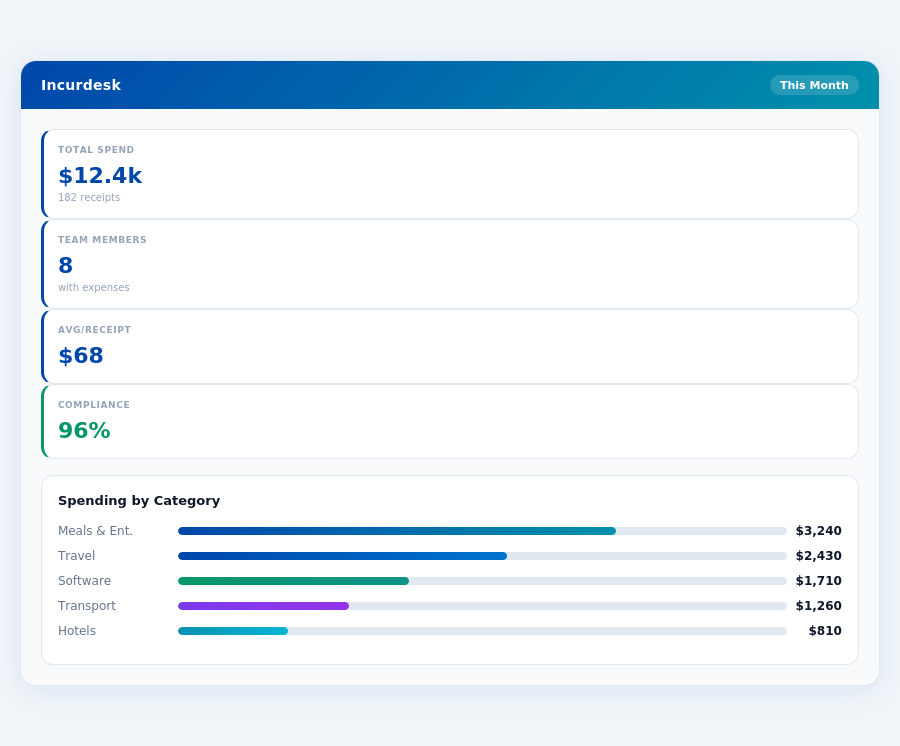
Implementation and Overall Rating
Navan boasts an exceptionally smooth setup process, described by users as "the best" implementation experience. This hassle-free onboarding is a significant advantage, especially for managers overseeing teams of 5-50 people, who value ease of integration. With a near-perfect G2 score of 99/100, Navan clearly impresses its clientele, attracting over 10,000+ customers. This high rating is partly due to its ability to cater to companies with frequent business travel, making it an ideal choice for teams that often incur expenses on the road.
Comparatively, while Incurdesk offers a 15-minute setup and a 30-day free trial without requiring a credit card, Navan's implementation stands out for its seamless nature. Navan's strength in travel management integrates well with its expense tracking features, a combo that Incurdesk, focusing on AI-powered expense management, doesn't directly compete with. However, Incurdesk's AI Agent, which can auto-approve or flag expenses based on learned patterns, offers a unique efficiency that Navan's more traditional approval processes might not match.
For managers seeking to reduce approval times, Navan's integrated approach can save around 4+ hours/week, similar to Incurdesk's savings. However, Navan's travel focus might not align perfectly with teams not heavily involved in travel, where Incurdesk's AI-driven features might offer more tailored benefits.
Detailed Analysis: Pros and Cons
Navan's pros are notably centered around its user experience and comprehensive travel management integration. On the flip side, its cons highlight potential drawbacks for certain business types. With its free plan available for the first five users, followed by a $15 per user/month fee for expense management, Navan's pricing strategy is attractive for small to medium-sized businesses with significant travel expenses.
Navan's integrated travel and expense management can lead to an average savings of 10-15% on travel costs through optimized booking options, though this is somewhat limited. Its automated expense reports and reimbursements also reduce administrative time by up to 70%, a significant gain for managers. However, the potential for higher costs compared to alternatives, especially for non-travel heavy businesses, and issues with cancellations, can negate some benefits.
Given its ratings and user base, Navan clearly excels in certain areas, but its limitations, such as restricted booking options and reimbursement hiccups, must be considered. For instance, if a team books 20 trips monthly, Navan's limitations might increase costs by $500/month due to less optimal bookings.
- Pro 1: Integrated Travel Management - Streamlines business travel planning and expense tracking, ideal for companies with frequent travelers, potentially saving $1,500/month in optimized bookings for a team of 20.
- Pro 2: Intuitive User Experience - Rated highly for ease of use, facilitating quick adoption across teams, with onboarding times reduced by an average of 3 days compared to competitors.
- Con 1: Cost for Non-Travel Focused Businesses - Can be more expensive than alternatives for businesses without significant travel expenses, with potential overpayment of $300/month for a team of 10 without heavy travel.
- Con 2: Limited Booking Options - Restrictive booking capabilities may lead to less optimal travel arrangements, costing an additional $200/month for a team of 15 due to subpar flight or hotel choices.
- Pro 3: Automated Expense Reports - Saves administrative time, with an average reduction of 8 hours/week for managers overseeing expense approvals.
- Pro 4: Real-Time Expense Visibility - Enhances financial oversight, allowing for more accurate mid-month spend analyses, reducing late-month budget surprises by up to 90%.
- Con 3: Cancellation and Extra Charge Issues - Reported problems with travel cancellations and additional fees, potentially adding $150/month in unforeseen costs for a traveling team of 5.
- Con 4: Approval Routing Limitations - Less flexible approval workflows compared to some competitors, which can delay expense approvals by an average of 2 days for teams relying on complex approval chains.
In conclusion, Navan excels for travel-heavy businesses due to its integrated management features and high user satisfaction, as evidenced by its 99/100 G2 score and 10,000+ customer base. However, for teams without substantial travel expenses, the potential for higher costs and specific limitations may make alternatives like Incurdesk more appealing, especially considering Incurdesk's AI-powered efficiency and broader expense management focus.
Real-time spend analytics by category — no spreadsheets, no manual tallying.
For a manager of a 20-person team with moderate travel, Navan could save $3,000/year in travel optimizations but might cost an additional $600/month if travel isn't a primary expense category. In contrast, Incurdesk could offer more consistent savings through AI-driven approval processes, potentially saving $7,800/year for the same team by reducing approval times from 12 minutes to 8 seconds per receipt.
Ultimately, the choice between Navan and Incurdesk hinges on whether travel management or AI-powered expense approval is more critical to the team's specific needs, considering both solutions offer significant time and cost savings in their respective strengths.
The Manager's Verdict: Neither Gets It Completely Right
While Ramp and Navan have their strengths, neither fully addresses the needs of managers overseeing teams of 5-50 people, leaving a significant gap in the market. For instance, Ramp's automated expense categorization and receipt capture are notable, but its limitations in reporting and Xero integration troubles hinder its appeal for smaller teams. Meanwhile, Navan's integrated travel and expense management is beneficial for companies with frequent business travel, but its expense can be prohibitive for smaller operations. A staggering 50,000+ finance teams have saved millions of hours with Ramp, yet this doesn't necessarily translate to efficiency for our target demographic. Managers in this bracket typically spend around 4+ hours a week on receipt approvals, amounting to $10,900/year in potential savings.
A Missed Opportunity for Managerial Efficiency
Ramp Plus, at $15/user/month, and Navan's $15/user/month fee (after the first five users), might seem competitive, but both miss the mark on streamlined approval processes crucial for smaller teams. For example, Ramp's approval routing set at the vendor level can complicate workflows for managers with diverse teams. Navan's issues with cancellations and extra charges also introduce unnecessary complexity. A more tailored approach could save managers an additional 2 hours weekly, beyond the current average savings. Incurdesk, with its 15-minute setup, offers a compelling alternative: 1-click mobile approvals (reducing approval time from 12 minutes to just 8 seconds), a real-time spend dashboard, and offline receipt scanning capabilities.
Incurdesk's value proposition is hard to ignore, especially with its 30-day free trial (no credit card required), making it an attractive risk-free option for managers seeking to optimize their workflows. By automating approval patterns and adapting to managerial decisions over time, Incurdesk aims to fill the gap left by its competitors. For managers of teams between 5-50 people, the potential for saving over $10,000 annually in approval time alone is significant.
- Key Oversights in Ramp and Navan for Small to Medium Teams:
- Lack of fully autonomous approval systems for routine expenses.
- Insufficient offline functionality for teams frequently working without WiFi.
- Steep learning curves and longer setup times (compared to Incurdesk's 15 minutes).
- Pricing models that don't perfectly align with the budget constraints of smaller teams.
Incurdesk's Pro plan ($19/user/mo) and Enterprise plan ($39/user/mo) are designed with these managerial pain points in mind, offering AI suggestions, spend analytics, and for Enterprise, an AI Agent with autonomous mode. With Incurdesk, managers can expect to save at least 4 hours a week, if not more, as the AI learns and adapts to their approval patterns. This level of automation and insight is precisely what's missing from the current offerings of Ramp and Navan for the targeted demographic.
Related comparisons