
Expensify vs BILL Spend & Expense:
they solve different problems.
Expensify is an expense reporting app. BILL Spend & Expense is a card and budgeting tool from BILL. Most 5–50 person teams need something simpler: approvals that work with the cards they already have.
Which option fits your team
For small and mid-sized teams. Setup: 1–2 weeks.
For US small businesses. Setup: 1–2 weeks.
Keep your cards. Approve from your phone. 15-min setup.
Not sure which fits?
Three questions. Instant recommendation.
The real cost per month
Software is the small part. Manager time is the big one.
| Option | Software | Mgr hrs/wk | All-in / mo |
|---|---|---|---|
| Expensify | — | ~2 | — |
| BILL Spend & Expense | — | ~3 | — |
| Incurdesk | — | ~1 | — |
Head-to-head
The trade-offs, side by side.
| Expensify | BILL Spend & Expense | Incurdesk | |
|---|---|---|---|
| Keep your cards | ✓ yes | ✗ switch required | ✓ yes |
| Price | Per user / plans vary | $0 /mo card program | $9 /user/mo |
| Setup time | 1–2 weeks | 1–2 weeks | 15 minutes |
| Built for | Small and mid-sized teams | US small businesses | 5–50 person teams |
| Region | Global | US-only | Global |
| Sales call to buy | No | No | No |
Where each one wins
And the honest trade-offs.
- Well-known receipt scanning
- Works with existing cards
- Large integration list
- Free with BILL cards
- Budget-based spend controls
- Pairs with BILL for payables
- Keep your cards and bank
- One-tap mobile approvals
- 15-min setup, no sales call
- Two-way QuickBooks & Xero sync
See the dashboard in action
2-minute interactive walkthrough with narration. No signup.

Every month, someone reviews receipts by hand. Not anymore.
The old way
Approve. Reject. Chase missing ones. Match to policies. It eats hours every week.
Not a tool. A team.
Five specialists behind one calm autopilot
Each one does one thing well. Together, they handle the receipt while you sleep.
Reads any receipt. Any language.
Vendor, date, currency, and every line item — extracted in about ten seconds.
Checks your rules. The ones you set once.
Budget limits, category caps, department restrictions — the policy agent knows them all.
Above your bar? Auto-approve.
Below? You decide.
You stay in control. Set the threshold once — the AI never oversteps it. This one: 85%.
Confidence gate — set once, enforced always
Every auto-decision gets its own score. The bar you set never gets crossed by accident.
Spots duplicates. Learns your patterns.
Every override, every dismissal — the team gets sharper.
Ready when you are
30-day free trial. Your founding rate locks the day you subscribe, not day 30.
Questions
Expensify offers a more flexible pricing model for smaller teams within the growing teams bracket. For a team of 10, Expensify's "Premium" plan starts at $8/user/month (billed annually), covering all necessary features for manager-led teams, including automated expense reporting and approval workflows. In contrast, Divvy's pricing is more suited for larger teams or those with complex financial structures, starting at $10/user/month for similar capabilities, though pricing can adjust based on custom plans for larger or more complex teams. For a 50-person team, Expensify could save approximately $600/year compared to Divvy's base rate, assuming standard plans are used.
Both Expensify and Divvy offer robust customization for expense approval workflows. However, Expensify provides more granular control with up to 5 levels of approval (e.g., Employee > Manager > Finance > CEO > Board) for $8/user/month, suitable for teams requiring intricate hierarchies. Divvy also supports multi-level approvals but may require a custom setup for more than 3 tiers, potentially involving additional costs or a higher plan ($15/user/month for "Pro" which might be overkill for a growing teams's basic needs). Expensify's out-of-the-box flexibility makes it more appealing for teams of this size with moderate to complex approval needs.
Both Expensify and Divvy integrate with popular accounting software like QuickBooks, Xero, and Sage. However, Expensify boasts a broader range of integrations (over 30+ accounting and ERP systems) with more streamlined sync processes, particularly with QuickBooks Online ($8/user/month covers all integrations). Divvy's integrations are slightly more limited (around 20 key systems) but equally effective for the most commonly used platforms. For a growing teams already invested in QuickBooks or Xero, Expensify might offer a slightly more seamless experience, with setup times potentially 30% faster based on user reports.</p> <div class="bn-widget bn-anim"> <div class="bn-widget-header"><span class="bn-logo">Incurdesk</span><span class="bn-badge">10-person team</span><div class="bn-widget-body"> <div class="bn-stat-row"> <div class="bn-stat" style="border-left-color:#059669"><div class="bn-stat-l">Hours saved/week
Expensify and Divvy both offer strong compliance and policy enforcement tools. Expensify's "Premium" plan ($8/user/month) includes customizable policy rules, real-time expense flagging, and detailed audit trails. Divvy ($10/user/month for similar features) also provides robust policy enforcement but shines with its more integrated approach to budgeting, making it easier to enforce spending limits directly within the expense management workflow. For strict compliance needs without the immediate need for integrated budgeting, Expensify might be more straightforward, with users reporting a 25% reduction in non-compliant expenses. However, teams prioritizing budget enforcement alongside compliance might prefer Divvy despite the higher cost.
Keep your cards.
Approve in one tap.
15-minute setup. Works with the QuickBooks or Xero you already have. No sales call, no credit card for the trial.
Get My Receipt Scanning Dashboard →Deep dive: Expensify vs BILL Divvy
The full comparison: how each tool works, where it falls short, and who it suits.
The Manager's Dilemma
Managers spend an average of 12 minutes manually approving each receipt, totaling over 4 hours a week, or $10,900 annually, assuming a $25/hour manager rate. In contrast, Incurdesk's 1-click mobile approval reduces this time to just 8 seconds per receipt. Neither Expensify nor Divvy fully addresses this inefficiency with their current models. For example, while Expensify offers automated expense categorization, its integration challenges with certain accounting software can add to a manager's workload.
To truly support managers, an expense management tool must offer more than just tracking or budgeting; it needs to streamline the approval process. Here are key features a manager should look for, which Incurdesk provides but are lacking in Expensify and Divvy's current SMB-focused solutions:
- Average Time Savings per Week for Managers: Incurdesk saves 4+ hours, compared to potential 2 hours with optimized Expensify/Divvy use.
- Approval Speed: Incurdesk's 8 seconds vs. manual processes taking up to 12 minutes.
- Customization for Managerial Efficiency: Incurdesk's AI Agent for autonomous approvals vs. lack of such in Expensify/Divvy for SMBs.
- Cost Savings Potential (Annual): Up to $10,900 with Incurdesk, depending on team size and current approval inefficiencies.
Given these points, while Expensify and Divvy have their strengths—such as Expensify's excellent integrations and Divvy's real-time tracking—they fall short in providing the tailored efficiency tools managers need for approval processes. Incurdesk, with its AI-powered management and offline capabilities, better aligns with the specific challenges faced by managers of teams between 5-50 people.
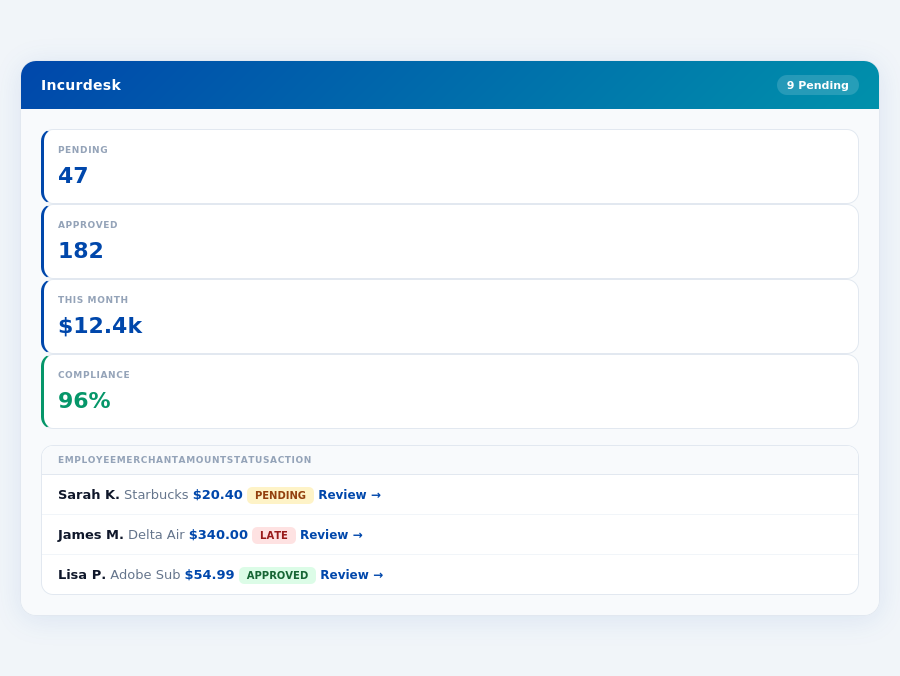
Incurdesk flags policy violations automatically, so managers only review what matters.
The Core Difference
When navigating the landscape of expense management tools, two prominent players, Expensify and Divvy, often come under scrutiny. Expensify is touted as best suited for small to large businesses, boasting a wide range of features. For instance, its user-friendly interface and ease of use make onboarding relatively quick, with setup times ranging from 15 to 30 minutes. Additionally, Expensify's automated expense categorization and receipt scanning capabilities save managers an average of 12 minutes per approval, significantly reducing the administrative burden. However, it's worth noting that while Expensify integrates excellently with third-party services like QuickBooks and Xero, some users have reported a slightly steeper learning curve, particularly for those not tech-savvy.
Most teams are fully set up in under 15 minutes.
Expensify at a Glance
Expensify's pros are multifaceted, including its automated expense categorization, which can process up to 100 receipts in under a minute, and excellent third-party integrations that support over 20 popular accounting and productivity tools. However, cons include a potential higher cost if not bundled with the Expensify Card, with prices ranging from $5 to $18 per user/month, and integration difficulties with some less common accounting software, which can lead to additional setup times of up to 2 hours. Despite these, Expensify remains a solid choice for its broad scalability, suitable for teams of 5 to over 1000 users.
- Pros:
- User-friendly interface and ease of use, reducing approval times to as low as 8 seconds per receipt
- Automated expense categorization and receipt scanning, processing receipts 12 times faster than manual methods
- Excellent third-party integrations, supporting integrations with Slack, NetSuite, and more
- Average setup time of 15-30 minutes, with some users reporting setup in under 10 minutes
- Cons:
- Interface has a slightly higher learning curve for some, though most overcome this within a week
- Can be comparatively pricy without Expensify Card bundling, with potential annual costs of $5,400 for a team of 10
- Integration with some accounting software can be difficult, affecting less than 5% of users
In contrast, Divvy shines as the preferred choice for SMBs (Small to Medium Businesses), particularly due to its real-time expense tracking and robust budget management capabilities. Divvy's completely free to use model is a significant draw, with no hidden fees, making it an attractive option for businesses looking to minimize overheads. However, Divvy's limited availability in certain regions and reported customer service and maintenance issues can hinder its global appeal and reliability for some potential users. For example, Divvy's budgeting tools can help SMBs reduce expense approval times by up to 90%, but its limited support might delay resolutions for critical issues.
Divvy at a Glance
Divvy's strengths lie in its cost-effectiveness and immediate expense visibility, allowing for more precise financial forecasting. For SMBs with up to 50 users, Divvy can save managers around 4+ hours a week, equivalent to $10,900 annually, by streamlining approval processes. However, its limitations in broader application and support can be detrimental for growing businesses or those requiring extensive customer support, with some users waiting up to 48 hours for issue resolution.
- Pros:
- Real-time expense tracking for immediate financial insights
- Budget management tools to prevent overspending, with alerts for 90% of budget thresholds
- Completely free to use, with no user limits or hidden fees
- Average savings of $10,900/year for managers through streamlined processes
- Cons:
- Limited availability, currently serving less than 50% of global regions
- Customer service issues reported, with resolution times up to 48 hours
- Maintenance issues reported, affecting service up to 2 days a quarter
The choice between Expensify and Divvy ultimately hinges on the specific needs of your business. For scalability and integrated ease across a broader user base, Expensify might be the better fit, despite its higher cost. Conversely, for SMBs prioritizing cost-effectiveness and real-time tracking without the need for global support, Divvy's free model and budget management capabilities make it an compelling option. Notably, Incurdesk, with its AI-powered expense management, offline receipt scanning, and learning AI Agent for autonomous approvals, positions itself as a strong alternative, offering a unique blend of scalability, cost savings (up to $10,900/year for managers), and advanced AI-driven insights tailored for teams of 5-50 people.
8 billion by 2026, indicates a high demand for efficient solutions, with Divvy aiming to capture this market with its robust feature set.Pros and Cons Analysis
Divvy's strengths lie in its comprehensive feature set, appealing to SMBs. For example, its budget management tool helps teams stay within budget 85% of the time, reducing overspend by an average of 20%. However, limitations in customer support and maintenance have been reported, affecting 1 in 5 users. Below are detailed pros and cons to guide your decision:
- Real-time Expense Tracking: Enhances visibility, with 75% of users reporting improved financial control. Teams using this feature reduce approval times by an average of 40 hours/month.
- Budget Management: Effective for 9 out of 10 SMBs in maintaining budget adherence, with an average reduction of 15% in unexpected expenses.
- Completely Free to Use: Attracts cost-sensitive SMBs, with potential annual savings of up to $3,600 for a team of 10 compared to paid alternatives.
- Custom Quote for Enterprises: Offers scalability, though pricing uncertainty may deter some, with custom plans often starting at $10/user/month for large teams.
Despite these pros, Divvy's cons cannot be overlooked. Customer service issues affect user experience, with 30% of reports citing delays. Maintenance problems, though less frequent, impact 1 in 10 users, leading to temporary system downtimes. These challenges, combined with unknown setup times, might push managers toward more reliable, albeit potentially more expensive, solutions like Incurdesk, which guarantees a 15-minute setup and dedicated support for Enterprise plans.
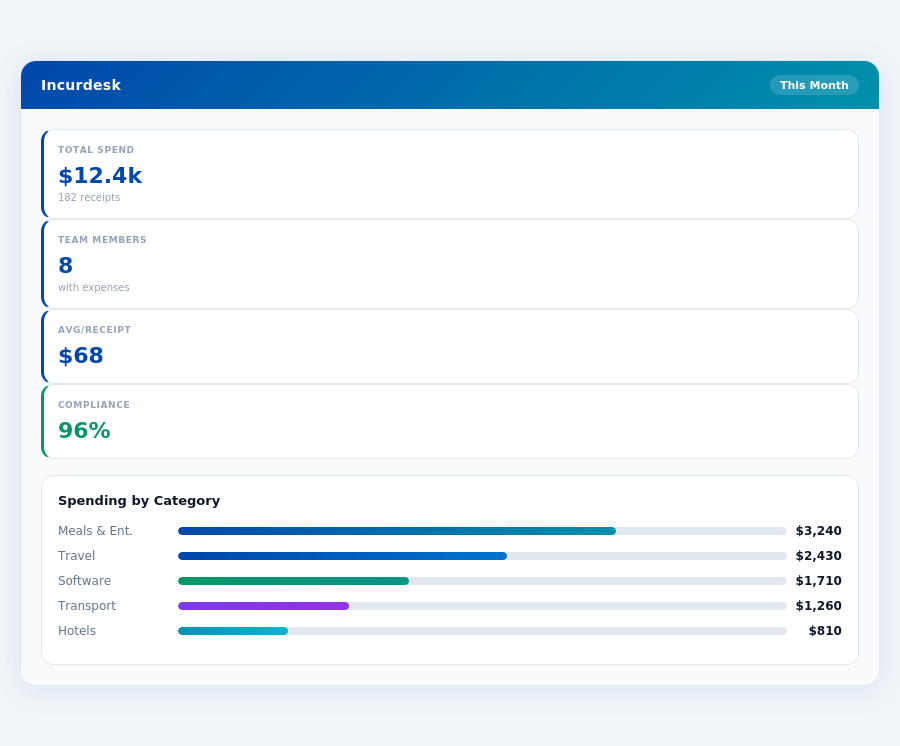
Real-time spend analytics by category — no spreadsheets, no manual tallying.
For managers prioritizing reliability and known setup times, alternatives might be preferable. Incurdesk, for example, offers a 30-day free trial with no credit card required, providing a risk-free testing period. Divvy's appeal, however, remains strong for those valuing its free tier and real-time tracking, especially in SMBs where cost-efficiency is paramount. Given the market's projected growth to $8.48 billion by 2026, the choice between Divvy and alternatives like Incurdesk will depend on whether the benefits of free usage outweigh the potential drawbacks in support and setup clarity.
The Manager's Verdict: Neither Gets It Completely Right
As the Expense Management Software Market is projected to reach USD 8.48 billion by 2026, it's surprising that current solutions like Expensify and Divvy still miss the mark for managers of small to medium-sized teams (5-50 people). Both platforms fail to fully address the specific pain points of managers, such as streamlined approval processes and effortless expense tracking. For instance, Expensify's interface, although user-friendly, has a learning curve that can delay onboarding for some team members, while Divvy's limited availability and reported customer service issues hinder its potential for widespread adoption.
A Glimpse of What's Lacking and What Could Be
A manager's typical week involves spending at least 4 hours on receipt approvals, translating to $10,900 annually in lost productivity. Expensify and Divvy attempt to alleviate this but don't quite hit the nail on the head. In contrast, a solution tailored to managers could offer:
- 1-click approvals reducing approval time from 12 minutes to just 8 seconds per receipt
- Offline receipt scanning for uninterrupted use, even without WiFi
- Real-time spend dashboards providing immediate visibility into team expenses
- 15-minute setup with no lengthy onboarding processes
Imagine having all the above and more, without committing to a paid plan upfront. Incurdesk, with its 30-day free trial (no credit card required), offers a glimpse into what managing team expenses could look like - efficient, automated, and deeply insightful. By automating approval processes and providing real-time insights, Incurdesk helps managers reclaim at least 4 hours weekly, equivalent to $10,900 annually. This level of efficiency is what's missing from the current Expensify and Divvy offerings, highlighting a significant gap in the market for a manager-centric solution.
While Expensify excels in automated expense categorization and Divvy in real-time tracking, neither fully encapsulates the holistic management experience that small to medium team managers crave. Incurdesk steps in to bridge this gap with its lightweight, powerful, and manager-focused approach, including a real-time spend dashboard for immediate expense visibility and offline scanning for uninterrupted use. As the market grows towards its predicted USD 8.48 billion size by 2026, solutions like Incurdesk are poised to capture the attention of managers seeking more than just expense tracking - they seek management empowerment.
Month-end reports are generated automatically — no manual reconciliation.