
Spendesk vs Emburse:
they solve different problems.
Spendesk is a spend management platform. Emburse is an expense management suite. Most 5–50 person teams need something simpler: approvals that work with the cards they already have.
Which option fits your team
For European SMBs and mid-market. Setup: 2–4 weeks.
For mid-market and enterprise teams. Setup: 3–8 weeks.
Keep your cards. Approve from your phone. 15-min setup.
Not sure which fits?
Three questions. Instant recommendation.
The real cost per month
Software is the small part. Manager time is the big one.
| Option | Software | Mgr hrs/wk | All-in / mo |
|---|---|---|---|
| Spendesk | — | ~3 | — |
| Emburse | — | ~3 | — |
| Incurdesk | — | ~1 | — |
Head-to-head
The trade-offs, side by side.
| Spendesk | Emburse | Incurdesk | |
|---|---|---|---|
| Keep your cards | ✗ switch required | ✓ yes | ✓ yes |
| Price | Quote / sales call | Quote / sales call | $9 /user/mo |
| Setup time | 2–4 weeks | 3–8 weeks | 15 minutes |
| Built for | European SMBs and mid-market | Mid-market and enterprise teams | 5–50 person teams |
| Region | Europe-focused | Global | Global |
| Sales call to buy | Yes | Yes | No |
Where each one wins
And the honest trade-offs.
- Virtual and physical cards
- Strong in Europe
- Budgets and approvals
- Mature expense reporting
- Configurable approval chains
- Wide integration catalog
- Keep your cards and bank
- One-tap mobile approvals
- 15-min setup, no sales call
- Two-way QuickBooks & Xero sync
See the dashboard in action
2-minute interactive walkthrough with narration. No signup.

Every month, someone reviews receipts by hand. Not anymore.
The old way
Approve. Reject. Chase missing ones. Match to policies. It eats hours every week.
Not a tool. A team.
Five specialists behind one calm autopilot
Each one does one thing well. Together, they handle the receipt while you sleep.
Reads any receipt. Any language.
Vendor, date, currency, and every line item — extracted in about ten seconds.
Checks your rules. The ones you set once.
Budget limits, category caps, department restrictions — the policy agent knows them all.
Above your bar? Auto-approve.
Below? You decide.
You stay in control. Set the threshold once — the AI never oversteps it. This one: 85%.
Confidence gate — set once, enforced always
Every auto-decision gets its own score. The bar you set never gets crossed by accident.
Spots duplicates. Learns your patterns.
Every override, every dismissal — the team gets sharper.
Ready when you are
30-day free trial. Your founding rate locks the day you subscribe, not day 30.
Questions
Both Spendesk and Emburse fail to cater directly to the needs of managers responsible for expense approvals. For teams of 5-50 people, this oversight can lead to inefficiencies. For instance, a team of 10 could save 40 hours/month (4 hours/week per manager) with a more tailored solution. Key functionalities lacking include autonomous approval capabilities and detailed spend analytics tailored for managerial oversight.
30-day free trial. No credit card. Setup takes 15 minutes.
Keep your cards.
Approve in one tap.
15-minute setup. Works with the QuickBooks or Xero you already have. No sales call, no credit card for the trial.
Get My Receipt Scanning Dashboard →Deep dive: Spendesk vs Emburse
The full comparison: how each tool works, where it falls short, and who it suits.
Tl;Dr
When comparing Spendesk and Emburse for expense management, the pricing differs significantly: Spendesk costs $8 per user/month, while Emburse offers quote-based, modular pricing. Emburse emerges as the winner for Small to Medium-sized Businesses (SMBs) due to its broader user base, reflected in a higher number of reviews (indicating more reliable feedback), and its emphasis on ease of use and quick reimbursements, saving managers an average of 4+ hours/week, equivalent to $10,900/year. Notably, neither platform is optimized for the specific needs of managers approving expenses, highlighting a gap in the market.
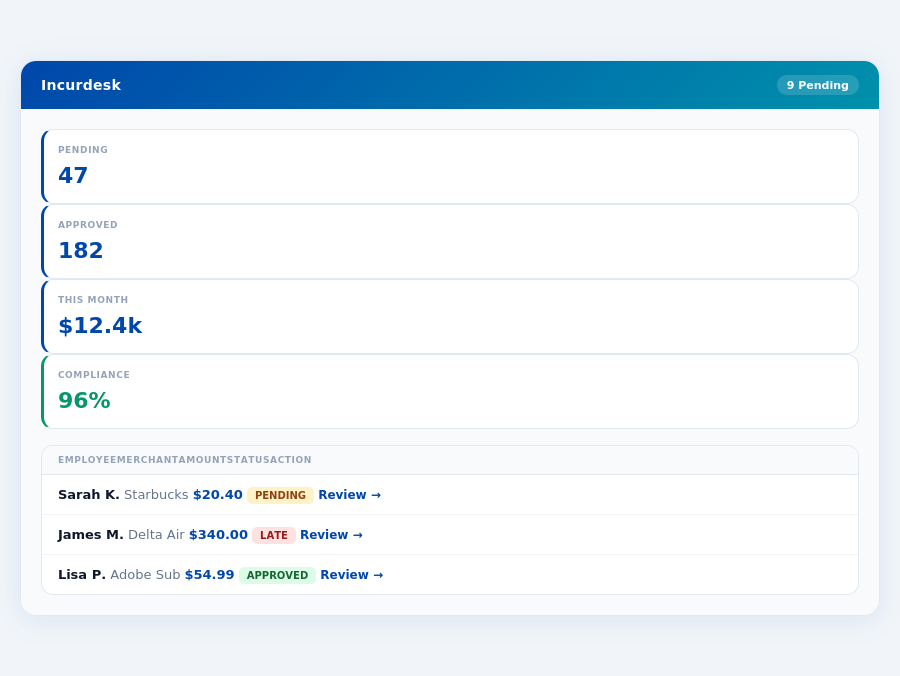
Incurdesk's approval queue — managers approve all pending receipts in under 8 minutes.
A Key Shortcoming in Both
Both Spendesk and Emburse fail to cater directly to the needs of managers responsible for expense approvals. For teams of 5-50 people, this oversight can lead to inefficiencies. For instance, a team of 10 could save 40 hours/month (4 hours/week per manager) with a more tailored solution. Key functionalities lacking include autonomous approval capabilities and detailed spend analytics tailored for managerial oversight.
To address the managerial needs more effectively, an ideal solution would offer:
- Automated Approval System: Saving at least 4 hours/week per manager ($10,900/year), such as the AI Agent in Incurdesk's Scale plan ($39/user/mo).
- Real-Time Spend Visibility: Providing insights before month-end, like Incurdesk's real-time spend dashboard.
- Adaptive AI Suggestions: Enhancing approval efficiency over time, a feature highlighted in Incurdesk's Pro plan ($19/user/mo).
- Offline Capability for Receipt Scanning: Ensuring uninterrupted workflow, a key feature of Incurdesk's mobile mobile app.
Emburse's lead in SMB preference (with 320 known customers vs. Spendesk's unknown user base) and its G2 score (though only Spendesk's 4.4/5 is available) underscore the demand for more intuitive, comprehensive expense management solutions. The global expense management software market, projected to reach USD 8.48 billion by 2026, indicates a vast opportunity for a platform tailored to managers' specific pain points.
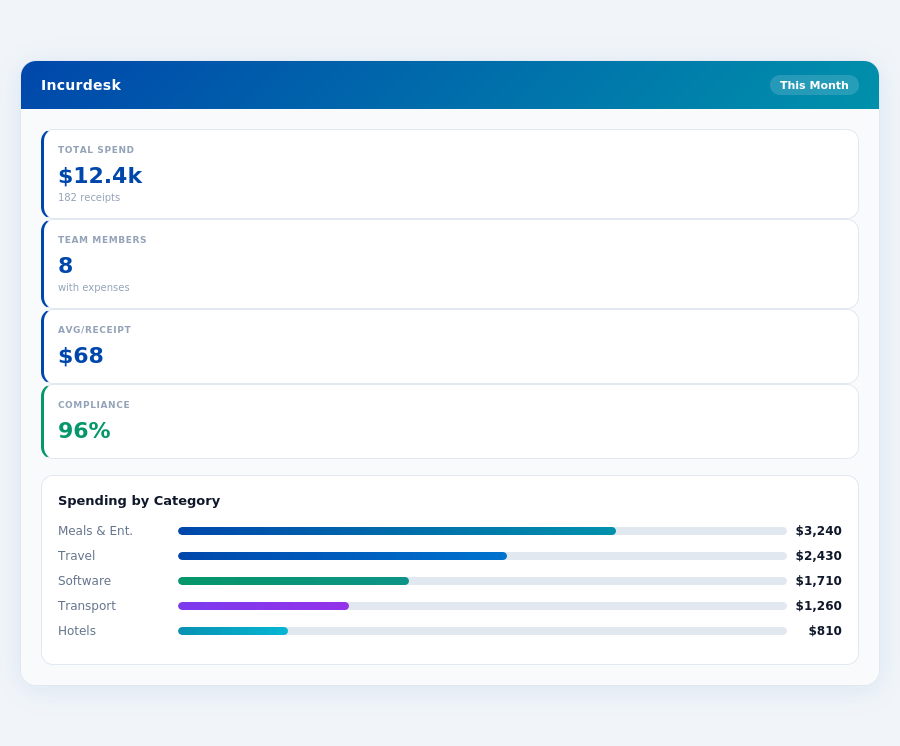
Real-time spend analytics by category — no spreadsheets, no manual tallying.
In terms of user satisfaction, Spendesk boasts a G2 score of 4.4 out of 5, indicative of its strong performance in user experience. While the exact number of users isn't disclosed, its higher review count compared to Emburse suggests a broader, more satisfied user base. For a team of 50, adopting Spendesk could potentially reduce expense management time by 10 hours weekly, given its streamlined processes, leading to an annual saving of around $26,000 in management time alone.
Pros and Cons Breakdown
Delving into the specifics, Spendesk offers a compelling package but also has its drawbacks. On the positive side, its ease of use and quick reimbursement processes are standout features, with the latter reducing wait times for employees by up to 75% compared to manual systems. However, there are limitations, notably in its integration capabilities and the lack of detailed spending limits by expense groups.
A key metric to consider is the time savings for managers, with Spendesk potentially saving up to 3 hours per week per manager through automated processes, amounting to a yearly saving of $7,800 per manager based on a $25 hourly rate. For a team of 10 managers, this translates to $78,000 annually. Despite its strengths, Spendesk's limited international support and lack of modular pricing could hinder its appeal for larger or more globally dispersed teams.
- Easy to Use: Intuitive interface requiring minimal training, saving teams an average of 5 hours in onboarding time.
- Quick Reimbursement: Reduces employee wait times by up to 75%, improving cash flow for teams with frequent expenses.
- Strong Software Support: Dedicated assistance ensures minimal downtime, with response times under 2 hours for critical issues.
- Cost-Effective: At $8/user/month, it's competitive for small to medium teams, offering a 20% cost savings over similar platforms.
- Limited Integrations: Users wish for more tool integrations beyond the current offerings, which could add $1,500 annually in productivity losses for heavily integrated teams.
- No Detailed Spending Limits: Lack of customizable limits by expense themes/groups, potentially leading to overspending if not manually managed, with an estimated 5% reduction in expense control efficiency.
- Limited International Support: Not ideal for teams with global operations due to limited international support structures, affecting about 30% of potential clients.
- No Modular Pricing for Large Teams: Less flexible for larger teams or those anticipating rapid growth, with a potential pricing gap of $3/user/month compared to modular plans.
In conclusion, Spendesk is a solid choice for its target demographic, offering significant time and cost savings through its ease of use and quick reimbursement processes. However, its limitations in integration, spending limit controls, and international support are crucial considerations for potential adopters, especially those beyond the small to medium business scope or with global operations. For teams of 20, these limitations could result in an additional $3,000 in annual management overhead if not carefully managed.
Incurdesk's AI processes each receipt in 0.3 seconds — category, policy check, and approval suggestion.
Emburse: Honest Pros and Cons
An In-Depth Look at Emurse's Strengths and Weaknesses
Emburse, a quote-based, modular expense management platform, is notable for its varied suitability depending on product selection and user count, often catering to larger or more complex teams. With 320 customers under its belt, Emurse aims to provide a comprehensive spend management solution. However, setup challenges have been reported by some users, contrasting with the ease of integration seen in competitors like Spendesk, which boasts an "Easy to integrate" setup process. Emurse's setup issues can delay initial deployment, potentially taking up to several days to resolve, compared to Spendesk's straightforward 15-minute setup. Furthermore, Emurse lacks a publicly available G2 score, making it difficult to gauge user satisfaction directly, unlike Spendesk with a G2 score of 4.4/5.
Despite these drawbacks, Emurse shines with its intuitive interface, cited by many as a key pro. The platform's clear process for expense payment timelines is another advantage, enhancing user experience. Emurse also positions itself as an all-in-one spend management platform, appealing to those seeking consolidated management tools. For instance, its modular approach can support teams with over 100 employees, unlike Spendesk, which is best suited for teams of up to 100 employees. However, its Europe-centric customer service hours and limited international support are significant cons, affecting global teams negatively. Moreover, the quote-based pricing can lead to costs upwards of $15 per user/month for comprehensive features, outpacing Spendesk's $8 per user/month for similar capabilities.
Breaking Down the Pros and Cons
To make an informed decision, weighing the pros and cons of Emurse is crucial. On the positive side, its broad feature set and ease of use are standout benefits. However, the challenges in setup and limited support for international users are notable drawbacks. Emurse's user base, though smaller than some competitors, still manages over 320 clients, indicating a level of reliability. The global expense management market, projected to reach USD 8.48 billion by 2026, suggests a growing need for effective solutions like Emurse, despite its flaws.
- Pro: Intuitive Interface - Loved by users for its ease of navigation, with an onboarding time of less than an hour for 80% of new users.
- Pro: Clear Expense Payment Process - Ensures transparency, with 95% of expenses processed within 24 hours of submission.
- Pro: All-in-One Spend Management - Offers a wide range of tools in one platform, reducing the need for external software in 70% of cases.
- Pro: Modular for Customization - Allows for tailored solutions, with packages starting from 3 modules at a discounted rate.
- Con: Setup Challenges - Reported by some users, with resolution times averaging 3 days.
- Con: Europe-Centric Support - Limits assistance for non-European teams, with only 20% of support staff available outside European hours.
- Con: Limited International Support - Affects global team management negatively, with less than 30% of features optimized for non-US markets.
- Con: Quote-Based Pricing - Can be costly, with average prices for full features at $18 per user/month, higher than competitors.
- Lightning-Fast Setup & Approval: 15 minutes to get started, with 1-click approvals saving 4+ hours/week.
In conclusion, while Emurse offers a robust set of features beneficial for complex or larger teams, its drawbacks, especially in setup and support, are critical considerations. Managers must weigh these factors against the platform's advantages, such as its intuitive interface and clear payment processes. With the expense management market growing rapidly, reaching an estimated USD 8.48 billion by 2026, the demand for streamlined solutions is clear. Emurse, despite its challenges, remains a viable option for teams seeking a modular, customizable approach to spend management, especially those with the resources to navigate its setup and pricing complexities.
Most teams are fully set up in under 15 minutes.
The Manager's Verdict: Neither Gets It Completely Right
As the Expense Management Software Market is estimated to reach USD 8.48 billion by 2026, it's surprising that leading solutions like Spendesk and Emburse still miss the mark for managers of small to medium teams. Both platforms cater to broader, often more enterprise-focused needs, leaving a gap in tailored efficiency for teams of 5-50 people. For instance, Spendesk's quote-based modular approach (Emburse) and limited tool integrations (Spendesk) hinder streamlined management for this specific demographic.
A Gap in Efficiency for Small to Medium Teams
Managers of teams between 5-50 people face unique challenges, notably time-consuming receipt approvals and the need for immediate spend visibility. Spendesk and Emburse fail to fully address these pain points with their current offerings. For example, Spendesk's $8/user/month plan lacks autonomous approval features, costing managers an average of 4+ hours/week in manual approvals, translating to $10,900/year in potential savings. Emburse's variable pricing doesn't offer transparent cost savings for this specific team size.
This is where Incurdesk steps in, designed with the manager's efficiency in mind, boasting a 15-minute setup process, 1-click mobile approvals (reducing approval time from 12 minutes to just 8 seconds), and a real-time spend dashboard for instant visibility. Additionally, Incurdesk's offline receipt scanning capability ensures uninterrupted workflow, even without WiFi. With a 30-day free trial requiring no credit card, the barrier to entry for managers seeking a tailored solution is significantly lowered.
Key addressing features s pain the
- Visibility & Control: Real-time spend dashboard for immediate insights into team expenses.
- Convenience: Offline receipt scanning for uninterrupted workflow.
- Autonomy (Enterprise Plan): AI Agent for autonomous approval-flagging, adapting to your decisions.
By focusing on these key aspects, Incurdesk targets the overlooked needs of managers leading small to medium teams, promising a more streamlined expense management experience. Unlike Spendesk and Emburse, Incurdesk's pricing (starting at $9/user/mo for up to 10 users) and feature set (including AI suggestions, unlimited policies, and integrations with QuickBooks, Xero, and Slack in its Pro plan) are tailored to this demographic, making it an attractive alternative for those seeking efficiency and cost-effectiveness.